> ## Documentation Index
> Fetch the complete documentation index at: https://devdocs.xbox.com/llms.txt
> Use this file to discover all available pages before exploring further.
# 伺服器匿名登入驗證
> 使用 CustomID 驗證搭配伺服器端玩家建立來設定 PlayFab 匿名登入,保護 HTML5 和 JavaScript 遊戲免於未經授權的註冊。
# 使用匿名登入設定 PlayFab 驗證
本指南說明如何使用具備伺服器端保護的匿名登入 API 實作 PlayFab 驗證,並僅著重於使用 HTML5/JavaScript 的 CustomID 驗證。
## 概觀
自 2025 年 6 月 30 日起,所有新建立的遊戲都會停用透過匿名 API 建立玩家的功能。
為了強化匿名登入的安全性,PlayFab 實作了一項重要的安全性功能,將玩家建立功能區分為用戶端 API 和伺服器端 API。
1. **已停用用戶端玩家建立**:
* 對於新建立的遊戲,用戶端的所有匿名登入 API (`LoginWithCustomID`、`LoginWithAndroidDeviceID`、`LoginWithIOSDeviceID`、`LoginWithNintendoSwitchDeviceId`) 不再自動建立新的玩家帳戶。在 2025 年 6 月 30 日之前建立的遊戲,可以透過 [Game Manager 設定](/zh-TW/services/playfab/identity/player-identity/platform-specific-authentication/anonymous-login#configuring-player-creation-settings)停用匿名登入。
* 停用用戶端玩家建立可防止未經授權的用戶端直接建立未經授權的帳戶。
* 只有現有玩家可以透過用戶端 API 登入。
2. **已啟用伺服器端玩家建立**:
* 玩家帳戶建立現在透過伺服器端 API (`LoginWithCustomID`、`LoginWithAndroidDeviceID`、`LoginWithIOSDeviceID`、`LoginWithNintendoDeviceId`) 處理。
* 這可確保所有帳戶建立都在安全、受控制的環境中進行。
## 必要條件
* 玩家的唯一識別碼 (CustomID)
* 已註冊的 [PlayFab](https://developer.playfab.com/) 遊戲
* 您 PlayFab 遊戲的秘密金鑰
* 熟悉[登入基本概念和最佳做法](/zh-TW/services/playfab/identity/player-identity/login/login-basics-best-practices)
* 具有有效網域名稱、可提供靜態 HTML 檔案的伺服器
如果您需要協助設定伺服器,請參閱[執行 HTTP 伺服器以進行測試](/zh-TW/services/playfab/identity/player-identity/platform-specific-authentication/running-an-http-server-for-testing)教學課程。在本指南中,我們假設您的網域為 `http://playfab.example`。
## 驗證流程
1. **伺服器端帳戶建立**:
* 使用伺服器 API 的 `Server/LoginWithCustomID` 建立新玩家
* 需要遊戲秘密金鑰
* 參考:[伺服器 API - Login With Custom ID](xref:titleid.playfabapi.com.server.authentication.loginwithcustomid)
2. **用戶端登入**:
* 使用用戶端 API 的 `Client/LoginWithCustomID` 讓現有玩家登入
* 參考:[用戶端 API - Login With Custom ID](xref:titleid.playfabapi.com.client.authentication.loginwithcustomid)
## 實作步驟
### 1. 設定您的開發環境
1. 從 [JavaScript SDK 文件](/zh-TW/services/playfab/sdks/javascript/)下載 JavaScript SDK
2. 安裝必要的 Node.js 套件:
```bash theme={null}
npm install playfab-sdk
```
### 2. 伺服器端實作 (Node.js)
請妥善保管您的遊戲秘密金鑰,切勿在用戶端程式碼中公開。秘密金鑰只應在安全的伺服器環境中使用。
```javascript theme={null}
const { create } = require('domain');
const http = require('http');
const PlayFab = require('playfab-sdk');
const PlayFabServer = require('playfab-sdk/Scripts/PlayFab/PlayFabServer');
// Initialize PlayFab settings
PlayFab.settings.titleId = "YOUR_TITLE_ID"; // Replace with your actual PlayFab Title ID
PlayFab.settings.developerSecretKey = "YOUR_SECRET_KEY"; // Replace with your actual secret key
// Callback function for PlayFab API responses
function onPlayFabResponse(error, result) {
if (error) {
console.error("PlayFab Error:", error);
return;
}
console.log("PlayFab Success:", result);
}
// Function to create user with custom ID
function createUserWithCustomId(customId, callback) {
PlayFab.PlayFabServer.LoginWithCustomID({
CreateAccount: true,
CustomId: customId,
}, (error, result) => {
if (error) {
console.error("PlayFab Error:", error);
callback(error);
return;
}
console.log("PlayFab Success:", result);
callback(null, result.data);
});
}
const customId = "YOUR_CUSTOM_ID"; // Replace with your actual custom ID
const server = http.createServer((req, res) => {
res.writeHead(200, {'Content-Type': 'application/json'});
createUserWithCustomId(customId, (error, result) => {
if (error) {
res.end(JSON.stringify({ error: error }));
return;
}
res.end(JSON.stringify({ success: result }));
});
});
const port = 3000;
server.listen(port, () => {
console.log(`Server running at http://localhost:${port}/`);
});
```
### 3. 用戶端實作 (HTML)
```html theme={null}
Server LoginWithCustomId Auth Example
```
## 設定玩家建立設定
### 現有遊戲
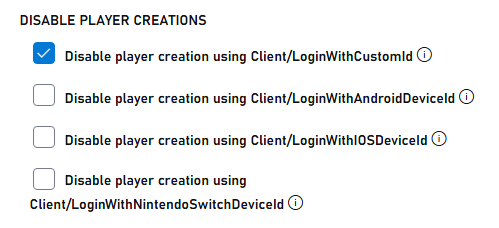
1. 瀏覽至 PlayFab 開發人員入口網站並選取您的遊戲
2. 移至 **Settings**。
3. 選取 **API Features** 索引標籤。
4. 核取方塊以防止透過匿名登入 API 建立新的玩家帳戶
 ### 新遊戲
為匿名登入 API 啟用自動建立玩家可能會危及安全性。請只在開發或測試期間暫時啟用此功能。移至生產環境之前,請務必停用此功能。
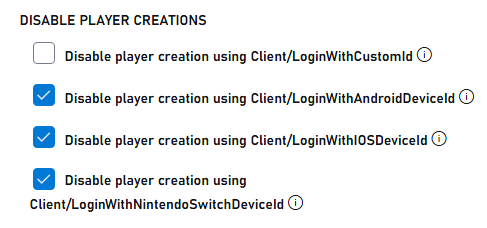
新遊戲預設會停用透過匿名 API 建立玩家的功能。若要啟用以進行測試,請執行下列操作:
1. 瀏覽至 PlayFab 開發人員入口網站並選取您的遊戲
2. 移至 **Settings**。
3. 選取 **API Features** 索引標籤。
4. 取消核取方塊,以允許透過匿名登入 API 建立新的玩家帳戶
### 新遊戲
為匿名登入 API 啟用自動建立玩家可能會危及安全性。請只在開發或測試期間暫時啟用此功能。移至生產環境之前,請務必停用此功能。
新遊戲預設會停用透過匿名 API 建立玩家的功能。若要啟用以進行測試,請執行下列操作:
1. 瀏覽至 PlayFab 開發人員入口網站並選取您的遊戲
2. 移至 **Settings**。
3. 選取 **API Features** 索引標籤。
4. 取消核取方塊,以允許透過匿名登入 API 建立新的玩家帳戶
 ## 測試和回應範例
### 伺服器回應範例
透過伺服器 API 成功建立使用者時,您會收到類似下列的回應:
```json theme={null}
{
"code": 200,
"status": "OK",
"data": {
"PlayFabId": "PLAYFAB_ID",
"SessionTicket": "SESSION_TICKET",
"NewlyCreated": true
}
}
```
### 用戶端回應範例
嘗試從用戶端 API 建立新帳戶 (此功能現已停用) 時,您會收到錯誤:
```json theme={null}
{
"code": 400,
"status": "BadRequest",
"error": "PlayerCreationDisabled"
}
```
透過用戶端 API 成功讓現有使用者登入時:
```json theme={null}
{
"code": 200,
"status": "OK",
"data": {
"PlayFabId": "PLAYFAB_ID",
"SessionTicket": "SESSION_TICKET",
"NewlyCreated": false
}
}
```
## 延伸閱讀
* [PlayFab 驗證概觀](/zh-TW/services/playfab/identity/player-identity/authentication)
* [登入基本概念和最佳做法](/zh-TW/services/playfab/identity/player-identity/login/login-basics-best-practices)
* [執行 HTTP 伺服器以進行測試](/zh-TW/services/playfab/identity/player-identity/platform-specific-authentication/running-an-http-server-for-testing)
## Related topics
- [驗證](/zh-TW/services/playfab/identity/player-identity/authentication/index.md)
- [玩家登入](/zh-TW/services/playfab/identity/player-identity/login/index.md)
- [處理多個 PlayFab 登入](/zh-TW/services/playfab/identity/player-identity/login/multiple-logins.md)
- [登入基本概念和最佳做法](/zh-TW/services/playfab/identity/player-identity/login/login-basics-best-practices.md)
- [使用 Twitch 和 HTML5 設定 PlayFab 驗證](/zh-TW/services/playfab/identity/player-identity/platform-specific-authentication/twitch-html5.md)
## 測試和回應範例
### 伺服器回應範例
透過伺服器 API 成功建立使用者時,您會收到類似下列的回應:
```json theme={null}
{
"code": 200,
"status": "OK",
"data": {
"PlayFabId": "PLAYFAB_ID",
"SessionTicket": "SESSION_TICKET",
"NewlyCreated": true
}
}
```
### 用戶端回應範例
嘗試從用戶端 API 建立新帳戶 (此功能現已停用) 時,您會收到錯誤:
```json theme={null}
{
"code": 400,
"status": "BadRequest",
"error": "PlayerCreationDisabled"
}
```
透過用戶端 API 成功讓現有使用者登入時:
```json theme={null}
{
"code": 200,
"status": "OK",
"data": {
"PlayFabId": "PLAYFAB_ID",
"SessionTicket": "SESSION_TICKET",
"NewlyCreated": false
}
}
```
## 延伸閱讀
* [PlayFab 驗證概觀](/zh-TW/services/playfab/identity/player-identity/authentication)
* [登入基本概念和最佳做法](/zh-TW/services/playfab/identity/player-identity/login/login-basics-best-practices)
* [執行 HTTP 伺服器以進行測試](/zh-TW/services/playfab/identity/player-identity/platform-specific-authentication/running-an-http-server-for-testing)
## Related topics
- [驗證](/zh-TW/services/playfab/identity/player-identity/authentication/index.md)
- [玩家登入](/zh-TW/services/playfab/identity/player-identity/login/index.md)
- [處理多個 PlayFab 登入](/zh-TW/services/playfab/identity/player-identity/login/multiple-logins.md)
- [登入基本概念和最佳做法](/zh-TW/services/playfab/identity/player-identity/login/login-basics-best-practices.md)
- [使用 Twitch 和 HTML5 設定 PlayFab 驗證](/zh-TW/services/playfab/identity/player-identity/platform-specific-authentication/twitch-html5.md)