> ## Documentation Index
> Fetch the complete documentation index at: https://devdocs.xbox.com/llms.txt
> Use this file to discover all available pages before exploring further.
# Economy (舊版) 中的優待券和促銷活動
> 從 Game Manager 產生及兌換 PlayFab 舊版 Economy 優待券,並將其與組合包或 CloudScript 搭配使用,以支援遊戲內促銷活動。
# 優待券和促銷活動 (舊版 Economy)
Economy v1 API 處於維護模式,不會再推出任何新功能,只會修正錯誤。\*\*v1 API 在可預見的未來仍會持續維護。\*\*請參閱 [Economy v2 概觀](/zh-TW/services/playfab/economy-monetization/economy-v2/overview),深入了解下一版的 PlayFab Economy!
優待券是字串權杖,您可以為客戶產生優待券,讓他們在遊戲中用來兌換庫存物品。結合組合包或 CloudScript,這些優待券幾乎可以用來觸發遊戲中的任何功能。
## 需求
* 熟悉[目錄](/zh-TW/services/playfab/economy-monetization/economy/items/catalogs)、組合包和容器。
* 熟悉 [Game Manager](/zh-TW/services/playfab/live-service-management/gamemanager)。
* 熟悉[玩家庫存](/zh-TW/services/playfab/player-progression/player-data/player-inventory)。
## 產生及兌換優待券的指示
以下所有範例都共用產生優待券的第一個基本步驟。這是在 Game Manager 中完成的。
從 **Game Manager**:
* 瀏覽至您的 **Title**。
* 從左側功能表選取 **Economy**。
* 移至您的 **Catalogs** 索引標籤。
在 **Items**、**Bundles** 和 **Containers** 這三個索引標籤區段中的任何一個,都有 **Coupons** 連結。
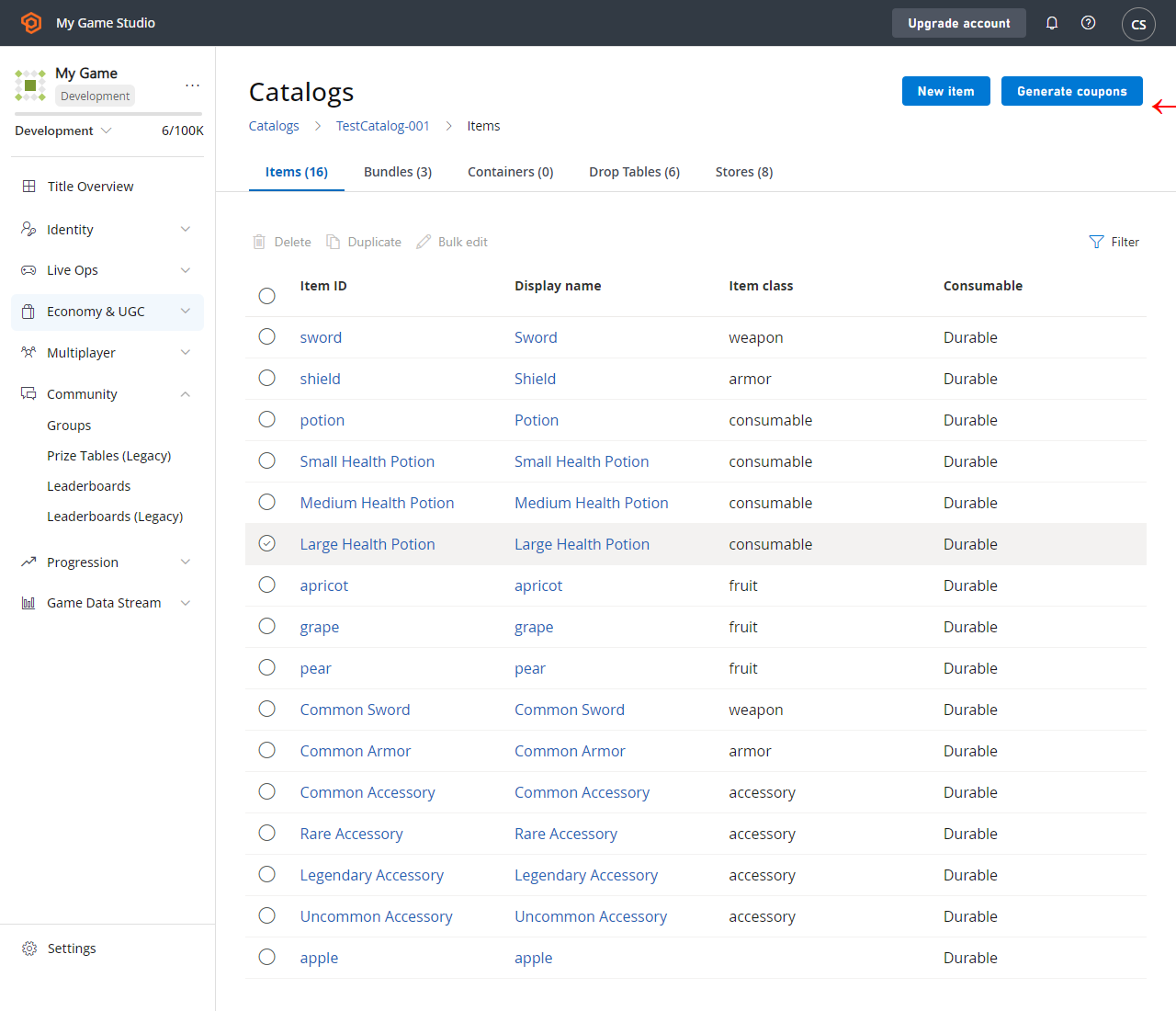 此連結會開啟一個視窗,讓您為該區段中的任何物品產生優待券。如果您想要為特定物品建立優待券:
* 在 **Items** 索引標籤中選取 **Coupons**。
* 組合包的 **Coupons** 位於 **Bundles** 下,容器的 **Coupons** 位於 **Containers** 下。
快顯視窗與我們在下方提供的視窗類似。(您的物品清單應與您的遊戲相符。顯示的物品在我們的[掉落表](/zh-TW/services/playfab/economy-monetization/economy/tutorials/drop-tables)教學課程中有所說明)。
此連結會開啟一個視窗,讓您為該區段中的任何物品產生優待券。如果您想要為特定物品建立優待券:
* 在 **Items** 索引標籤中選取 **Coupons**。
* 組合包的 **Coupons** 位於 **Bundles** 下,容器的 **Coupons** 位於 **Containers** 下。
快顯視窗與我們在下方提供的視窗類似。(您的物品清單應與您的遊戲相符。顯示的物品在我們的[掉落表](/zh-TW/services/playfab/economy-monetization/economy/tutorials/drop-tables)教學課程中有所說明)。
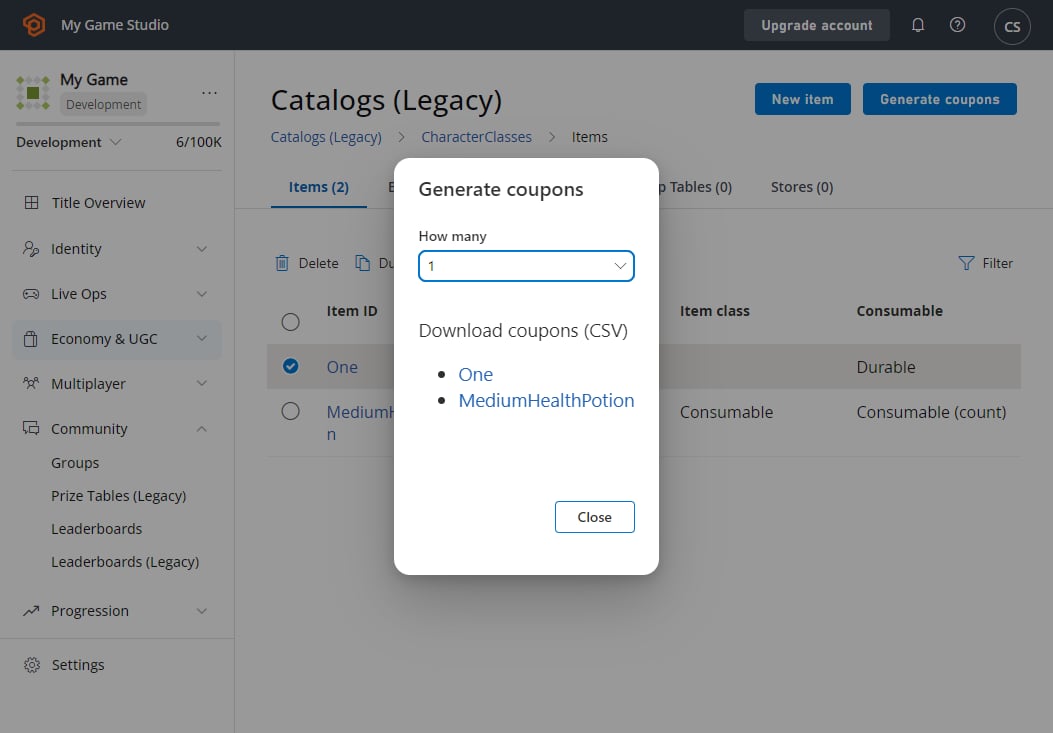 若要完成優待券產生:
* 選取要產生的 **Coupons** 數量。
* 然後選取 **Coupons** 應產生的 **Item**。
* 接著即可下載包含 **Coupons** 清單的 **CSV** 文字檔
選取範例中的其中一個連結,會產生下列十個以逗號分隔的 **Coupons**。
```xml theme={null}
65g-d4q5-zph,ahs-aofk-5ip,rqp-pk6c-yuu,58d-64h9-a6q,zxk-jtmi-5a1,oeu-6e4z-365,mfy-euhb-qj3,ru9-r1ux-wzy,shj-54cm-5oh,719-7hxc-pzz
```
最後,如果您提供可讓客戶輸入代碼的 GUI,並由其呼叫 [RedeemCoupon](xref:titleid.playfabapi.com.client.playeritemmanagement.redeemcoupon),客戶即可兌換優待券。
```csharp theme={null}
// Unity/C#
void UseCoupon(string couponCode)
{
var primaryCatalogName = "TestCatalog-001"; // In your game, this should just be a constant matching your primary catalog
var request = new RedeemCouponRequest
{
CatalogVersion = primaryCatalogName,
CouponCode = couponCode // This comes from player input, in this case, one of the coupon codes generated above
};
PlayFabClientAPI.RedeemCoupon(request, LogSuccess, LogFailure);
}
```
### 範例案例:庫存物品優待券
使用優待券最直接的方式是贈送庫存物品。建立目錄之後,您可以依照我們先前討論過的指示,為一般物品產生優待券。此案例沒有其他特殊步驟。
### 範例案例:虛擬貨幣優待券*或*多個物品優待券
優待券無法直接授與[虛擬貨幣](/zh-TW/services/playfab/economy-monetization/economy/tutorials/currencies),而且只能授與單一物品。
不過,組合包可用來將庫存物品順暢地轉換為物品群組或虛擬貨幣。在 VC 範例中,您應該建立內容為 VC 的新組合包物品。
將組合包設定為在 **15 秒**後到期。如此一來,玩家一開啟組合包就會立即看到 VC,而不會看到中間物品。
若要完成優待券產生:
* 選取要產生的 **Coupons** 數量。
* 然後選取 **Coupons** 應產生的 **Item**。
* 接著即可下載包含 **Coupons** 清單的 **CSV** 文字檔
選取範例中的其中一個連結,會產生下列十個以逗號分隔的 **Coupons**。
```xml theme={null}
65g-d4q5-zph,ahs-aofk-5ip,rqp-pk6c-yuu,58d-64h9-a6q,zxk-jtmi-5a1,oeu-6e4z-365,mfy-euhb-qj3,ru9-r1ux-wzy,shj-54cm-5oh,719-7hxc-pzz
```
最後,如果您提供可讓客戶輸入代碼的 GUI,並由其呼叫 [RedeemCoupon](xref:titleid.playfabapi.com.client.playeritemmanagement.redeemcoupon),客戶即可兌換優待券。
```csharp theme={null}
// Unity/C#
void UseCoupon(string couponCode)
{
var primaryCatalogName = "TestCatalog-001"; // In your game, this should just be a constant matching your primary catalog
var request = new RedeemCouponRequest
{
CatalogVersion = primaryCatalogName,
CouponCode = couponCode // This comes from player input, in this case, one of the coupon codes generated above
};
PlayFabClientAPI.RedeemCoupon(request, LogSuccess, LogFailure);
}
```
### 範例案例:庫存物品優待券
使用優待券最直接的方式是贈送庫存物品。建立目錄之後,您可以依照我們先前討論過的指示,為一般物品產生優待券。此案例沒有其他特殊步驟。
### 範例案例:虛擬貨幣優待券*或*多個物品優待券
優待券無法直接授與[虛擬貨幣](/zh-TW/services/playfab/economy-monetization/economy/tutorials/currencies),而且只能授與單一物品。
不過,組合包可用來將庫存物品順暢地轉換為物品群組或虛擬貨幣。在 VC 範例中,您應該建立內容為 VC 的新組合包物品。
將組合包設定為在 **15 秒**後到期。如此一來,玩家一開啟組合包就會立即看到 VC,而不會看到中間物品。
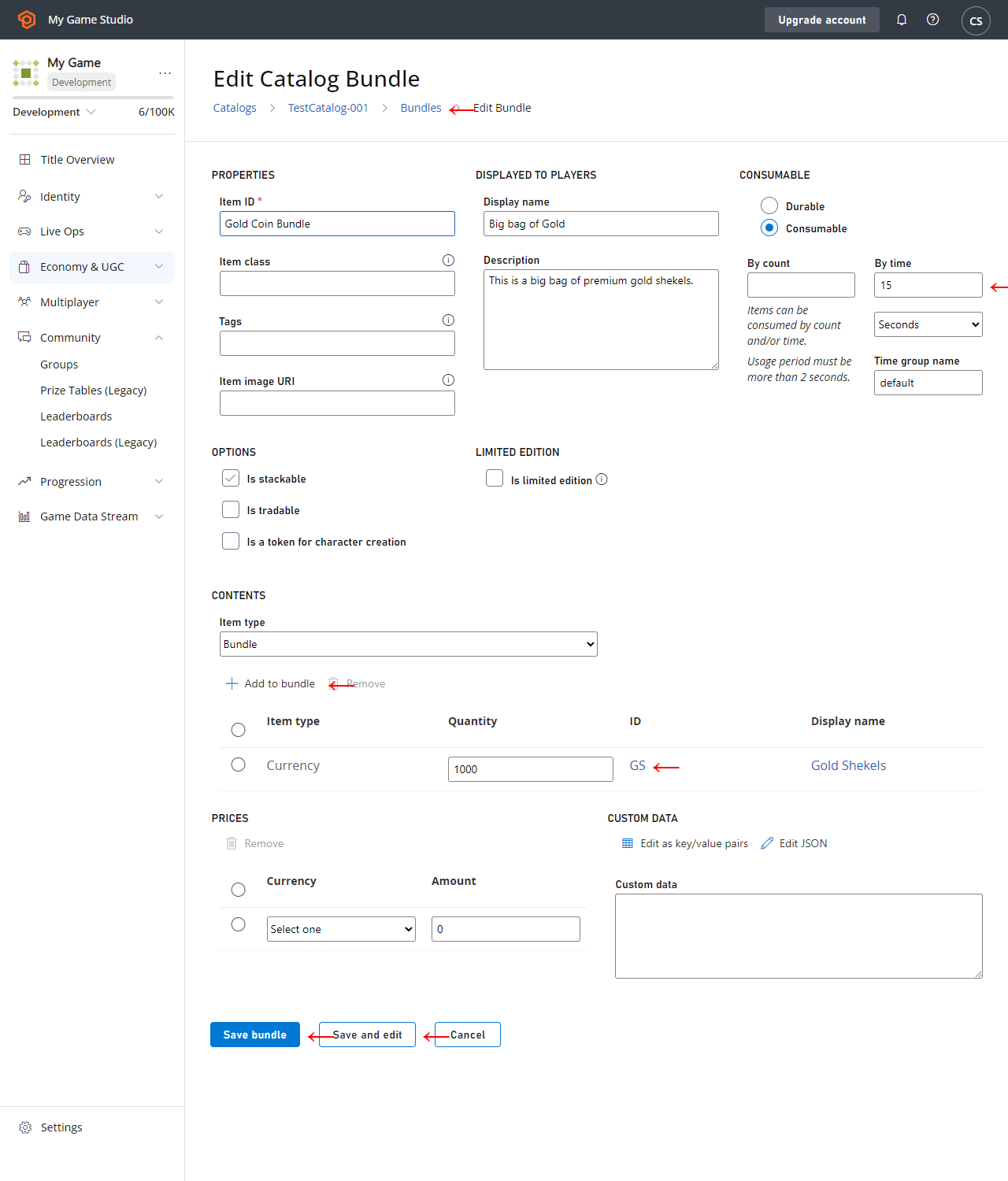 多個物品的運作方式相同:
* 建立包含多個物品的組合包,甚至可以包含[掉落表](/zh-TW/services/playfab/economy-monetization/economy/tutorials/drop-tables)。
* 將其設定為在 **15 秒**後到期。
* 優待券可以產生該組合包。
* 接著組合包會轉換為多個物品。
* 中間的組合包物品會消失。
## 使用案例
* 展覽活動中的實體獎勵:
* 您可以列印優待券代碼清單,並在展覽活動中作為贈品發放。
* 遊戲外的通訊,例如論壇、[推播通知](/zh-TW/services/playfab/live-service-management/game-configuration/title-communications/push-notifications/quickstart)和電子郵件。
* 作為重新吸引玩家活動或其他社群推廣的一部分,*直接*將優待券代碼傳送給玩家。
* 錦標賽:
* 使用[可重設的排行榜](/zh-TW/services/playfab/community/leaderboards/tournaments-leaderboards/using-resettable-statistics-and-leaderboards)時,將優待券傳送給排名最高的玩家。
在此案例中,您也可以直接發放庫存物品,因此請選擇與您的遊戲較相關的方式。
## 最佳做法
使用 PlayFab 庫存時,您應該將庫存大小保持在相對較小的範圍內,每位玩家*總計少於 100 個物品*。授與*過多物品*的組合包可能會受到節流或速率限制。
## Related topics
- [PlayFab Economy 文件](/zh-TW/services/playfab/economy-monetization/economy/index.md)
- [Economy (舊版) 中的商店與促銷](/zh-TW/services/playfab/economy-monetization/economy/tutorials/stores-and-sales.md)
- [兌換優待券](/zh-TW/services/playfab/api-references/rest/server/player-item-management/redeem-coupon.md)
- [CouponGrantedInventoryItem](/zh-TW/services/playfab/api-references/events/data-types/coupongrantedinventoryitem.md)
- [XBOX 服務使用者權限的用戶端使用](/zh-TW/services/xbox-services/fundamentals/identity/privileges/concepts/live-user-privileges-client.md)
多個物品的運作方式相同:
* 建立包含多個物品的組合包,甚至可以包含[掉落表](/zh-TW/services/playfab/economy-monetization/economy/tutorials/drop-tables)。
* 將其設定為在 **15 秒**後到期。
* 優待券可以產生該組合包。
* 接著組合包會轉換為多個物品。
* 中間的組合包物品會消失。
## 使用案例
* 展覽活動中的實體獎勵:
* 您可以列印優待券代碼清單,並在展覽活動中作為贈品發放。
* 遊戲外的通訊,例如論壇、[推播通知](/zh-TW/services/playfab/live-service-management/game-configuration/title-communications/push-notifications/quickstart)和電子郵件。
* 作為重新吸引玩家活動或其他社群推廣的一部分,*直接*將優待券代碼傳送給玩家。
* 錦標賽:
* 使用[可重設的排行榜](/zh-TW/services/playfab/community/leaderboards/tournaments-leaderboards/using-resettable-statistics-and-leaderboards)時,將優待券傳送給排名最高的玩家。
在此案例中,您也可以直接發放庫存物品,因此請選擇與您的遊戲較相關的方式。
## 最佳做法
使用 PlayFab 庫存時,您應該將庫存大小保持在相對較小的範圍內,每位玩家*總計少於 100 個物品*。授與*過多物品*的組合包可能會受到節流或速率限制。
## Related topics
- [PlayFab Economy 文件](/zh-TW/services/playfab/economy-monetization/economy/index.md)
- [Economy (舊版) 中的商店與促銷](/zh-TW/services/playfab/economy-monetization/economy/tutorials/stores-and-sales.md)
- [兌換優待券](/zh-TW/services/playfab/api-references/rest/server/player-item-management/redeem-coupon.md)
- [CouponGrantedInventoryItem](/zh-TW/services/playfab/api-references/events/data-types/coupongrantedinventoryitem.md)
- [XBOX 服務使用者權限的用戶端使用](/zh-TW/services/xbox-services/fundamentals/identity/privileges/concepts/live-user-privileges-client.md)