> ## Documentation Index
> Fetch the complete documentation index at: https://devdocs.xbox.com/llms.txt
> Use this file to discover all available pages before exploring further.
# PlayFab GDPR - 刪除和匯出玩家資料
> 如何使用 PlayFab Admin API 匯出或刪除玩家的資料,以符合一般資料保護規範 (GDPR)。
PlayFab 致力於遵循一般資料保護規範 (GDPR),並且身為您的服務提供者,我們會確保提供您所需的掛勾,讓玩家能夠檢視或刪除與其相關的已儲存資料。
雖然我們無法為您提供法律建議 (*我們也鼓勵您尋求法律顧問的協助,以確保您符合 GDPR*),但我們會協助您履行 GDPR 規定的義務。
PlayFab 提供三個 API,協助您回應玩家資料要求:
* [GetPlayedTitleList](xref:titleid.playfabapi.com.admin.accountmanagement.getplayedtitlelist) - 呼叫此 API 以取得與指定玩家有關聯資料的 TitleId 清單。此清單的範圍限定於 PublisherID,代表如果您刪除或匯出此玩家的資料,將會受到影響的遊戲集合。
* [DeleteMasterPlayerAccount](xref:titleid.playfabapi.com.admin.accountmanagement.deletemasterplayeraccount) - 呼叫此 API 以刪除指定玩家的記錄。
* [ExportMasterPlayerData](xref:titleid.playfabapi.com.admin.accountmanagement.exportmasterplayerdata) - 呼叫此 API 以匯出指定玩家的所有相關資料和記錄。
## 確定您找到所有資料
在使用 `DeleteMasterPlayerAccount` 或 `ExportMasterPlayerData` API 之前,請務必記住,您的玩家可能已在您的工作室建立多個主要玩家帳戶。
當玩家使用不同的裝置或不同的認證來玩您的遊戲時,就可能發生這種情況。由於他們提供了不同且無關的認證 (例如,不同的電子郵件地址或社群媒體帳戶),我們會將其視為不同的玩家。
玩家可能擁有多個主要玩家帳戶的另一種情況,是您已將工作室設定為使用多個發行者識別碼;不過,擁有多個發行者識別碼的情況並不常見。
您可以在 PlayFab Game Manager 中,每個遊戲設定功能表的 **API Features** 索引標籤上,檢查遊戲的發行者識別碼。
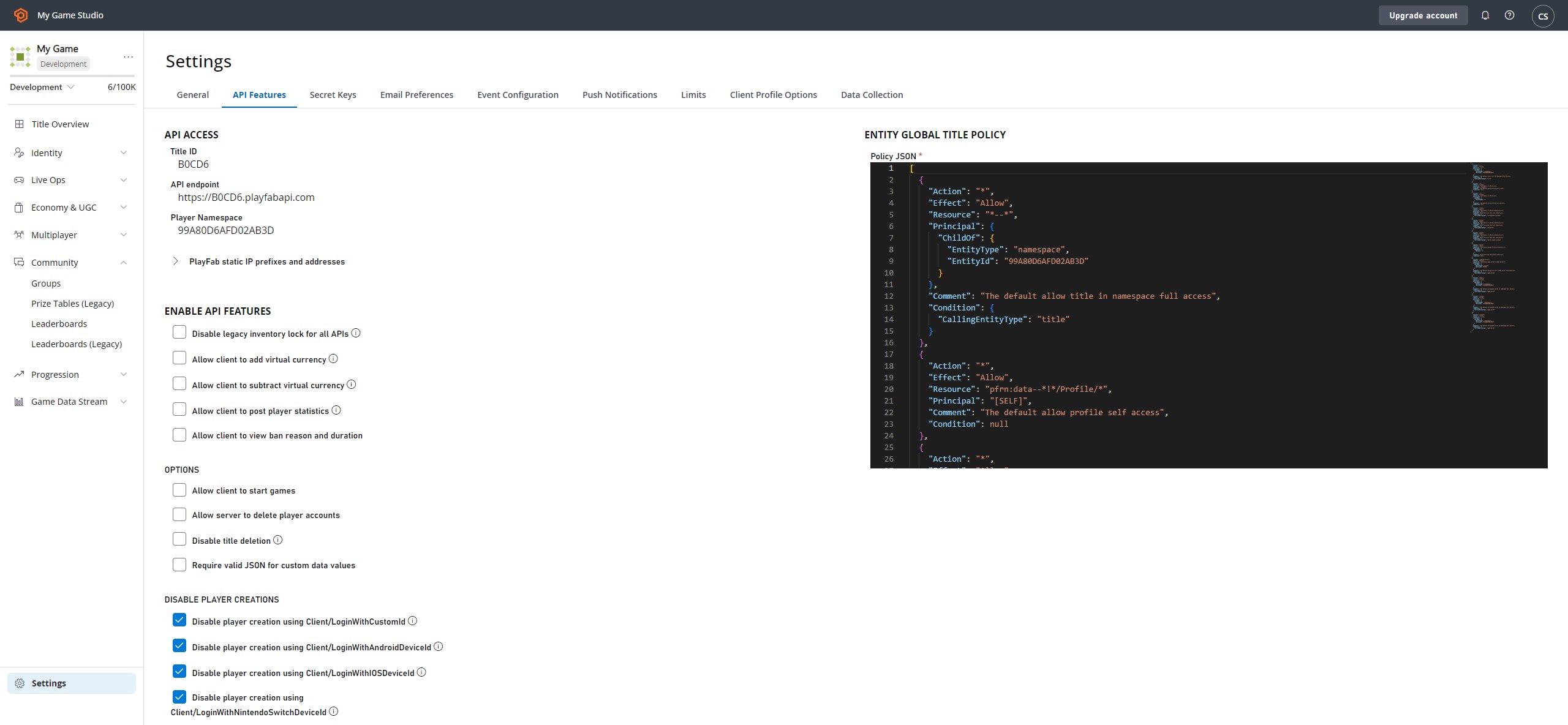 您了解自己的遊戲以及它們如何驗證玩家。在呼叫 `DeleteMasterPlayerAccount` 或 `ExportMasterPlayerData` 之前,請確定您已向玩家收集正確的裝置識別碼和/或認證。
透過這些認證,我們可以識別*每個*主要玩家帳戶的 PlayFabId。
下列 API 可協助您將認證轉換為 `PlayFabId`:
* [GetUserAccountInfo](xref:titleid.playfabapi.com.admin.accountmanagement.getuseraccountinfo) - 此 API 可協助您依電子郵件、`TitleDisplayName`、`PlayFabId` 或 `PlayFabUsername` 尋找玩家。
* [GetPlayerIdFromAuthToken](xref:titleid.playfabapi.com.admin.accountmanagement.getplayeridfromauthtoken) - 此 API 可讓您從特定的 `AuthToken` 尋找玩家,該權杖會在玩家登入時授與給玩家。
* [GetPlayFabIDsFromFacebookIDs](xref:titleid.playfabapi.com.server.accountmanagement.getplayfabidsfromfacebookids) - 此 API 會從一或多個 `FacebookId` 推導出玩家的 `PlayFabId`。
* [GetPlayFabIDsFromSteamIDs](xref:titleid.playfabapi.com.server.accountmanagement.getplayfabidsfromsteamids) - 此 API 會從一或多個 `SteamIds` 推導出玩家的 `PlayFabId`。
這些 API 都是遊戲特定的。前兩個是 Admin API,後兩個是 Server API。
即使您的玩家只有一個 PlayFabId,他們也可能已使用該識別碼玩過您的多個遊戲。這表示他們的資料要求可能跨越多個遊戲。
若要取得此遊戲清單,請針對每個 PlayFabId 呼叫 `GetPlayedTitleList`。您*可能*會想要通知玩家,他們的要求將會影響傳回的遊戲清單。
此外,`GetPlayedTitleList` 會傳回 `TitleIds`,*而非* `Title Names`;請考慮先將這些識別碼轉換為 `Title Names`,再將其顯示在確認頁面中。
以下是一小段虛擬程式碼,可更清楚說明我們的意思...
```csharp theme={null}
//Here you would iterate through a request of known Ids, Emails, linked accounts
//or other PlayFab searchable info on the player that you have.
//and store it in user credentials for that player.
user {
credentials: (email/ids/linked accounts)
}
//create a variable to hold a list of all the PlayFabIds you want to remove.
PlayFabIdList
//create a list of affected titles
AffectedTitles
//Keep track of all your titles, this is important
//and should include all titles across all your namespaces.
foreach(title in ){
//each user record you have for the player, you should have a list of credentials for that player
//so you can find them in PlayFab
foreach(cred in user.credentials){
//There are a few helper Admin and Server API's that help you do this part.
//See below this pseudo code block for some tips!
pfid =
PlayFabIdList.add(pfid)
}
//go through the list of PlayFabIds that you have and fine all titles that
//performing the action would affect
foreach(pfid in PlayFabIdList){
AffectedTitles = title.GetPlayedTitleList(pfid)
}
}
```
以下是如何使用 **GetPlayedTitleList** 的快速範例。
```csharp theme={null}
public static async void StartFindTitlesExample(Action callback)
{
var task = await PlayFabAdminAPI.GetPlayedTitleListAsync(new GetPlayedTitleListRequest() {
PlayFabId = PlayFabId
});
��� if(task.Error != null)
{
callback(task.Error);
return;
}
var TitleList = task.Result.TitleIds;
foreach (var title in TitleList)
{
Console.WriteLine(string.Format("Title Found: {0}", title));
}
callback(null);
}
```
此時,您已擁有此玩家的 `PlayFabIds` 清單 (根據他們所分享的認證),以及每個 `PlayFabId` 的遊戲清單。接下來呢?
現在您已準備好進行刪除或匯出!
## 其他考量
使用這些 API 很容易造成損害。為錯誤的玩家匯出資料或刪除錯誤的玩家可能會造成嚴重損害,而且是**永久性的**!
身為遊戲開發人員,您有責任確認認證與要求匯出或刪除其玩家資料的玩家相符。使用這些 API 時,PlayFab 不會提供任何類型的驗證。
不過,PlayFab 確實提供[電子郵件驗證功能](/zh-TW/services/playfab/live-service-management/game-configuration/title-communications/emails/using-a-rule-to-verify-a-contact-email-address)。但我們的解決方案並非唯一的驗證選項。您也可以建立自己的流程。
無論您使用哪種技術,我們都建議您在執行任何這些動作之前,先進行某種形式的驗證。
## Related topics
- [PlayFab GDPR - 匯出玩家資料](/zh-TW/services/playfab/data-analytics/privacy-compliance/gdpr-exporting-player-data.md)
- [PlayFab GDPR - 刪除玩家資料](/zh-TW/services/playfab/data-analytics/privacy-compliance/gdpr-deleting-player-data.md)
- [PlayFab 玩家進度文件](/zh-TW/services/playfab/player-progression/index.md)
- [PlayFab 資料與分析文件](/zh-TW/services/playfab/data-analytics/index.md)
- [匯出主要玩家資料](/zh-TW/services/playfab/api-references/rest/admin/account-management/export-master-player-data.md)
您了解自己的遊戲以及它們如何驗證玩家。在呼叫 `DeleteMasterPlayerAccount` 或 `ExportMasterPlayerData` 之前,請確定您已向玩家收集正確的裝置識別碼和/或認證。
透過這些認證,我們可以識別*每個*主要玩家帳戶的 PlayFabId。
下列 API 可協助您將認證轉換為 `PlayFabId`:
* [GetUserAccountInfo](xref:titleid.playfabapi.com.admin.accountmanagement.getuseraccountinfo) - 此 API 可協助您依電子郵件、`TitleDisplayName`、`PlayFabId` 或 `PlayFabUsername` 尋找玩家。
* [GetPlayerIdFromAuthToken](xref:titleid.playfabapi.com.admin.accountmanagement.getplayeridfromauthtoken) - 此 API 可讓您從特定的 `AuthToken` 尋找玩家,該權杖會在玩家登入時授與給玩家。
* [GetPlayFabIDsFromFacebookIDs](xref:titleid.playfabapi.com.server.accountmanagement.getplayfabidsfromfacebookids) - 此 API 會從一或多個 `FacebookId` 推導出玩家的 `PlayFabId`。
* [GetPlayFabIDsFromSteamIDs](xref:titleid.playfabapi.com.server.accountmanagement.getplayfabidsfromsteamids) - 此 API 會從一或多個 `SteamIds` 推導出玩家的 `PlayFabId`。
這些 API 都是遊戲特定的。前兩個是 Admin API,後兩個是 Server API。
即使您的玩家只有一個 PlayFabId,他們也可能已使用該識別碼玩過您的多個遊戲。這表示他們的資料要求可能跨越多個遊戲。
若要取得此遊戲清單,請針對每個 PlayFabId 呼叫 `GetPlayedTitleList`。您*可能*會想要通知玩家,他們的要求將會影響傳回的遊戲清單。
此外,`GetPlayedTitleList` 會傳回 `TitleIds`,*而非* `Title Names`;請考慮先將這些識別碼轉換為 `Title Names`,再將其顯示在確認頁面中。
以下是一小段虛擬程式碼,可更清楚說明我們的意思...
```csharp theme={null}
//Here you would iterate through a request of known Ids, Emails, linked accounts
//or other PlayFab searchable info on the player that you have.
//and store it in user credentials for that player.
user {
credentials: (email/ids/linked accounts)
}
//create a variable to hold a list of all the PlayFabIds you want to remove.
PlayFabIdList
//create a list of affected titles
AffectedTitles
//Keep track of all your titles, this is important
//and should include all titles across all your namespaces.
foreach(title in ){
//each user record you have for the player, you should have a list of credentials for that player
//so you can find them in PlayFab
foreach(cred in user.credentials){
//There are a few helper Admin and Server API's that help you do this part.
//See below this pseudo code block for some tips!
pfid =
PlayFabIdList.add(pfid)
}
//go through the list of PlayFabIds that you have and fine all titles that
//performing the action would affect
foreach(pfid in PlayFabIdList){
AffectedTitles = title.GetPlayedTitleList(pfid)
}
}
```
以下是如何使用 **GetPlayedTitleList** 的快速範例。
```csharp theme={null}
public static async void StartFindTitlesExample(Action callback)
{
var task = await PlayFabAdminAPI.GetPlayedTitleListAsync(new GetPlayedTitleListRequest() {
PlayFabId = PlayFabId
});
��� if(task.Error != null)
{
callback(task.Error);
return;
}
var TitleList = task.Result.TitleIds;
foreach (var title in TitleList)
{
Console.WriteLine(string.Format("Title Found: {0}", title));
}
callback(null);
}
```
此時,您已擁有此玩家的 `PlayFabIds` 清單 (根據他們所分享的認證),以及每個 `PlayFabId` 的遊戲清單。接下來呢?
現在您已準備好進行刪除或匯出!
## 其他考量
使用這些 API 很容易造成損害。為錯誤的玩家匯出資料或刪除錯誤的玩家可能會造成嚴重損害,而且是**永久性的**!
身為遊戲開發人員,您有責任確認認證與要求匯出或刪除其玩家資料的玩家相符。使用這些 API 時,PlayFab 不會提供任何類型的驗證。
不過,PlayFab 確實提供[電子郵件驗證功能](/zh-TW/services/playfab/live-service-management/game-configuration/title-communications/emails/using-a-rule-to-verify-a-contact-email-address)。但我們的解決方案並非唯一的驗證選項。您也可以建立自己的流程。
無論您使用哪種技術,我們都建議您在執行任何這些動作之前,先進行某種形式的驗證。
## Related topics
- [PlayFab GDPR - 匯出玩家資料](/zh-TW/services/playfab/data-analytics/privacy-compliance/gdpr-exporting-player-data.md)
- [PlayFab GDPR - 刪除玩家資料](/zh-TW/services/playfab/data-analytics/privacy-compliance/gdpr-deleting-player-data.md)
- [PlayFab 玩家進度文件](/zh-TW/services/playfab/player-progression/index.md)
- [PlayFab 資料與分析文件](/zh-TW/services/playfab/data-analytics/index.md)
- [匯出主要玩家資料](/zh-TW/services/playfab/api-references/rest/admin/account-management/export-master-player-data.md)