> ## Documentation Index
> Fetch the complete documentation index at: https://devdocs.xbox.com/llms.txt
> Use this file to discover all available pages before exploring further.
# Insights 匯出
> 使用 Game Manager 中舊版的 Insights Event Export 將遊戲事件資料大量匯出到外部儲存體;請在 Insights 淘汰前移轉至 Data Connections。
# 匯出資料
PlayFab Insights Management 已於 2026/3/31 淘汰。我們建議日後使用 [Data Connections](/zh-TW/services/playfab/data-analytics/export-data/data-connection-adx) 來管理您的效能和成本。如果您的遊戲仍在使用 **Event Export**,請繼續參閱本文以了解最佳做法詳細資料。如需詳細資訊,請參閱 [PlayFab Digest: March feature updates](https://developer.microsoft.com/en-us/games/articles/2026/04/playfab-digest-march-feature-updates/)。
Event Export 是不透過查詢即可從 Insights 資料叢集匯出資料的主要機制。您可以在 PlayFab Game Manager 的資料區段下找到 Event Export。您可以執行的不同匯出命令數量取決於您的效能等級。
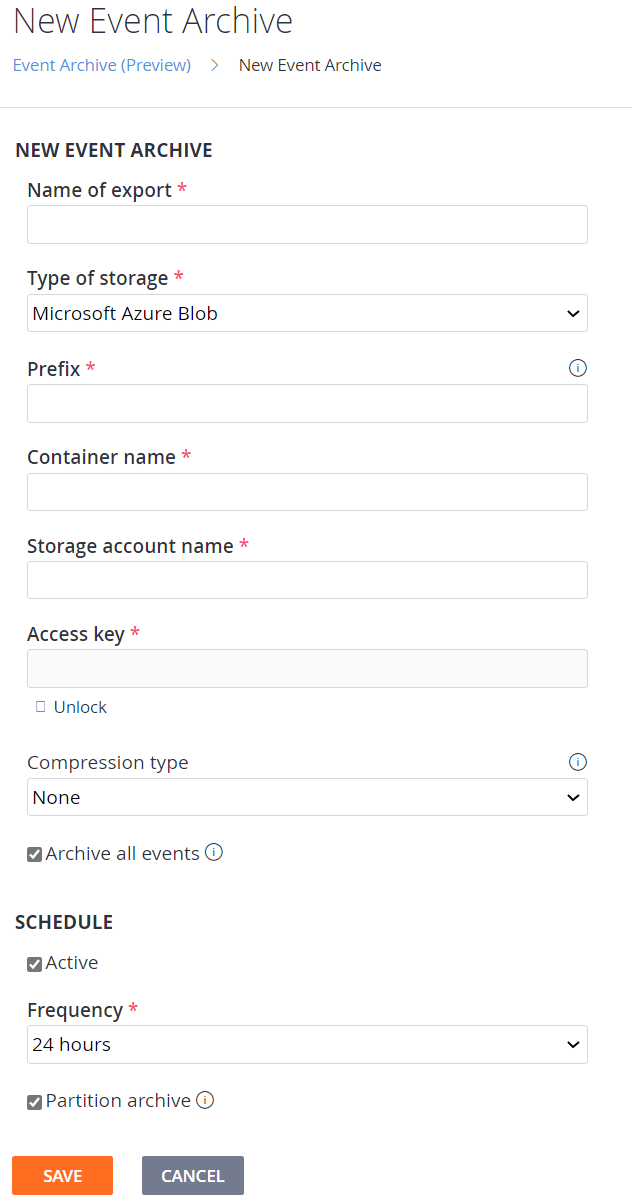 若要建立新的匯出:
1. 瀏覽至 Event Export 頁面。
2. 選取「New Event Export」。
3. 在必要欄位中填入您的外部儲存體帳戶資訊。
4. 有數個選項可供選擇要匯出的資料
1. 您可以選取所有事件的核取方塊,此選項會匯出所有資料。
2. 您可以選取一或多個要匯出的資料表
3. 您可以選擇使用自訂查詢來定義匯出的輸出。**注意** 使用自訂查詢匯出所有資料時,會稍微多出一些來自 ETL 程序的資料行。**注意** 使用自訂查詢時,輸出必須有名為 timestamp 的時間戳記資料行。
5. 您可以選擇每小時一次或每天一次作為匯出頻率
6. 您可以選擇將資料分割成個別檔案,以提高儲存和載入的效率
### 使用案例
1. 匯出所有資料以擷取到不同的資料系統。匯出所有資料提供一種有效率的方式,來建立要儲存為冷儲存或擷取到另一個資料處理系統的檔案。雖然此使用案例可行,但這並不是 Insights 和 Export 的預期使用案例。PlayFab Insights 在資料修改和轉換方面表現出色,因此建議採用第二個案例,而非此案例。
2. 匯出自訂查詢資料。使用自訂查詢可讓您選取自訂資料集進行匯出。這非常適合將清理過的資料模型載入 Spark 和 pandas (python) 等機器學習系統,或載入提供特殊使用案例的其他資料系統和視覺效果平台。
### 連續匯出
連續資料匯出只會從建立匯出的時間點開始匯出資料。
## Related topics
- [Insights](/zh-TW/services/playfab/data-analytics/legacy/insights/overview.md)
- [Insights 定價](/zh-TW/services/playfab/data-analytics/legacy/insights/pricing.md)
- [Insights 最佳做法](/zh-TW/services/playfab/data-analytics/legacy/insights/best-practices.md)
- [匯出 XBOX 測試帳戶](/zh-TW/services/xbox-services/develop/test-accounts/live-exporting-test-accounts.md)
- [取得區段匯出](/zh-TW/services/playfab/api-references/rest/server/play-stream/get-segment-export.md)
若要建立新的匯出:
1. 瀏覽至 Event Export 頁面。
2. 選取「New Event Export」。
3. 在必要欄位中填入您的外部儲存體帳戶資訊。
4. 有數個選項可供選擇要匯出的資料
1. 您可以選取所有事件的核取方塊,此選項會匯出所有資料。
2. 您可以選取一或多個要匯出的資料表
3. 您可以選擇使用自訂查詢來定義匯出的輸出。**注意** 使用自訂查詢匯出所有資料時,會稍微多出一些來自 ETL 程序的資料行。**注意** 使用自訂查詢時,輸出必須有名為 timestamp 的時間戳記資料行。
5. 您可以選擇每小時一次或每天一次作為匯出頻率
6. 您可以選擇將資料分割成個別檔案,以提高儲存和載入的效率
### 使用案例
1. 匯出所有資料以擷取到不同的資料系統。匯出所有資料提供一種有效率的方式,來建立要儲存為冷儲存或擷取到另一個資料處理系統的檔案。雖然此使用案例可行,但這並不是 Insights 和 Export 的預期使用案例。PlayFab Insights 在資料修改和轉換方面表現出色,因此建議採用第二個案例,而非此案例。
2. 匯出自訂查詢資料。使用自訂查詢可讓您選取自訂資料集進行匯出。這非常適合將清理過的資料模型載入 Spark 和 pandas (python) 等機器學習系統,或載入提供特殊使用案例的其他資料系統和視覺效果平台。
### 連續匯出
連續資料匯出只會從建立匯出的時間點開始匯出資料。
## Related topics
- [Insights](/zh-TW/services/playfab/data-analytics/legacy/insights/overview.md)
- [Insights 定價](/zh-TW/services/playfab/data-analytics/legacy/insights/pricing.md)
- [Insights 最佳做法](/zh-TW/services/playfab/data-analytics/legacy/insights/best-practices.md)
- [匯出 XBOX 測試帳戶](/zh-TW/services/xbox-services/develop/test-accounts/live-exporting-test-accounts.md)
- [取得區段匯出](/zh-TW/services/playfab/api-references/rest/server/play-stream/get-segment-export.md)