> ## Documentation Index
> Fetch the complete documentation index at: https://devdocs.xbox.com/llms.txt
> Use this file to discover all available pages before exploring further.
# 將 Kusto Explorer 連線至 Insights
> 使用 Microsoft Entra ID 驗證設定 Kusto Explorer,以從桌面用戶端執行 KQL 查詢並探索舊版 PlayFab Insights 遊戲遙測資料。
# 教學課程:將 Kusto Explorer 連線至 Insights
本指南可協助您開始搭配 Insights 使用 Kusto Explorer。連線之後,您可以使用 Kusto Explorer 查詢及探索遊戲資料。若要深入了解可與 Insights 連線的其他工具,請參閱[將外部工具連線至 Insights](/zh-TW/services/playfab/data-analytics/legacy/connectivity)。
PlayFab Insights 管理已於 3/31/2026 淘汰。我們建議日後使用 [Azure Data Explorer (ADX) 連線](/zh-TW/services/playfab/data-analytics/export-data/data-connection-adx)來管理您的效能和成本。如果您的遊戲仍在使用 **Insights**,請繼續參閱本文以了解實作詳細資料。如需詳細資訊,請參閱 [PlayFab Digest: March feature updates](https://developer.microsoft.com/en-us/games/articles/2026/04/playfab-digest-march-feature-updates/)。
## 必要條件
### 使用 AAD 驗證的 PlayFab 帳戶
您需要一個驗證提供者設定為 Microsoft 的 PlayFab 帳戶或使用者。Microsoft 驗證提供者使用 Azure Active Directory (AAD) 進行驗證,這是使用 Azure 服務的必要條件。如需建立 AAD 驗證帳戶或使用者的指示,請參閱 [Game Manager 的 Azure Active Directory 驗證](/zh-TW/services/playfab/identity/dev-identity/authentication/aad-authentication)。
確認帳戶或使用者已設定為使用 Microsoft 驗證提供者。
* 瀏覽至 [developer.playfab.com](https://developer.playfab.com)。
* 選取 **Sign in with Microsoft** 以存取您的 PlayFab 帳戶。
如果您可以登入,表示該帳戶已設定為使用 Microsoft 驗證提供者。
### Insights 的 Game Manager 權限
您需要為帳戶指派已啟用下列 Game Manager 權限的[使用者角色](/zh-TW/services/playfab/identity/dev-identity/permissions/playfab-user-roles)。
* 系統管理員狀態。
* 存取 Explorer 索引標籤及相關資料。
* Analytics 資料的讀取和寫入權限。
您可以建立新的使用者角色,或將這些權限新增至現有角色。
### 其他必要條件
* [Kusto.Explorer](https://learn.microsoft.com/en-us/azure/data-explorer/kusto/tools/kusto-explorer)
Insights 僅支援 V1 查詢回應結構描述。您可以使用下列步驟在 Kusto Explorer 中更新回應結構描述。
在您的本機電腦上,開啟 Kusto.Explorer。
1. 選取 **Tools** 索引標籤,然後選取 **Options...**
2. 在 **Connections** 類別下,變更下列兩個屬性。
* 從下拉式選項中將 **Query results protocol** 設定為 **V1**。
* 從下拉式選項中將 **KQL Parser version** 設定為 **V1**。 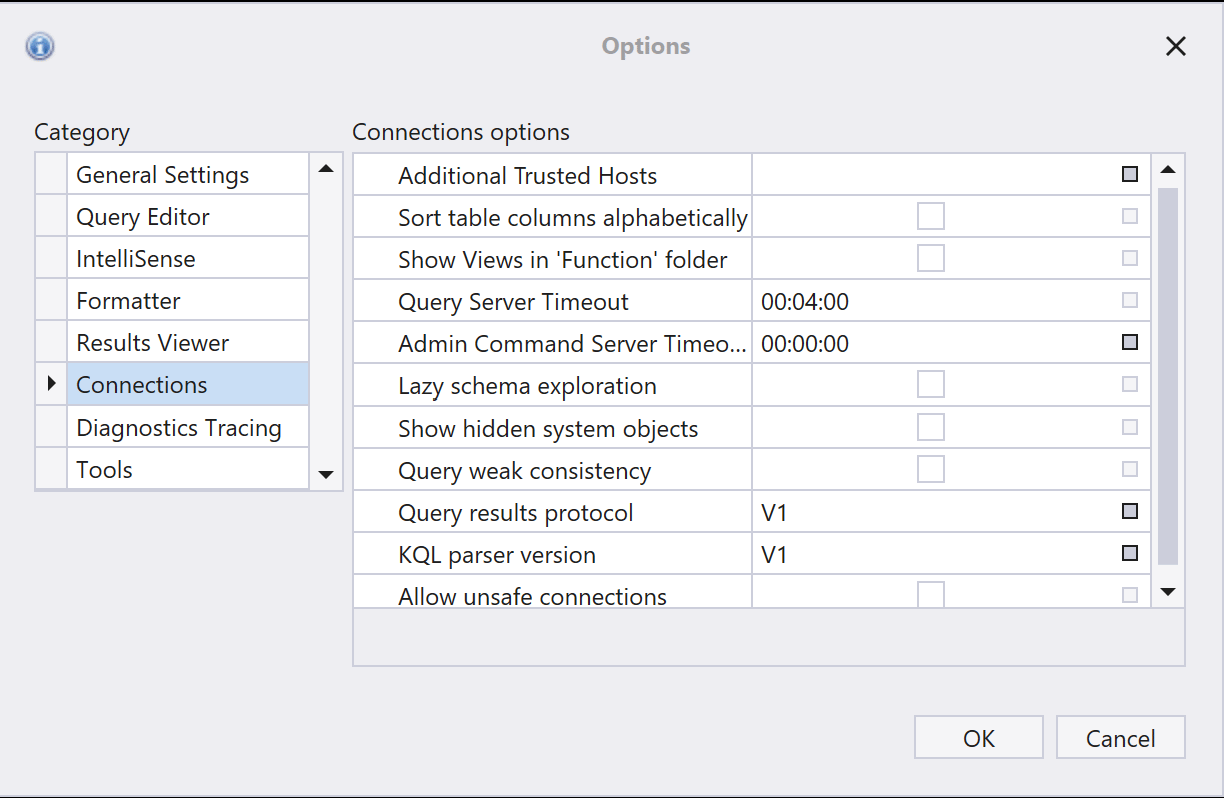 ## 使用 Kusto Explorer 連線
在您的本機電腦上,開啟 Kusto.Explorer。
1. 新增連線。您可以透過兩種不同的方式執行此動作:
* 選取 **Connections** 索引標籤,然後選取 **Add connection**。
* 以滑鼠右鍵按一下左側導覽面板中的 **Connections** 資料夾,然後選取 **Add connection**。
2. 在 **Add connection** 對話方塊中:
* 在 **Cluster connection** 下,輸入 PlayFab API 端點,也就是 `https://insights.playfab.com`。
* 在 **Security** 下,確定已選取 **AAD Federated**。
* 展開 **Advanced: Connection String** 方塊,並將 **Initial Catalog** 的值從 **NetDefaultDB** 變更為 ``。請注意,此處的 `` 必須全部大寫。在下面的範例中,此變更已在字串中醒目提示。
## 使用 Kusto Explorer 連線
在您的本機電腦上,開啟 Kusto.Explorer。
1. 新增連線。您可以透過兩種不同的方式執行此動作:
* 選取 **Connections** 索引標籤,然後選取 **Add connection**。
* 以滑鼠右鍵按一下左側導覽面板中的 **Connections** 資料夾,然後選取 **Add connection**。
2. 在 **Add connection** 對話方塊中:
* 在 **Cluster connection** 下,輸入 PlayFab API 端點,也就是 `https://insights.playfab.com`。
* 在 **Security** 下,確定已選取 **AAD Federated**。
* 展開 **Advanced: Connection String** 方塊,並將 **Initial Catalog** 的值從 **NetDefaultDB** 變更為 ``。請注意,此處的 `` 必須全部大寫。在下面的範例中,此變更已在字串中醒目提示。 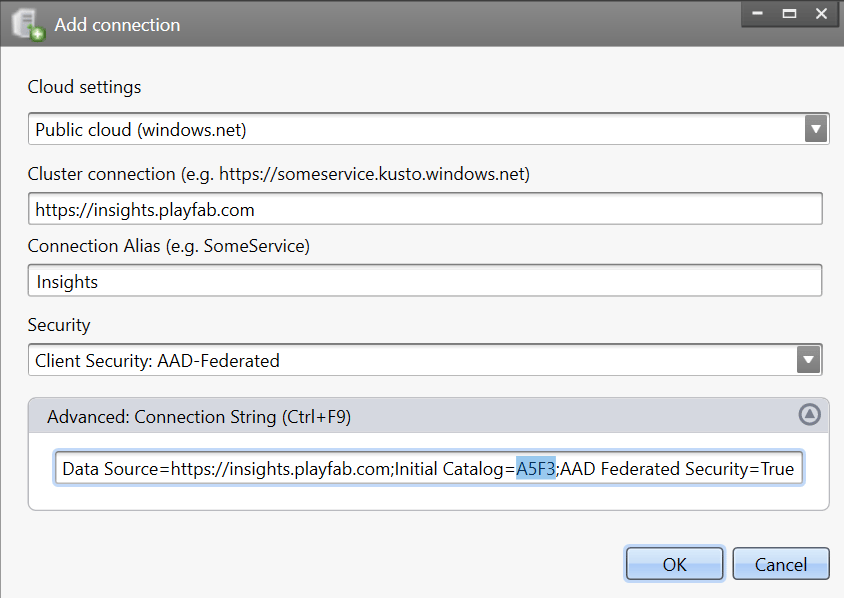 3. 選取 **OK**。現在,您應該可以將查詢結果視覺化。
## 其他資源
* [Kusto Explorer 文件](https://learn.microsoft.com/en-us/azure/kusto/tools/kusto-explorer)
* [將外部工具連線至 Insights](/zh-TW/services/playfab/data-analytics/legacy/connectivity)
## Related topics
- [將外部工具與 Insights 連線](/zh-TW/services/playfab/data-analytics/legacy/connectivity/index.md)
- [將 Kusto C# SDK 連線至 Insights](/zh-TW/services/playfab/data-analytics/legacy/connectivity/connecting-kusto-csharp-to-insights.md)
- [將 Azure Data Explorer 連線至 Insights](/zh-TW/services/playfab/data-analytics/legacy/connectivity/connecting-azure-data-explorer-to-insights.md)
- [將 Python 連線至 Insights](/zh-TW/services/playfab/data-analytics/legacy/connectivity/connecting-python-to-insights.md)
- [將 Grafana 連線至 Insights](/zh-TW/services/playfab/data-analytics/legacy/connectivity/connecting-grafana-to-insights.md)
3. 選取 **OK**。現在,您應該可以將查詢結果視覺化。
## 其他資源
* [Kusto Explorer 文件](https://learn.microsoft.com/en-us/azure/kusto/tools/kusto-explorer)
* [將外部工具連線至 Insights](/zh-TW/services/playfab/data-analytics/legacy/connectivity)
## Related topics
- [將外部工具與 Insights 連線](/zh-TW/services/playfab/data-analytics/legacy/connectivity/index.md)
- [將 Kusto C# SDK 連線至 Insights](/zh-TW/services/playfab/data-analytics/legacy/connectivity/connecting-kusto-csharp-to-insights.md)
- [將 Azure Data Explorer 連線至 Insights](/zh-TW/services/playfab/data-analytics/legacy/connectivity/connecting-azure-data-explorer-to-insights.md)
- [將 Python 連線至 Insights](/zh-TW/services/playfab/data-analytics/legacy/connectivity/connecting-python-to-insights.md)
- [將 Grafana 連線至 Insights](/zh-TW/services/playfab/data-analytics/legacy/connectivity/connecting-grafana-to-insights.md)