> ## Documentation Index
> Fetch the complete documentation index at: https://devdocs.xbox.com/llms.txt
> Use this file to discover all available pages before exploring further.
# 使用取樣的 Manage Events
> 使用 PlayFab Manage Events 搭配取樣,只擷取一定百分比的 PlayStream 和遙測事件,以降低儲存成本並提升查詢效能。
## 概觀
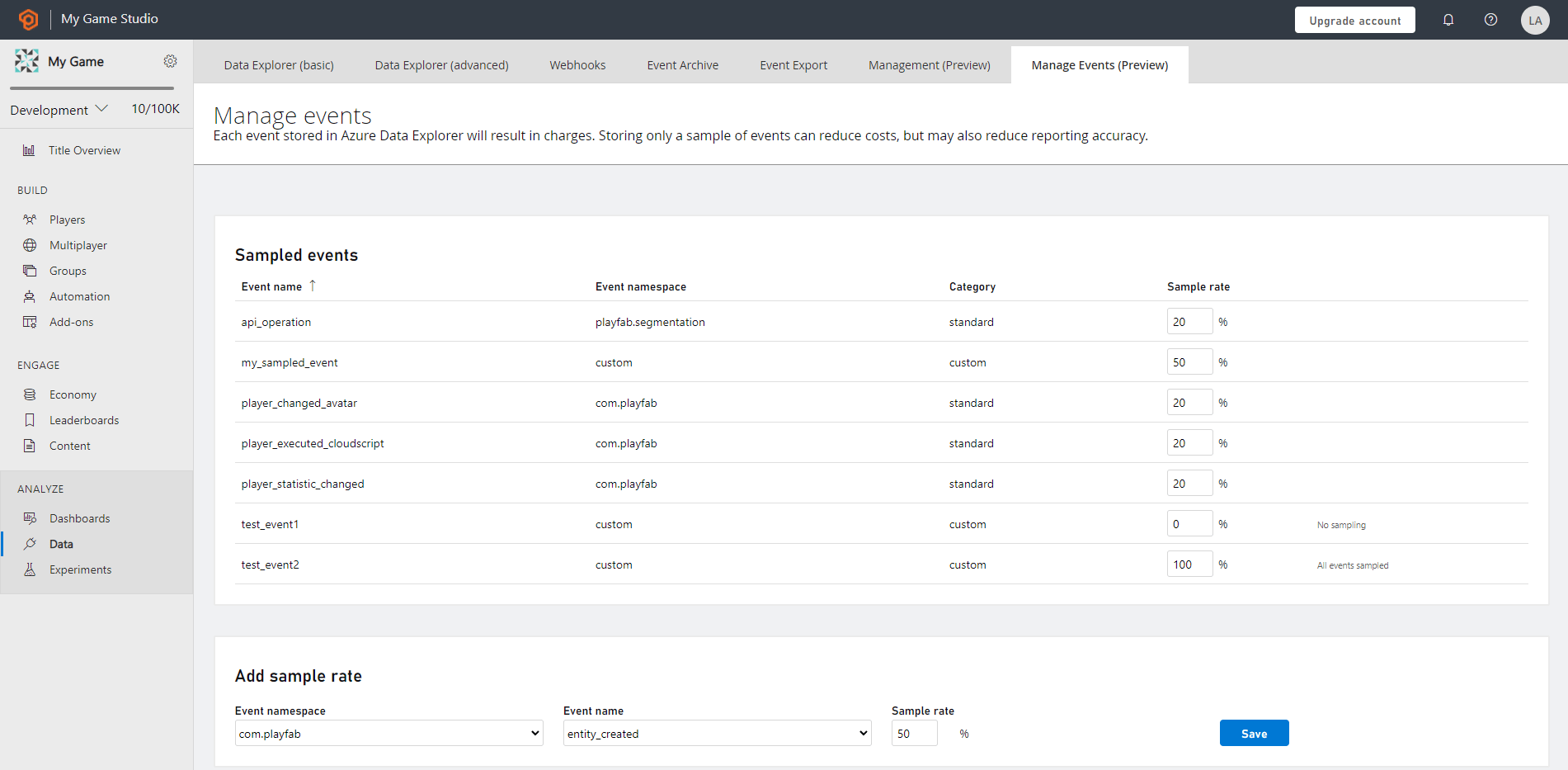
PlayFab **Manage Events** 功能可協助您設定要在遊戲租用戶資料庫中接收的事件資料百分比。
根據預設,所有 PlayStream 和遙測 (自訂) 事件都會被儲存。不過,在某些情況下,您可能只想擷取事件的樣本集。若要達成此目的,請使用 Manage Events 搭配取樣率。
### Manage Events 的優點
取樣能減少事件的總量,以受控且彈性的方式為您帶來下列好處:
* 降低遊戲租用戶資料庫的儲存成本
* 提升事件搜尋的效能
* 輕鬆探索資料,以判斷大型資料集的特性
* 在不損失任何資料精確度的情況下,完整驗證資料格式、統計計算和其他分析
### 取樣比率
取樣比率是任何事件被納入樣本結果集的機率百分比,範圍從 0% 到 100%。根據預設,事件取樣並未啟用,這表示取樣率設定為 100%,遊戲的每個事件都會被擷取並儲存到遊戲租用戶資料庫中。
 ### 對取樣資料進行資料分析
若要進行符合統計真實性的資料分析,請確保依事件的取樣率進行相對應的比例調整來檢查資料。
當您使用事件樣本集計算統計資料時,統計值將不會準確。若要取得最準確的統計近似值,您必須依相對應的取樣比率調整數值的比例。因為使用取樣時,傳回的集合並不是所有事件的完整集合。
使用事件取樣時,統計計算的命令可能較難解讀,例如 count、summarize、max、min 等。
## Related topics
- [Event Sampling 快速入門](/zh-TW/services/playfab/data-analytics/export-data/event-sampling-quickstart.md)
- [XBOX Series X|S 上的取樣器意見反應與 SFS](/zh-TW/build/core-features/graphics/newfeatures/sfs/index.md)
- [SetShapeEqCompCompressorMode](/zh-TW/reference/audio/shapeeqcompcontext/functions/setshapeeqcompcompressormode.md)
- [為什麼要使用 Sampler Feedback?](/zh-TW/build/core-features/graphics/newfeatures/sfs/why-sf.md)
- [XAPU 概觀](/zh-TW/build/console-features/audio/overviews/xapu-overview.md)
### 對取樣資料進行資料分析
若要進行符合統計真實性的資料分析,請確保依事件的取樣率進行相對應的比例調整來檢查資料。
當您使用事件樣本集計算統計資料時,統計值將不會準確。若要取得最準確的統計近似值,您必須依相對應的取樣比率調整數值的比例。因為使用取樣時,傳回的集合並不是所有事件的完整集合。
使用事件取樣時,統計計算的命令可能較難解讀,例如 count、summarize、max、min 等。
## Related topics
- [Event Sampling 快速入門](/zh-TW/services/playfab/data-analytics/export-data/event-sampling-quickstart.md)
- [XBOX Series X|S 上的取樣器意見反應與 SFS](/zh-TW/build/core-features/graphics/newfeatures/sfs/index.md)
- [SetShapeEqCompCompressorMode](/zh-TW/reference/audio/shapeeqcompcontext/functions/setshapeeqcompcompressormode.md)
- [為什麼要使用 Sampler Feedback?](/zh-TW/build/core-features/graphics/newfeatures/sfs/why-sf.md)
- [XAPU 概觀](/zh-TW/build/console-features/audio/overviews/xapu-overview.md)