> ## Documentation Index
> Fetch the complete documentation index at: https://devdocs.xbox.com/llms.txt
> Use this file to discover all available pages before exploring further.
# 排行榜快速入門
> PlayFab Leaderboards 快速入門:在 Game Manager 中建立您的第一個排行榜,並使用您的 TitleId 和開發人員秘密金鑰設定 C# SDK。
# 排行榜快速入門
在本指南中,我們將了解如何為 Leaderboard 服務設定開發環境。我們也將
學習如何從我們的網站 [Game Manager](https://developer.playfab.com) 快速建立排行榜。
## 必要條件
我們需要 PlayFab 帳戶才能使用 PlayFab Leaderboards 服務。如需建立帳戶的指示,
請參閱[驗證](/zh-TW/services/playfab/identity/player-identity/authentication)
## 建立排行榜
我們將在左側功能表中選取 \[Progression]。
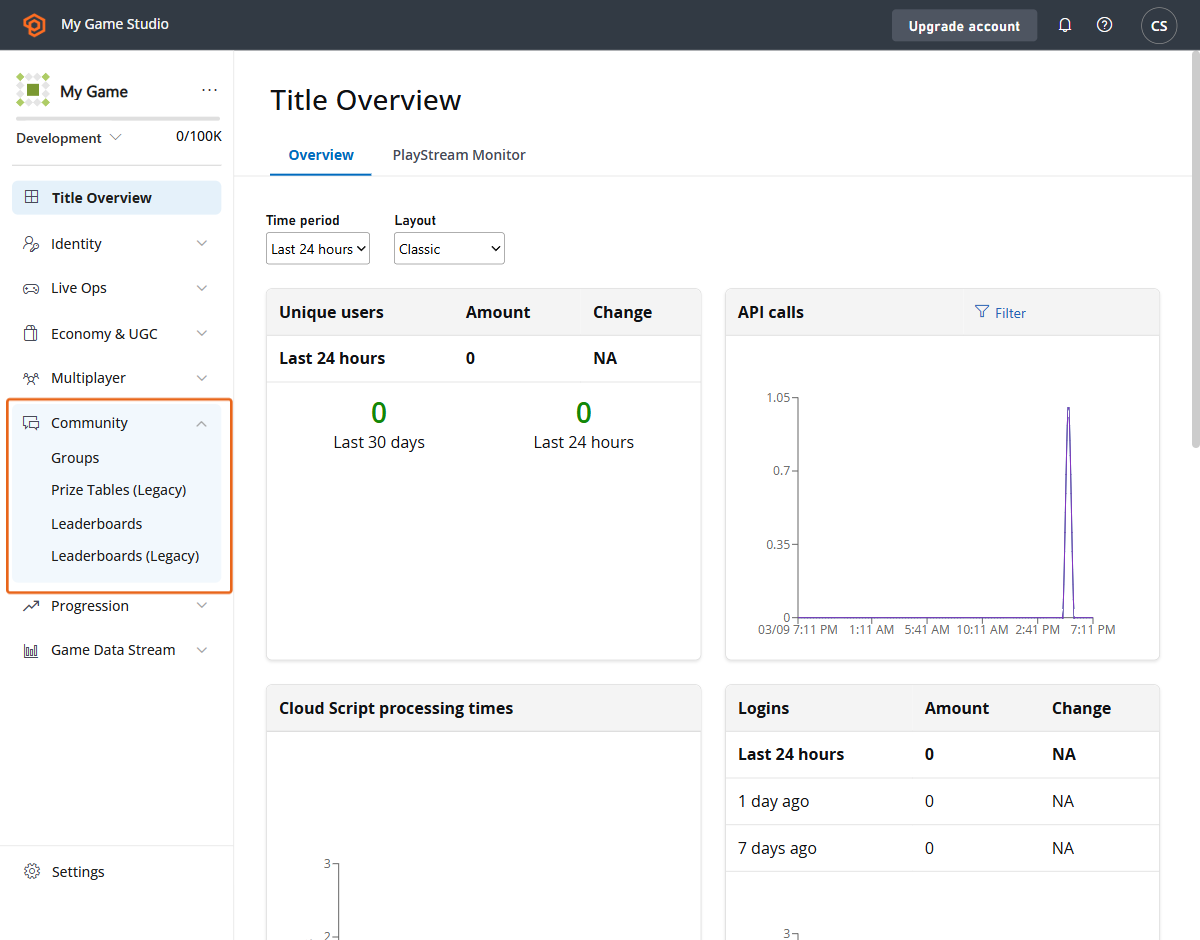 接著,我們從上方功能表選取 \[Leaderboards] 索引標籤。
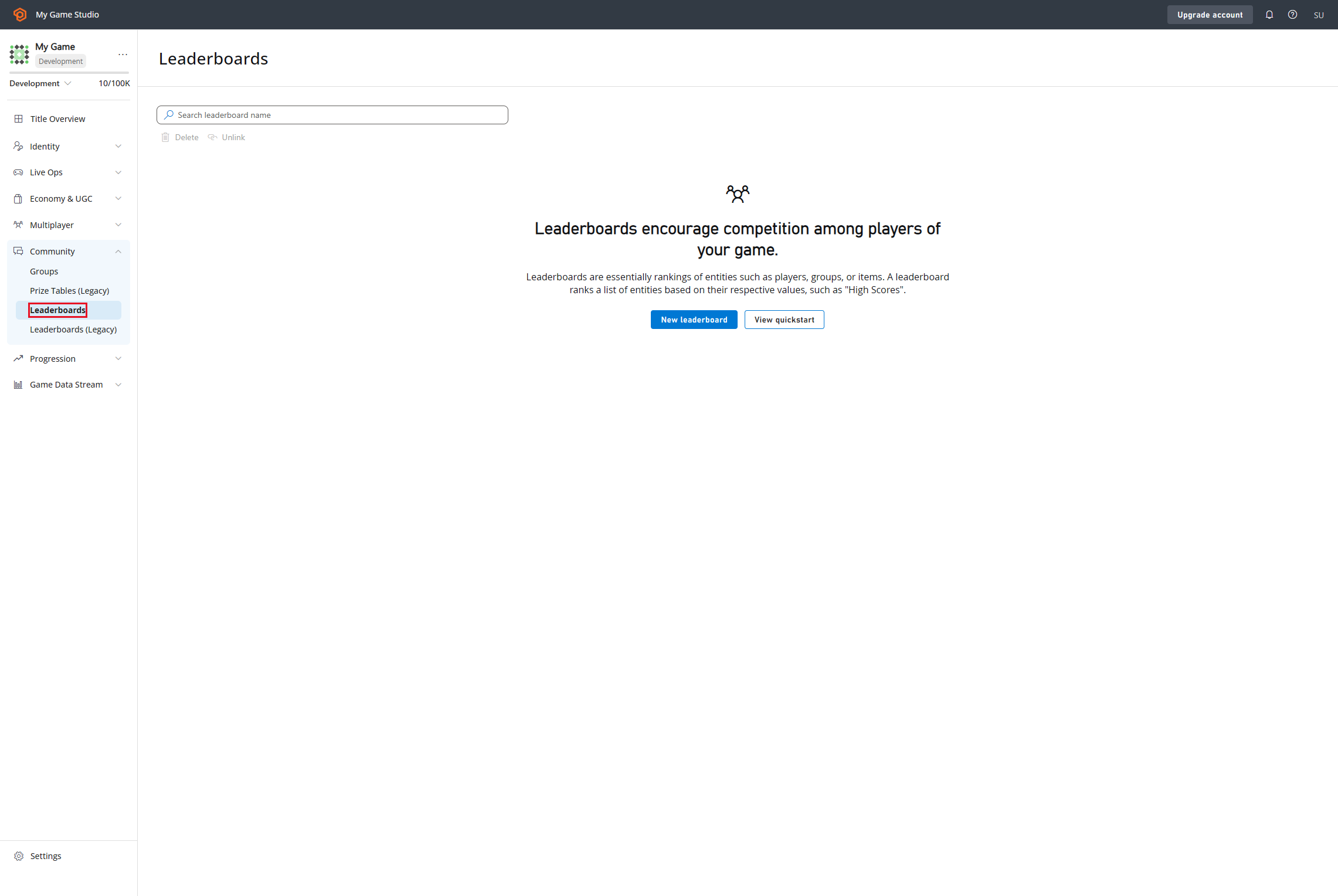 然後我們將前往 \[New Leaderboard] 按鈕,並建立我們的排行榜定義。
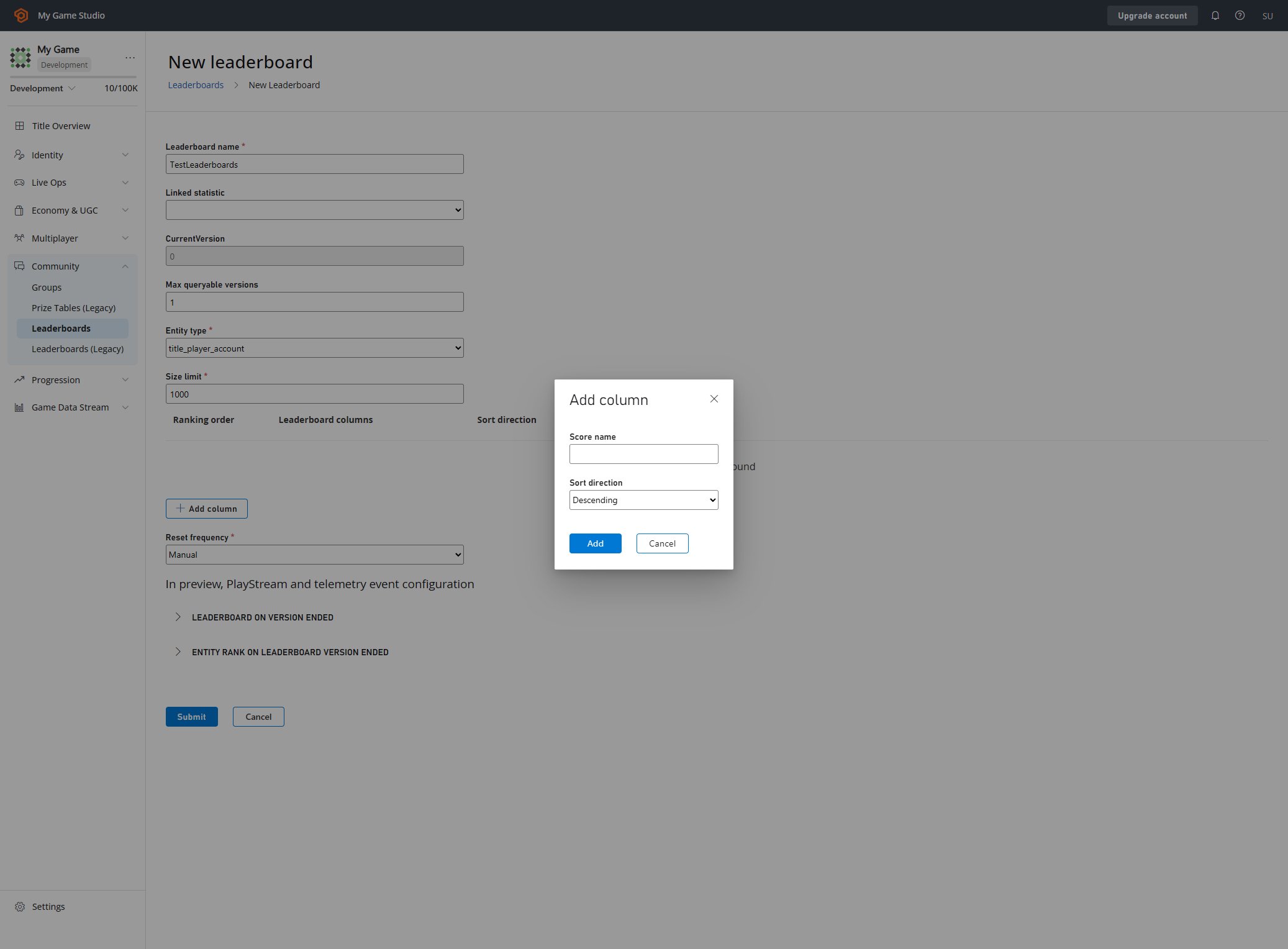 在這裡,我們可以設定排行榜的每個面向。在此深入了解可用的參數以及
如何建立排行榜:
* [建立基本排行榜](/zh-TW/services/playfab/community/leaderboards/create-basic-leaderboard)。
* [API 參考](/zh-TW/services/playfab/community/leaderboards/api-reference)
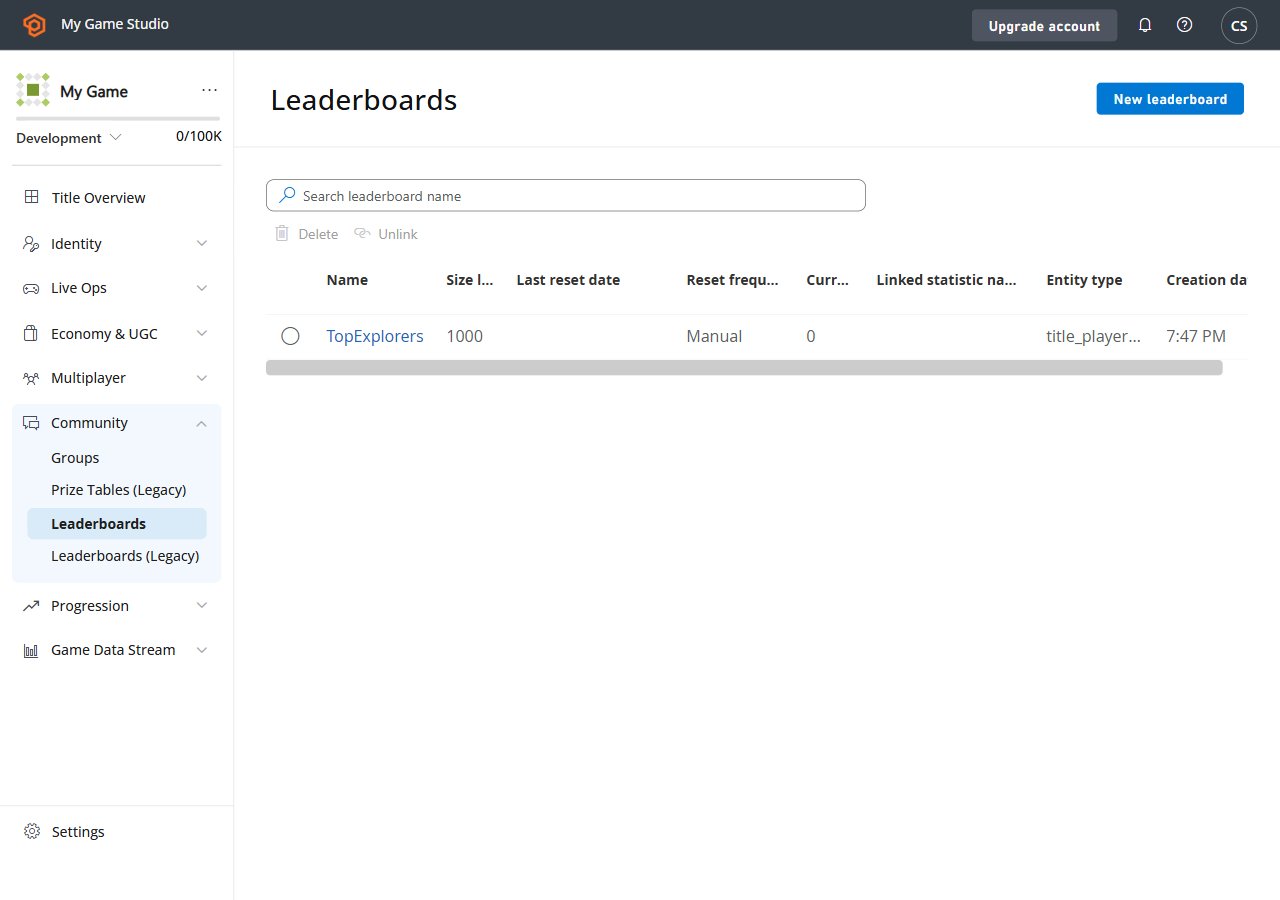
最終結果應如下所示。
在這裡,我們可以設定排行榜的每個面向。在此深入了解可用的參數以及
如何建立排行榜:
* [建立基本排行榜](/zh-TW/services/playfab/community/leaderboards/create-basic-leaderboard)。
* [API 參考](/zh-TW/services/playfab/community/leaderboards/api-reference)
最終結果應如下所示。
 ## 設定環境
在這裡,我們將學習如何設定開發人員環境以使用 C# SDK,但此處介紹的概念
也適用於其他 SDK 或一般的 HTTP 要求。
## 設定 TitleId 和 DeveloperSecretKey
以遊戲實體身分進行驗證時需要 DeveloperSecretKey。
```C# theme={null}
PlayFabSettings.staticSettings.TitleId = ""; // Change this value to your own titleId from PlayFab Game Manager
PlayFabSettings.staticSettings.DeveloperSecretKey = ""; // Change this to your title's secret key from Game Manager
```
## 建立遊戲並取得秘密金鑰
* 登入 [https://developer.playfab.com/](https://developer.playfab.com/)
* 建立遊戲
* 在設定下的 \[API Features] 區段中找到遊戲 ID。
* 產生秘密金鑰:
* 遊戲檢視左上角遊戲名稱旁的齒輪圖示
* \[Title Settings]
* \[Secret Keys]
* \[New secret key]
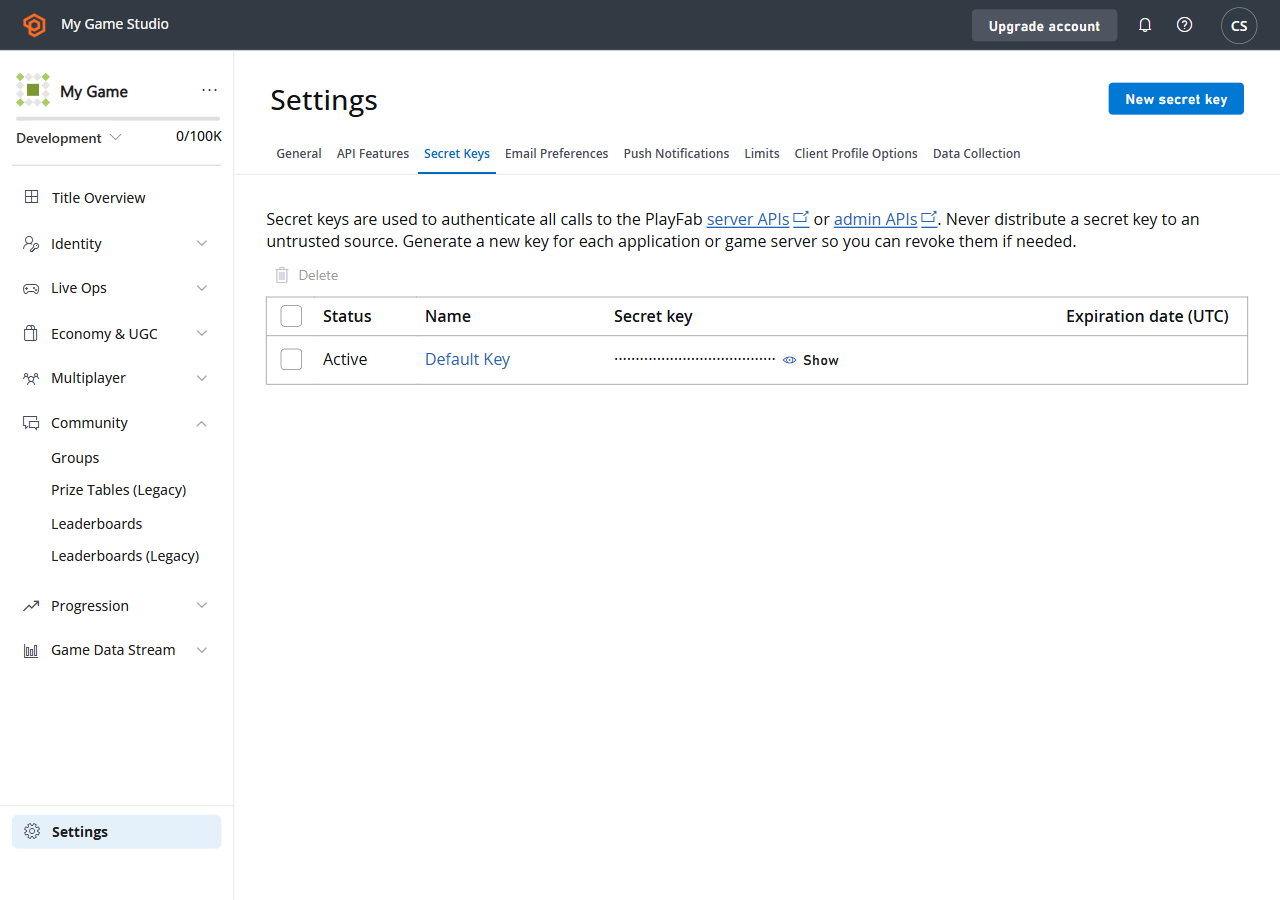
以下是您在 Game Manager 中找到 \[Secret Key] 區段時,UI 的樣子。
## 設定環境
在這裡,我們將學習如何設定開發人員環境以使用 C# SDK,但此處介紹的概念
也適用於其他 SDK 或一般的 HTTP 要求。
## 設定 TitleId 和 DeveloperSecretKey
以遊戲實體身分進行驗證時需要 DeveloperSecretKey。
```C# theme={null}
PlayFabSettings.staticSettings.TitleId = ""; // Change this value to your own titleId from PlayFab Game Manager
PlayFabSettings.staticSettings.DeveloperSecretKey = ""; // Change this to your title's secret key from Game Manager
```
## 建立遊戲並取得秘密金鑰
* 登入 [https://developer.playfab.com/](https://developer.playfab.com/)
* 建立遊戲
* 在設定下的 \[API Features] 區段中找到遊戲 ID。
* 產生秘密金鑰:
* 遊戲檢視左上角遊戲名稱旁的齒輪圖示
* \[Title Settings]
* \[Secret Keys]
* \[New secret key]
以下是您在 Game Manager 中找到 \[Secret Key] 區段時,UI 的樣子。
 ## 以遊戲身分登入
對於寫入作業,我們建議從您的遊戲伺服器使用 TitleEntity,此方法會傳回 `AuthenticationContext`,
它將用於我們發出的所有要求。
```C# theme={null}
public static async Task LoginAsTitleEntity()
{
GetEntityTokenRequest request = new GetEntityTokenRequest()
{
Entity = new PlayFab.AuthenticationModels.EntityKey()
{
Id = PlayFabSettings.staticSettings.TitleId,
Type = "title",
},
};
PlayFabResult entityTokenResult = await PlayFabAuthenticationAPI.GetEntityTokenAsync(request);
PlayFabAuthenticationContext authContext = new PlayFabAuthenticationContext
{
EntityToken = entityTokenResult.Result.EntityToken
};
return authContext;
}
```
## 以玩家身分登入 (建立玩家)
此方法會根據識別碼建立玩家,並傳回類型為 `title_player_account` 的實體。詳細資訊請見:
[實體快速入門](/zh-TW/services/playfab/live-service-management/game-configuration/entities/quickstart)
```C# theme={null}
private static async Task LoginAsPlayer(string customId = "GettingStartedGuide")
{
LoginWithCustomIDRequest request = new LoginWithCustomIDRequest { CustomId = customId, CreateAccount = true };
PlayFabResult loginResult = await PlayFabClientAPI.LoginWithCustomIDAsync(request);
return loginResult.Result.AuthenticationContext;
}
```
## 設定實體的顯示名稱屬性
為了讓 `DisplayName` 屬性能成為「Get Leaderboards API」回應的一部分,
我們需要為建立的每個實體執行下列程式碼,以便將實體對應至遊戲的自訂
顯示名稱。
```C# theme={null}
private static async Task UpdateEntityDisplayName(PlayFabAuthenticationContext context, string customId)
{
SetDisplayNameRequest request = new SetDisplayNameRequest()
{
AuthenticationContext = context,
DisplayName = customId,
Entity = new PlayFab.ProfilesModels.EntityKey()
{
Id = context.EntityId,
Type = context.EntityType,
},
};
PlayFabResult updateNameResult = await PlayFabProfilesAPI.SetDisplayNameAsync(request);
}
```
## 另請參閱
* [建立基本排行榜](/zh-TW/services/playfab/community/leaderboards/create-basic-leaderboard)。
* [使用排行榜執行更多操作](/zh-TW/services/playfab/community/leaderboards/doing-more-with-leaderboards)。
* [限制 ](/zh-TW/services/playfab/community/leaderboards/limits-leaderboards)。
* [配額 ](/zh-TW/services/playfab/community/leaderboards/quota-leaderboards)。
* [季節性排行榜](/zh-TW/services/playfab/community/leaderboards/seasonal-leaderboards)。
* [群組排行榜](/zh-TW/services/playfab/community/leaderboards/group-leaderboards)。
* [手動層級](/zh-TW/services/playfab/community/leaderboards/manual-tiers)。
* [依統計資料為玩家排名](/zh-TW/services/playfab/community/leaderboards/leaderboards-linked-to-stats)。
* [將內容相關資料新增至排行榜](/zh-TW/services/playfab/community/leaderboards/metadata-leaderboards)。
* [API 參考](/zh-TW/services/playfab/community/leaderboards/api-reference)。
* [排行榜計量](/zh-TW/services/playfab/pricing/meters/leaderboard-meters)。
* [排行榜與 Cloudscript](/zh-TW/services/playfab/community/leaderboards/leaderboards-cloudscript)。
* [排行榜與 Playstream](/zh-TW/services/playfab/community/leaderboards/leaderboards-with-playstream-and-telemetry)
## Related topics
- [錦標賽與排行榜快速入門](/zh-TW/services/playfab/community/leaderboards/tournaments-leaderboards/quickstart.md)
- [PlayFab Leaderboards 概觀](/zh-TW/services/playfab/community/leaderboards/index.md)
- [PlayFab Community 文件](/zh-TW/services/playfab/community/index.md)
- [建立基本排行榜](/zh-TW/services/playfab/community/leaderboards/create-basic-leaderboard.md)
- [排行榜與 PlayStream 和 Telemetry](/zh-TW/services/playfab/community/leaderboards/leaderboards-with-playstream-and-telemetry.md)
## 以遊戲身分登入
對於寫入作業,我們建議從您的遊戲伺服器使用 TitleEntity,此方法會傳回 `AuthenticationContext`,
它將用於我們發出的所有要求。
```C# theme={null}
public static async Task LoginAsTitleEntity()
{
GetEntityTokenRequest request = new GetEntityTokenRequest()
{
Entity = new PlayFab.AuthenticationModels.EntityKey()
{
Id = PlayFabSettings.staticSettings.TitleId,
Type = "title",
},
};
PlayFabResult entityTokenResult = await PlayFabAuthenticationAPI.GetEntityTokenAsync(request);
PlayFabAuthenticationContext authContext = new PlayFabAuthenticationContext
{
EntityToken = entityTokenResult.Result.EntityToken
};
return authContext;
}
```
## 以玩家身分登入 (建立玩家)
此方法會根據識別碼建立玩家,並傳回類型為 `title_player_account` 的實體。詳細資訊請見:
[實體快速入門](/zh-TW/services/playfab/live-service-management/game-configuration/entities/quickstart)
```C# theme={null}
private static async Task LoginAsPlayer(string customId = "GettingStartedGuide")
{
LoginWithCustomIDRequest request = new LoginWithCustomIDRequest { CustomId = customId, CreateAccount = true };
PlayFabResult loginResult = await PlayFabClientAPI.LoginWithCustomIDAsync(request);
return loginResult.Result.AuthenticationContext;
}
```
## 設定實體的顯示名稱屬性
為了讓 `DisplayName` 屬性能成為「Get Leaderboards API」回應的一部分,
我們需要為建立的每個實體執行下列程式碼,以便將實體對應至遊戲的自訂
顯示名稱。
```C# theme={null}
private static async Task UpdateEntityDisplayName(PlayFabAuthenticationContext context, string customId)
{
SetDisplayNameRequest request = new SetDisplayNameRequest()
{
AuthenticationContext = context,
DisplayName = customId,
Entity = new PlayFab.ProfilesModels.EntityKey()
{
Id = context.EntityId,
Type = context.EntityType,
},
};
PlayFabResult updateNameResult = await PlayFabProfilesAPI.SetDisplayNameAsync(request);
}
```
## 另請參閱
* [建立基本排行榜](/zh-TW/services/playfab/community/leaderboards/create-basic-leaderboard)。
* [使用排行榜執行更多操作](/zh-TW/services/playfab/community/leaderboards/doing-more-with-leaderboards)。
* [限制 ](/zh-TW/services/playfab/community/leaderboards/limits-leaderboards)。
* [配額 ](/zh-TW/services/playfab/community/leaderboards/quota-leaderboards)。
* [季節性排行榜](/zh-TW/services/playfab/community/leaderboards/seasonal-leaderboards)。
* [群組排行榜](/zh-TW/services/playfab/community/leaderboards/group-leaderboards)。
* [手動層級](/zh-TW/services/playfab/community/leaderboards/manual-tiers)。
* [依統計資料為玩家排名](/zh-TW/services/playfab/community/leaderboards/leaderboards-linked-to-stats)。
* [將內容相關資料新增至排行榜](/zh-TW/services/playfab/community/leaderboards/metadata-leaderboards)。
* [API 參考](/zh-TW/services/playfab/community/leaderboards/api-reference)。
* [排行榜計量](/zh-TW/services/playfab/pricing/meters/leaderboard-meters)。
* [排行榜與 Cloudscript](/zh-TW/services/playfab/community/leaderboards/leaderboards-cloudscript)。
* [排行榜與 Playstream](/zh-TW/services/playfab/community/leaderboards/leaderboards-with-playstream-and-telemetry)
## Related topics
- [錦標賽與排行榜快速入門](/zh-TW/services/playfab/community/leaderboards/tournaments-leaderboards/quickstart.md)
- [PlayFab Leaderboards 概觀](/zh-TW/services/playfab/community/leaderboards/index.md)
- [PlayFab Community 文件](/zh-TW/services/playfab/community/index.md)
- [建立基本排行榜](/zh-TW/services/playfab/community/leaderboards/create-basic-leaderboard.md)
- [排行榜與 PlayStream 和 Telemetry](/zh-TW/services/playfab/community/leaderboards/leaderboards-with-playstream-and-telemetry.md)