> ## Documentation Index
> Fetch the complete documentation index at: https://devdocs.xbox.com/llms.txt
> Use this file to discover all available pages before exploring further.
# 滾輪
> 滾輪
# 滾輪
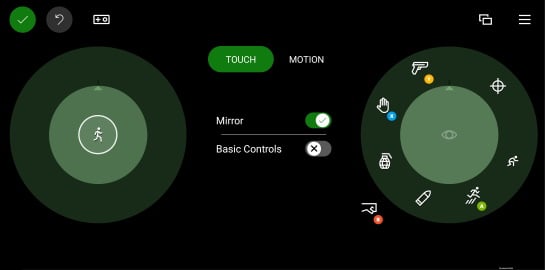
排列在內圈與外圈圓形區域中的一組觸控控制項。
## 屬性
[`inner`](/zh-TW/reference/system/touchadaptationkit/layout/game-streaming-touch-inner-wheel) - *object*、*選擇性*。最多四個排列在滾輪[內圈](/zh-TW/reference/system/touchadaptationkit/layout/game-streaming-touch-inner-wheel)部分的控制項。
`outer` - *array*、*選擇性*。最多 8 個位置的陣列,可填入控制項和/或[控制項叢集](/zh-TW/reference/system/touchadaptationkit/layout/game-streaming-touch-control-cluster-outer),這些控制項會放置在 `wheel` 所代表之圓形區域的內圈周圍。
* `outer` 區域中的第一個位置從滾輪頂端 (大約 1 點鐘方向) 開始,並以順時針方向繼續。
* 可以使用 `null` 略過位置。
* [控制項叢集](/zh-TW/reference/system/touchadaptationkit/layout/game-streaming-touch-control-cluster-outer)一律會佔用 8 個可用位置中的 2 個,也就是其指定的位置與下一個位置。
## 備註
玩家可以調整 `wheel` 控制項的大小與旋轉。依照個人喜好進行自訂時,玩家可以變更滾輪的大小與旋轉。
 **提示**
* [`inner`](/zh-TW/reference/system/touchadaptationkit/layout/game-streaming-touch-inner-wheel) 區域應用於放置該隻手最容易觸及的控制項。
* 左側的 `inner` 位置應用於主要的玩家移動控制項。
* 需要玩家移動手部才能觸及的 `outer` 位置,應用於不常存取的命令。
## 範例
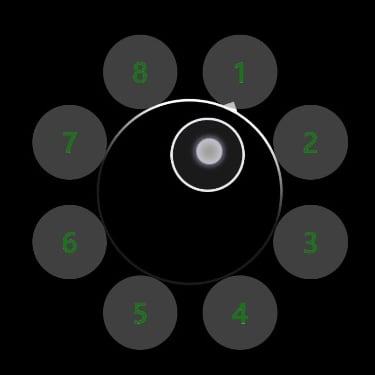
##### 範例 1:中央有搖桿且每個外圈位置都有自訂按鈕的範例滾輪
**提示**
* [`inner`](/zh-TW/reference/system/touchadaptationkit/layout/game-streaming-touch-inner-wheel) 區域應用於放置該隻手最容易觸及的控制項。
* 左側的 `inner` 位置應用於主要的玩家移動控制項。
* 需要玩家移動手部才能觸及的 `outer` 位置,應用於不常存取的命令。
## 範例
##### 範例 1:中央有搖桿且每個外圈位置都有自訂按鈕的範例滾輪
 ```JSON theme={null}
"left": {
"inner": [
{
"type": "joystick",
"axis": {
"input": "axisXY",
"output": "leftJoystick",
"deadzone": {
"threshold": 0.05,
"radial": true
}
}
}
],
"outer" : [
{
"type": "button",
"action": "gamepadX",
"styles": {
"default" : {
"faceImage" : {
"type": "asset",
"value": "one"
},
"background" : {
"type": "color",
"value": "#80808080"
}
}
}
},
{
"type": "button",
"action": "gamepadX",
"styles": {
"default" : {
"faceImage" : {
"type": "asset",
"value": "two"
},
"background" : {
"type": "color",
"value": "#80808080"
}
}
}
},
{
"type": "button",
"action": "gamepadX",
"styles": {
"default" : {
"faceImage" : {
"type": "asset",
"value": "three"
},
"background" : {
"type": "color",
"value": "#80808080"
}
}
}
},
{
"type": "button",
"action": "gamepadX",
"styles": {
"default" : {
"faceImage" : {
"type": "asset",
"value": "four"
},
"background" : {
"type": "color",
"value": "#80808080"
}
}
}
},
{
"type": "button",
"action": "gamepadX",
"styles": {
"default" : {
"faceImage" : {
"type": "asset",
"value": "five"
},
"background" : {
"type": "color",
"value": "#80808080"
}
}
}
},
{
"type": "button",
"action": "gamepadX",
"styles": {
"default" : {
"faceImage" : {
"type": "asset",
"value": "six"
},
"background" : {
"type": "color",
"value": "#80808080"
}
}
}
},
{
"type": "button",
"action": "gamepadX",
"styles": {
"default" : {
"faceImage" : {
"type": "asset",
"value": "seven"
},
"background" : {
"type": "color",
"value": "#80808080"
}
}
}
},
{
"type": "button",
"action": "gamepadX",
"styles": {
"default" : {
"faceImage" : {
"type": "asset",
"value": "eight"
},
"background" : {
"type": "color",
"value": "#80808080"
}
}
}
}
]
}
```
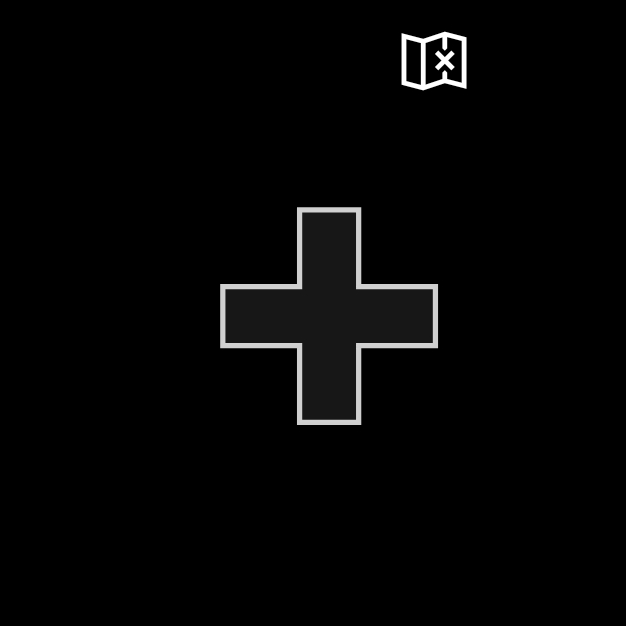
##### 範例 2:具有方向鍵與地圖按鈕的範例左滾輪
```JSON theme={null}
"left": {
"inner": [
{
"type": "joystick",
"axis": {
"input": "axisXY",
"output": "leftJoystick",
"deadzone": {
"threshold": 0.05,
"radial": true
}
}
}
],
"outer" : [
{
"type": "button",
"action": "gamepadX",
"styles": {
"default" : {
"faceImage" : {
"type": "asset",
"value": "one"
},
"background" : {
"type": "color",
"value": "#80808080"
}
}
}
},
{
"type": "button",
"action": "gamepadX",
"styles": {
"default" : {
"faceImage" : {
"type": "asset",
"value": "two"
},
"background" : {
"type": "color",
"value": "#80808080"
}
}
}
},
{
"type": "button",
"action": "gamepadX",
"styles": {
"default" : {
"faceImage" : {
"type": "asset",
"value": "three"
},
"background" : {
"type": "color",
"value": "#80808080"
}
}
}
},
{
"type": "button",
"action": "gamepadX",
"styles": {
"default" : {
"faceImage" : {
"type": "asset",
"value": "four"
},
"background" : {
"type": "color",
"value": "#80808080"
}
}
}
},
{
"type": "button",
"action": "gamepadX",
"styles": {
"default" : {
"faceImage" : {
"type": "asset",
"value": "five"
},
"background" : {
"type": "color",
"value": "#80808080"
}
}
}
},
{
"type": "button",
"action": "gamepadX",
"styles": {
"default" : {
"faceImage" : {
"type": "asset",
"value": "six"
},
"background" : {
"type": "color",
"value": "#80808080"
}
}
}
},
{
"type": "button",
"action": "gamepadX",
"styles": {
"default" : {
"faceImage" : {
"type": "asset",
"value": "seven"
},
"background" : {
"type": "color",
"value": "#80808080"
}
}
}
},
{
"type": "button",
"action": "gamepadX",
"styles": {
"default" : {
"faceImage" : {
"type": "asset",
"value": "eight"
},
"background" : {
"type": "color",
"value": "#80808080"
}
}
}
}
]
}
```
##### 範例 2:具有方向鍵與地圖按鈕的範例左滾輪
 ```JSON theme={null}
"left": {
"inner": [
{
"type": "directionalPad",
"scale": 1.5
}
],
"outer" : [
{
"type": "button",
"action": "leftBumper",
"styles": {
"default" : {
"faceImage" : {
"type": "icon",
"value": "map"
}
}
}
},
null,
null,
null,
null,
null,
null
]
}
```
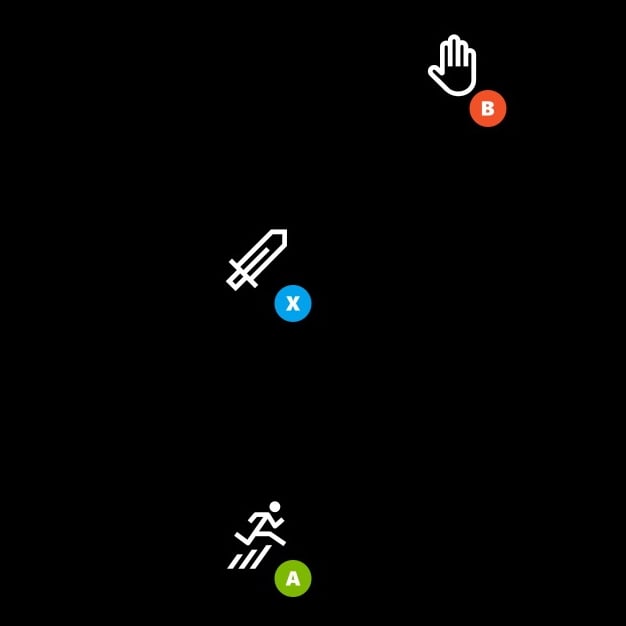
##### 範例 3:具有三個按鈕的範例右滾輪
按鈕排列在右手最容易觸及的位置。`outer` 區域中的按鈕排列成叢集,以提供更大的點擊區域。
```JSON theme={null}
"left": {
"inner": [
{
"type": "directionalPad",
"scale": 1.5
}
],
"outer" : [
{
"type": "button",
"action": "leftBumper",
"styles": {
"default" : {
"faceImage" : {
"type": "icon",
"value": "map"
}
}
}
},
null,
null,
null,
null,
null,
null
]
}
```
##### 範例 3:具有三個按鈕的範例右滾輪
按鈕排列在右手最容易觸及的位置。`outer` 區域中的按鈕排列成叢集,以提供更大的點擊區域。
 ```JSON theme={null}
"right": {
"inner": [
{
"type": "button",
"action": "gamepadX",
"styles": {
"default": {
"faceImage": {
"type": "icon",
"value": "sword"
}
}
}
}
],
"outer": [
[
{
"type": "button",
"action": "gamepadB",
"styles": {
"default": {
"faceImage": {
"type": "icon",
"value": "interact"
}
}
}
},
null
],
null,
[
{
"type": "button",
"action": "gamepadA",
"styles": {
"default": {
"faceImage": {
"type": "icon",
"value": "jump"
}
}
}
},
null
]
]
}
```
## 另請參閱
[Touch Adaptation Kit 參考](/zh-TW/build/core-features/common/game-streaming/game-streaming-touch-touch-adaptation-kit-overview)\
[配置](/zh-TW/reference/system/touchadaptationkit/layout/game-streaming-touch-layout)
```JSON theme={null}
"right": {
"inner": [
{
"type": "button",
"action": "gamepadX",
"styles": {
"default": {
"faceImage": {
"type": "icon",
"value": "sword"
}
}
}
}
],
"outer": [
[
{
"type": "button",
"action": "gamepadB",
"styles": {
"default": {
"faceImage": {
"type": "icon",
"value": "interact"
}
}
}
},
null
],
null,
[
{
"type": "button",
"action": "gamepadA",
"styles": {
"default": {
"faceImage": {
"type": "icon",
"value": "jump"
}
}
}
},
null
]
]
}
```
## 另請參閱
[Touch Adaptation Kit 參考](/zh-TW/build/core-features/common/game-streaming/game-streaming-touch-touch-adaptation-kit-overview)\
[配置](/zh-TW/reference/system/touchadaptationkit/layout/game-streaming-touch-layout)