> ## Documentation Index
> Fetch the complete documentation index at: https://devdocs.xbox.com/llms.txt
> Use this file to discover all available pages before exploring further.
# 內容
> 內容
# 內容
定義配置的實際內容。配置上的內容會依據其在顯示器上的位置組織成容器,例如 `lower`。每個容器內都有一組控制項 (例如按鈕),這些控制項可以直接指定,也可以依據具名屬性或子陣列放入子容器中。
## 屬性
`center` - *object*、*選擇性*。顯示在螢幕中央的控制項[滾輪](/zh-TW/reference/system/touchadaptationkit/layout/game-streaming-touch-wheel)。
`layers` - *object*、*選擇性*。一組[圖層](/zh-TW/reference/system/touchadaptationkit/layout/game-streaming-touch-layer)定義,可讓一組控制項依據[圖層動作](/zh-TW/reference/system/touchadaptationkit/layout/game-streaming-touch-layer-action)來顯示。
`left` - *object*、*選擇性*。預設顯示在玩家左手/拇指下方的控制項[滾輪](/zh-TW/reference/system/touchadaptationkit/layout/game-streaming-touch-wheel)。
`lower` - *object*、*選擇性*。可讓您將控制項放置在下方控制項列中 `leftCenter`、`center` 或 `rightCenter` 三個位置中任一位置的物件。
`right` - *object*、*選擇性*。預設顯示在玩家右手/拇指下方的控制項[滾輪](/zh-TW/reference/system/touchadaptationkit/layout/game-streaming-touch-wheel)。
`sensors` - *array*、*選擇性*。應在此配置上啟用的[感應器控制項](/zh-TW/build/core-features/common/game-streaming/game-streaming-touch-touch-adaptation-kit-overview#sensor-controls)清單。
`upper` - *object*、*選擇性*。可讓您將控制項陣列放置在上方控制項列中 `right` 位置的物件。
## 備註
配置上可用的控制項位置如下:
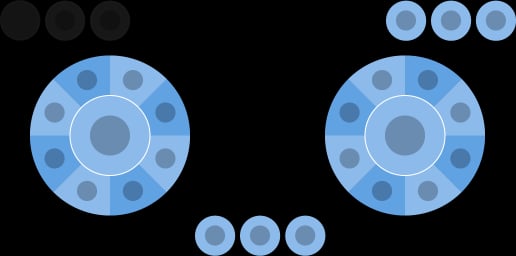 依照慣例,`left` 滾輪主要用於移動,而 `right` 滾輪則用於最常見的動作。
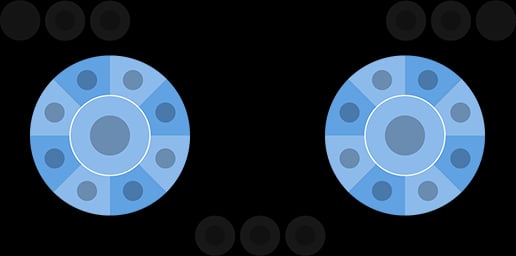 請考慮將不常使用的工作放在 `upperRight` 或 `lower` 位置。
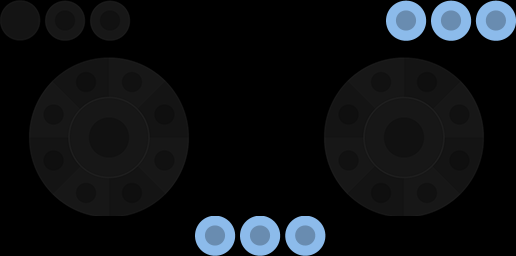 `center` 滾輪位置在橫向使用時的人體工學位置不佳。應僅在手機的 `orientation` 為直向時使用。
`orientation` 只會影響所顯示的觸控配置。只有在遊戲明確變更轉譯方式以符合配置方向時,才應使用預設 `landscape` 以外的值。
## 範例
如需各種遊戲類型的完整配置範例,請參閱[我們的 GitHub](https://github.com/microsoft/xbox-game-streaming-tools/tree/main/touch-adaptation-kit/samples)。
這些範例也示範了更進階的功能,例如使用自訂資產來打造量身訂做的外觀和風格。
## 需求
配置的版本是由配置 json 檔案中的 `$schema` 屬性所指定。這會指定配置中可用的特定控制項與功能集。
此處所述的屬性適用於配置版本 4.0 及更新版本。
## 另請參閱
[Touch Adaptation Kit 參考](/zh-TW/build/core-features/common/game-streaming/game-streaming-touch-touch-adaptation-kit-overview)\
[開始使用範例配置](/zh-TW/build/core-features/common/game-streaming/building-touch-layouts/samples/game-streaming-touch-getting-started-with-sample-layouts)
## Related topics
- [Visual Studio (內容)](/zh-TW/tools/tools-pc/visualstudio/gr-visualstudio-toc.md)
- [Game Saves (內容)](/zh-TW/build/core-features/common/game-save/game-saves-toc.md)
- [刪除內容](/zh-TW/services/playfab/api-references/rest/admin/content/delete-content.md)
- [Intelligent Delivery:OnDemand 內容](/zh-TW/build/core-features/common/packaging/intelligentdelivery-ondemand.md)
- [內容傳遞網路](/zh-TW/services/playfab/data-analytics/legacy/content-delivery-network/index.md)
`center` 滾輪位置在橫向使用時的人體工學位置不佳。應僅在手機的 `orientation` 為直向時使用。
`orientation` 只會影響所顯示的觸控配置。只有在遊戲明確變更轉譯方式以符合配置方向時,才應使用預設 `landscape` 以外的值。
## 範例
如需各種遊戲類型的完整配置範例,請參閱[我們的 GitHub](https://github.com/microsoft/xbox-game-streaming-tools/tree/main/touch-adaptation-kit/samples)。
這些範例也示範了更進階的功能,例如使用自訂資產來打造量身訂做的外觀和風格。
## 需求
配置的版本是由配置 json 檔案中的 `$schema` 屬性所指定。這會指定配置中可用的特定控制項與功能集。
此處所述的屬性適用於配置版本 4.0 及更新版本。
## 另請參閱
[Touch Adaptation Kit 參考](/zh-TW/build/core-features/common/game-streaming/game-streaming-touch-touch-adaptation-kit-overview)\
[開始使用範例配置](/zh-TW/build/core-features/common/game-streaming/building-touch-layouts/samples/game-streaming-touch-getting-started-with-sample-layouts)
## Related topics
- [Visual Studio (內容)](/zh-TW/tools/tools-pc/visualstudio/gr-visualstudio-toc.md)
- [Game Saves (內容)](/zh-TW/build/core-features/common/game-save/game-saves-toc.md)
- [刪除內容](/zh-TW/services/playfab/api-references/rest/admin/content/delete-content.md)
- [Intelligent Delivery:OnDemand 內容](/zh-TW/build/core-features/common/packaging/intelligentdelivery-ondemand.md)
- [內容傳遞網路](/zh-TW/services/playfab/data-analytics/legacy/content-delivery-network/index.md)