> ## Documentation Index
> Fetch the complete documentation index at: https://devdocs.xbox.com/llms.txt
> Use this file to discover all available pages before exploring further.
# 圖層 (實驗性)
> 圖層 (實驗性)
# 圖層 (實驗性)
可覆疊在基礎觸控配置上方的子觸控配置。
圖層目前以實驗形式提供使用,可能會根據早期採用者的意見反應而變更行為。
## 屬性
具名圖層物件包含下列屬性。
`center` - *object*、*選用*。顯示在螢幕中央的控制項[轉盤](/zh-TW/reference/system/touchadaptationkit/layout/game-streaming-touch-wheel)。
`left` - *object*、*選用*。根據預設顯示在玩家左手/拇指下方的控制項[轉盤](/zh-TW/reference/system/touchadaptationkit/layout/game-streaming-touch-wheel)。
`lower` - *object*、*選用*。可讓您將控制項放置在下方控制項列中 `leftCenter`、`center` 或 `rightCenter` 三個位置中任一位置的物件。
`right` - *object*、*選用*。根據預設顯示在玩家右手/拇指下方的控制項[轉盤](/zh-TW/reference/system/touchadaptationkit/layout/game-streaming-touch-wheel)。
`upper` - *object*、*選用*。可讓您將控制項陣列放置在上方控制項列中 `right` 位置的物件。
## 備註
使用 `layer` 時,在一般配置中會使用 `control` 的每個位置 (`center`、`left`、`lower`、`right`、`upper` 位置),您可以加入控制項來取代先前顯示的內容,或使用 [`blank`](/zh-TW/reference/system/touchadaptationkit/controls/game-streaming-touch-blank) 控制項來隱藏該位置先前顯示的內容。
若要顯示 `layer`,您必須有一個具有[圖層動作](/zh-TW/reference/system/touchadaptationkit/layout/game-streaming-touch-layer-action)的 [`button`](/zh-TW/reference/system/touchadaptationkit/controls/game-streaming-touch-button) 控制項,以使配置顯示。
## 範例
此範例從簡單的平台遊戲配置開始,右上角有一個按鈕,可切換顯示具有進階能力的圖層。
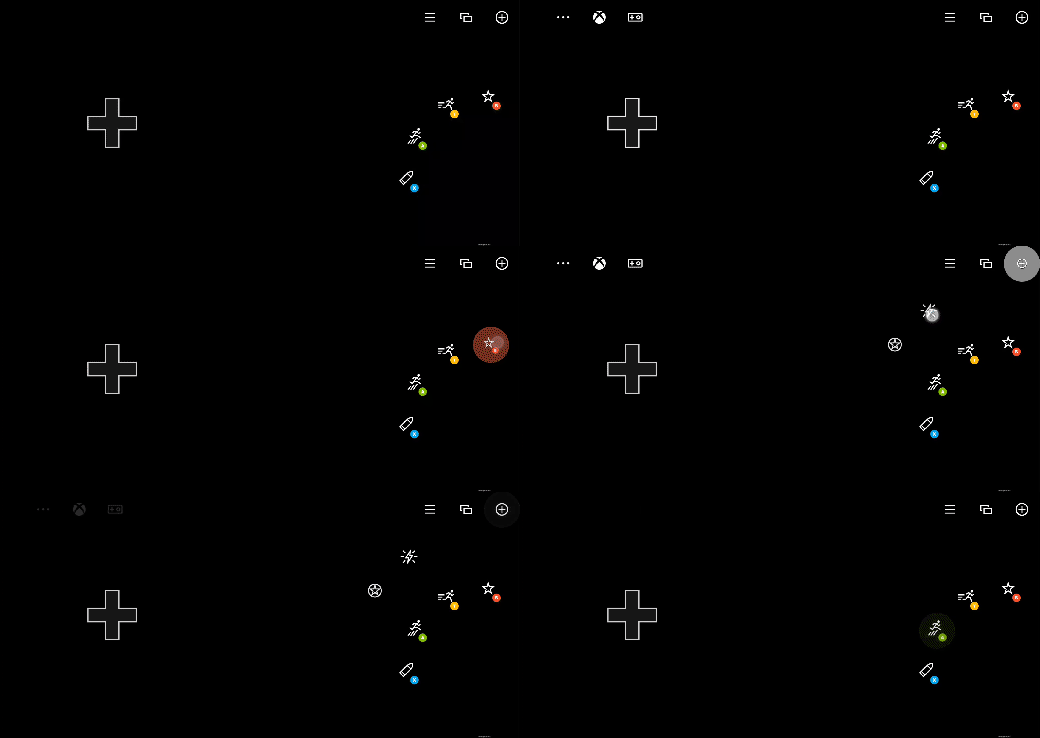 ```JSON theme={null}
{
"$schema": "https://raw.githubusercontent.com/microsoft/xbox-game-streaming-tools/main/touch-adaptation-kit/schemas/layout/v3.1/layout.json",
"content": {
"left": {
"inner": [
{
"type": "directionalPad",
"scale": 1.5
}
]
},
"right": {
"inner": [
{
"type": "button",
"action": "gamepadY",
"styles": {
"default": {
"faceImage": {
"type": "icon",
"value": "dash"
}
}
}
},
{
"type": "button",
"action": "gamepadA",
"styles": {
"default": {
"faceImage": {
"type": "icon",
"value": "jump"
}
}
}
}
],
"outer": [
null,
{
"type": "button",
"action": "gamepadB",
"styles": {
"default": {
"faceImage": {
"type": "icon",
"value": "specialAbility"
}
}
}
},
null,
null,
{
"type": "button",
"action": "gamepadX",
"styles": {
"default": {
"faceImage": {
"type": "icon",
"value": "fire"
}
}
}
}
]
},
"upper": {
"right": [
{
"type": "button",
"action": {
"type": "layer",
"target": "selectAbility"
},
"styles": {
"default": {
"faceImage": {
"type": "icon",
"value": "add"
}
}
},
"toggle" : true
},
{
"type": "button",
"action": "view"
},
{
"type": "button",
"action": "menu"
}
]
},
"layers": {
"selectAbility": {
"right": {
"outer": [
null,
null,
null,
null,
null,
null,
{
"type": "button",
"action": "rightBumper",
"styles": {
"default": {
"faceImage": {
"type": "icon",
"value": "ability2"
}
}
}
},
{
"type": "button",
"action": "leftBumper",
"styles": {
"default": {
"faceImage": {
"type": "icon",
"value": "ability"
}
}
}
}
]
}
}
}
}
}
```
## 另請參閱
[觸控調整套件參考](/zh-TW/build/core-features/common/game-streaming/game-streaming-touch-touch-adaptation-kit-overview)\
[空白控制項](/zh-TW/reference/system/touchadaptationkit/controls/game-streaming-touch-blank)\
[圖層動作](/zh-TW/reference/system/touchadaptationkit/layout/game-streaming-touch-layer-action)\
[配置](/zh-TW/reference/system/touchadaptationkit/layout/game-streaming-touch-layout)
## Related topics
- [安裝 GDK 工具鏈](/zh-TW/home/setup-install/download-install.md)
- [使用 PlayFab 加入後端服務](/zh-TW/home/build-first-title/add-backend-services.md)
- [XR-018:使用者產生的內容](/zh-TW/publishing/certification/xr/xr-018.md)
- [XBOX 認證失敗模式分析 (FMA)](/zh-TW/publishing/certification/fma/overview.md)
- [NDA 主題目錄 - Microsoft Learn 線上連結](/zh-TW/nda/nda-topic-directory.md)
```JSON theme={null}
{
"$schema": "https://raw.githubusercontent.com/microsoft/xbox-game-streaming-tools/main/touch-adaptation-kit/schemas/layout/v3.1/layout.json",
"content": {
"left": {
"inner": [
{
"type": "directionalPad",
"scale": 1.5
}
]
},
"right": {
"inner": [
{
"type": "button",
"action": "gamepadY",
"styles": {
"default": {
"faceImage": {
"type": "icon",
"value": "dash"
}
}
}
},
{
"type": "button",
"action": "gamepadA",
"styles": {
"default": {
"faceImage": {
"type": "icon",
"value": "jump"
}
}
}
}
],
"outer": [
null,
{
"type": "button",
"action": "gamepadB",
"styles": {
"default": {
"faceImage": {
"type": "icon",
"value": "specialAbility"
}
}
}
},
null,
null,
{
"type": "button",
"action": "gamepadX",
"styles": {
"default": {
"faceImage": {
"type": "icon",
"value": "fire"
}
}
}
}
]
},
"upper": {
"right": [
{
"type": "button",
"action": {
"type": "layer",
"target": "selectAbility"
},
"styles": {
"default": {
"faceImage": {
"type": "icon",
"value": "add"
}
}
},
"toggle" : true
},
{
"type": "button",
"action": "view"
},
{
"type": "button",
"action": "menu"
}
]
},
"layers": {
"selectAbility": {
"right": {
"outer": [
null,
null,
null,
null,
null,
null,
{
"type": "button",
"action": "rightBumper",
"styles": {
"default": {
"faceImage": {
"type": "icon",
"value": "ability2"
}
}
}
},
{
"type": "button",
"action": "leftBumper",
"styles": {
"default": {
"faceImage": {
"type": "icon",
"value": "ability"
}
}
}
}
]
}
}
}
}
}
```
## 另請參閱
[觸控調整套件參考](/zh-TW/build/core-features/common/game-streaming/game-streaming-touch-touch-adaptation-kit-overview)\
[空白控制項](/zh-TW/reference/system/touchadaptationkit/controls/game-streaming-touch-blank)\
[圖層動作](/zh-TW/reference/system/touchadaptationkit/layout/game-streaming-touch-layer-action)\
[配置](/zh-TW/reference/system/touchadaptationkit/layout/game-streaming-touch-layout)
## Related topics
- [安裝 GDK 工具鏈](/zh-TW/home/setup-install/download-install.md)
- [使用 PlayFab 加入後端服務](/zh-TW/home/build-first-title/add-backend-services.md)
- [XR-018:使用者產生的內容](/zh-TW/publishing/certification/xr/xr-018.md)
- [XBOX 認證失敗模式分析 (FMA)](/zh-TW/publishing/certification/fma/overview.md)
- [NDA 主題目錄 - Microsoft Learn 線上連結](/zh-TW/nda/nda-topic-directory.md)