> ## Documentation Index
> Fetch the complete documentation index at: https://devdocs.xbox.com/llms.txt
> Use this file to discover all available pages before exploring further.
# 內部轉盤
> 內部轉盤
# 內部轉盤
最多四個控制項的陣列,用來分割轉盤的內部部分。
## 備註
如果轉盤 `inner` 區段的主要任務是玩家移動,請勿在該區段中使用多個控制項。請將整個 `inner` 區段用於您偏好的移動控制項 (例如[搖桿](/zh-TW/reference/system/touchadaptationkit/controls/game-streaming-touch-joystick)或[方向鍵](/zh-TW/reference/system/touchadaptationkit/controls/game-streaming-touch-directionalpad)。)
使用 `control cluster` 將多個觸控控制項放在單一定義的區域中。
在 `inner` 區域中,特別是當 `wheel` 的 `expand` 設定為 true 時,控制項的點擊區域可能會大於其視覺顯示範圍。
**`inner wheel` 區域中的控制項叢集模式**
> 影像顯示 `right` 內部轉盤上叢集中控制項的點擊區域,而非實際的控制項呈現。控制項會呈現在點擊區域的中央位置。
#### 模式 1. 一個控制項
 ```JSON theme={null}
{
"inner" : {
"type": "button",
"action": "gamepadA"
}
}
```
#### 模式 2. 兩個控制項
```JSON theme={null}
{
"inner" : {
"type": "button",
"action": "gamepadA"
}
}
```
#### 模式 2. 兩個控制項
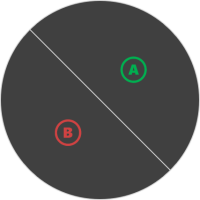 *注意:* 此方向適用於 `right` 轉盤中的控制項。對於 `left`,方向會重新調整。
```JSON theme={null}
"right" : {
"inner": [
{
"type": "button",
"action": "gamepadA"
},
{
"type": "button",
"action": "gamepadB"
}
]
}
}
```
#### 模式 3:三個控制項
*注意:* 此方向適用於 `right` 轉盤中的控制項。對於 `left`,方向會重新調整。
```JSON theme={null}
"right" : {
"inner": [
{
"type": "button",
"action": "gamepadA"
},
{
"type": "button",
"action": "gamepadB"
}
]
}
}
```
#### 模式 3:三個控制項
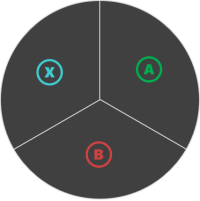 ```JSON theme={null}
{
"inner": [
{
"type": "button",
"action": "gamepadA"
},
{
"type": "button",
"action": "gamepadB"
},
{
"type": "button",
"action": "gamepadX"
}
]
}
```
#### 模式 4. 四個控制項
```JSON theme={null}
{
"inner": [
{
"type": "button",
"action": "gamepadA"
},
{
"type": "button",
"action": "gamepadB"
},
{
"type": "button",
"action": "gamepadX"
}
]
}
```
#### 模式 4. 四個控制項
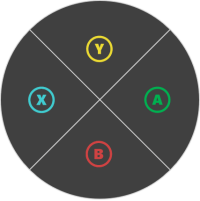 ```JSON theme={null}
{
"inner": [
{
"type": "button",
"action": "gamepadA"
},
{
"type": "button",
"action": "gamepadB"
},
{
"type": "button",
"action": "gamepadX"
},
{
"type": "button",
"action": "gamepadY"
}
]
}
```
## 另請參閱
[觸控調整套件參考](/zh-TW/build/core-features/common/game-streaming/game-streaming-touch-touch-adaptation-kit-overview)\
[轉盤](/zh-TW/reference/system/touchadaptationkit/layout/game-streaming-touch-wheel)
## Related topics
- [PlayFab Multiplayer C++ SDK 版本資訊](/zh-TW/services/playfab/multiplayer/lobby/lobby-matchmaking-sdks/lobby-and-matchmaking-release-notes.md)
- [PlayFab Party 版本資訊](/zh-TW/services/playfab/multiplayer/networking/release-notes.md)
- [認證逐步指南](/zh-TW/publishing/game-publishing/concepts/certification/certification-guide.md)
- [XBOX 主機遊戲的認證測試 XBOX 需求](/zh-TW/publishing/certification/console-cert-tested-requirements.md)
- [XR-003 提交的遊戲品質](/zh-TW/publishing/certification/xr/xr-003.md)
```JSON theme={null}
{
"inner": [
{
"type": "button",
"action": "gamepadA"
},
{
"type": "button",
"action": "gamepadB"
},
{
"type": "button",
"action": "gamepadX"
},
{
"type": "button",
"action": "gamepadY"
}
]
}
```
## 另請參閱
[觸控調整套件參考](/zh-TW/build/core-features/common/game-streaming/game-streaming-touch-touch-adaptation-kit-overview)\
[轉盤](/zh-TW/reference/system/touchadaptationkit/layout/game-streaming-touch-wheel)
## Related topics
- [PlayFab Multiplayer C++ SDK 版本資訊](/zh-TW/services/playfab/multiplayer/lobby/lobby-matchmaking-sdks/lobby-and-matchmaking-release-notes.md)
- [PlayFab Party 版本資訊](/zh-TW/services/playfab/multiplayer/networking/release-notes.md)
- [認證逐步指南](/zh-TW/publishing/game-publishing/concepts/certification/certification-guide.md)
- [XBOX 主機遊戲的認證測試 XBOX 需求](/zh-TW/publishing/certification/console-cert-tested-requirements.md)
- [XR-003 提交的遊戲品質](/zh-TW/publishing/certification/xr/xr-003.md)