> ## Documentation Index
> Fetch the complete documentation index at: https://devdocs.xbox.com/llms.txt
> Use this file to discover all available pages before exploring further.
# 色彩調色盤
> 色彩調色盤
# 色彩調色盤
可在配置中參考的可重複使用色彩集合。
## 屬性
`default` - *object*、*選用*。[十六進位色彩](/zh-TW/reference/system/touchadaptationkit/types/game-streaming-touch-hexcolor)定義的集合,可使用[色彩參考](/zh-TW/reference/system/touchadaptationkit/types/game-streaming-touch-colorreference)來參考。
`highContrast` - *object*、*選用*。[十六進位色彩](/zh-TW/reference/system/touchadaptationkit/types/game-streaming-touch-hexcolor)定義的集合,可使用[色彩參考](/zh-TW/reference/system/touchadaptationkit/types/game-streaming-touch-colorreference)來參考。啟用[高對比模式](/zh-TW/build/core-features/common/game-streaming/building-touch-layouts/game-streaming-tak-high-contrast-mode)時,會覆寫 `default` 中的定義。
## 範例
```JSON theme={null}
{
"$schema": "https://raw.githubusercontent.com/microsoft/xbox-game-streaming-tools/main/touch-adaptation-kit/schemas/layout/4.0/layout.json",
"styles": {
"colors": {
"default": {
"myColor1": "#ff0000ff",
"myColor2": "#00ff00ff",
"system_contentPrimary": "#0000ffff"
},
"highContrast": {
"myColor1": "#00ff00ff",
"system_contrastPrimary": "#0000ffaa"
}
}
},
"content": {
"left": {
"inner": [
{
"type": "directionalPad",
"styles": {
"idle": {
"background": {
"type": "color",
"value": "colors/myColor1"
}
}
}
}
]
},
"right": {
"inner": [
{
"type": "button",
"action": "gamepadY"
},
{
"type": "button",
"action": "gamepadB"
},
{
"type": "button",
"action": "gamepadA",
"styles": {
"idle": {
"background": {
"type": "color",
"value": "colors/myColor2"
}
}
}
},
{
"type": "button",
"action": "gamepadX"
}
]
}
}
}
```
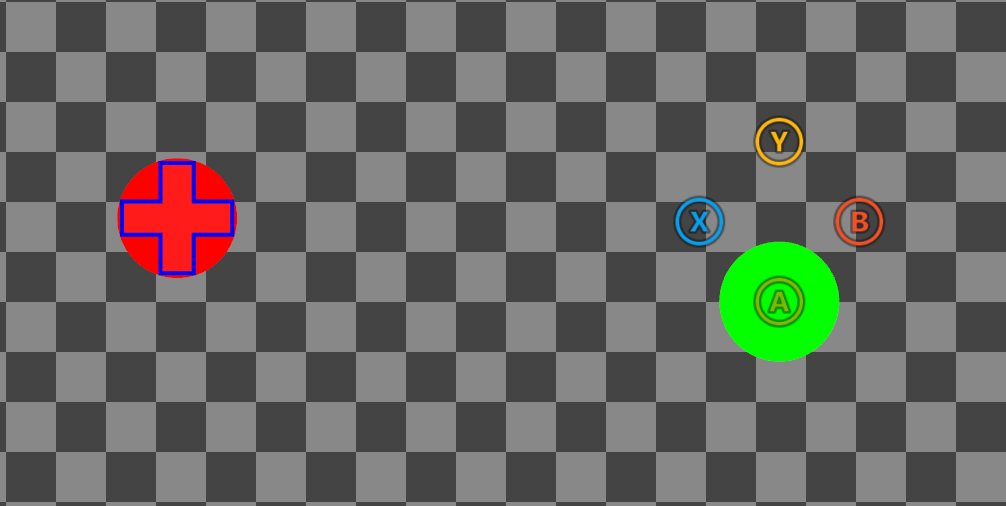
上述配置在高對比模式**停用**時:
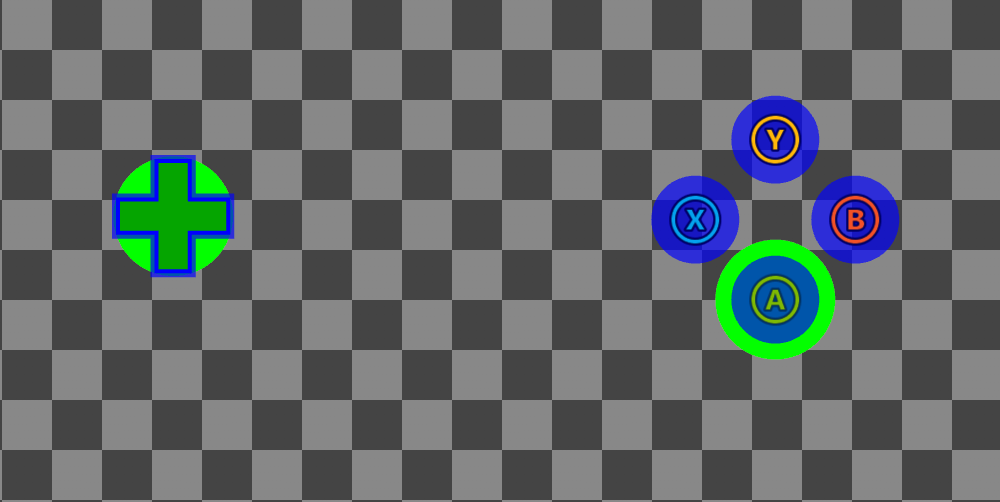
 以及在高對比模式**啟用**時:
 ## 備註
上述[範例](#sample)包含覆寫[系統色彩](#system-colors) (例如 `system_contentPrimary`、`system_accentPrimary` 等) 的色彩定義,以及自訂色彩定義 (`myColor1`、`myColor2`)。控制項在設定樣式時會**隱含地**取樣系統色彩,這表示任何覆寫都會影響所有控制項的全域樣式 (除非控制項在自訂 `styles` 區塊中有自己的覆寫)。自訂色彩必須使用[色彩參考](/zh-TW/reference/system/touchadaptationkit/types/game-streaming-touch-colorreference) (例如 `colors/myColor1`) **明確地**參考。此外,自訂色彩定義**不能**使用保留的 `system_` 前置詞,因為它保留給系統色彩使用。
色彩定義宣告在 `default` 和 `highContrast` 物件中,並分別在[高對比模式](/zh-TW/build/core-features/common/game-streaming/building-touch-layouts/game-streaming-tak-high-contrast-mode)停用或啟用時啟動。高對比模式停用時,色彩會從 `default` 取樣。啟用時,色彩會先從 `highContrast` 取樣,如果不存在定義,則回復為 `default`。如果 `default` 中沒有系統色彩覆寫,則會使用系統預設值,而自訂色彩則**必須**在 `default` 中定義。下表概述上述色彩定義會如何根據高對比 (HC) 模式是否啟用而解析:
| 色彩定義 | HC 模式停用 | HC 模式啟用 |
| :- | - | - |
| myColor1 | `#ff0000ff` | `#00ff00ff` |
| myColor2 | `#00ff00ff` | `#00ff00ff` |
| system\_contentPrimary | `#0000ffff` | `#0000ffff` |
| system\_contrastPrimary | 系統預設值 | `#0000ffaa` |
## 系統色彩
下表摘要列出觸控調整套件中的系統色彩清單、它們用於設定控制項樣式的方式說明,以及高對比 (HC) 模式停用/啟用時的系統預設值。
| 系統色彩 | 描述 | HC 模式停用 | HC 模式啟用 |
| :- | :- | :- | :- |
| system\_contentPrimary | 用於設定中間筆觸、圖示色調和方向鍵漸層等元件樣式的色彩。 | `#ffffffff` | `#ffffffff` |
| system\_contentSecondary | 用於設定背景和填滿等元件樣式的色彩。 | `#ffffff1a` | `#ffffffff` |
| system\_contrastPrimary | 用於設定內部/外部筆觸和正面影像背板等對比元件樣式的色彩。 | `#00000000` | `#000000bf` |
| system\_contrastSecondary | 用於設定觸控板筆觸等對比元件樣式的色彩。 | `#00000000` | `#ffffffff` |
| system\_actionColorDefault | 用於設定 `action` 欄位設為非遊戲控制器動作之控制項上元件樣式的色彩。 | `#ffffffff` | `#ffffffe6` |
| system\_actionColorA | 用於設定 `action` 欄位設為 `gamepadA` 之控制項上元件樣式的色彩。 | `#7eb902ff` | `#ffffffe6` |
| system\_actionColorB | 用於設定 `action` 欄位設為 `gamepadB` 之控制項上元件樣式的色彩。 | `#f25127ff` | `#ffffffe6` |
| system\_actionColorX | 用於設定 `action` 欄位設為 `gamepadX` 之控制項上元件樣式的色彩。 | `#00a2eeff` | `#ffffffe6` |
| system\_actionColorY | 用於設定 `action` 欄位設為 `gamepadY` 之控制項上元件樣式的色彩。 | `#ffb807ff` | `#ffffffe6` |
| system\_accentPrimary | 用於設定人體工學編輯內部轉盤等元件樣式的色彩。 | `#8cc08cff` | `#8cc08cff` |
| system\_accentSecondary | 用於設定人體工學編輯外部轉盤等元件樣式的色彩。 | `#61ab61ff` | `#61ab61ff` |
如需最新清單,請參閱[最新結構描述](https://github.com/microsoft/xbox-game-streaming-tools/blob/main/touch-adaptation-kit/schemas/layout/v4.0/layout.json)中前置詞為 `_SystemColor` 的定義。
## 另請參閱
[觸控調整套件參考](/zh-TW/build/core-features/common/game-streaming/game-streaming-touch-touch-adaptation-kit-overview)\
[觸控調整配置的高對比模式](/zh-TW/build/core-features/common/game-streaming/building-touch-layouts/game-streaming-tak-high-contrast-mode)
## Related topics
- [PAGE 107 · 活动中的无障碍游戏演示站](/zh-CN/build/game-principles/accessibility/page/page-107-game-demo-stations.md)
- [XBOX 设备上产品的商店列表](/zh-CN/publishing/game-publishing/concepts/store-listing.md)
- [XBOX Accessibility Guidelines (XAG)](/zh-TW/build/game-principles/accessibility/xbox-accessibility-guidelines.md)
- [XAG 103:视觉与音频提示的补充通道](/zh-CN/build/game-principles/accessibility/xag-deep-dives/xag-103-additional-cues.md)
- [認證逐步指南](/zh-TW/publishing/game-publishing/concepts/certification/certification-guide.md)
## 備註
上述[範例](#sample)包含覆寫[系統色彩](#system-colors) (例如 `system_contentPrimary`、`system_accentPrimary` 等) 的色彩定義,以及自訂色彩定義 (`myColor1`、`myColor2`)。控制項在設定樣式時會**隱含地**取樣系統色彩,這表示任何覆寫都會影響所有控制項的全域樣式 (除非控制項在自訂 `styles` 區塊中有自己的覆寫)。自訂色彩必須使用[色彩參考](/zh-TW/reference/system/touchadaptationkit/types/game-streaming-touch-colorreference) (例如 `colors/myColor1`) **明確地**參考。此外,自訂色彩定義**不能**使用保留的 `system_` 前置詞,因為它保留給系統色彩使用。
色彩定義宣告在 `default` 和 `highContrast` 物件中,並分別在[高對比模式](/zh-TW/build/core-features/common/game-streaming/building-touch-layouts/game-streaming-tak-high-contrast-mode)停用或啟用時啟動。高對比模式停用時,色彩會從 `default` 取樣。啟用時,色彩會先從 `highContrast` 取樣,如果不存在定義,則回復為 `default`。如果 `default` 中沒有系統色彩覆寫,則會使用系統預設值,而自訂色彩則**必須**在 `default` 中定義。下表概述上述色彩定義會如何根據高對比 (HC) 模式是否啟用而解析:
| 色彩定義 | HC 模式停用 | HC 模式啟用 |
| :- | - | - |
| myColor1 | `#ff0000ff` | `#00ff00ff` |
| myColor2 | `#00ff00ff` | `#00ff00ff` |
| system\_contentPrimary | `#0000ffff` | `#0000ffff` |
| system\_contrastPrimary | 系統預設值 | `#0000ffaa` |
## 系統色彩
下表摘要列出觸控調整套件中的系統色彩清單、它們用於設定控制項樣式的方式說明,以及高對比 (HC) 模式停用/啟用時的系統預設值。
| 系統色彩 | 描述 | HC 模式停用 | HC 模式啟用 |
| :- | :- | :- | :- |
| system\_contentPrimary | 用於設定中間筆觸、圖示色調和方向鍵漸層等元件樣式的色彩。 | `#ffffffff` | `#ffffffff` |
| system\_contentSecondary | 用於設定背景和填滿等元件樣式的色彩。 | `#ffffff1a` | `#ffffffff` |
| system\_contrastPrimary | 用於設定內部/外部筆觸和正面影像背板等對比元件樣式的色彩。 | `#00000000` | `#000000bf` |
| system\_contrastSecondary | 用於設定觸控板筆觸等對比元件樣式的色彩。 | `#00000000` | `#ffffffff` |
| system\_actionColorDefault | 用於設定 `action` 欄位設為非遊戲控制器動作之控制項上元件樣式的色彩。 | `#ffffffff` | `#ffffffe6` |
| system\_actionColorA | 用於設定 `action` 欄位設為 `gamepadA` 之控制項上元件樣式的色彩。 | `#7eb902ff` | `#ffffffe6` |
| system\_actionColorB | 用於設定 `action` 欄位設為 `gamepadB` 之控制項上元件樣式的色彩。 | `#f25127ff` | `#ffffffe6` |
| system\_actionColorX | 用於設定 `action` 欄位設為 `gamepadX` 之控制項上元件樣式的色彩。 | `#00a2eeff` | `#ffffffe6` |
| system\_actionColorY | 用於設定 `action` 欄位設為 `gamepadY` 之控制項上元件樣式的色彩。 | `#ffb807ff` | `#ffffffe6` |
| system\_accentPrimary | 用於設定人體工學編輯內部轉盤等元件樣式的色彩。 | `#8cc08cff` | `#8cc08cff` |
| system\_accentSecondary | 用於設定人體工學編輯外部轉盤等元件樣式的色彩。 | `#61ab61ff` | `#61ab61ff` |
如需最新清單,請參閱[最新結構描述](https://github.com/microsoft/xbox-game-streaming-tools/blob/main/touch-adaptation-kit/schemas/layout/v4.0/layout.json)中前置詞為 `_SystemColor` 的定義。
## 另請參閱
[觸控調整套件參考](/zh-TW/build/core-features/common/game-streaming/game-streaming-touch-touch-adaptation-kit-overview)\
[觸控調整配置的高對比模式](/zh-TW/build/core-features/common/game-streaming/building-touch-layouts/game-streaming-tak-high-contrast-mode)
## Related topics
- [PAGE 107 · 活动中的无障碍游戏演示站](/zh-CN/build/game-principles/accessibility/page/page-107-game-demo-stations.md)
- [XBOX 设备上产品的商店列表](/zh-CN/publishing/game-publishing/concepts/store-listing.md)
- [XBOX Accessibility Guidelines (XAG)](/zh-TW/build/game-principles/accessibility/xbox-accessibility-guidelines.md)
- [XAG 103:视觉与音频提示的补充通道](/zh-CN/build/game-principles/accessibility/xag-deep-dives/xag-103-additional-cues.md)
- [認證逐步指南](/zh-TW/publishing/game-publishing/concepts/certification/certification-guide.md)