> ## Documentation Index
> Fetch the complete documentation index at: https://devdocs.xbox.com/llms.txt
> Use this file to discover all available pages before exploring further.
# 方向鍵
> 方向鍵
# 方向鍵
一律對應至遊戲控制器方向鍵的方向鍵控制項。
## 屬性
`type` - *"directionalPad"*。指定控制項類型。
`scale` - *number*、*選用*。預設值為 1。大小乘數,由於方向鍵的放置方式與按鈕相同,不會像搖桿一樣自動縮放,因此此屬性很實用。
`deadzone` - *number*、*選用*。介於 0 到 1 之間的值,以控制項的百分比指定死區的大小。請注意,與搖桿的[死區](/zh-TW/reference/system/touchadaptationkit/types/game-streaming-touch-deadzone)不同,方向鍵的死區一律為軸向 (方形)。
`enabled` - *boolean*、*選用*。預設為 `true`。將控制項的視覺狀態設定為啟用/停用。停用的控制項仍會接收玩家的輸入,但「不會」根據輸入變更視覺樣式。
`visible` - *boolean*、*選用*。預設為 `true`。決定是否向玩家顯示控制項以供互動。若要在遊戲過程中變更,請參閱[使用遊戲狀態變更觸控配置](/zh-TW/build/core-features/common/game-streaming/building-touch-layouts/game-streaming-touch-changing-layouts-game-state#change_state)。
`styles` - *object*、*選用*。自訂控制項的視覺呈現。樣式以每個可設定樣式之狀態的物件來表示。
`interaction` - *object*、*選用*。可改變使用者與控制項之互動機制的屬性定義
**互動**
`activationType` - *string*、*選用*。定義方向鍵互動中任何指定方向所允許的啟動類型。預設為 `allowNeighboring`。設定為 `exclusive` 時,方向鍵一次只能啟動單一方向 (亦即 'Up'、'Right'、'Down' 或 'Left' 其中之一)。設定為 `allowNeighboring` 時,可藉由點選兩個方向之間的位置,同時啟動一個方向及其任一相鄰方向 (亦即,除了能啟動每個個別方向之外,使用者還可以藉由點選兩者之間的位置來啟動 'Up+Right'、'Right+Down'、'Down+Left' 或 'Left+Up')。
**狀態和樣式屬性**
方向鍵控制項可設定下列狀態的樣式:
* `default` - 基本樣式。
* `disabled` - 控制項停用時的樣式。如果未指定,則控制項停用時,會對預設樣式套用轉換,使其呈現停用外觀。
* `idle` - 玩家「未」與控制項互動時套用。
* `activated` - 玩家觸控按鈕時套用。
下列屬性可用來設定方向鍵控制項的樣式:
`opacity` - *number*、*選用*。要套用至控制項的不透明度。除了 `disabled` 以外,所有狀態的預設值皆為 1.0。
`fill` - *object*、*選用*。定義了色彩的物件,用於方向鍵啟動時所使用的漸層。
`gradient` - *object*、*選用*。定義了色彩的物件,用於方向鍵啟動時所使用的漸層。
`background` - *object*、*選用*。可以是[色彩](/zh-TW/reference/system/touchadaptationkit/types/game-streaming-touch-color)或[影像資產](/zh-TW/reference/system/touchadaptationkit/types/game-streaming-touch-asset)。
`stroke` - *object*、*選用*。用於方向鍵外框的色彩。必須是 [stroke](/zh-TW/reference/system/touchadaptationkit/types/game-streaming-touch-stroke) 物件。
**資產尺寸**
對於每個接受影像資產的樣式物件,指定的資產會以基本解析度,以及該基本解析度的 1.5x、2.0x、3.0x 和 4.0x 比例提供。指定影像的解析度必須小於或等於下列最大解析度:
| 物件 | @1.0x | @1.5x | @2.0x | @3.0x | @4.0x |
| :- | :- | :- | :- | :- | :- |
| background | 75x75 | 112x112 | 150x150 | 225x225 | 300x300 |
## 備註
方向鍵用來提供類似實體控制器上方向鍵的體驗。
如果將其用作玩家的主要移動機制 (通常位於 `left` `inner` 位置),建議使用 2 的縮放比例。
**樣式備註**
如果 `background` 使用自訂影像資產,所參考的最大解析度是針對 scale=1.0。如果使用不同的縮放比例,最大解析度將等於解析度與縮放比例的乘積。例如,scale=1.5 表示 @1.0x DPI 背景影像的最大解析度可為 90x90。
透過 Windows 版本的 Content Test Application 進行串流時,並非所有樣式都能正確顯示。
## 範例
#### 範例 1:預設方向鍵
**圖 1. 方向鍵**
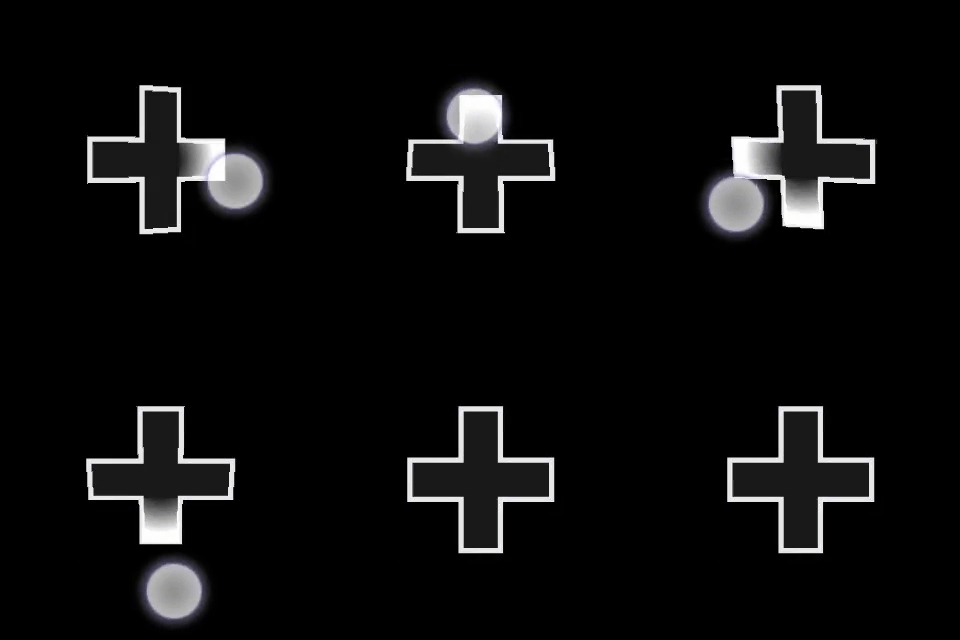 ```
{
"type": "directionalPad",
"scale": 1.0
}
```
#### 範例 2:具有自訂色彩的較大方向鍵。
**圖 1. 自訂方向鍵**
```
{
"type": "directionalPad",
"scale": 1.0
}
```
#### 範例 2:具有自訂色彩的較大方向鍵。
**圖 1. 自訂方向鍵**
 ```
{
"type": "directionalPad" ,
"scale": 2.0,
"styles" : {
"default" : {
"fill" : "#0e7a0d10",
"gradient" : {
"color": "#0e7a0d10"
},
"stroke" : {
"type": "solid",
"color" : "#0e7a0dff"
}
}
}
}
```
## 需求
**配置版本:** 1.0+,(樣式支援自 3.0+ 起,互動支援自 3.4+ 起)。
## Related topics
- [術語](/zh-TW/publishing/certification/console-cert-terminology.md)
- [XR022 官方命名標準](/zh-TW/publishing/certification/fma/xr-022.md)
- [构建触控的设计师指南](/zh-CN/build/core-features/common/game-streaming/building-touch-layouts/game-streaming-tak-designers-guide.md)
- [タッチ コントロール構築のデザイナーズ ガイド](/ja-jp/build/core-features/common/game-streaming/building-touch-layouts/game-streaming-tak-designers-guide.md)
- [PlayFab Party 文本转语音和文本输入 UX 指南](/zh-CN/services/playfab/community/voice-communications/party-text-to-speech-ux-guidelines.md)
```
{
"type": "directionalPad" ,
"scale": 2.0,
"styles" : {
"default" : {
"fill" : "#0e7a0d10",
"gradient" : {
"color": "#0e7a0d10"
},
"stroke" : {
"type": "solid",
"color" : "#0e7a0dff"
}
}
}
}
```
## 需求
**配置版本:** 1.0+,(樣式支援自 3.0+ 起,互動支援自 3.4+ 起)。
## Related topics
- [術語](/zh-TW/publishing/certification/console-cert-terminology.md)
- [XR022 官方命名標準](/zh-TW/publishing/certification/fma/xr-022.md)
- [构建触控的设计师指南](/zh-CN/build/core-features/common/game-streaming/building-touch-layouts/game-streaming-tak-designers-guide.md)
- [タッチ コントロール構築のデザイナーズ ガイド](/ja-jp/build/core-features/common/game-streaming/building-touch-layouts/game-streaming-tak-designers-guide.md)
- [PlayFab Party 文本转语音和文本输入 UX 指南](/zh-CN/services/playfab/community/voice-communications/party-text-to-speech-ux-guidelines.md)