> ## Documentation Index
> Fetch the complete documentation index at: https://devdocs.xbox.com/llms.txt
> Use this file to discover all available pages before exploring further.
# 按鈕
> 按鈕
# 按鈕
可回應玩家觸控輸入的基本控制項。可設定樣式,讓背景和正面影像都使用自訂美術圖。
## 屬性
`type` - *"button"*。指定控制項類型。
`action` - *string*。玩家觸控按鈕時要叫用的[動作](/zh-TW/reference/system/touchadaptationkit/types/game-streaming-touch-action)。
`enabled` - *boolean*、*選用*。預設為 `true`。將控制項的視覺狀態設定為啟用/停用。停用的控制項仍會接收玩家的輸入,但*不會*根據輸入變更視覺樣式。
`pullAction` - *string* 或 *object*、*選用*。玩家在觸控期間拉動按鈕時要叫用的[動作](/zh-TW/reference/system/touchadaptationkit/types/game-streaming-touch-action)。將拉動動作定義為物件時 (如下方範例所示),拉動按鈕會變成分段式,拉動動作 `items` 陣列中的每個項目會將一個動作指派給該分段。分段會平均分佈在按鈕周圍,最多允許 4 個分段。
* 分段拉動動作屬性 (於 v4.1 推出)
* `type` - *"segmented"*。指定拉動動作的類型為分段拉動動作。
* `items` - *array*。最多 4 個[動作](/zh-TW/reference/system/touchadaptationkit/types/game-streaming-touch-action)的陣列,當玩家將觸控拖曳或拉動至控制項中該分段方向的邊緣時,便會叫用對應的動作。
`toggle` - *boolean*、*選用*。預設為 `false`。
* 如果為 `false`,按下按鈕時會傳送輸入,未按下時則不會傳送。
* 如果為 `true`,每次按下按鈕都會切換是否為對應的動作傳送輸入。
`visible` - *boolean*、*選用*。預設為 `true`。決定是否向玩家顯示控制項以供互動。若要在遊戲過程中變更,請參閱[使用遊戲狀態變更觸控配置](/zh-TW/build/core-features/common/game-streaming/building-touch-layouts/game-streaming-touch-changing-layouts-game-state#change_state)。
`styles` - *object*、*選用*。自訂控制項的視覺呈現。樣式以每個可設定樣式之狀態的物件來表示。
按鈕控制項可設定下列狀態的樣式。
* `default` - 基本樣式。
* `disabled` - 控制項停用時的樣式。如果未指定,控制項停用時,會對預設樣式套用轉換,使其呈現停用外觀。
* `idle` - 玩家*未*與控制項互動時套用。
* `activated` - 玩家觸控按鈕時套用。
* `pulled` - 玩家觸控並拉動按鈕時套用。對於分段拉動動作,只有正被拉動的單一分段會套用此狀態的樣式;其他分段則保留 `activated` 樣式。
* `toggled` - 按鈕處於切換狀態且玩家未觸控按鈕時套用。
**每個狀態的樣式屬性**
`opacity` - *number*、*選用*。要套用至控制項的不透明度。除了 `disabled` 以外,所有狀態的預設值皆為 1.0。
`faceImage` - *object*、*選用*。可以是[圖示](/zh-TW/reference/system/touchadaptationkit/types/game-streaming-touch-icon)或[影像資產](/zh-TW/reference/system/touchadaptationkit/types/game-streaming-touch-asset)。
`background` - *object*、*選用*。可以是[色彩](/zh-TW/reference/system/touchadaptationkit/types/game-streaming-touch-color)或[影像資產](/zh-TW/reference/system/touchadaptationkit/types/game-streaming-touch-asset)。在閒置和停用狀態下不會顯示。
**資產尺寸**
對於每個接受影像資產的樣式物件,指定的資產會以基本解析度,以及該基本解析度的 1.5x、2.0x、3.0x 和 4.0x 比例提供。指定影像的解析度必須小於或等於下列最大解析度。
| 物件 | @1.0x | @1.5x | @2.0x | @3.0x | @4.0x |
| :- | :- | :- | :- | :- | :- |
| faceImage | 60x60 | 90x90 | 120x120 | 180x180 | 240x240 |
| background | 60x60 | 90x90 | 120x120 | 180x180 | 240x240 |
## 備註
按鈕通常用來讓玩家執行一般會由實體控制器上一或多個實體按鈕完成的動作。
利用多個動作,讓玩家能輕鬆重現組合動作 (例如,同時按下左肩鍵和右肩鍵)。
**樣式備註**
處於 `activated` 狀態時,`faceImage` 會縮小 25% 顯示。
對於未使用自訂資產且只有單一 `gamepadX`、`gamepadY`、`gamepadA` 或 `gamepadB` 動作的按鈕,會有標籤和背景色彩的預設樣式。
## 範例
#### 範例 1:對應至 A 按鈕的跳躍按鈕
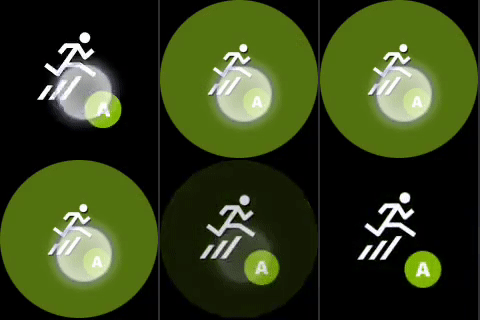 ```JSON theme={null}
{
"type": "button",
"action": "gamepadA",
"styles": {
"default": {
"faceImage": {
"type": "icon",
"value": "jump"
}
}
}
}
```
#### 範例 2:對應至同時按下左肩鍵和右肩鍵的蹲下按鈕
```JSON theme={null}
{
"type": "button",
"action": "gamepadA",
"styles": {
"default": {
"faceImage": {
"type": "icon",
"value": "jump"
}
}
}
}
```
#### 範例 2:對應至同時按下左肩鍵和右肩鍵的蹲下按鈕
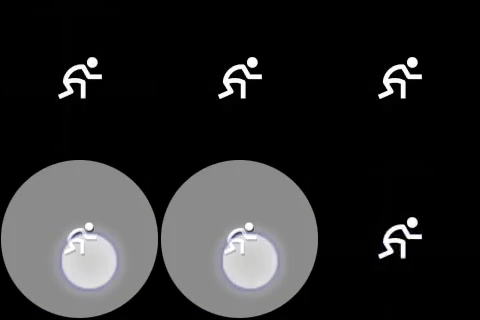 ```JSON theme={null}
{
"type": "button",
"action": [ "leftBumper", "rightBumper"] ,
"styles": {
"default": {
"faceImage": {
"type": "icon",
"value": "crouch"
}
}
}
}
```
#### 範例 3:具有自訂正面影像和背景影像的按鈕
```JSON theme={null}
{
"type": "button",
"action": [ "leftBumper", "rightBumper"] ,
"styles": {
"default": {
"faceImage": {
"type": "icon",
"value": "crouch"
}
}
}
}
```
#### 範例 3:具有自訂正面影像和背景影像的按鈕
 ```JSON theme={null}
{
"type": "button",
"action": "gamepadA",
"enabled" : true,
"styles": {
"default": {
"background": {
"type": "asset",
"value": "hex_background"
},
"faceImage": {
"type": "asset",
"value": "one"
}
},
"activated": {
"background": {
"type": "asset",
"value": "hex_background_glow"
}
}
}
}
```
#### 範例 4:每個分段具有自訂樣式的分段拉動動作
若要設定分段拉動按鈕的樣式,`pullIndicator` 陣列的長度必須與定義分段的 `items` 屬性相同。換句話說,每個分段都必須有樣式定義,或必須使用 `null` 來省略特定分段的樣式覆寫。
```JSON theme={null}
{
"type": "button",
"action": "gamepadA",
"enabled" : true,
"styles": {
"default": {
"background": {
"type": "asset",
"value": "hex_background"
},
"faceImage": {
"type": "asset",
"value": "one"
}
},
"activated": {
"background": {
"type": "asset",
"value": "hex_background_glow"
}
}
}
}
```
#### 範例 4:每個分段具有自訂樣式的分段拉動動作
若要設定分段拉動按鈕的樣式,`pullIndicator` 陣列的長度必須與定義分段的 `items` 屬性相同。換句話說,每個分段都必須有樣式定義,或必須使用 `null` 來省略特定分段的樣式覆寫。
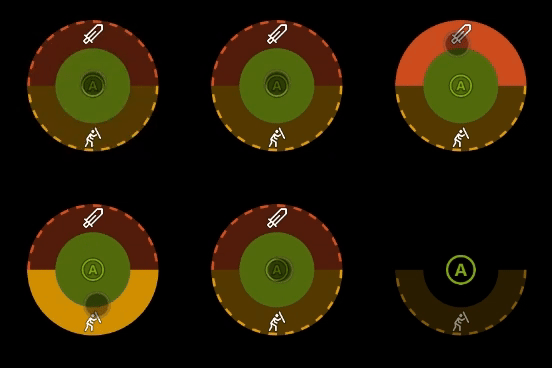 ```JSON theme={null}
{
"type": "button",
"action": "gamepadA",
"pullAction": {
"type": "segmented",
"items": [
"gamepadB",
"gamepadY"
]
},
"styles": {
"default": {
"pullIndicator": [
{
"faceImage": {
"type": "icon",
"value": "sword"
}
},
{
"faceImage": {
"type": "icon",
"value": "block"
}
}
]
},
"idle": {
"pullIndicator": [
null,
{
"opacity": 0.5
}
]
}
}
}
```
## 需求
**最低配置版本:** 1.0+ (樣式支援自 2.0+ 起)。
## 另請參閱
[觸控調整套件參考](/zh-TW/build/core-features/common/game-streaming/game-streaming-touch-touch-adaptation-kit-overview)
## Related topics
- [媒體驗證測試步驟](/zh-TW/publishing/game-publishing/concepts/certification/certification-media-validation-test-steps.md)
- [開發者無障礙資源](/zh-TW/build/game-principles/accessibility/accessibility-resources.md)
- [術語](/zh-TW/publishing/certification/console-cert-terminology.md)
- [帳戶方案升級](/zh-TW/services/playfab/pricing/account-upgrades.md)
- [最常失敗的測試案例](/zh-TW/publishing/certification/xr-top-failing.md)
```JSON theme={null}
{
"type": "button",
"action": "gamepadA",
"pullAction": {
"type": "segmented",
"items": [
"gamepadB",
"gamepadY"
]
},
"styles": {
"default": {
"pullIndicator": [
{
"faceImage": {
"type": "icon",
"value": "sword"
}
},
{
"faceImage": {
"type": "icon",
"value": "block"
}
}
]
},
"idle": {
"pullIndicator": [
null,
{
"opacity": 0.5
}
]
}
}
}
```
## 需求
**最低配置版本:** 1.0+ (樣式支援自 2.0+ 起)。
## 另請參閱
[觸控調整套件參考](/zh-TW/build/core-features/common/game-streaming/game-streaming-touch-touch-adaptation-kit-overview)
## Related topics
- [媒體驗證測試步驟](/zh-TW/publishing/game-publishing/concepts/certification/certification-media-validation-test-steps.md)
- [開發者無障礙資源](/zh-TW/build/game-principles/accessibility/accessibility-resources.md)
- [術語](/zh-TW/publishing/certification/console-cert-terminology.md)
- [帳戶方案升級](/zh-TW/services/playfab/pricing/account-upgrades.md)
- [最常失敗的測試案例](/zh-TW/publishing/certification/xr-top-failing.md)