> ## Documentation Index
> Fetch the complete documentation index at: https://devdocs.xbox.com/llms.txt
> Use this file to discover all available pages before exploring further.
# XFrontPanelGetButtonStates
> XFrontPanelGetButtonStates
# XFrontPanelGetButtonStates
取得前面板按鈕的狀態。
## 語法
```cpp theme={null}
HRESULT XFrontPanelGetButtonStates(
XFrontPanelButton* buttons
)
```
### 參數
*buttons* \_Out\_\
類型:[XFrontPanelButton](/zh-TW/reference/devkit/xfrontpaneldisplay/enums/xfrontpanelbutton)\*
值的指標,指出前面板按鈕目前的狀態。
### 傳回值
類型:HRESULT
如果成功,會傳回 `S_OK`;否則會傳回錯誤碼。
## 備註
XBOX One X 開發套件的前面板包含五個可程式化按鈕,以及一個運作方式類似 5 向方向鍵的方向按鈕。
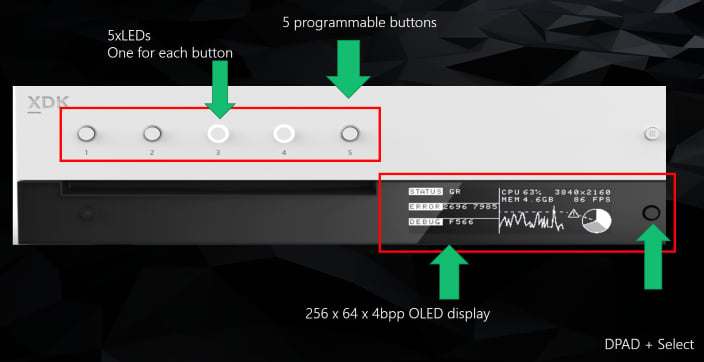 *buttons* 參數指向 [XFrontPanelButton](/zh-TW/reference/devkit/xfrontpaneldisplay/enums/xfrontpanelbutton) 物件,指出每個按鈕的狀態。
如需詳細資訊,請參閱 [XBOX One X:使用前面板顯示器 (NDA 主題)](https://learn.microsoft.com/gaming/gdk/docs/gdk-dev/console-dev/dev-kits/concepts/scorpio-frontpanel)。
## 需求
**標頭:** xfrontpaneldisplay.h
**程式庫:** xfrontpaneldisplay.lib
**支援的平台:** XBOX One 系列主機和 XBOX Series 主機
## 另請參閱
[XFrontPanelDisplay](/zh-TW/reference/devkit/xfrontpaneldisplay/xfrontpaneldisplay_members)
## Related topics
- [XFrontPanelGetButtonStates](/reference/devkit/xfrontpaneldisplay/functions/xfrontpanelgetbuttonstates.md)
- [XFrontPanelButton](/reference/devkit/xfrontpaneldisplay/enums/xfrontpanelbutton.md)
- [XFrontPanelDisplay](/reference/devkit/xfrontpaneldisplay/xfrontpaneldisplay_members.md)
*buttons* 參數指向 [XFrontPanelButton](/zh-TW/reference/devkit/xfrontpaneldisplay/enums/xfrontpanelbutton) 物件,指出每個按鈕的狀態。
如需詳細資訊,請參閱 [XBOX One X:使用前面板顯示器 (NDA 主題)](https://learn.microsoft.com/gaming/gdk/docs/gdk-dev/console-dev/dev-kits/concepts/scorpio-frontpanel)。
## 需求
**標頭:** xfrontpaneldisplay.h
**程式庫:** xfrontpaneldisplay.lib
**支援的平台:** XBOX One 系列主機和 XBOX Series 主機
## 另請參閱
[XFrontPanelDisplay](/zh-TW/reference/devkit/xfrontpaneldisplay/xfrontpaneldisplay_members)
## Related topics
- [XFrontPanelGetButtonStates](/reference/devkit/xfrontpaneldisplay/functions/xfrontpanelgetbuttonstates.md)
- [XFrontPanelButton](/reference/devkit/xfrontpaneldisplay/enums/xfrontpanelbutton.md)
- [XFrontPanelDisplay](/reference/devkit/xfrontpaneldisplay/xfrontpaneldisplay_members.md)