> ## Documentation Index
> Fetch the complete documentation index at: https://devdocs.xbox.com/llms.txt
> Use this file to discover all available pages before exploring further.
# 要求 User Store ID 以進行服務對服務驗證
> 說明取得 User Store ID 以向 Microsoft Store 服務 API 進行服務對服務驗證所需的設定和步驟。
本文說明取得 User Store ID 以進行 Microsoft Store 服務對服務驗證的設定和步驟。
User Store ID 會代表特定使用者,驗證對 Microsoft Store API 的服務呼叫。在 XBOX 主機上,此身分識別會繫結至 `XUser` 物件的帳戶。在 PC 上,此身分識別會繫結至登入 Microsoft Store 應用程式並用於購買的帳戶。
在 PC 上,Microsoft Store 應用程式的帳戶身分識別可能與登入 XBOX Live 並遊玩遊戲的帳戶不同。
如需遊玩帳戶和購買帳戶可能不同的詳細資訊,請參閱[處理 PC 上市集帳戶不相符的情況](/zh-TW/publishing/xstore-commerce/xstore-mismatched-accounts)。
User Store ID 金鑰有兩種類型。
1. [User Collections ID](#to-create-a-user-collections-id-key-for-the-microsoft-store-collections-service),用於向 Microsoft Store Collections 服務進行驗證
2. [User Purchase ID](#to-create-a-user-purchase-id-key-for-the-microsoft-store-purchase-service),用於向 Microsoft Store Purchase 服務進行驗證
下列各節概述取得 User Store ID 以呼叫各個服務的程序:
1. [設定 Microsoft Entra ID 應用程式](#step-1-configure-a-microsoft-entra-id-application)。
2. [在 Partner Center 中將您的 Microsoft Entra 應用程式識別碼與用戶端應用程式建立關聯](#step-2-associate-your-microsoft-entra-application-id-with-your-client-app-in-partner-center)。
3. 在您的服務中,[建立代表您發行者身分識別的 Microsoft Entra ID 存取權杖](#step-3-creating-microsoft-entra-id-access-tokens)。
4. 在您的遊戲中,[建立代表使用者身分識別的 User Store ID 金鑰](#step-4-create-a-user-store-id-key),並將此金鑰傳回您的服務。
5. [驗證對 Microsoft Store API 的要求](#step-5-authenticate-calls-to-the-microsoft-store-apis)。
6. 在 User Store ID 金鑰到期時[更新金鑰](/zh-TW/publishing/xstore-commerce/xstore-renew-userstoreid)。
此程序涉及兩個軟體元件:
* **您的服務:** 安全的後端,負責建立 Microsoft Entra 存取權杖並呼叫 Store API。
* **您的遊戲:** 用戶端,負責為已登入的使用者建立 User Store ID 金鑰並將其傳遞給您的服務。
## Microsoft.StoreServices .NET 程式庫和範例
若要簡化整合,請使用 GitHub 上的 Microsoft.StoreServices。此程式庫會處理驗證和金鑰流程,並提供 Store 服務呼叫的包裝函式。範例包含消耗性產品、退款對帳及金鑰更新的端對端模式。
* [Microsoft.StoreServices 程式庫](https://github.com/microsoft/Microsoft-Store-Services)
* [Microsoft.StoreServices 範例](https://github.com/microsoft/Microsoft-Store-Services-Sample)
## 步驟 1:設定 Microsoft Entra ID 應用程式
在使用 Microsoft Store API 之前,請建立 Microsoft Entra Web 應用程式,以便在呼叫 API 時識別您的服務。從已註冊的 Web 應用程式取得租用戶識別碼、應用程式識別碼和祕密金鑰,以便在後續步驟中產生所需的存取權杖。
您可以在發行者底下的多個遊戲和產品之間重複使用 Web 應用程式的租用戶識別碼、應用程式識別碼和祕密金鑰。您不需要為每個遊戲建立新的應用程式。
1. 如果您尚未這麼做,請依照[快速入門:向 Microsoft 身分識別平台註冊應用程式](https://learn.microsoft.com/en-us/azure/active-directory/develop/active-directory-integrating-applications)中的指示,向 Microsoft Entra ID 註冊 **Web 應用程式 / API** 應用程式。
> \[!NOTE] 註冊應用程式時,請選擇 **Web 應用程式 / API** 作為應用程式類型。此類型可讓您擷取應用程式的金鑰 (也稱為\_用戶端密碼\_)。若要呼叫 Microsoft Store API,您必須在後續步驟中向 Microsoft Entra ID 要求存取權杖時提供用戶端密碼。
2. 在 [Azure 管理入口網站](https://portal.azure.com/)中,前往 **Microsoft Entra ID**。選取您的目錄,在左窗格中選取 **App registrations**,然後選取您的應用程式。
3. 複製 **Application (client) ID** 和 **Directory (tenant) ID** 值以供稍後使用。
4. 在左窗格的 **Certificates & Secrets** 下建立並複製新的用戶端密碼。
## 步驟 2:在 Partner Center 中將您的 Microsoft Entra 應用程式識別碼與用戶端應用程式建立關聯
1. 登入 [Partner Center](https://partner.microsoft.com/dashboard),然後選取您的遊戲。
2. 選取 **Services** > **Product collections and purchases**。在其中一個可用的 **Client ID** 欄位中輸入您的 Microsoft Entra 應用程式識別碼。
3. 選取 **Save**。
4. 將遊戲及其附加元件重新發佈至市集。
附加元件產品會繼承儲存在其父遊戲 **Product collections and purchases** 頁面中的用戶端識別碼。遊戲組合產品有自己的 **Product collections and purchases** 頁面,您需要在該頁面中新增用戶端識別碼。
## 步驟 3:建立 Microsoft Entra ID 存取權杖
所有 API 要求都需要在 Authorization 標頭中提供持有人權杖,稱為服務存取權杖。所需的其他存取權杖取決於您所呼叫的服務或 API。
請只在您的服務內容中建立 Microsoft Entra ID 存取權杖,而不要在您的應用程式中建立。如果您將用戶端密碼傳送至應用程式,可能會導致密碼外洩。
### 了解不同的存取權杖和對象 URI
每個存取權杖都與建立它時所使用的不同對象 URI 相關聯。
| 存取權杖類型 | 對象 URI | 用途 |
| - | - | - |
| 服務存取權杖 | `https://onestore.microsoft.com/.default` | 對 Store 服務端點的 Authorization 標頭中的持有人權杖 |
| Collections 存取權杖 | `https://onestore.microsoft.com/b2b/keys/create/collections/.default` | 建立 User Collections ID (`UserCollectionsId`) 以呼叫 b2bLicensePreview 或 publisherQuery |
| Purchase 存取權杖 | `https://onestore.microsoft.com/b2b/keys/create/purchase/.default` | 建立 User Purchase ID (`UserPurchaseId`) 以呼叫 Recurrence 或其他 Purchase 服務 |
切勿將使用 `https://onestore.microsoft.com/.default` 對象的服務存取權杖傳送至用戶端。請將其安全地儲存在您的服務中。
### 建立存取權杖
若要建立存取權杖,請在您的服務中使用 OAuth 2.0 API。依照 [Microsoft 身分識別平台和 OAuth 2.0 用戶端認證流程](https://learn.microsoft.com/en-us/azure/active-directory/develop/v2-oauth2-client-creds-grant-flow)中的指示,將 HTTP POST 傳送至 `https://login.microsoftonline.com//oauth2/v2.0/token` 端點。下列範例顯示範例要求。
```syntax theme={null}
POST https://login.microsoftonline.com//oauth2/v2.0/token HTTP/1.1
Host: login.microsoftonline.com
Content-Type: application/x-www-form-urlencoded; charset=utf-8
grant_type=client_credentials
&client_id=
&client_secret=
&resource=https://onestore.microsoft.com/.default
```
針對每個權杖要求:
* 將 `client_id` 和 `client_secret` 設定為 [Azure 管理入口網站](https://portal.azure.com/)中的應用程式註冊值。
* 將 `resource` 設定為您所需權杖類型的對象 URI。請參閱[了解不同的存取權杖和對象 URI](#understanding-the-different-access-tokens-and-audience-uris)。
您可以在現有存取權杖到期之前或之後建立新的存取權杖。
如需存取權杖結構的詳細資訊,請參閱[安全性權杖](https://learn.microsoft.com/en-us/azure/active-directory/develop/security-tokens)。
## 步驟 4:建立 User Store ID 金鑰
為了在要求中識別使用者,您的服務會取得 User Store ID 金鑰。**User Store ID** 是 User Collections ID 或 User Purchase ID 的通稱。這兩種金鑰之間唯一的差異在於它們可以向哪個對應的服務進行驗證。
您可以使用 GDK API 在用戶端上產生 User Store ID 金鑰,也可以在您的服務上產生。本節著重於透過 GDK API 在用戶端上建立 User Store ID 金鑰。如需如何在您的服務上產生 User Store ID 金鑰的詳細資訊,請參閱[使用 X-token 或 OAuth 2.0 從您的服務要求 User Store ID](/zh-TW/publishing/xstore-commerce/xstore-requesting-userstoreid-oauth)。
User Store ID 金鑰是代表登入 Microsoft Store 應用程式之使用者的 JSON Web 權杖 (JWT)。如需此金鑰中宣告的詳細資訊,請參閱 [User Store ID 金鑰中的宣告](#claims-in-a-user-store-id-key)。
每個 User Store ID 金鑰的有效期為 30 天。您的服務可以在金鑰到期之前更新金鑰。如果您的服務需要持續存取以查詢使用者的權利,請更新您的 Microsoft Store ID 金鑰,而不是建立新的金鑰。如需詳細資訊,請參閱[更新 User Store ID 金鑰](/zh-TW/publishing/xstore-commerce/xstore-renew-userstoreid)。
### 為 Microsoft Store Collections 服務建立 User Collections ID 金鑰
User Collections ID 金鑰可讓您使用 Collections API 查詢使用者擁有的產品並管理消耗性產品。如需消耗性產品管理的詳細資訊,請參閱[從您的服務管理消耗性產品](/zh-TW/publishing/xstore-commerce/xstore-managing-consumables)。
1. 將您在[步驟 3](#step-3-creating-microsoft-entra-id-access-tokens) 中建立的 Collections 存取權杖傳遞給遊戲。
2. 在遊戲中,呼叫 [XStoreGetUserCollectionsIdAsync](/zh-TW/reference/system/xstore/xstore_members) 以擷取 User Collections ID 金鑰。將 Collections 存取權杖作為 `serviceTicket` 參數傳遞。您也可以選擇在 `publisherUserId` 中傳遞您的內部使用者識別碼。
3. 在您的應用程式成功建立 User Collections ID 金鑰之後,將金鑰傳回您的服務。
### 為 Microsoft Store Purchase 服務建立 User Purchase ID 金鑰
User Purchase ID 金鑰可讓您使用 Purchase API 查詢使用者擁有的產品並管理消耗性產品。如需消耗性產品管理的詳細資訊,請參閱[從您的服務管理消耗性產品](/zh-TW/publishing/xstore-commerce/xstore-managing-consumables)。
1. 將您在[步驟 3](#step-3-creating-microsoft-entra-id-access-tokens) 中建立的 Purchase 存取權杖傳遞給遊戲。
2. 在遊戲中,呼叫 [XStoreGetUserPurchaseIdAsync](/zh-TW/reference/system/xstore/xstore_members) 以擷取 User Purchase ID 金鑰。將 Purchase 存取權杖作為 `serviceTicket` 參數傳遞。您也可以選擇在 `publisherUserId` 中傳遞您的內部使用者識別碼。
3. 在您的應用程式成功建立 User Purchase ID 金鑰之後,將金鑰傳回您的服務。
## 步驟 5:驗證對 Microsoft Store API 的呼叫
如需指示,請參閱[使用 Microsoft Entra ID 和 User Store ID 進行驗證](/zh-TW/publishing/xstore-commerce/xstore-authenticating-service#authenticating-with-microsoft-entra-id-and-user-store-ids)。
## 步驟 6:在 User Store ID 金鑰到期時更新金鑰
如需指示,請參閱[更新 User Store ID 金鑰](/zh-TW/publishing/xstore-commerce/xstore-renew-userstoreid)。
## 其他資訊
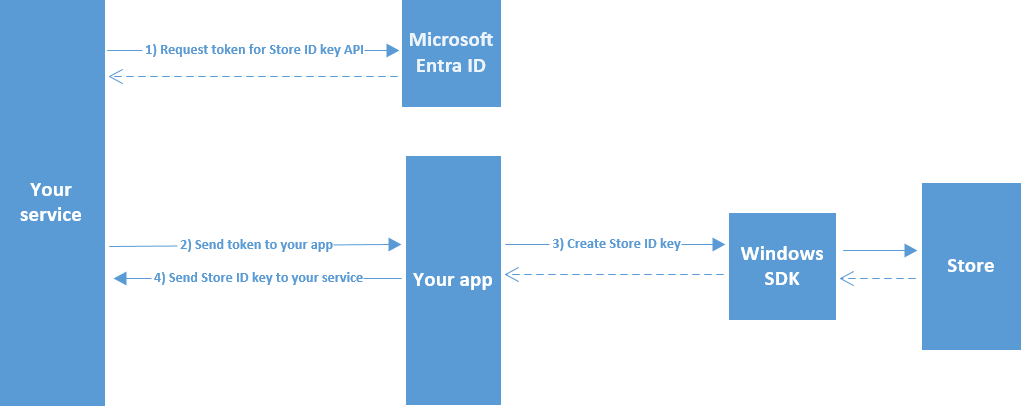
### 建立 User Store ID 金鑰的圖表
下圖說明建立 User Store ID 金鑰的程序。
 ### User Store ID 金鑰中的宣告
User Store ID 金鑰是 JWT,代表您要存取其產品擁有權資訊之使用者的身分識別。使用 Base64 解碼時,User Store ID 金鑰包含下表所示的宣告。
| 參數 | 類型 | 描述 |
| - | - | - |
| `iat` | `int` | 金鑰的發行時間,以 epoch 時間表示。使用此值來判斷權杖的存在時間。 |
| `iss` | `string` | 識別發行者。與 `aud` 宣告的值相同。 |
| `aud` | `string` | 識別對象。必須是下列其中一個值:`https://collections.mp.microsoft.com/v6.0/keys` 或 `https://purchase.mp.microsoft.com/v6.0/keys`。 |
| `exp` | `int` | 識別到期時間,在此時間當下或之後,金鑰將不再有效而無法處理 (更新金鑰除外)。此宣告的值以 epoch 時間表示。 |
| `nbf` | `int` | 識別權杖開始有效可供處理的時間。此宣告的值以 epoch 時間表示。 |
| `http://schemas.microsoft.com/marketplace/2015/08/claims/key/clientId` | `string` | 識別開發人員的用戶端識別碼。 |
| `http://schemas.microsoft.com/marketplace/2015/08/claims/key/payload` | `string` | 不透明的承載 (已加密且經過 Base64 編碼),其中包含僅供 Microsoft Store 服務使用的資訊。 |
| `http://schemas.microsoft.com/marketplace/2015/08/claims/key/userId` | `string` | 在您服務的內容中識別目前使用者的使用者識別碼。與您傳遞至[用來建立 User Store ID 金鑰之方法](#step-4-create-a-user-store-id-key)的選擇性 `publisherUserId` 參數的值相同。 |
| `http://schemas.microsoft.com/marketplace/2015/08/claims/key/refreshUri` | `string` | 可用來更新金鑰的 URI。 |
下列範例顯示已解碼的 User Store ID 標頭。
```json theme={null}
{
"typ":"JWT",
"alg":"RS256",
"kid": "36D101AF67A9F61B8017FB96F91EDD4B22F05804",
"x5t":"agA_pgJ7Twx_Ex2_rEeQ2o5fZ5g"
}
```
在用戶端和遊戲服務中,請將 JWT 簽章和 `kid` 宣告視為不透明值。Store API 會驗證簽章。
已解碼的 User Store ID 宣告集範例。
```json theme={null}
{
"http://schemas.microsoft.com/marketplace/2015/08/claims/key/clientId": "1d577369placeholder7393beef1e13d",
"http://schemas.microsoft.com/marketplace/2015/08/claims/key/payload": "placeholderytCRzCHSqnfczv3f0343wfSydx7hghfu0snWzMqyoAGy5DSJ5rMSsKoQFAccs1iNlwlGrX+/eIwh/VlUhLrncyP8c18mNAzAGK+lTAd2oiMQWRRAZxPwGrJrwiq2fTq5NOVDnQS9Za6/GdRjeiQrv6c0x+WNKxSQ7LV/uH1x+IEhYVtDu53GiXIwekltwaV6EkQGphYy7tbNsW2GqxgcoLLMUVOsQjI+FYBA3MdQpalV/aFN4UrJDkMWJBnmz3vrxBNGEApLWTS4Bd3cMswXsV9m+VhOEfnv+6PrL2jq8OZFoF3FUUpY8Fet2DfFr6xjZs3CBS1095J2yyNFWKBZxAXXNjn+zkvqqiVRjjkjNajhuaNKJk4MGHfk2rZiMy/aosyaEpCyncdisHVSx/S4JwIuxTnfnlY24vS0OXy7mFiZjjB8qL03cLsBXM4utCyXSIggb90GAx0+EFlVoJD7+ZKlm1M90xO/QSMDlrzFyuqcXXDBOnt7rPynPTrOZLVF+ODI5HhWEqArkVnc5MYnrZD06YEwClmTDkHQcxCvU+XUEvTbEk69qR2sfnuXV4cJRRWseUTfYoGyuxkQ2eWAAI1BXGxYECIaAnWF0W6ThweL5ZZDdadW9Ug5U3fZd4WxiDlB/EZ3aTy8kYXTW4Uo0adTkCmdLibw=",
"http://schemas.microsoft.com/marketplace/2015/08/claims/key/userId": "infusQplaceholder/SZWoPB4FqLEwHXgZFuMJ6TuTY=",
"http://schemas.microsoft.com/marketplace/2015/08/claims/key/refreshUri": "https://collections.mp.microsoft.com/v6.0/b2b/keys/renew",
"iat": 1442395542,
"iss": "https://collections.mp.microsoft.com/v6.0/keys",
"aud": "https://collections.mp.microsoft.com/v6.0/keys",
"exp": 1450171541,
"nbf": 1442391941
}
```
## 參考 API 文件
* [XStore (API 內容)](/zh-TW/reference/system/xstore/xstore_members)
* 函式
* [XStoreGetUserCollectionsIdAsync](/zh-TW/reference/system/xstore/xstore_members)
* [XStoreGetUserPurchaseIdAsync](/zh-TW/reference/system/xstore/xstore_members)
## 另請參閱
[從您的服務管理產品](/zh-TW/publishing/xstore-commerce/xstore-authenticating-service)
[使用 Microsoft Store API 驗證您的服務](/zh-TW/publishing/xstore-commerce/xstore-authenticating-service)
[使用 X-token 或 OAuth 2.0 從您的服務要求 User Store ID](/zh-TW/publishing/xstore-commerce/xstore-requesting-userstoreid-oauth)
[更新 User Store ID 金鑰](/zh-TW/publishing/xstore-commerce/xstore-renew-userstoreid)
[Microsoft.StoreServices 程式庫](https://github.com/microsoft/Microsoft-Store-Services)
[Microsoft.StoreServices 範例](https://github.com/microsoft/Microsoft-Store-Services-Sample)
## Related topics
- [XR-013 將 Microsoft 帳戶與發行者帳戶連結](/zh-TW/publishing/certification/xr/xr-013.md)
- [認證付費服務方案](/zh-TW/publishing/game-publishing/concepts/certification/certification-paid-services.md)
- [XBOX 合作夥伴加入流程:取得存取權限與發行](/zh-TW/home/onboarding.md)
- [XR-074 與 XBOX 及合作夥伴服務的連線中斷](/zh-TW/publishing/certification/xr/xr-074.md)
- [使用 PlayFab 加入後端服務](/zh-TW/home/build-first-title/add-backend-services.md)
### User Store ID 金鑰中的宣告
User Store ID 金鑰是 JWT,代表您要存取其產品擁有權資訊之使用者的身分識別。使用 Base64 解碼時,User Store ID 金鑰包含下表所示的宣告。
| 參數 | 類型 | 描述 |
| - | - | - |
| `iat` | `int` | 金鑰的發行時間,以 epoch 時間表示。使用此值來判斷權杖的存在時間。 |
| `iss` | `string` | 識別發行者。與 `aud` 宣告的值相同。 |
| `aud` | `string` | 識別對象。必須是下列其中一個值:`https://collections.mp.microsoft.com/v6.0/keys` 或 `https://purchase.mp.microsoft.com/v6.0/keys`。 |
| `exp` | `int` | 識別到期時間,在此時間當下或之後,金鑰將不再有效而無法處理 (更新金鑰除外)。此宣告的值以 epoch 時間表示。 |
| `nbf` | `int` | 識別權杖開始有效可供處理的時間。此宣告的值以 epoch 時間表示。 |
| `http://schemas.microsoft.com/marketplace/2015/08/claims/key/clientId` | `string` | 識別開發人員的用戶端識別碼。 |
| `http://schemas.microsoft.com/marketplace/2015/08/claims/key/payload` | `string` | 不透明的承載 (已加密且經過 Base64 編碼),其中包含僅供 Microsoft Store 服務使用的資訊。 |
| `http://schemas.microsoft.com/marketplace/2015/08/claims/key/userId` | `string` | 在您服務的內容中識別目前使用者的使用者識別碼。與您傳遞至[用來建立 User Store ID 金鑰之方法](#step-4-create-a-user-store-id-key)的選擇性 `publisherUserId` 參數的值相同。 |
| `http://schemas.microsoft.com/marketplace/2015/08/claims/key/refreshUri` | `string` | 可用來更新金鑰的 URI。 |
下列範例顯示已解碼的 User Store ID 標頭。
```json theme={null}
{
"typ":"JWT",
"alg":"RS256",
"kid": "36D101AF67A9F61B8017FB96F91EDD4B22F05804",
"x5t":"agA_pgJ7Twx_Ex2_rEeQ2o5fZ5g"
}
```
在用戶端和遊戲服務中,請將 JWT 簽章和 `kid` 宣告視為不透明值。Store API 會驗證簽章。
已解碼的 User Store ID 宣告集範例。
```json theme={null}
{
"http://schemas.microsoft.com/marketplace/2015/08/claims/key/clientId": "1d577369placeholder7393beef1e13d",
"http://schemas.microsoft.com/marketplace/2015/08/claims/key/payload": "placeholderytCRzCHSqnfczv3f0343wfSydx7hghfu0snWzMqyoAGy5DSJ5rMSsKoQFAccs1iNlwlGrX+/eIwh/VlUhLrncyP8c18mNAzAGK+lTAd2oiMQWRRAZxPwGrJrwiq2fTq5NOVDnQS9Za6/GdRjeiQrv6c0x+WNKxSQ7LV/uH1x+IEhYVtDu53GiXIwekltwaV6EkQGphYy7tbNsW2GqxgcoLLMUVOsQjI+FYBA3MdQpalV/aFN4UrJDkMWJBnmz3vrxBNGEApLWTS4Bd3cMswXsV9m+VhOEfnv+6PrL2jq8OZFoF3FUUpY8Fet2DfFr6xjZs3CBS1095J2yyNFWKBZxAXXNjn+zkvqqiVRjjkjNajhuaNKJk4MGHfk2rZiMy/aosyaEpCyncdisHVSx/S4JwIuxTnfnlY24vS0OXy7mFiZjjB8qL03cLsBXM4utCyXSIggb90GAx0+EFlVoJD7+ZKlm1M90xO/QSMDlrzFyuqcXXDBOnt7rPynPTrOZLVF+ODI5HhWEqArkVnc5MYnrZD06YEwClmTDkHQcxCvU+XUEvTbEk69qR2sfnuXV4cJRRWseUTfYoGyuxkQ2eWAAI1BXGxYECIaAnWF0W6ThweL5ZZDdadW9Ug5U3fZd4WxiDlB/EZ3aTy8kYXTW4Uo0adTkCmdLibw=",
"http://schemas.microsoft.com/marketplace/2015/08/claims/key/userId": "infusQplaceholder/SZWoPB4FqLEwHXgZFuMJ6TuTY=",
"http://schemas.microsoft.com/marketplace/2015/08/claims/key/refreshUri": "https://collections.mp.microsoft.com/v6.0/b2b/keys/renew",
"iat": 1442395542,
"iss": "https://collections.mp.microsoft.com/v6.0/keys",
"aud": "https://collections.mp.microsoft.com/v6.0/keys",
"exp": 1450171541,
"nbf": 1442391941
}
```
## 參考 API 文件
* [XStore (API 內容)](/zh-TW/reference/system/xstore/xstore_members)
* 函式
* [XStoreGetUserCollectionsIdAsync](/zh-TW/reference/system/xstore/xstore_members)
* [XStoreGetUserPurchaseIdAsync](/zh-TW/reference/system/xstore/xstore_members)
## 另請參閱
[從您的服務管理產品](/zh-TW/publishing/xstore-commerce/xstore-authenticating-service)
[使用 Microsoft Store API 驗證您的服務](/zh-TW/publishing/xstore-commerce/xstore-authenticating-service)
[使用 X-token 或 OAuth 2.0 從您的服務要求 User Store ID](/zh-TW/publishing/xstore-commerce/xstore-requesting-userstoreid-oauth)
[更新 User Store ID 金鑰](/zh-TW/publishing/xstore-commerce/xstore-renew-userstoreid)
[Microsoft.StoreServices 程式庫](https://github.com/microsoft/Microsoft-Store-Services)
[Microsoft.StoreServices 範例](https://github.com/microsoft/Microsoft-Store-Services-Sample)
## Related topics
- [XR-013 將 Microsoft 帳戶與發行者帳戶連結](/zh-TW/publishing/certification/xr/xr-013.md)
- [認證付費服務方案](/zh-TW/publishing/game-publishing/concepts/certification/certification-paid-services.md)
- [XBOX 合作夥伴加入流程:取得存取權限與發行](/zh-TW/home/onboarding.md)
- [XR-074 與 XBOX 及合作夥伴服務的連線中斷](/zh-TW/publishing/certification/xr/xr-074.md)
- [使用 PlayFab 加入後端服務](/zh-TW/home/build-first-title/add-backend-services.md)