> ## Documentation Index
> Fetch the complete documentation index at: https://devdocs.xbox.com/llms.txt
> Use this file to discover all available pages before exploring further.
# 啟用 XStore 開發和測試
> 在沙箱中為 XStore API 開發和測試設定您的 XBOX 產品,包括權利、授權和測試帳戶需求。
遊戲會使用 [XStore API](/zh-TW/reference/system/xstore/xstore_members) 對與您的遊戲及其相關產品 (例如附加元件) 關聯的授權和權利執行作業。許多 `XStore` 作業會操作由 Microsoft Store 服務管理的遊戲相關資訊。
此頁面已較先前版本大幅更新。
自 2023 年 6 月起,大部分[\*](#exceptions) `XStore` API 測試不再需要將組建設定為可授權 (例如 contentIdOverride),也不再需要每個帳戶都擁有遊戲的權利。
當您在開發沙箱中測試商務時,單一測試帳戶上的所有購買都必須在同一個沙箱中完成。將測試帳戶切換到另一個沙箱並購買更多項目,會導致該帳戶在兩個沙箱中的查詢結果都不如預期。這是因為對單一帳戶而言,購買的授權和資訊會繫結到最初購買該項目的沙箱。
在 PC 上的開發沙箱中測試商務時,請確定登入 Microsoft Store 應用程式和 XBOX 應用程式的帳戶相同。在沙箱中時,用於 Microsoft Store 中項目的認證會特別繫結到 XBOX 帳戶。這對於確保所有作業都與專門發佈到作用中沙箱的產品互動至關重要。如需詳細資訊,請參閱[處理 PC 上商店帳戶不相符的案例](/zh-TW/publishing/xstore-commerce/xstore-mismatched-accounts)。
若要測試大部分[\*](#exceptions) `XStore` API,請確定遊戲設定包含從 Partner Center 衍生的適當值。
* **與授權相關的 API,例如 [XStoreQueryGameLicenseAsync](/zh-TW/reference/system/xstore/xstore_members),需要完整授權的內容才能正常運作。** 如需完整詳細資料,請參閱[啟用授權測試](/zh-TW/publishing/xstore-commerce/xstore-licensing-setup)。
## 將遊戲 ID 套用至 MicrosoftGameConfig
首先,在 [Partner Center](/zh-TW/publishing/xstore-commerce/xstore-initial-configuration) 上發佈您的遊戲和附加元件。
接著在遊戲的設定檔中,確定這些值與您設定的遊戲相符:
```xml theme={null}
9NTL0QDWZ4FS
000000004C2690C8
62ab3c24
```
### Identity
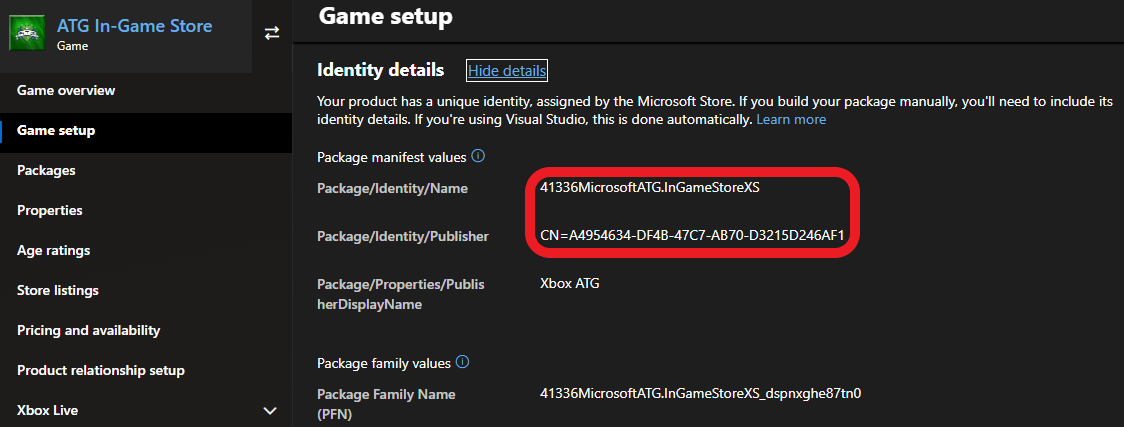
位於 Partner Center 的 **Game setup > Identity details** 下。
在 PC 上:必須嚴格符合 Partner Center 中指派給您遊戲的值。
雖然主機上並非必要,但在建立要提交至 Partner Center 的套件時應加以檢查。
`Identity` 節點中的 `Name` 必須符合 **Package/Identity/Name**;`Identity` 節點中的 `Publisher` 必須符合 **Package/Identity/Publisher**。
 ### StoreID
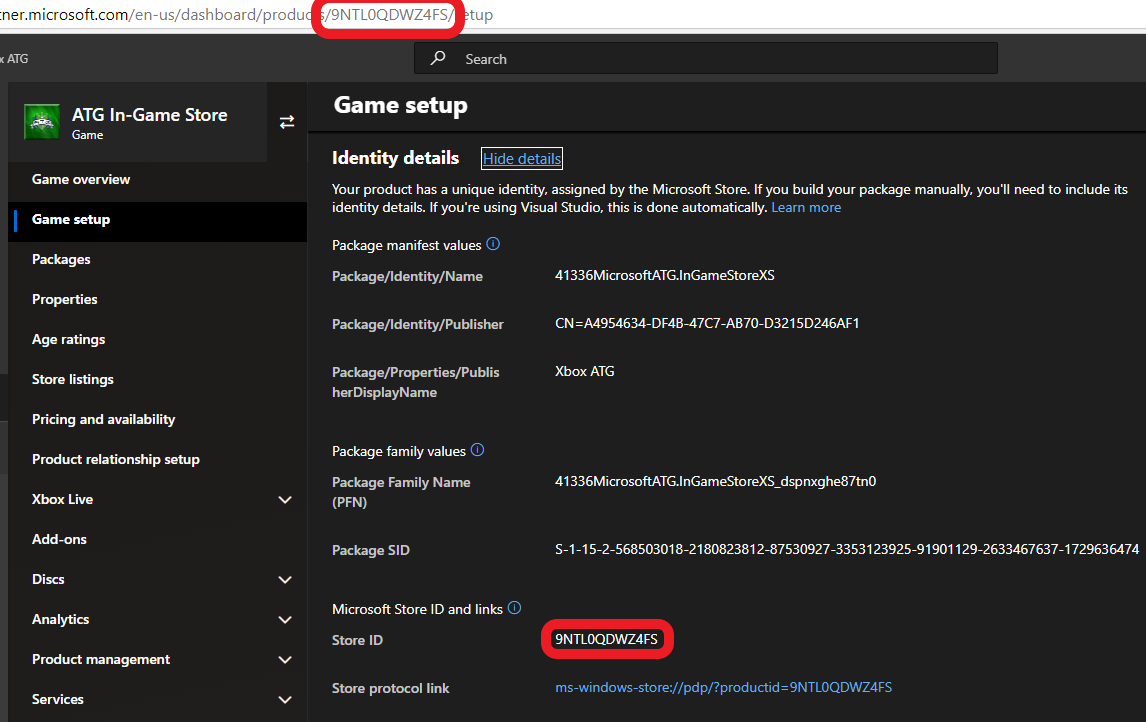
同樣位於 **Game setup > Identity details**
### StoreID
同樣位於 **Game setup > Identity details**
 ## 參考 API 文件
* [XStore (API 內容)](/zh-TW/reference/system/xstore/xstore_members)
* 函式
* [XStoreQueryGameLicenseAsync](/zh-TW/reference/system/xstore/xstore_members)
## 另請參閱
[Commerce 概觀](/zh-TW/publishing/xstore-commerce/xstore-commerce-overview)
[Partner Center 中的初始設定](/zh-TW/publishing/xstore-commerce/xstore-initial-configuration)
[啟用授權測試](/zh-TW/publishing/xstore-commerce/xstore-licensing-setup)
[正確切換沙箱以進行商店作業](/zh-TW/publishing/xstore-commerce/xstore-switching-sandbox)
[XStore API 參考](/zh-TW/reference/system/xstore/xstore_members)
## Related topics
- [XBOX 需求和測試案例的變更歷程記錄](/zh-TW/publishing/certification/xr-change-history.md)
- [XBOX 主機遊戲的認證測試 XBOX 需求](/zh-TW/publishing/certification/console-cert-tested-requirements.md)
- [NDA 主題目錄 - Microsoft Learn 線上連結](/zh-TW/nda/nda-topic-directory.md)
- [XBOX 遊戲的 XBOX 需求](/zh-TW/publishing/certification/xbox-requirements.md)
- [XBOX 合作夥伴加入流程:取得存取權限與發行](/zh-TW/home/onboarding.md)
## 參考 API 文件
* [XStore (API 內容)](/zh-TW/reference/system/xstore/xstore_members)
* 函式
* [XStoreQueryGameLicenseAsync](/zh-TW/reference/system/xstore/xstore_members)
## 另請參閱
[Commerce 概觀](/zh-TW/publishing/xstore-commerce/xstore-commerce-overview)
[Partner Center 中的初始設定](/zh-TW/publishing/xstore-commerce/xstore-initial-configuration)
[啟用授權測試](/zh-TW/publishing/xstore-commerce/xstore-licensing-setup)
[正確切換沙箱以進行商店作業](/zh-TW/publishing/xstore-commerce/xstore-switching-sandbox)
[XStore API 參考](/zh-TW/reference/system/xstore/xstore_members)
## Related topics
- [XBOX 需求和測試案例的變更歷程記錄](/zh-TW/publishing/certification/xr-change-history.md)
- [XBOX 主機遊戲的認證測試 XBOX 需求](/zh-TW/publishing/certification/console-cert-tested-requirements.md)
- [NDA 主題目錄 - Microsoft Learn 線上連結](/zh-TW/nda/nda-topic-directory.md)
- [XBOX 遊戲的 XBOX 需求](/zh-TW/publishing/certification/xbox-requirements.md)
- [XBOX 合作夥伴加入流程:取得存取權限與發行](/zh-TW/home/onboarding.md)