> ## Documentation Index
> Fetch the complete documentation index at: https://devdocs.xbox.com/llms.txt
> Use this file to discover all available pages before exploring further.
# 使用 TAK 編輯器封裝觸控調整組合
> 使用 TAK 編輯器封裝觸控調整組合
本文概述使用 TAK 編輯器封裝觸控調整組合,以透過您的 Microsoft 帳戶代表提交至 XBOX Game Streaming 服務的程序。封裝程序包含建立 `.takx` 檔案,其中包含組合所需的所有資產和中繼資料。您可以深入了解[發佈觸控配置](/zh-TW/build/core-features/common/game-streaming/building-touch-layouts/game-streaming-touch-publishing-layouts),以及 TAK CLI 中驅動封裝程序的基礎 [pack 命令](/zh-TW/build/core-features/common/game-streaming/tak-command-line-tool/game-streaming-tak-command-line-pack-command)。
## 先決條件
* 已使用 TAK 編輯器建立至少包含一個配置的有效組合。如果您尚未建立組合,請參閱[建立新的組合](/zh-TW/build/core-features/common/game-streaming/tak-editor/game-streaming-tak-editor-create-bundle#create-a-new-bundle)。
## 封裝組合
1. 啟動命令選擇區 (在 Windows 上為 `Ctrl+Shift+P`,在 macOS 上為 `Cmd+Shift+P`)。
2. 搜尋 "Pack",然後選取 "Touch Adaptation Kit: Pack Bundle"。
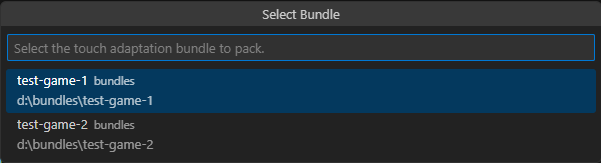
 3. 如果工作區中有多個組合,系統會顯示組合清單。選取您要封裝的組合。如果只有一個組合,則會略過此步驟,命令會使用唯一可用的組合繼續進行。
 4. 驗證:系統會顯示下拉式選單,詢問是否應在封裝前驗證組合的正確性。**強烈建議在此步驟回答 "Yes"**,以確保組合可以順利提交給您的 Microsoft 帳戶代表。
5. 資產最佳化:系統會顯示下拉式選單,詢問是否應在封裝作業期間以量化方式最佳化組合中的資產。這可以減少封裝後組合的大小,但也可能影響資產的視覺品質。如果啟用資產最佳化,建議在您的遊戲中測試封裝後的組合,以確保視覺品質可以接受。
6. 系統會顯示儲存檔案對話方塊,讓您指定 `.takx` 檔案的位置和名稱。瀏覽至所需位置並輸入檔案名稱。系統會自動附加 `.takx` 副檔名。按一下 "Save Bundle" 以啟動封裝程序。
請注意,檔案可以儲存在電腦可存取的任何位置,不需要與未封裝 (鬆散) 組合位於同一個工作區資料夾中。
## 下一步
> \[!div class="nextstepaction"]
> [疑難排解](/zh-TW/build/core-features/common/game-streaming/tak-editor/game-streaming-tak-editor-troubleshooting)
## Related topics
- [Unity 總覽](/zh-TW/paths/unity/overview.md)
- [Unreal Engine 總覽](/zh-TW/paths/unreal/overview.md)
- [Windows 與 ROG XBOX Ally 總覽](/zh-TW/paths/windows/overview.md)
- [使用 GDKX 建置並執行你的第一個主機遊戲](/zh-TW/home/build-first-title/first-console-title-walkthrough.md)
- [XR-018:使用者產生的內容](/zh-TW/publishing/certification/xr/xr-018.md)
4. 驗證:系統會顯示下拉式選單,詢問是否應在封裝前驗證組合的正確性。**強烈建議在此步驟回答 "Yes"**,以確保組合可以順利提交給您的 Microsoft 帳戶代表。
5. 資產最佳化:系統會顯示下拉式選單,詢問是否應在封裝作業期間以量化方式最佳化組合中的資產。這可以減少封裝後組合的大小,但也可能影響資產的視覺品質。如果啟用資產最佳化,建議在您的遊戲中測試封裝後的組合,以確保視覺品質可以接受。
6. 系統會顯示儲存檔案對話方塊,讓您指定 `.takx` 檔案的位置和名稱。瀏覽至所需位置並輸入檔案名稱。系統會自動附加 `.takx` 副檔名。按一下 "Save Bundle" 以啟動封裝程序。
請注意,檔案可以儲存在電腦可存取的任何位置,不需要與未封裝 (鬆散) 組合位於同一個工作區資料夾中。
## 下一步
> \[!div class="nextstepaction"]
> [疑難排解](/zh-TW/build/core-features/common/game-streaming/tak-editor/game-streaming-tak-editor-troubleshooting)
## Related topics
- [Unity 總覽](/zh-TW/paths/unity/overview.md)
- [Unreal Engine 總覽](/zh-TW/paths/unreal/overview.md)
- [Windows 與 ROG XBOX Ally 總覽](/zh-TW/paths/windows/overview.md)
- [使用 GDKX 建置並執行你的第一個主機遊戲](/zh-TW/home/build-first-title/first-console-title-walkthrough.md)
- [XR-018:使用者產生的內容](/zh-TW/publishing/certification/xr/xr-018.md)