> ## Documentation Index
> Fetch the complete documentation index at: https://devdocs.xbox.com/llms.txt
> Use this file to discover all available pages before exploring further.
# 2D 平台遊戲觸控控制配置
> 2D 平台遊戲觸控控制配置
兩個適用於平台遊戲的範例觸控控制配置。
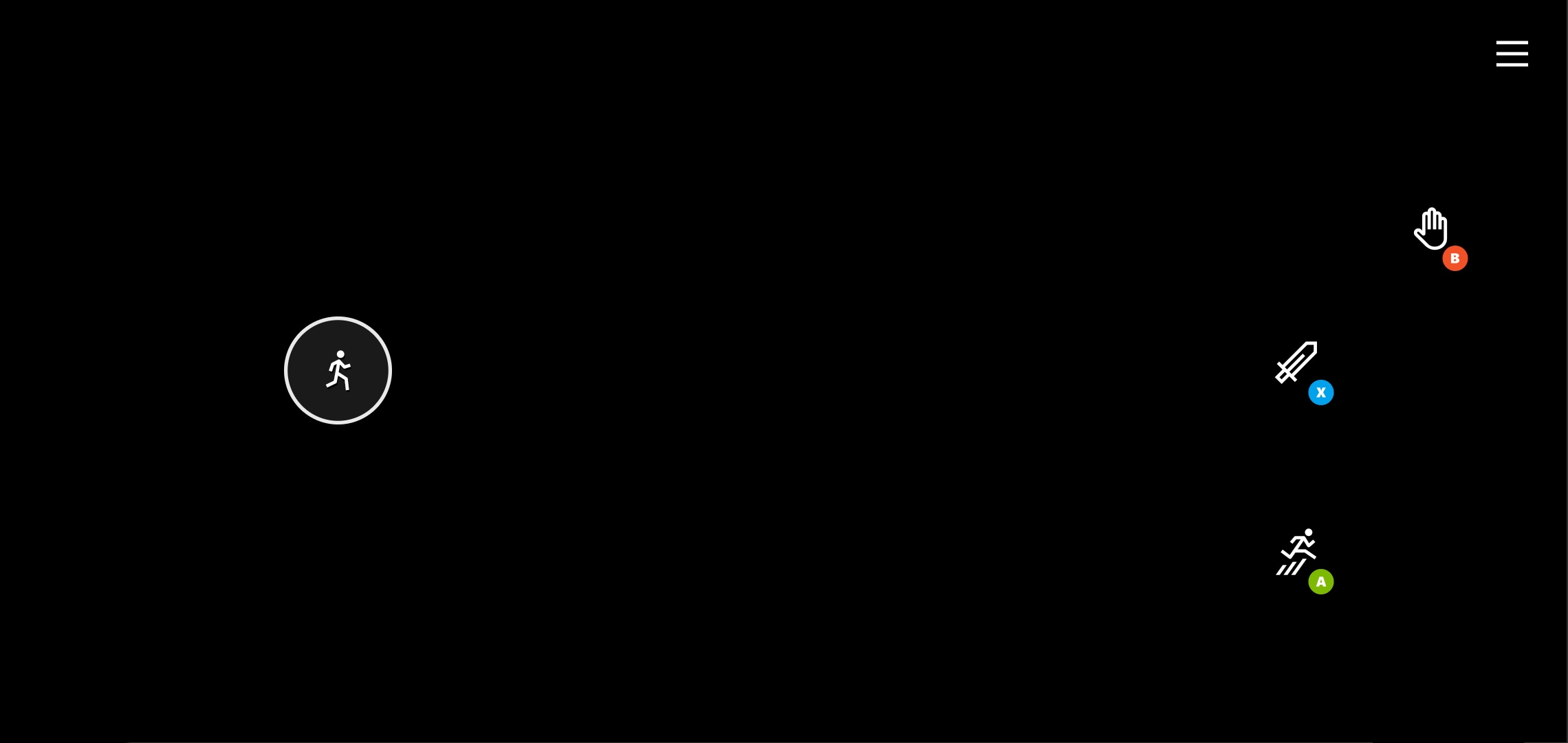
**簡單平台遊戲配置**
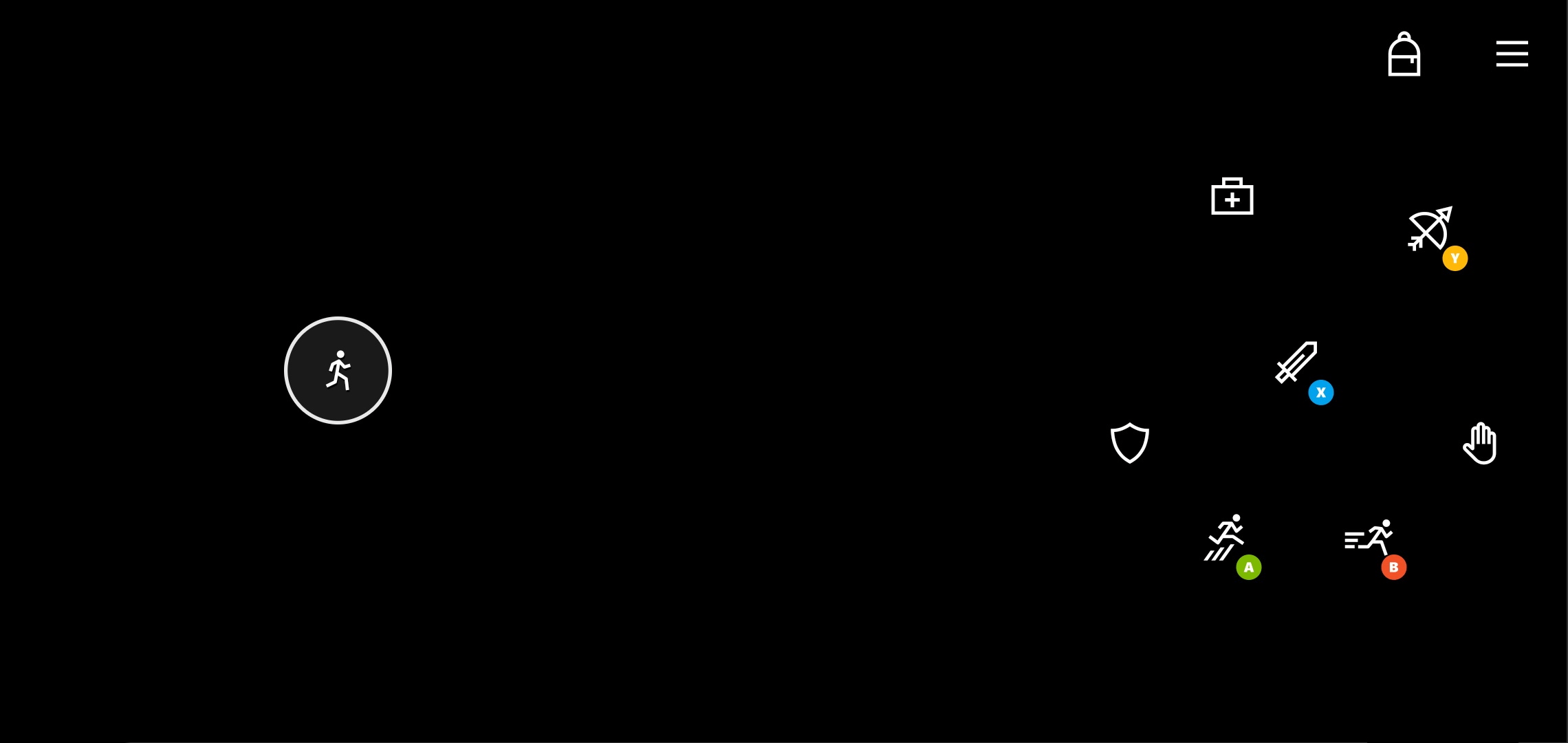
 **具有更多玩家動作的平台遊戲配置**
 ## 備註
\_簡單平台遊戲\_配置示範基本的 2D 平台遊戲如何提供非常精簡的觸控體驗。
主要元素包括:
* 供左手使用的移動搖桿。如果遊戲針對方向鍵輸入進行了更多最佳化,也可以考慮使用方向鍵。
* 三個主要動作 (開火、跳躍、互動) 根據玩家預期的互動優先順序,以弧形排列在右手側。
\_平台遊戲\_配置以簡單平台遊戲配置為基礎,展示可為玩家新增其他控制項的位置。
主要的其他元素:
* 物品欄管理放在右上方
* 針對主要動作 (劍、跳躍、弓) 最佳化擺放位置,其他較不常用的動作則放在其周圍。
## 可用性
1. TAK [sample-layouts](https://github.com/microsoft/xbox-game-streaming-tools/tree/main/touch-adaptation-kit/samples/sample-layouts) 範例的一部分。
2. TAK 命令列工具 [create 命令](/zh-TW/build/core-features/common/game-streaming/tak-command-line-tool/game-streaming-tak-command-line-create-command)
## Related topics
- [範例](/zh-TW/build/core-features/common/game-streaming/building-touch-layouts/samples/index.md)
- [為 XBOX 遊戲串流建置觸控控制配置](/zh-TW/build/core-features/common/game-streaming/building-touch-layouts/index.md)
- [根據遊戲狀態變更觸控控制配置](/zh-TW/build/core-features/common/game-streaming/building-touch-layouts/game-streaming-touch-changing-layouts-game-state.md)
- [格鬥觸控控制配置](/zh-TW/build/core-features/common/game-streaming/building-touch-layouts/samples/game-streaming-touch-tak-sample-fighter.md)
- [駕駛觸控控制配置](/zh-TW/build/core-features/common/game-streaming/building-touch-layouts/samples/game-streaming-touch-tak-sample-driving.md)
## 備註
\_簡單平台遊戲\_配置示範基本的 2D 平台遊戲如何提供非常精簡的觸控體驗。
主要元素包括:
* 供左手使用的移動搖桿。如果遊戲針對方向鍵輸入進行了更多最佳化,也可以考慮使用方向鍵。
* 三個主要動作 (開火、跳躍、互動) 根據玩家預期的互動優先順序,以弧形排列在右手側。
\_平台遊戲\_配置以簡單平台遊戲配置為基礎,展示可為玩家新增其他控制項的位置。
主要的其他元素:
* 物品欄管理放在右上方
* 針對主要動作 (劍、跳躍、弓) 最佳化擺放位置,其他較不常用的動作則放在其周圍。
## 可用性
1. TAK [sample-layouts](https://github.com/microsoft/xbox-game-streaming-tools/tree/main/touch-adaptation-kit/samples/sample-layouts) 範例的一部分。
2. TAK 命令列工具 [create 命令](/zh-TW/build/core-features/common/game-streaming/tak-command-line-tool/game-streaming-tak-command-line-create-command)
## Related topics
- [範例](/zh-TW/build/core-features/common/game-streaming/building-touch-layouts/samples/index.md)
- [為 XBOX 遊戲串流建置觸控控制配置](/zh-TW/build/core-features/common/game-streaming/building-touch-layouts/index.md)
- [根據遊戲狀態變更觸控控制配置](/zh-TW/build/core-features/common/game-streaming/building-touch-layouts/game-streaming-touch-changing-layouts-game-state.md)
- [格鬥觸控控制配置](/zh-TW/build/core-features/common/game-streaming/building-touch-layouts/samples/game-streaming-touch-tak-sample-fighter.md)
- [駕駛觸控控制配置](/zh-TW/build/core-features/common/game-streaming/building-touch-layouts/samples/game-streaming-touch-tak-sample-driving.md)