> ## Documentation Index
> Fetch the complete documentation index at: https://devdocs.xbox.com/llms.txt
> Use this file to discover all available pages before exploring further.
# 部署您的觸控控制配置
> 部署您的觸控控制配置
## 概觀
在您[建置觸控配置](/zh-TW/build/core-features/common/game-streaming/building-touch-layouts/game-streaming-touch-building-touch-layout)之後,您會想要在遊戲中與其互動。
## 必要條件
若要部署和檢視您的配置,您需要具備:
* 一部具有[觸控調整套件命令列工具 (tak.exe)](/zh-TW/build/core-features/common/game-streaming/tak-command-line-tool/game-streaming-tak-command-line) 的 Windows PC。
* 一部具有 [Web 內容測試應用程式](/zh-TW/build/core-features/common/game-streaming/game-streaming-web-content-test-application)、[Android 內容測試應用程式 (已淘汰)](/zh-TW/build/core-features/common/game-streaming/game-streaming-android-content-test-application) 或 [Windows PC 內容測試應用程式 (已淘汰)](/zh-TW/build/core-features/common/game-streaming/game-streaming-windows-pc-content-test-application) 的裝置。
* 一組您想要部署和檢視的配置。
## 部署您的配置
### 1. 提供配置
在具有[觸控調整套件命令列工具 (tak.exe)](/zh-TW/build/core-features/common/game-streaming/tak-command-line-tool/game-streaming-tak-command-line) 的 Windows PC 上,使用 [Serve 命令](/zh-TW/build/core-features/common/game-streaming/tak-command-line-tool/game-streaming-tak-command-line-serve-command)讓要求配置的裝置可以取得這些配置。
```pwsh theme={null}
C:\Program Files (x86)\Microsoft GDK\bin>tak serve --layout-path C:\MyGameLayouts
Verifying touch adaptation bundle 'C:\MyGameLayouts '.
Now listening on: http://0.0.0.0:9269
Application started. Press Ctrl+C to shut down.
Hosting environment: Production
Content root path: C:\MyGameLayouts
```
### 2. 設定內容測試應用程式以進行載入
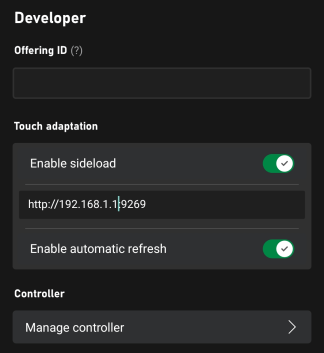
在內容測試應用程式的設定中,輸入觸控調整設定 (位於 \[開發人員] 區段) 的組態。
* 確定已開啟 **\[啟用側載]**。
* 輸入提供配置之 PC 的位址 (包括連接埠)。
如果您搭配 **Safari** 使用 [Web 內容測試應用程式](/zh-TW/build/core-features/common/game-streaming/game-streaming-web-content-test-application),或連線至執行 serve 命令的**遠端 PC**,請確定側載位址以 `https` 開頭,並且已使用 `--certificate-file` 選項。如需啟動安全 (HTTPS) 側載伺服器的詳細資訊,請參閱 [Serve 命令](/zh-TW/build/core-features/common/game-streaming/tak-command-line-tool/game-streaming-tak-command-line-serve-command)。
* 如果您希望對配置所做的變更立即在所有已連線的用戶端上更新,請啟用自動重新整理 (否則,只有在啟動新的串流連線時才會更新)。
 。
### 3. 串流您的遊戲
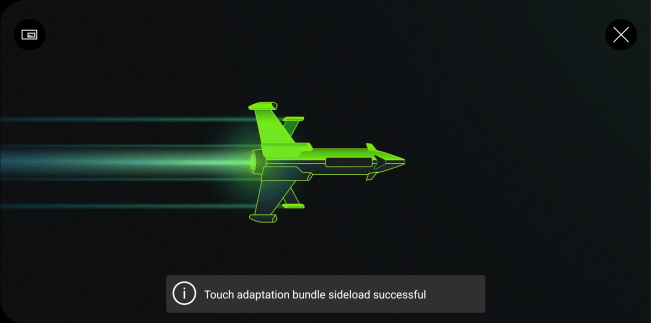
每次建立串流連線時,CTA 都會連線至 TAK 伺服器並下載最新的配置。
。
### 3. 串流您的遊戲
每次建立串流連線時,CTA 都會連線至 TAK 伺服器並下載最新的配置。
 。
要求配置時,您會在執行 `serve` 命令的 PC 上看到要求和下載。
```
C:\Program Files (x86)\Microsoft GDK\bin>tak serve --layout-path C:\MyGame\layouts
Verifying touch adaptation bundle 'C:\MyGame\layouts'.
Now listening on: http://0.0.0.0:9269
Application started. Press Ctrl+C to shut down.
Hosting environment: Production
Content root path: C:\MyGame\layouts
Request starting HTTP/1.1 POST http://192.168.1.1:9269/connection/negotiate?negotiateVersion=1 0
Request finished in 1.6283ms 200 application/json
Request starting HTTP/1.1 GET http://192.168.1.1:9269/connection?id=3u0Xs_Dlwn-J1mREHTcG5w
Request starting HTTP/1.1 GET http://192.168.1.1:9269/v1/tabs/active/download
Request finished in 3.9865ms 200 application/octet-stream
```
### 4. 選取您的配置
啟動串流工作階段之後,您可以選取左上角的 `...` 按鈕開啟串流內覆疊,然後依序選取 \[開發人員] 和 \[TAK],以選取要使用的觸控配置。
。
要求配置時,您會在執行 `serve` 命令的 PC 上看到要求和下載。
```
C:\Program Files (x86)\Microsoft GDK\bin>tak serve --layout-path C:\MyGame\layouts
Verifying touch adaptation bundle 'C:\MyGame\layouts'.
Now listening on: http://0.0.0.0:9269
Application started. Press Ctrl+C to shut down.
Hosting environment: Production
Content root path: C:\MyGame\layouts
Request starting HTTP/1.1 POST http://192.168.1.1:9269/connection/negotiate?negotiateVersion=1 0
Request finished in 1.6283ms 200 application/json
Request starting HTTP/1.1 GET http://192.168.1.1:9269/connection?id=3u0Xs_Dlwn-J1mREHTcG5w
Request starting HTTP/1.1 GET http://192.168.1.1:9269/v1/tabs/active/download
Request finished in 3.9865ms 200 application/octet-stream
```
### 4. 選取您的配置
啟動串流工作階段之後,您可以選取左上角的 `...` 按鈕開啟串流內覆疊,然後依序選取 \[開發人員] 和 \[TAK],以選取要使用的觸控配置。
 ## Related topics
- [构建您的 Unreal 示例项目](/zh-CN/services/playfab/multiplayer/servers/server-sdks/unreal-gsdk/building-the-third-person-mp-example-project.md)
- [标准 XBOX 控制器触控控制布局](/zh-CN/build/core-features/common/game-streaming/building-touch-layouts/samples/game-streaming-touch-tak-sample-full-layout.md)
- [触控入门](/zh-CN/build/core-features/common/game-streaming/game-streaming-getting-started-with-touch.md)
- [XBOX Accessibility Guidelines (XAG)](/zh-TW/build/game-principles/accessibility/xbox-accessibility-guidelines.md)
- [内容测试应用 (CTA) 串流配置概述](/zh-CN/build/core-features/common/game-streaming/game-streaming-content-test-application-stream-config.md)
## Related topics
- [构建您的 Unreal 示例项目](/zh-CN/services/playfab/multiplayer/servers/server-sdks/unreal-gsdk/building-the-third-person-mp-example-project.md)
- [标准 XBOX 控制器触控控制布局](/zh-CN/build/core-features/common/game-streaming/building-touch-layouts/samples/game-streaming-touch-tak-sample-full-layout.md)
- [触控入门](/zh-CN/build/core-features/common/game-streaming/game-streaming-getting-started-with-touch.md)
- [XBOX Accessibility Guidelines (XAG)](/zh-TW/build/game-principles/accessibility/xbox-accessibility-guidelines.md)
- [内容测试应用 (CTA) 串流配置概述](/zh-CN/build/core-features/common/game-streaming/game-streaming-content-test-application-stream-config.md)