> ## Documentation Index
> Fetch the complete documentation index at: https://devdocs.xbox.com/llms.txt
> Use this file to discover all available pages before exploring further.
# Visual Studio 2022 支持说明
> Visual Studio 2022 支持说明
Microsoft 游戏开发工具包 (GDK) 开发支持 [Visual Studio 2022](https://visualstudio.microsoft.com/),并按照 [Visual Studio 产品生命周期和服务](https://learn.microsoft.com/visualstudio/productinfo/vs-servicing),为 17.8、17.10、17.12 和 17.14 提供长期支持通道。
自 2025 年 1 月起,Visual Studio 2022 版本 17.0 - 17.7 不再受支持。
自 2024 年 7 月起,Visual Studio 2022 版本 17.0 - 17.4 不再受支持。
## 安装 Visual Studio 2022
Microsoft 游戏开发工具包 (GDK) 支持使用 Visual Studio 2022 的 **Professional** 版或 **Enterprise** 版进行开发。不支持 Community 版。
基于 ARM 的设备不支持 GDK Visual Studio 扩展 (VSIX) 组件。若要使用 GDK Visual Studio 项目模板、属性页和调试扩展,请在基于 x64 的开发 PC 上安装 GDK。
安装 Visual Studio 2022 时,必须在安装期间选择 **使用 C++ 的游戏开发** 工作负载,如以下屏幕截图所示。
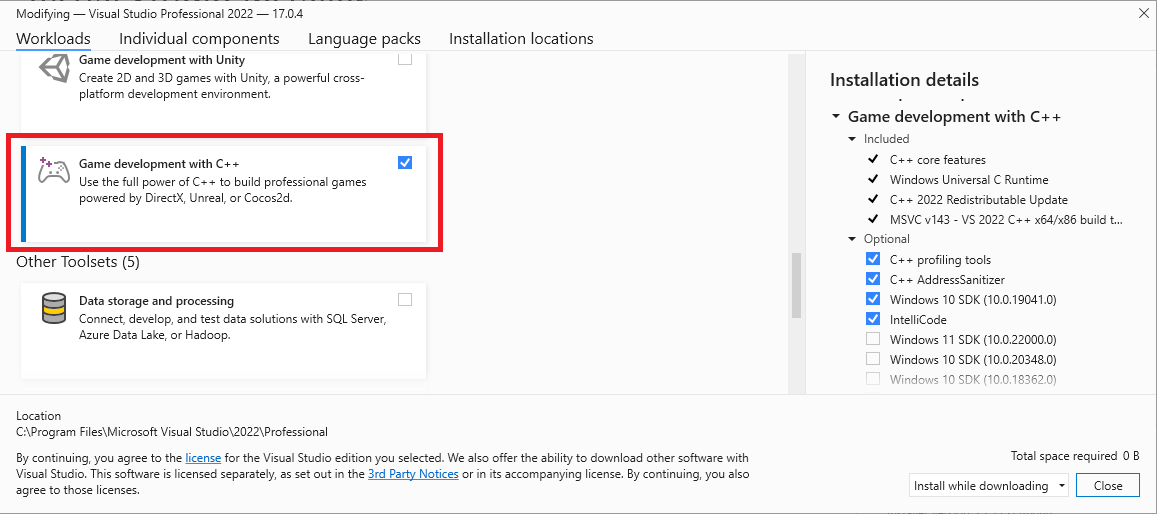 除了游戏开发所需的核心 C++ 工具之外,还请确保已安装 **Windows 10 SDK (19041)** 或 **Windows 11 SDK (22000)** 组件,以提供使用 Microsoft 游戏开发工具包 (GDK) 构建游戏所需的 Windows 10 SDK。
> 也可以使用 *Windows 10 SDK* (20348)、*Windows SDK for Windows 11* (10.0.22000) 或 *Windows SDK for Windows 11, Version 22H2* (10.0.22621),但不是必需的。对于 2023 年 10 月版本,强烈建议在 PC 开发时使用 *Windows 11 SDK* 或更高版本。
尽管不是必需的,但安装 **使用 C++ 的桌面开发** 工作负载可以提供你可能觉得有用的更多工具和示例。例如,如果你使用 Clang/LLVM 工具集进行构建,则需要 **使用 C++ 的桌面开发**。
如果你正在构建使用 Unity 的游戏,请安装 **使用 Unity 的游戏开发** 工作负载。
## 安装可选工具集
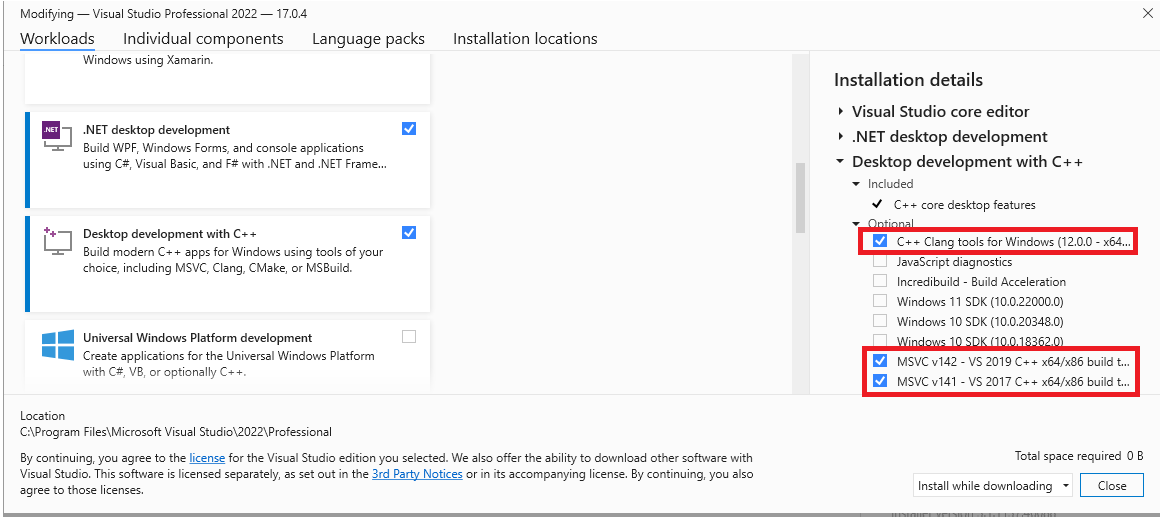
Visual Studio 2022 版本的 MVSC 构建工具(版本 **v143**)随 **使用 C++ 的游戏开发** 工作负载一起安装。除了 **v143** 工具集之外,Microsoft 游戏开发工具包 (GDK) 还支持使用以下工具集进行构建:
* v142(Visual Studio 2019 工具集)
* C++ Clang tools for windows
这种灵活性允许你在不更新工具集的情况下升级到 Visual Studio 2022 IDE。
可以在 **使用 C++ 的桌面开发** 工作负载下找到可选工具集,或者在 Visual Studio 安装对话框中搜索 **单个组件**。
除了游戏开发所需的核心 C++ 工具之外,还请确保已安装 **Windows 10 SDK (19041)** 或 **Windows 11 SDK (22000)** 组件,以提供使用 Microsoft 游戏开发工具包 (GDK) 构建游戏所需的 Windows 10 SDK。
> 也可以使用 *Windows 10 SDK* (20348)、*Windows SDK for Windows 11* (10.0.22000) 或 *Windows SDK for Windows 11, Version 22H2* (10.0.22621),但不是必需的。对于 2023 年 10 月版本,强烈建议在 PC 开发时使用 *Windows 11 SDK* 或更高版本。
尽管不是必需的,但安装 **使用 C++ 的桌面开发** 工作负载可以提供你可能觉得有用的更多工具和示例。例如,如果你使用 Clang/LLVM 工具集进行构建,则需要 **使用 C++ 的桌面开发**。
如果你正在构建使用 Unity 的游戏,请安装 **使用 Unity 的游戏开发** 工作负载。
## 安装可选工具集
Visual Studio 2022 版本的 MVSC 构建工具(版本 **v143**)随 **使用 C++ 的游戏开发** 工作负载一起安装。除了 **v143** 工具集之外,Microsoft 游戏开发工具包 (GDK) 还支持使用以下工具集进行构建:
* v142(Visual Studio 2019 工具集)
* C++ Clang tools for windows
这种灵活性允许你在不更新工具集的情况下升级到 Visual Studio 2022 IDE。
可以在 **使用 C++ 的桌面开发** 工作负载下找到可选工具集,或者在 Visual Studio 安装对话框中搜索 **单个组件**。
 > 自 2024 年 10 月发布起,Visual Studio 2017 工具集 `v141` 不再受支持。
## 为项目选择工具集
用于项目的工具集是通过项目属性页中的 **平台工具集** 属性指定的。
> 自 2024 年 10 月发布起,Visual Studio 2017 工具集 `v141` 不再受支持。
## 为项目选择工具集
用于项目的工具集是通过项目属性页中的 **平台工具集** 属性指定的。
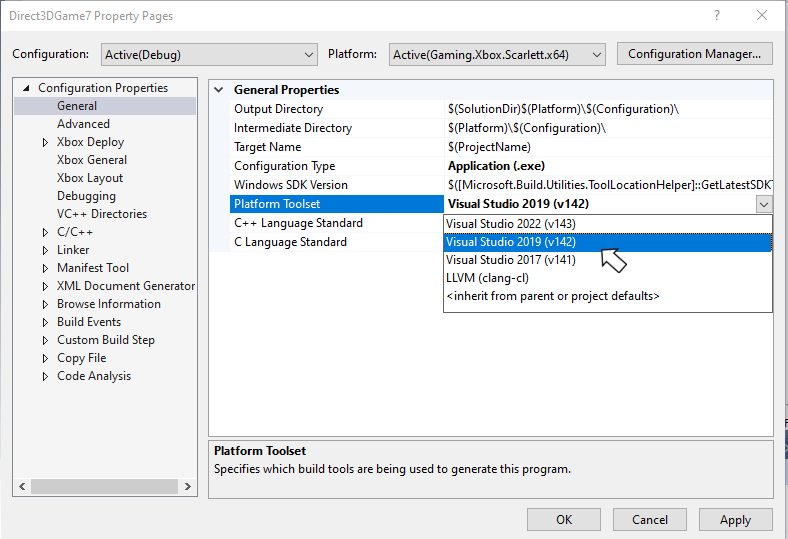 也可以在项目文件中手动指定 **PlatformToolset** 属性,如以下属性组所示。
```xml theme={null}
Application
v142
true
Unicode
false
false
```
## Visual Studio 2022 服务模型
Visual Studio 2022 包含一个新的服务模型,允许你选择一个服务基线,然后仅获取该基线的更新。这种新模型取代了以前版本 Visual Studio 的服务模型,后者强烈鼓励使用最新可用版本。有关 Visual Studio 2022 服务模型的更多详细信息,请参阅 [Visual Studio 产品生命周期和服务](https://learn.microsoft.com/visualstudio/productinfo/vs-servicing)。
## 报告 bug
**Visual C++ 编译器** 的 bug 报告应(如有可能)通过 Visual Studio 的 *报告问题...* 提交。请参阅 [Microsoft Docs](https://learn.microsoft.com/visualstudio/ide/how-to-report-a-problem-with-visual-studio) 和 [开发者社区](https://aka.ms/feedback/report?space=62) 网站。请务必阅读 [此页](https://aka.ms/compilerbug),了解为编译器创建良好 bug 报告的详细信息。
如果需要私密信息才能重现问题,你可以在标记为 “仅限 Microsoft” 的公共报告问题上添加评论。
对于 **clang/LLVM for Windows 编译器** 的 bug 报告,请使用 [https://bugs.llvm.org/](https://bugs.llvm.org/)
对于 **Microsoft 标准 C++ 库**(又称 STL)的 bug 报告,请使用 [https://github.com/microsoft/STL/issues](https://github.com/microsoft/STL/issues)
一如既往,对于需要升级处理的关键问题,请随时联系你的 *Microsoft 代表*。
## 另请参阅
[用于 PC 游戏开发的 Visual Studio](/tools/tools-pc/visualstudio/gr-visualstudio-toc)
## Related topics
- [Visual Studio](/zh-CN/tools/tools-pc/visualstudio/index.md)
- [Visual Studio(目录)](/zh-CN/tools/tools-pc/visualstudio/gr-visualstudio-toc.md)
- [面向主机开发的 Visual Studio](/zh-CN/tools/tools-console/visualstudio/visualstudio.md)
- [Visual Studio 2022 GDK 支持说明](/zh-CN/tools/tools-console/visualstudio/vs-2022-support-notes.md)
- [Visual Studio 2019 支持说明](/zh-CN/tools/tools-pc/visualstudio/gr-vs-2019-support-notes.md)
也可以在项目文件中手动指定 **PlatformToolset** 属性,如以下属性组所示。
```xml theme={null}
Application
v142
true
Unicode
false
false
```
## Visual Studio 2022 服务模型
Visual Studio 2022 包含一个新的服务模型,允许你选择一个服务基线,然后仅获取该基线的更新。这种新模型取代了以前版本 Visual Studio 的服务模型,后者强烈鼓励使用最新可用版本。有关 Visual Studio 2022 服务模型的更多详细信息,请参阅 [Visual Studio 产品生命周期和服务](https://learn.microsoft.com/visualstudio/productinfo/vs-servicing)。
## 报告 bug
**Visual C++ 编译器** 的 bug 报告应(如有可能)通过 Visual Studio 的 *报告问题...* 提交。请参阅 [Microsoft Docs](https://learn.microsoft.com/visualstudio/ide/how-to-report-a-problem-with-visual-studio) 和 [开发者社区](https://aka.ms/feedback/report?space=62) 网站。请务必阅读 [此页](https://aka.ms/compilerbug),了解为编译器创建良好 bug 报告的详细信息。
如果需要私密信息才能重现问题,你可以在标记为 “仅限 Microsoft” 的公共报告问题上添加评论。
对于 **clang/LLVM for Windows 编译器** 的 bug 报告,请使用 [https://bugs.llvm.org/](https://bugs.llvm.org/)
对于 **Microsoft 标准 C++ 库**(又称 STL)的 bug 报告,请使用 [https://github.com/microsoft/STL/issues](https://github.com/microsoft/STL/issues)
一如既往,对于需要升级处理的关键问题,请随时联系你的 *Microsoft 代表*。
## 另请参阅
[用于 PC 游戏开发的 Visual Studio](/tools/tools-pc/visualstudio/gr-visualstudio-toc)
## Related topics
- [Visual Studio](/zh-CN/tools/tools-pc/visualstudio/index.md)
- [Visual Studio(目录)](/zh-CN/tools/tools-pc/visualstudio/gr-visualstudio-toc.md)
- [面向主机开发的 Visual Studio](/zh-CN/tools/tools-console/visualstudio/visualstudio.md)
- [Visual Studio 2022 GDK 支持说明](/zh-CN/tools/tools-console/visualstudio/vs-2022-support-notes.md)
- [Visual Studio 2019 支持说明](/zh-CN/tools/tools-pc/visualstudio/gr-vs-2019-support-notes.md)