> ## Documentation Index
> Fetch the complete documentation index at: https://devdocs.xbox.com/llms.txt
> Use this file to discover all available pages before exploring further.
# Performance 页面
> Performance 页面
使用 Performance 页面查看主机的实时性能数据,如以下截图所示。
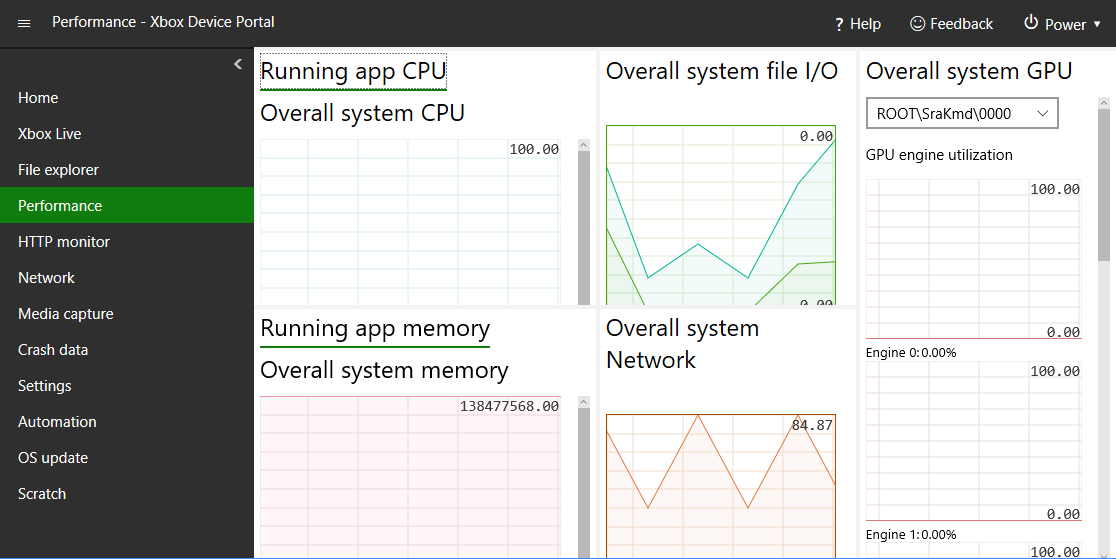 Performance 页面包含以下窗格。
## Running app CPU 窗格
Running app CPU 窗格显示可用总 CPU 的百分比。
## Running app memory 窗格
Running app memory 窗格显示总内存、正在使用的内存、可用已提交内存、分页内存和非分页内存。
## Overall system GPU 窗格
Overall system GPU 窗格显示 GPU 引擎利用率以及可用总 GPU 的百分比。
## Overall system file I/O
Overall system file I/O 窗格显示 IO 读取和写入。
## Overall system Network 窗格
Overall system Network 窗格显示已接收和已发送的网络流量。
## Related topics
- [XBOX GDK 主机开发 NDA 主题索引](/zh-CN/nda/nda-overview.md)
- [Home 页面](/zh-CN/tools/tools-console/wdp/windows-device-portal-on-xbox-home.md)
- [Network 页面](/zh-CN/tools/tools-console/wdp/windows-device-portal-on-xbox-network.md)
- [Scratch 页面](/zh-CN/tools/tools-console/wdp/windows-device-portal-on-xbox-scratch.md)
- [Crash data 页面](/zh-CN/tools/tools-console/wdp/windows-device-portal-on-xbox-crash-data.md)
Performance 页面包含以下窗格。
## Running app CPU 窗格
Running app CPU 窗格显示可用总 CPU 的百分比。
## Running app memory 窗格
Running app memory 窗格显示总内存、正在使用的内存、可用已提交内存、分页内存和非分页内存。
## Overall system GPU 窗格
Overall system GPU 窗格显示 GPU 引擎利用率以及可用总 GPU 的百分比。
## Overall system file I/O
Overall system file I/O 窗格显示 IO 读取和写入。
## Overall system Network 窗格
Overall system Network 窗格显示已接收和已发送的网络流量。
## Related topics
- [XBOX GDK 主机开发 NDA 主题索引](/zh-CN/nda/nda-overview.md)
- [Home 页面](/zh-CN/tools/tools-console/wdp/windows-device-portal-on-xbox-home.md)
- [Network 页面](/zh-CN/tools/tools-console/wdp/windows-device-portal-on-xbox-network.md)
- [Scratch 页面](/zh-CN/tools/tools-console/wdp/windows-device-portal-on-xbox-scratch.md)
- [Crash data 页面](/zh-CN/tools/tools-console/wdp/windows-device-portal-on-xbox-crash-data.md)