> ## Documentation Index
> Fetch the complete documentation index at: https://devdocs.xbox.com/llms.txt
> Use this file to discover all available pages before exploring further.
# Network 页面
> Network 页面
使用 Network 页面可在可用的网络接口和配置文件之间切换、配置 Fiddler 以及检索网络配置信息,如以下截图所示。
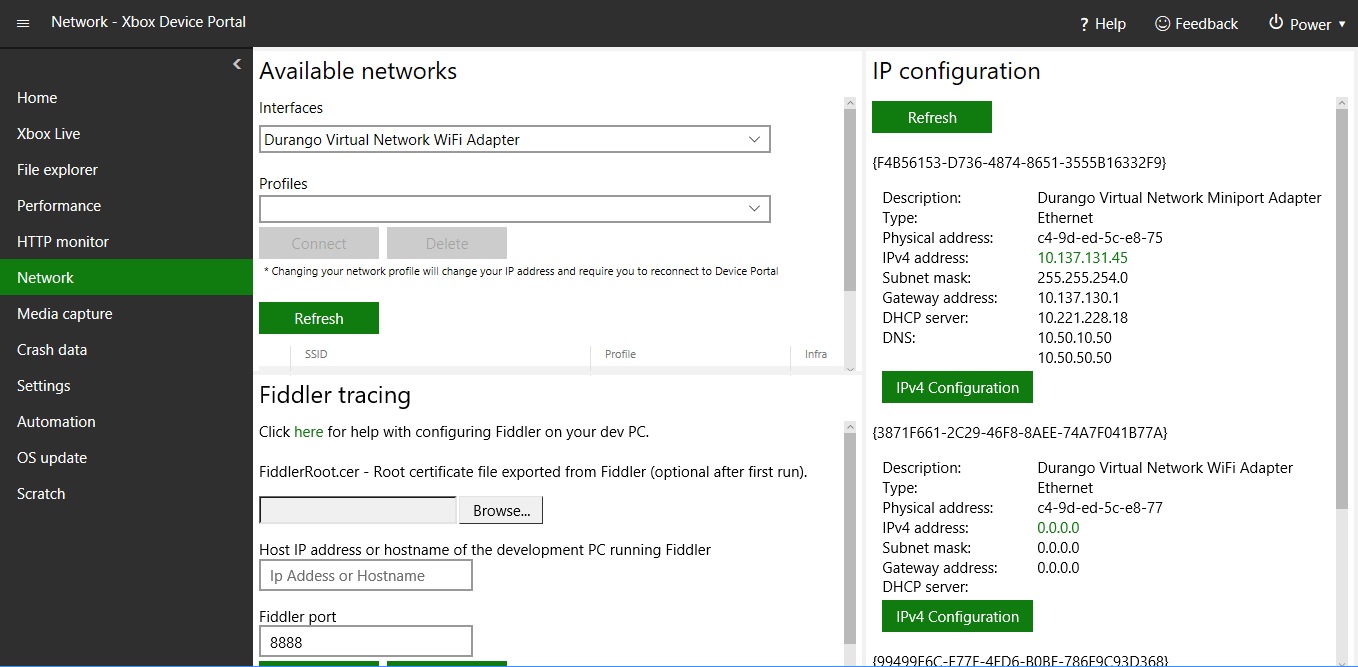 Network 页面包含以下窗格。
## Available networks 窗格
Available networks 窗格显示可用的网络。你可以选择主机应使用的网络。
## Fiddler tracing 窗格
Fiddler tracing 页面显示与主机搭配使用的 Fiddler 的配置设置。
## IP configuration 窗格
IP configuration 窗格显示可用接口的 IP 配置值。
## Related topics
- [XBOX Device Portal(XBOX 上的 Windows Device Portal)](/zh-CN/tools/tools-console/wdp/index.md)
- [Performance 页面](/zh-CN/tools/tools-console/wdp/windows-device-portal-on-xbox-performance.md)
- [OS update 页面](/zh-CN/tools/tools-console/wdp/windows-device-portal-on-xbox-os-update.md)
- [Home 页面](/zh-CN/tools/tools-console/wdp/windows-device-portal-on-xbox-home.md)
- [Scratch 页面](/zh-CN/tools/tools-console/wdp/windows-device-portal-on-xbox-scratch.md)
Network 页面包含以下窗格。
## Available networks 窗格
Available networks 窗格显示可用的网络。你可以选择主机应使用的网络。
## Fiddler tracing 窗格
Fiddler tracing 页面显示与主机搭配使用的 Fiddler 的配置设置。
## IP configuration 窗格
IP configuration 窗格显示可用接口的 IP 配置值。
## Related topics
- [XBOX Device Portal(XBOX 上的 Windows Device Portal)](/zh-CN/tools/tools-console/wdp/index.md)
- [Performance 页面](/zh-CN/tools/tools-console/wdp/windows-device-portal-on-xbox-performance.md)
- [OS update 页面](/zh-CN/tools/tools-console/wdp/windows-device-portal-on-xbox-os-update.md)
- [Home 页面](/zh-CN/tools/tools-console/wdp/windows-device-portal-on-xbox-home.md)
- [Scratch 页面](/zh-CN/tools/tools-console/wdp/windows-device-portal-on-xbox-scratch.md)