> ## Documentation Index
> Fetch the complete documentation index at: https://devdocs.xbox.com/llms.txt
> Use this file to discover all available pages before exploring further.
# File explorer 页面
> File explorer 页面
使用 File explorer 页面浏览主机上的文件系统,如以下截图所示。
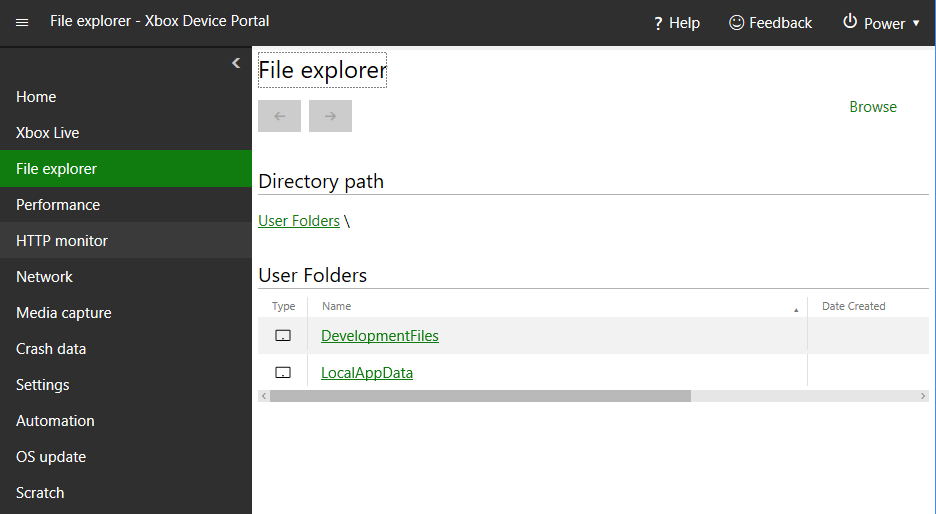 File explorer 页面包含以下窗格。
## Directory path 窗格
使用 Directory path 窗格查看当前正在查看的目录的路径。
## Directory contents 窗格
使用 Directory contents 窗格查看当前正在查看的目录的内容。
## Upload a file to this directory 窗格
使用 Upload a file to this directory 窗格,将文件从开发 PC 上传到当前正在查看的目录。
## Related topics
- [XBOX Device Portal(XBOX 上的 Windows Device Portal)](/zh-CN/tools/tools-console/wdp/index.md)
- [Insights 最佳实践](/zh-CN/services/playfab/data-analytics/legacy/insights/best-practices.md)
- [Performance 页面](/zh-CN/tools/tools-console/wdp/windows-device-portal-on-xbox-performance.md)
- [Data Explorer 快速入门](/zh-CN/services/playfab/data-analytics/learn-data/data-explorer/quickstart.md)
- [XBOX Gaming Explorer](/zh-CN/tools/tools-console/visualstudio/xbox-gaming-explorer.md)
File explorer 页面包含以下窗格。
## Directory path 窗格
使用 Directory path 窗格查看当前正在查看的目录的路径。
## Directory contents 窗格
使用 Directory contents 窗格查看当前正在查看的目录的内容。
## Upload a file to this directory 窗格
使用 Upload a file to this directory 窗格,将文件从开发 PC 上传到当前正在查看的目录。
## Related topics
- [XBOX Device Portal(XBOX 上的 Windows Device Portal)](/zh-CN/tools/tools-console/wdp/index.md)
- [Insights 最佳实践](/zh-CN/services/playfab/data-analytics/legacy/insights/best-practices.md)
- [Performance 页面](/zh-CN/tools/tools-console/wdp/windows-device-portal-on-xbox-performance.md)
- [Data Explorer 快速入门](/zh-CN/services/playfab/data-analytics/learn-data/data-explorer/quickstart.md)
- [XBOX Gaming Explorer](/zh-CN/tools/tools-console/visualstudio/xbox-gaming-explorer.md)