> ## Documentation Index
> Fetch the complete documentation index at: https://devdocs.xbox.com/llms.txt
> Use this file to discover all available pages before exploring further.
# 启用 XBOX Device Portal
> 启用 XBOX Device Portal
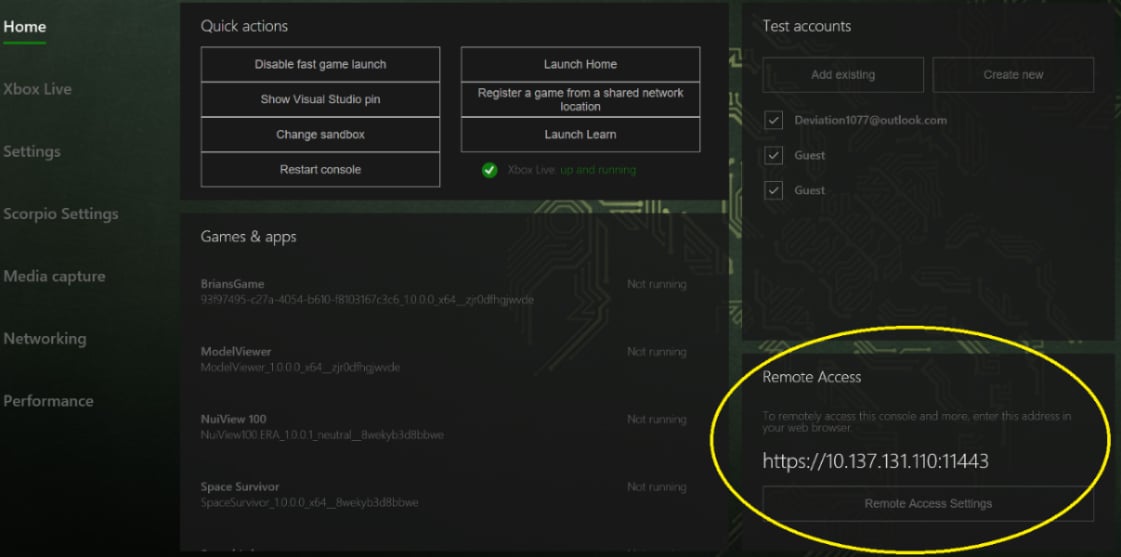
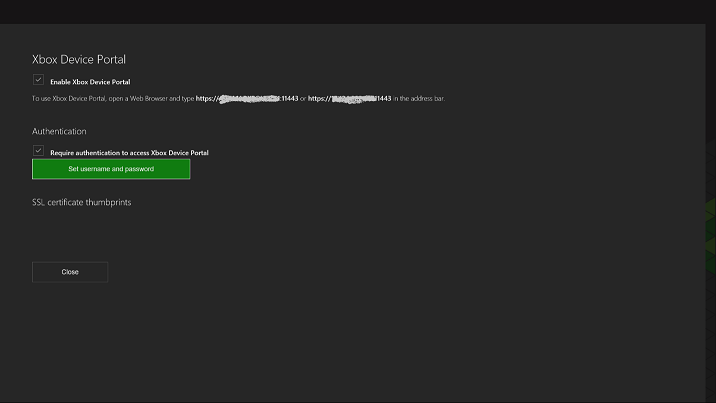
要在 XBOX One 主机上启用或禁用 XBOX Device Portal,请在 Developer Home (Dev Home) 的**主页**界面的 **Remote Access** 选项卡中选择 **Remote Access Settings** 按钮,如以下截图所示。
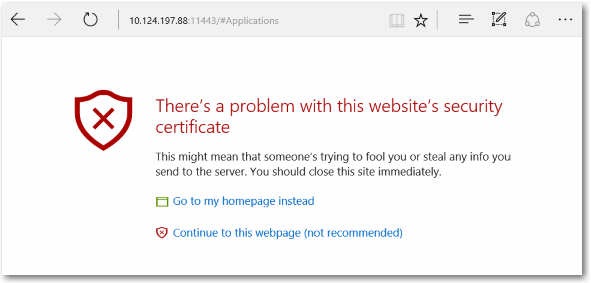
 当你从 Web 浏览器连接到 XBOX Device Portal 时,会出现一条关于所提供证书的警告消息(类似于以下截图)。这是因为由你的 XBOX 开发套件签名的安全证书不被视为知名的可信颁发者。若要访问 XBOX Device Portal,请选择 **继续访问此网页**。
 ## 使用自定义 SSL 证书
要在连接到 XBOX Device Portal 时防止出现此警告消息,请将你的 Web 浏览器设置为信任你的开发套件。方法是提供你自己的根证书颁发机构(*root CA*)和 SSL 证书。根 CA 会对证书进行签名以建立可信连接。每个开发套件都需要一个由根 CA 签名的唯一证书。使用一个根 CA 和多个证书,可以将同一台开发 PC 连接到多个开发套件。在多台开发 PC 上使用同一个根 CA,可以使用相同的证书连接到相同的开发套件。
### 预配 XBOX Device Portal
1. 如果你或你的组织已有根 CA,请使用它为每个开发套件创建证书。
2. 如果你没有根 CA,则必须自行创建。有关如何执行此操作并将你的根 CA 安装到开发 PC 的“受信任的根证书颁发机构”中,请参阅[使用自定义 SSL 证书预配 Device Portal](https://learn.microsoft.com/windows/uwp/debug-test-perf/device-portal-ssl)。
3. 使用该根 CA 为开发套件创建一个已签名的证书。有关如何执行此操作,请参阅前面的链接。
4. 通过在无人参与安装脚本中使用 **Add XBOX Device Portal custom certificate** 操作,将该证书添加到 XBOX Device Portal。
## Related topics
- [XBOX Device Portal(XBOX 上的 Windows Device Portal)](/zh-CN/tools/tools-console/wdp/index.md)
- [使用 XBOX Device Portal 管理主机设置](/zh-CN/tools/tools-console/wdp/windows-device-portal-on-xbox-settings.md)
- [网络页面](/zh-CN/tools/tools-console/devhome/devhome-networking.md)
- [XBOX Manager:管理主机设置](/zh-CN/tools/tools-console/xbom/manager-tool-console-settings.md)
- [向 XBOX Device Portal 工作区添加工具](/zh-CN/tools/tools-console/wdp/windows-device-portal-on-xbox-adding-tools.md)
## 使用自定义 SSL 证书
要在连接到 XBOX Device Portal 时防止出现此警告消息,请将你的 Web 浏览器设置为信任你的开发套件。方法是提供你自己的根证书颁发机构(*root CA*)和 SSL 证书。根 CA 会对证书进行签名以建立可信连接。每个开发套件都需要一个由根 CA 签名的唯一证书。使用一个根 CA 和多个证书,可以将同一台开发 PC 连接到多个开发套件。在多台开发 PC 上使用同一个根 CA,可以使用相同的证书连接到相同的开发套件。
### 预配 XBOX Device Portal
1. 如果你或你的组织已有根 CA,请使用它为每个开发套件创建证书。
2. 如果你没有根 CA,则必须自行创建。有关如何执行此操作并将你的根 CA 安装到开发 PC 的“受信任的根证书颁发机构”中,请参阅[使用自定义 SSL 证书预配 Device Portal](https://learn.microsoft.com/windows/uwp/debug-test-perf/device-portal-ssl)。
3. 使用该根 CA 为开发套件创建一个已签名的证书。有关如何执行此操作,请参阅前面的链接。
4. 通过在无人参与安装脚本中使用 **Add XBOX Device Portal custom certificate** 操作,将该证书添加到 XBOX Device Portal。
## Related topics
- [XBOX Device Portal(XBOX 上的 Windows Device Portal)](/zh-CN/tools/tools-console/wdp/index.md)
- [使用 XBOX Device Portal 管理主机设置](/zh-CN/tools/tools-console/wdp/windows-device-portal-on-xbox-settings.md)
- [网络页面](/zh-CN/tools/tools-console/devhome/devhome-networking.md)
- [XBOX Manager:管理主机设置](/zh-CN/tools/tools-console/xbom/manager-tool-console-settings.md)
- [向 XBOX Device Portal 工作区添加工具](/zh-CN/tools/tools-console/wdp/windows-device-portal-on-xbox-adding-tools.md)