> ## Documentation Index
> Fetch the complete documentation index at: https://devdocs.xbox.com/llms.txt
> Use this file to discover all available pages before exploring further.
# XBOX System Monitor
> XBOX System Monitor
本主题介绍 XBOX System Monitor 工具窗口,这是 Microsoft Game Development Kit (GDK) 安装到 Visual Studio shell 中的一个工具窗口。系统监视器是一个由两个选项卡组成的性能监视与诊断窗口。第一个选项卡 **Memory (CPU)** 以类似任务管理器的视图展示系统监视器所连接主机(且当前在 [XBOX Gaming Explorer](/tools/tools-console/visualstudio/xbox-gaming-explorer) 中被选中的主机)的状态。**Memory (CPU)** 选项卡关注游戏和工具的内存消耗。第二个选项卡 **Console Monitor** 显示来自 *OutputDebugString* API 以及主机游戏诊断事件的跟踪数据。
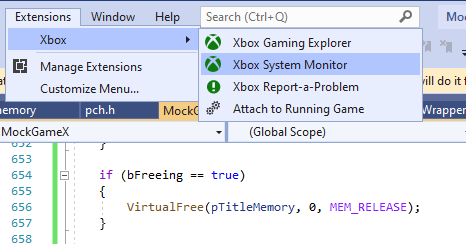
如下面的截图所示,你可以在 Visual Studio 中选择 **XBOX** Extensions 菜单来访问 XBOX System Monitor。
 ## Memory (CPU)
**Memory (CPU)** 选项卡以折线图和一组条形图的形式显示主机上当前正在使用的游戏内存与工具内存量。以下截图展示了一个使用极少工具内存的游戏,但该游戏使用的游戏内存量在缓慢增长。
## Memory (CPU)
**Memory (CPU)** 选项卡以折线图和一组条形图的形式显示主机上当前正在使用的游戏内存与工具内存量。以下截图展示了一个使用极少工具内存的游戏,但该游戏使用的游戏内存量在缓慢增长。
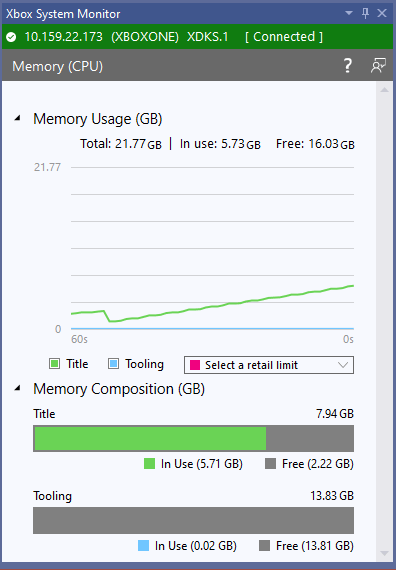 如果你正在开发一个将在 XBOX One 系列多种成员上运行的游戏,了解你的游戏距离每种主机类型的零售内存上限有多近会很有帮助。在截图中的图表里,y 轴上显示的值范围会随系统监视器所连接的主机类型而变化。例如,XBOX Series X 开发套件上的最大 y 值大于 XBOX One 开发套件上的最大 y 值。
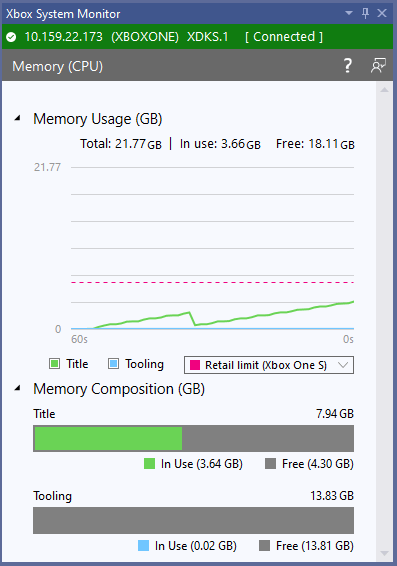
你可以选择 **Retail Limits** 下拉列表来查看主机列表及其零售内存上限。如果你勾选某个主机类型旁边的复选框,你会在图表上看到一条代表该主机零售内存上限的水平线。以下截图显示了接近 XBOX One S 主机零售内存上限的游戏。
如果你正在开发一个将在 XBOX One 系列多种成员上运行的游戏,了解你的游戏距离每种主机类型的零售内存上限有多近会很有帮助。在截图中的图表里,y 轴上显示的值范围会随系统监视器所连接的主机类型而变化。例如,XBOX Series X 开发套件上的最大 y 值大于 XBOX One 开发套件上的最大 y 值。
你可以选择 **Retail Limits** 下拉列表来查看主机列表及其零售内存上限。如果你勾选某个主机类型旁边的复选框,你会在图表上看到一条代表该主机零售内存上限的水平线。以下截图显示了接近 XBOX One S 主机零售内存上限的游戏。
 有关每种主机类型上可用的游戏内存量的更多信息,请参阅[为游戏和开发套件配置内存](/build/console-features/memory/system-memory-tooling)。
有关用于深入分析游戏如何使用内存的工具说明,请参阅[分析内存使用与性能](/tools/tools-console/pix/memory-performance)。有关 PIX 提供的工具的更多信息,请参阅 [PIX](/tools/tools-console/pix/pix)。
## Console Monitor
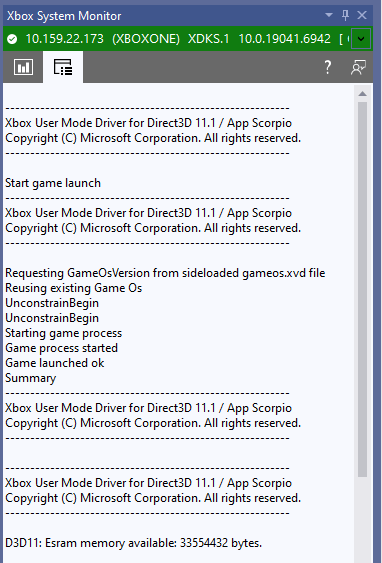
**Console Monitor** 选项卡显示 [xbWatson](/tools/tools-console/xbWatson/xbwatson) 中当前显示的主机跟踪的一个子集。所显示的跟踪包括传递给 *OutputDebugString* API 的字符串以及来自主机游戏诊断事件的数据。*OutputDebugString* 数据同时包含来自你的游戏和系统本身的数据。
有关每种主机类型上可用的游戏内存量的更多信息,请参阅[为游戏和开发套件配置内存](/build/console-features/memory/system-memory-tooling)。
有关用于深入分析游戏如何使用内存的工具说明,请参阅[分析内存使用与性能](/tools/tools-console/pix/memory-performance)。有关 PIX 提供的工具的更多信息,请参阅 [PIX](/tools/tools-console/pix/pix)。
## Console Monitor
**Console Monitor** 选项卡显示 [xbWatson](/tools/tools-console/xbWatson/xbwatson) 中当前显示的主机跟踪的一个子集。所显示的跟踪包括传递给 *OutputDebugString* API 的字符串以及来自主机游戏诊断事件的数据。*OutputDebugString* 数据同时包含来自你的游戏和系统本身的数据。
 ## 另请参阅
[Visual Studio](/tools/tools-console/visualstudio/visualstudio)
[XBOX Gaming Explorer](/tools/tools-console/visualstudio/xbox-gaming-explorer)
[分析内存使用与性能](/tools/tools-console/pix/memory-performance)
## Related topics
- [XPackageUpdateInstallationMonitor](/zh-CN/reference/system/xpackage/functions/xpackageupdateinstallationmonitor.md)
- [XPackageCreateInstallationMonitor](/zh-CN/reference/system/xpackage/functions/xpackagecreateinstallationmonitor.md)
- [XTaskQueueUnregisterMonitor](/zh-CN/reference/system/xtaskqueue/functions/xtaskqueueunregistermonitor.md)
- [XAppBroadcastMonitorCallback](/zh-CN/reference/system/xappcapture/functions/xappbroadcastmonitorcallback.md)
- [XTaskQueueMonitorCallback](/zh-CN/reference/system/xtaskqueue/functions/xtaskqueuemonitorcallback.md)
## 另请参阅
[Visual Studio](/tools/tools-console/visualstudio/visualstudio)
[XBOX Gaming Explorer](/tools/tools-console/visualstudio/xbox-gaming-explorer)
[分析内存使用与性能](/tools/tools-console/pix/memory-performance)
## Related topics
- [XPackageUpdateInstallationMonitor](/zh-CN/reference/system/xpackage/functions/xpackageupdateinstallationmonitor.md)
- [XPackageCreateInstallationMonitor](/zh-CN/reference/system/xpackage/functions/xpackagecreateinstallationmonitor.md)
- [XTaskQueueUnregisterMonitor](/zh-CN/reference/system/xtaskqueue/functions/xtaskqueueunregistermonitor.md)
- [XAppBroadcastMonitorCallback](/zh-CN/reference/system/xappcapture/functions/xappbroadcastmonitorcallback.md)
- [XTaskQueueMonitorCallback](/zh-CN/reference/system/xtaskqueue/functions/xtaskqueuemonitorcallback.md)