> ## Documentation Index
> Fetch the complete documentation index at: https://devdocs.xbox.com/llms.txt
> Use this file to discover all available pages before exploring further.
# Profile-guided optimization in Visual Studio
> Profile-guided optimization in Visual Studio
本主题介绍如何为部署并运行在 XBOX Series X 开发套件或 XBOX One 开发套件上的游戏使用[按配置优化](https://learn.microsoft.com/cpp/build/profile-guided-optimizations)(PGO)。PGO 是一种运行时编译器优化技术,它使用运行重要或以性能为中心的用户场景时收集到的分析数据,来构建游戏的优化版本。
与传统的静态优化相比,按配置优化具有显著优势,因为它基于游戏在零售环境中的可能使用方式。PGO 对于对应常见用户场景的代码路径倾向于优先考虑速度,而对于不常见的用户场景则倾向于优先考虑体积。其结果是常见场景的代码更快,而使用频率较低的场景的代码更小。
PGO 带来的性能提升因游戏而异,但通常可预期 5-30% 的提升。请注意,PGO 不会解决应用程序中以 GPU 为中心的部分的性能问题。
## 创建插桩版本
使用 PGO 进行训练需要包含 PGO 插桩的游戏版本。PGO 使用此插桩来确定哪些代码路径执行得最频繁。若要创建插桩版本,只需在 Visual Studio 中设置两个生成属性。
#### 创建插桩版本
1. 在**解决方案资源管理器**中,右键单击你的项目,然后选择**属性**。
2. 在**属性页**对话框中,展开**配置属性**和 **C/C++** 节点。
3. 选择**优化**属性页,然后将**整个程序优化**设置为**是**(图 1)。**图 1. 设置整个程序优化属性。** 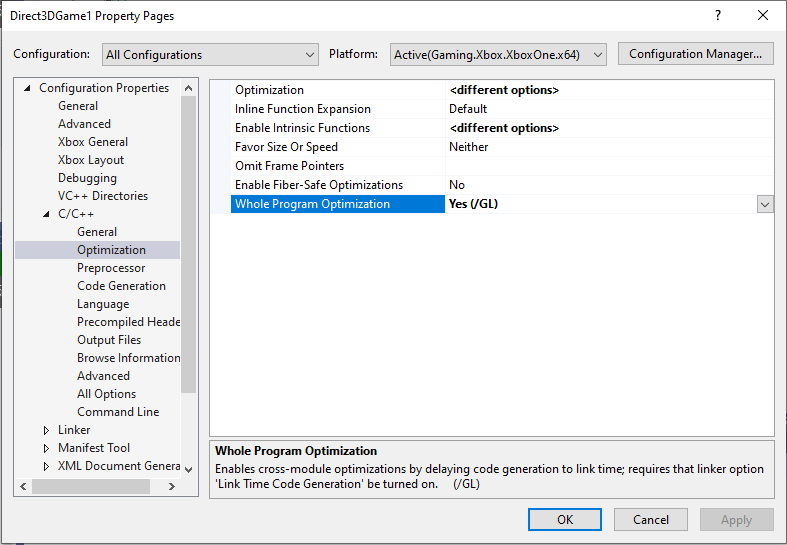 4. 展开**链接器**节点。
5. 选择**优化**属性页,然后将**链接时间代码生成**设置为 **Profile Guided Optimization - Instrument**(图 2)。**图 2. 为插桩版本设置链接时间代码生成属性。**
4. 展开**链接器**节点。
5. 选择**优化**属性页,然后将**链接时间代码生成**设置为 **Profile Guided Optimization - Instrument**(图 2)。**图 2. 为插桩版本设置链接时间代码生成属性。** 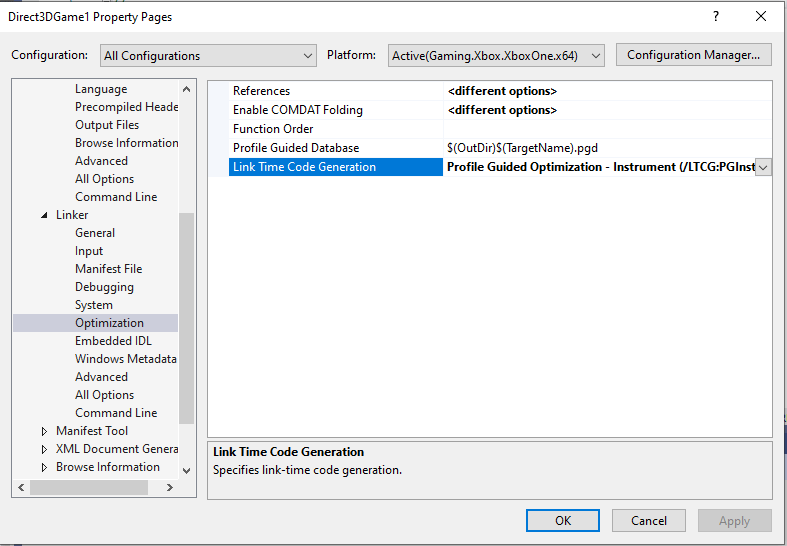 \[!NOTE] 此过程中描述的两个属性对应于 MSBuild 中的 `/GL` 编译器开关和 `/LTCG:PGInstrument` 链接器开关。
6. 生成插桩版本并将其部署到 XBOX One 主机。在游戏运行时,你可以看到 PGO 文件已作为游戏的一部分部署,类似图 3。**图 3. 插桩版本部署的 PGO 文件。**
\[!NOTE] 此过程中描述的两个属性对应于 MSBuild 中的 `/GL` 编译器开关和 `/LTCG:PGInstrument` 链接器开关。
6. 生成插桩版本并将其部署到 XBOX One 主机。在游戏运行时,你可以看到 PGO 文件已作为游戏的一部分部署,类似图 3。**图 3. 插桩版本部署的 PGO 文件。** 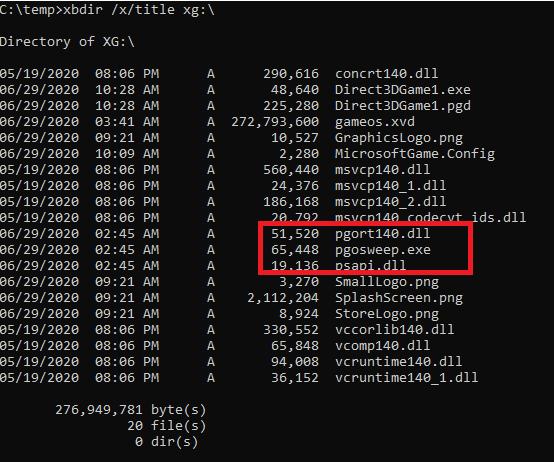 ## 部署所需文件
Microsoft Game Development Kit (GDK) 包含三个必须与游戏一起部署才能使用 PGO 的文件。其中一个名为 *psapi.dll* 的文件安装在 *C:\Program Files (x86)\Microsoft GDK\edition\GXDK\bin*。另外两个名为 *pgort140.dll* 和 *pgosweep.exe* 的文件来自你的 Visual Studio 安装。
如果你使用 MSBuild 生成游戏,那么在创建插桩版本时,这些文件会自动复制到你的 *Layout* 目录中。
如果你使用 `makefiles` 生成游戏,则需要手动将这三个文件添加到你的 *Layout* 目录中,以便它们与你的游戏一起部署。在 Visual Studio 中,将这些文件添加到你的项目并从生成中排除是一种便捷的方式,可以将文件复制到 *Layout* 目录并与游戏一起部署。
#### 将所需文件添加到 Visual Studio 项目
1. 在**解决方案资源管理器**中,右键单击你的项目,选择**添加**,然后选择**现有项**(图 4)。**图 4. 将 PGO 文件添加到项目。**
## 部署所需文件
Microsoft Game Development Kit (GDK) 包含三个必须与游戏一起部署才能使用 PGO 的文件。其中一个名为 *psapi.dll* 的文件安装在 *C:\Program Files (x86)\Microsoft GDK\edition\GXDK\bin*。另外两个名为 *pgort140.dll* 和 *pgosweep.exe* 的文件来自你的 Visual Studio 安装。
如果你使用 MSBuild 生成游戏,那么在创建插桩版本时,这些文件会自动复制到你的 *Layout* 目录中。
如果你使用 `makefiles` 生成游戏,则需要手动将这三个文件添加到你的 *Layout* 目录中,以便它们与你的游戏一起部署。在 Visual Studio 中,将这些文件添加到你的项目并从生成中排除是一种便捷的方式,可以将文件复制到 *Layout* 目录并与游戏一起部署。
#### 将所需文件添加到 Visual Studio 项目
1. 在**解决方案资源管理器**中,右键单击你的项目,选择**添加**,然后选择**现有项**(图 4)。**图 4. 将 PGO 文件添加到项目。** 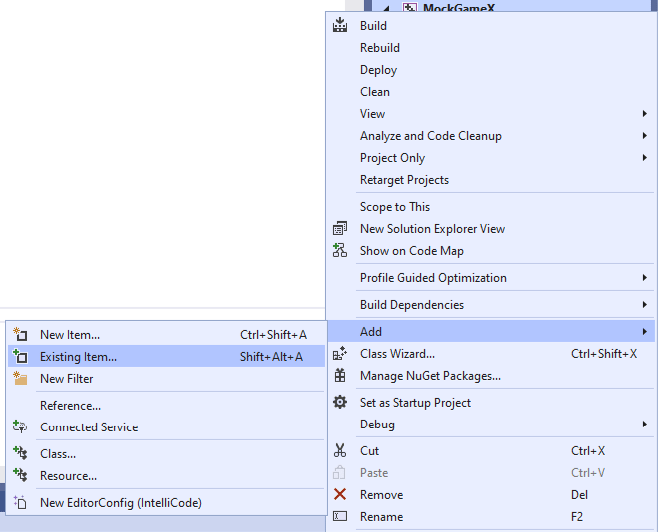 2. 前往 *C:\Program Files (x86)\Microsoft GDK\edition\GXDK\bin*,选择 PGO 文件(*psapi.dll*),然后选择**添加**将文件添加到你的项目。
3. 前往适用于你的工具集的 *C:\Program Files (x86)\Microsoft Visual Studio\2019\edition\VC\Tools\MSVC\version\bin\Hostx64\x64\onecore* 或 *C:\Program Files\Microsoft Visual Studio\2022\edition\VC\Tools\MSVC\version\bin\Hostx64\x64\onecore*,并选择 PGO 文件(*pgort140.dll* 和 *pgosweep.exe*)。然后选择**添加**将文件添加到你的项目。
4. 在**解决方案资源管理器**中,右键单击 *pgort140.dll*,然后选择**属性**。
5. 在**属性页**对话框中,展开**配置属性**节点,然后选择**常规**属性页。
6. 将**从生成中排除**设置为**是**,然后将**项类型**设置为**不参与生成**(图 5)。**图 5. 从生成中排除 PGO 文件。**
2. 前往 *C:\Program Files (x86)\Microsoft GDK\edition\GXDK\bin*,选择 PGO 文件(*psapi.dll*),然后选择**添加**将文件添加到你的项目。
3. 前往适用于你的工具集的 *C:\Program Files (x86)\Microsoft Visual Studio\2019\edition\VC\Tools\MSVC\version\bin\Hostx64\x64\onecore* 或 *C:\Program Files\Microsoft Visual Studio\2022\edition\VC\Tools\MSVC\version\bin\Hostx64\x64\onecore*,并选择 PGO 文件(*pgort140.dll* 和 *pgosweep.exe*)。然后选择**添加**将文件添加到你的项目。
4. 在**解决方案资源管理器**中,右键单击 *pgort140.dll*,然后选择**属性**。
5. 在**属性页**对话框中,展开**配置属性**节点,然后选择**常规**属性页。
6. 将**从生成中排除**设置为**是**,然后将**项类型**设置为**不参与生成**(图 5)。**图 5. 从生成中排除 PGO 文件。** 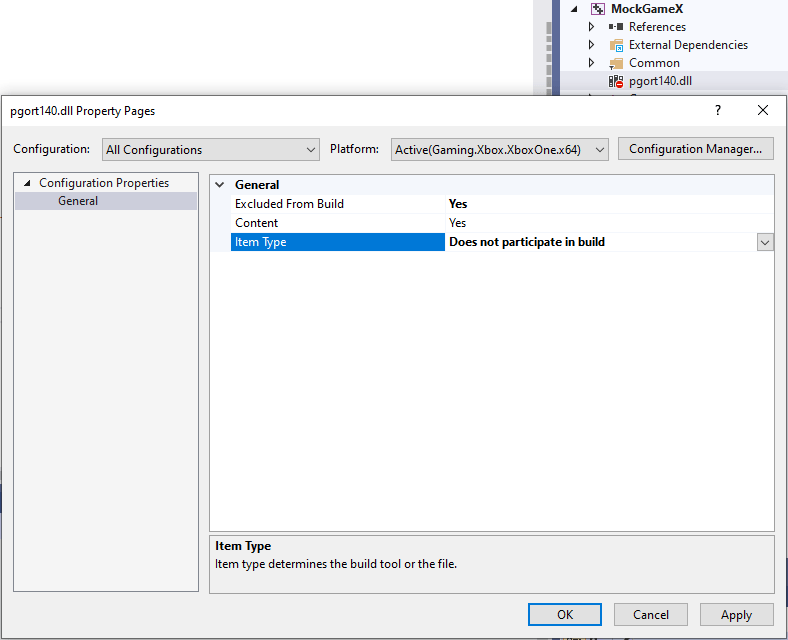 现在 PGO 文件将会被复制到你的 *Layout* 目录并与游戏一起部署。
## 使用插桩版本进行训练
训练是 PGO 中最重要的阶段。使用 PGO 获得的性能提升与应用程序的训练质量成正比。在 PGO 的训练阶段,请在游戏运行时演练常见的以性能为中心的场景。
在演练完常见性能场景后,启动 PGO 项目(.pgc)文件的收集,该文件用于捕获你的训练数据。使用 *pgosweep.exe* 生成 .pgc 文件(图 6)。
**图 6. 运行 pgosweep.exe。**
现在 PGO 文件将会被复制到你的 *Layout* 目录并与游戏一起部署。
## 使用插桩版本进行训练
训练是 PGO 中最重要的阶段。使用 PGO 获得的性能提升与应用程序的训练质量成正比。在 PGO 的训练阶段,请在游戏运行时演练常见的以性能为中心的场景。
在演练完常见性能场景后,启动 PGO 项目(.pgc)文件的收集,该文件用于捕获你的训练数据。使用 *pgosweep.exe* 生成 .pgc 文件(图 6)。
**图 6. 运行 pgosweep.exe。**
 在此示例中,我们创建了名为 *Direct3DGame1!1.pgc* 的 .pgc 文件。在创建 .pgc 文件时,我们通常使用约定 *titlename!#.pgc*,其中 *titlename* 是正在运行的游戏名称,而 *#* 等于你先前创建的 *titlename!#.pgc* 文件数加 1。
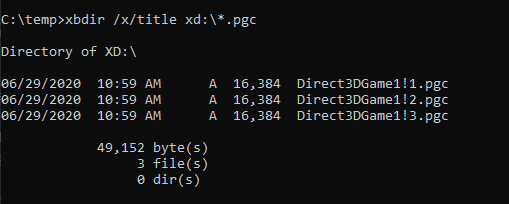
每次运行 *pgosweep.exe* 都会创建一个单独的 .pgc 文件。理想情况下,你会创建大量代表各种以性能为中心的场景的 .pgc 文件。完成 .pgc 文件的创建后,你可以在**主机**(即 SystemScratch)的 *D:\\* 目录中看到它们,类似图 7。
**图 7. 顺序命名的 .pgc 文件。**
在此示例中,我们创建了名为 *Direct3DGame1!1.pgc* 的 .pgc 文件。在创建 .pgc 文件时,我们通常使用约定 *titlename!#.pgc*,其中 *titlename* 是正在运行的游戏名称,而 *#* 等于你先前创建的 *titlename!#.pgc* 文件数加 1。
每次运行 *pgosweep.exe* 都会创建一个单独的 .pgc 文件。理想情况下,你会创建大量代表各种以性能为中心的场景的 .pgc 文件。完成 .pgc 文件的创建后,你可以在**主机**(即 SystemScratch)的 *D:\\* 目录中看到它们,类似图 7。
**图 7. 顺序命名的 .pgc 文件。**
 接下来,你需要将 .pgc 文件合并为另一种称为 .pgd 文件的 PGO 项目。.pgd 文件由编译器在 PGO 的最后阶段(优化阶段)使用。
在开始优化之前,请使用 [xbcp.exe](/tools/tools-console/commandlinetools/xbcp) 将 .pgc 文件从主机复制回你的 PC。.pgc 文件必须复制到你的生成输出目录。(在图 8 中,生成输出目录是 *C:\temp\Direct3DGame1\Gaming.Xbox.XboxOne.x64\Release*。)
**图 8. 将 .pgc 文件复制到生成输出目录。**
接下来,你需要将 .pgc 文件合并为另一种称为 .pgd 文件的 PGO 项目。.pgd 文件由编译器在 PGO 的最后阶段(优化阶段)使用。
在开始优化之前,请使用 [xbcp.exe](/tools/tools-console/commandlinetools/xbcp) 将 .pgc 文件从主机复制回你的 PC。.pgc 文件必须复制到你的生成输出目录。(在图 8 中,生成输出目录是 *C:\temp\Direct3DGame1\Gaming.Xbox.XboxOne.x64\Release*。)
**图 8. 将 .pgc 文件复制到生成输出目录。**
 ## 创建优化版本
若要创建优化版本,请将**链接时间代码生成**属性设置为 **Profile Guided Optimization - Update**(图 9)。
**图 9. 为优化版本设置链接时间代码生成属性。**
## 创建优化版本
若要创建优化版本,请将**链接时间代码生成**属性设置为 **Profile Guided Optimization - Update**(图 9)。
**图 9. 为优化版本设置链接时间代码生成属性。**
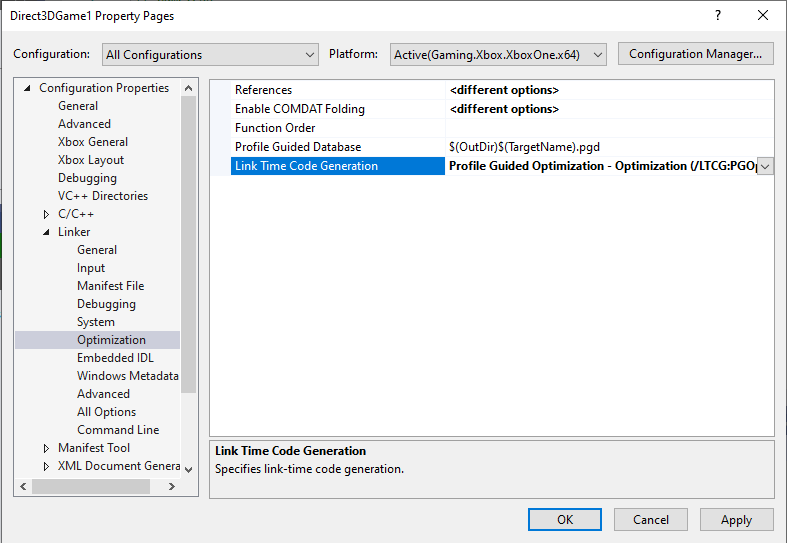 此属性对应于 MSBuild 中的 `/LTCG:PGOptimize` 链接器开关。
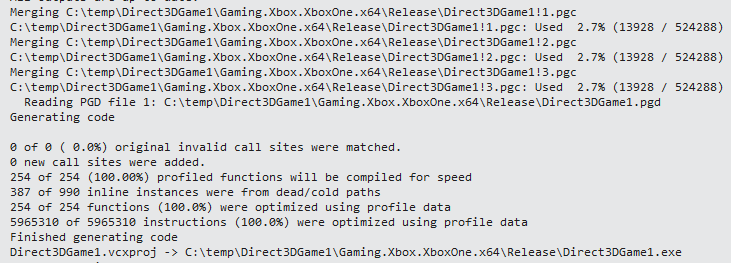
重新生成游戏后,你的生成输出将包含与 PGO 相关的消息,类似于图 10 中所示。
**图 10. 生成输出中的 PGO 相关消息。**
此属性对应于 MSBuild 中的 `/LTCG:PGOptimize` 链接器开关。
重新生成游戏后,你的生成输出将包含与 PGO 相关的消息,类似于图 10 中所示。
**图 10. 生成输出中的 PGO 相关消息。**
 ## XBOX 上使用 PGO 的建议
以上说明概述了在 XBOX 上通过内置 Visual Studio 项目属性使用 Microsoft Game Development Kit (GDK) 上的 PGO。但 Visual C++ 编译器已弃用通过 `/LTCG:PGInstrument`、`/LTCG:PGOptimize` 和 `/LTCG:PGUpdate` 开关使用 PGO 的方式,这些开关由 Visual Studio 2019 和 Visual Studio 2022 中的 Visual Studio 项目属性控制。
推荐的替代方案如下。
* 对于 C/C++ 编译器,使用 `/GL`(如前面图 1 所示,将**整个程序优化**属性设置为 **Yes (/GL)**)。
* 对于链接器,使用 `/LTCG`(将**链接时间代码生成**属性设置为 **Use Link Time Code Generation (/LTCG)**,如图 11 所示)。**图 11. 设置链接时间代码生成属性。**
## XBOX 上使用 PGO 的建议
以上说明概述了在 XBOX 上通过内置 Visual Studio 项目属性使用 Microsoft Game Development Kit (GDK) 上的 PGO。但 Visual C++ 编译器已弃用通过 `/LTCG:PGInstrument`、`/LTCG:PGOptimize` 和 `/LTCG:PGUpdate` 开关使用 PGO 的方式,这些开关由 Visual Studio 2019 和 Visual Studio 2022 中的 Visual Studio 项目属性控制。
推荐的替代方案如下。
* 对于 C/C++ 编译器,使用 `/GL`(如前面图 1 所示,将**整个程序优化**属性设置为 **Yes (/GL)**)。
* 对于链接器,使用 `/LTCG`(将**链接时间代码生成**属性设置为 **Use Link Time Code Generation (/LTCG)**,如图 11 所示)。**图 11. 设置链接时间代码生成属性。** 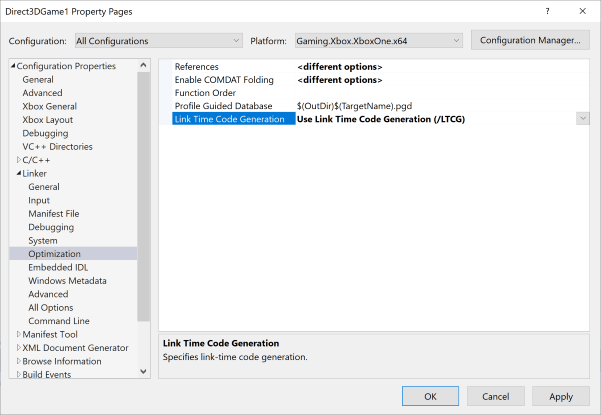 然后,通过将以下新链接器开关之一添加到**命令行**属性页上的**其他选项**框来使用它们:
* 使用 `/FASTGENPROFILE` 或 `/GENPROFILE` 生成 PGO 配置文件(图 12)。有关这些开关的详细信息,请参阅 Microsoft Docs 上的 [/GENPROFILE, /FASTGENPROFILE (Generate Profiling Instrumented Build)](https://learn.microsoft.com/cpp/build/reference/genprofile-fastgenprofile-generate-profiling-instrumented-build)。**图 12. 设置用于生成 PGO 配置文件的链接器开关。**
然后,通过将以下新链接器开关之一添加到**命令行**属性页上的**其他选项**框来使用它们:
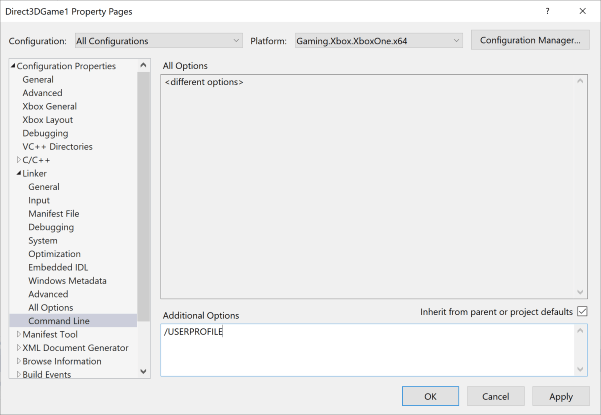
* 使用 `/FASTGENPROFILE` 或 `/GENPROFILE` 生成 PGO 配置文件(图 12)。有关这些开关的详细信息,请参阅 Microsoft Docs 上的 [/GENPROFILE, /FASTGENPROFILE (Generate Profiling Instrumented Build)](https://learn.microsoft.com/cpp/build/reference/genprofile-fastgenprofile-generate-profiling-instrumented-build)。**图 12. 设置用于生成 PGO 配置文件的链接器开关。** 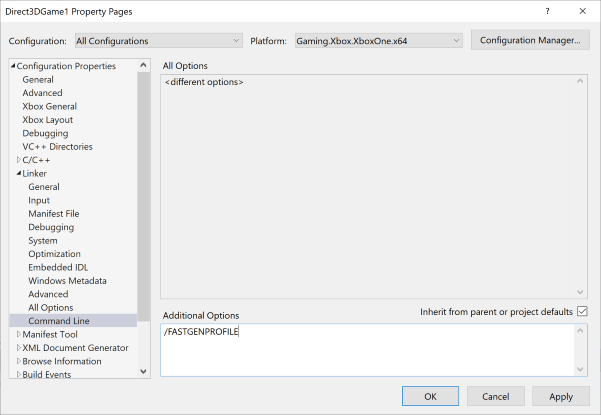 * 使用 `/USEPROFILE` 针对一组 PGO 配置文件进行优化(图 13)。有关此开关的详细信息,请参阅 Microsoft Docs 上的 [/USEPROFILE (Run PGO in thread safe mode)](https://learn.microsoft.com/cpp/build/reference/useprofile)。**图 13. 设置用于针对一组 PGO 配置文件进行优化的链接器开关。**
  ## PGO 故障排除
### 运行时性能
在分析插桩版本时,工具本身可能会导致性能问题。这类问题可能使你的游戏难以控制。`/FASTGENPROFILE` 开关是一个不错的选择,可以使插桩版本对于分析交互式游戏会话更快。
### 依赖项
如果你启用了 PGO 插桩后发现你的游戏无法再加载,请确认 *pgort140.dll* 和 *vcruntime140.dll* 与你的游戏 .exe 文件位于同一文件夹中。
如果尝试运行 *pgosweep.exe* 失败(通常报错为 STATUS\_DLL\_NOT\_FOUND),请确认 *pgort140.dll*、*psapi.dll* 和 *vcruntime140.dll* 与你的游戏 .exe 文件位于同一文件夹中。
另外,请确认你使用的是 x64 *onecore* 版本的 *pgort140.dll* 和 *pgosweep.exe*。
### 内存使用
PGO 使用内存来捕获配置文件,这对于占用大量可用内存的游戏可能是一个挑战。若要成功执行 PGO,你可能需要使用 [xbconfig.exe](/tools/tools-console/commandlinetools/xbconfig) 中的 ExtraTitleMemory 设置、[XMemTransferMemory](/reference/system/xmem/functions/xmemtransfermemory) 函数或两者兼用。
使用 `/FASTGENPROFILE` 而不是 `/LTCG:PGInstrument` 或 `/GENPROFILE` 会产生更小的内存占用,效果相似。
\[!NOTE] 在 2020 年 6 月 GDK(及其 QFE)中发布的 PGO 版本使用游戏内存。在未来的版本中,PGO 将更新为正确使用工具内存。
## 另请参阅
[按配置优化](/tools/tools-console/pgo/pgo) [XBOX 主机游戏开发(环境和工具)](/tools/tools-console/gc-tools-console-toc)
## Related topics
- [Profile-guided optimization](/zh-CN/tools/tools-console/pgo/pgo.md)
- [面向 XBOX 游戏的 Profile-Guided Optimization (PGO)](/zh-CN/tools/tools-console/pgo/index.md)
- [Visual Studio](/zh-CN/tools/tools-pc/visualstudio/index.md)
- [Visual Studio(目录)](/zh-CN/tools/tools-pc/visualstudio/gr-visualstudio-toc.md)
- [Visual Studio 2019 支持说明](/zh-CN/tools/tools-pc/visualstudio/gr-vs-2019-support-notes.md)
## PGO 故障排除
### 运行时性能
在分析插桩版本时,工具本身可能会导致性能问题。这类问题可能使你的游戏难以控制。`/FASTGENPROFILE` 开关是一个不错的选择,可以使插桩版本对于分析交互式游戏会话更快。
### 依赖项
如果你启用了 PGO 插桩后发现你的游戏无法再加载,请确认 *pgort140.dll* 和 *vcruntime140.dll* 与你的游戏 .exe 文件位于同一文件夹中。
如果尝试运行 *pgosweep.exe* 失败(通常报错为 STATUS\_DLL\_NOT\_FOUND),请确认 *pgort140.dll*、*psapi.dll* 和 *vcruntime140.dll* 与你的游戏 .exe 文件位于同一文件夹中。
另外,请确认你使用的是 x64 *onecore* 版本的 *pgort140.dll* 和 *pgosweep.exe*。
### 内存使用
PGO 使用内存来捕获配置文件,这对于占用大量可用内存的游戏可能是一个挑战。若要成功执行 PGO,你可能需要使用 [xbconfig.exe](/tools/tools-console/commandlinetools/xbconfig) 中的 ExtraTitleMemory 设置、[XMemTransferMemory](/reference/system/xmem/functions/xmemtransfermemory) 函数或两者兼用。
使用 `/FASTGENPROFILE` 而不是 `/LTCG:PGInstrument` 或 `/GENPROFILE` 会产生更小的内存占用,效果相似。
\[!NOTE] 在 2020 年 6 月 GDK(及其 QFE)中发布的 PGO 版本使用游戏内存。在未来的版本中,PGO 将更新为正确使用工具内存。
## 另请参阅
[按配置优化](/tools/tools-console/pgo/pgo) [XBOX 主机游戏开发(环境和工具)](/tools/tools-console/gc-tools-console-toc)
## Related topics
- [Profile-guided optimization](/zh-CN/tools/tools-console/pgo/pgo.md)
- [面向 XBOX 游戏的 Profile-Guided Optimization (PGO)](/zh-CN/tools/tools-console/pgo/index.md)
- [Visual Studio](/zh-CN/tools/tools-pc/visualstudio/index.md)
- [Visual Studio(目录)](/zh-CN/tools/tools-pc/visualstudio/gr-visualstudio-toc.md)
- [Visual Studio 2019 支持说明](/zh-CN/tools/tools-pc/visualstudio/gr-vs-2019-support-notes.md)