> ## Documentation Index
> Fetch the complete documentation index at: https://devdocs.xbox.com/llms.txt
> Use this file to discover all available pages before exploring further.
# 在合作伙伴中心配置数据共享
> 通过在合作伙伴中心配置功能区域共享策略,授予配套应用、Web 服务和其他游戏访问你的 XBOX services 数据的权限。
你可以使用[合作伙伴中心](https://developer.microsoft.com/dashboard/windows/overview)允许其他服务、游戏和应用访问游戏的 XBOX services 设置和数据。
例如,你可能希望 Web 服务在网站上显示排行榜,或者你可能有一个配套应用,它可以访问游戏的 title storage 来查看或修改已保存的游戏数据。
此主题不适用于 XBOX Creators Program 中的游戏。
默认情况下,只有游戏本身可以访问存储在 XBOX services 上的设置和数据。
你可以通过在合作伙伴中心配置数据共享来更改此设置。
## 添加配置:
1. 转到[合作伙伴中心](https://developer.microsoft.com/dashboard/windows/overview),然后选择你的游戏。
2. 在左侧导航窗格中选择 **XBOX services** > **Gameplay settings**。**Gameplay Setting** 页面出现。
3. 选择 **Access Policies** 链接。**Feature area sharing** 部分出现在 **Gameplay Setting** 页面内。
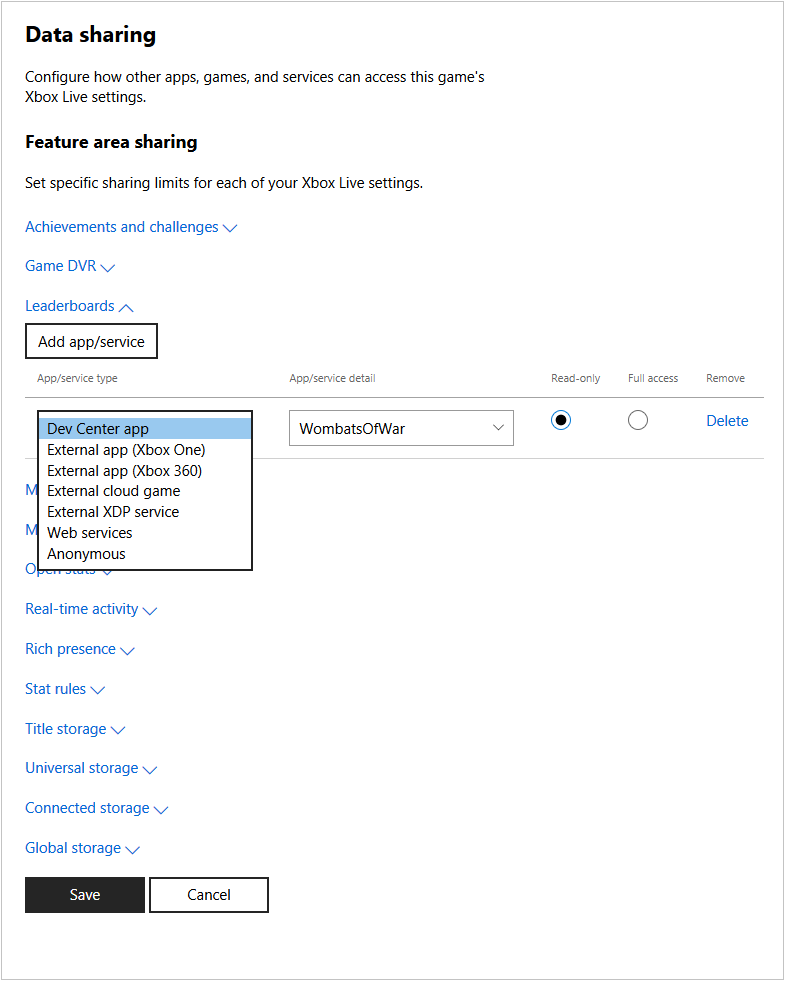 4. 选择你要授予访问权限的设置,例如 **Game DVR** 或 **Leaderboards**,然后选择 **Add app/service**。
会在配置为访问该设置的应用/服务列表底部添加一个新行。
在 Game DVR 中,默认情况下存在一个 "Anonymous" 的行。
Anonymous 应用/服务类型允许 XBOX services 在 XBOX 体验中共享游戏片段;例如,此类型使 Game DVR 片段出现在游戏的游戏中心中。
新游戏默认为 Game DVR 配置为 Anonymous。
请勿从 Game DVR 部分删除 Anonymous 类型。
5. 在下拉框中选择应用或服务类型(例如 **Dev Center app** 或 **Anonymous**),并填写详细信息框以指明将访问数据的应用、title ID 或 service ID。
6. 选择应用或服务是否只能读取数据,或者是否具有对数据的完全访问权限。
7. 对每个设置以及每个需要访问这些设置的应用或服务重复此操作。要删除条目,请选择 **Delete**。
8. 完成后,选择 **Save** 按钮。
## Related topics
- [门户配置概述](/zh-CN/services/xbox-services/fundamentals/portal-config/live-portal-config-overview.md)
- [门户配置](/zh-CN/services/xbox-services/fundamentals/portal-config/index.md)
- [在合作伙伴中心配置 Title Storage](/zh-CN/services/xbox-services/storage/title-storage/config/live-title-storage-portal-config.md)
- [在合作伙伴中心配置 Game DVR](/zh-CN/services/xbox-services/fundamentals/portal-config/live-game-dvr.md)
- [在合作伙伴中心配置 XBOX services 设置](/zh-CN/services/xbox-services/fundamentals/portal-config/live-config-xbl-setup.md)
4. 选择你要授予访问权限的设置,例如 **Game DVR** 或 **Leaderboards**,然后选择 **Add app/service**。
会在配置为访问该设置的应用/服务列表底部添加一个新行。
在 Game DVR 中,默认情况下存在一个 "Anonymous" 的行。
Anonymous 应用/服务类型允许 XBOX services 在 XBOX 体验中共享游戏片段;例如,此类型使 Game DVR 片段出现在游戏的游戏中心中。
新游戏默认为 Game DVR 配置为 Anonymous。
请勿从 Game DVR 部分删除 Anonymous 类型。
5. 在下拉框中选择应用或服务类型(例如 **Dev Center app** 或 **Anonymous**),并填写详细信息框以指明将访问数据的应用、title ID 或 service ID。
6. 选择应用或服务是否只能读取数据,或者是否具有对数据的完全访问权限。
7. 对每个设置以及每个需要访问这些设置的应用或服务重复此操作。要删除条目,请选择 **Delete**。
8. 完成后,选择 **Save** 按钮。
## Related topics
- [门户配置概述](/zh-CN/services/xbox-services/fundamentals/portal-config/live-portal-config-overview.md)
- [门户配置](/zh-CN/services/xbox-services/fundamentals/portal-config/index.md)
- [在合作伙伴中心配置 Title Storage](/zh-CN/services/xbox-services/storage/title-storage/config/live-title-storage-portal-config.md)
- [在合作伙伴中心配置 Game DVR](/zh-CN/services/xbox-services/fundamentals/portal-config/live-game-dvr.md)
- [在合作伙伴中心配置 XBOX services 设置](/zh-CN/services/xbox-services/fundamentals/portal-config/live-config-xbl-setup.md)