> ## Documentation Index
> Fetch the complete documentation index at: https://devdocs.xbox.com/llms.txt
> Use this file to discover all available pages before exploring further.
# 在 Partner Center 中配置本地化字符串
> 使用 localization.xml 下载和上传工作流在 Partner Center 中为 XBOX Live 成就和 XSAPI 值配置本地化字符串。
本主题介绍如何在 Partner Center 中配置本地化字符串。这些值决定 title 配置(例如成就)在系统 UI 和 XSAPI 调用(例如 `XblAchievementsGetAchievementAsync`)中的显示方式。当系统当前语言设置中不提供本地化字符串时,[XBOX 服务语言回退](/services/xbox-services/community/localized-strings/live-language-fallback)过程将决定使用哪种语言。
例如,如果一项成就在 Partner Center 中具有 en-US 本地化字符串 "Hello, World!" 和 es-MX 字符串 "¡Hola, mundo!",则会出现以下场景:
| 系统设置 | 使用的语言 | 在系统 UI 和 XSAPI 调用中的显示 |
| ----- | ------- | --------------------- |
| en-US | en-US | "Hello, World!" |
| es-MX | es-MX | "¡Hola, mundo!" |
| es-AR | es-MX\* | "¡Hola, mundo!" |
| zh-CN | en-US\* | "Hello, World!" |
\*XBOX 服务语言回退
要将您的所有 XBOX 服务配置本地化为您的游戏支持的所有语言,请使用 Partner Center 中的**本地化字符串**页面。您在后续 XBOX 服务页面上创建的服务配置会添加到您下载的文件中。
使用 [Partner Center](https://partner.microsoft.com/dashboard) 以与您的游戏关联的所有语言配置本地化字符串。
**在 Partner Center 中添加字符串配置**
1. 在 Partner Center 中,选择 **XBOX services** > **Gameplay settings** > **Localized strings**。您的 title 的**本地化字符串**配置页面会出现。
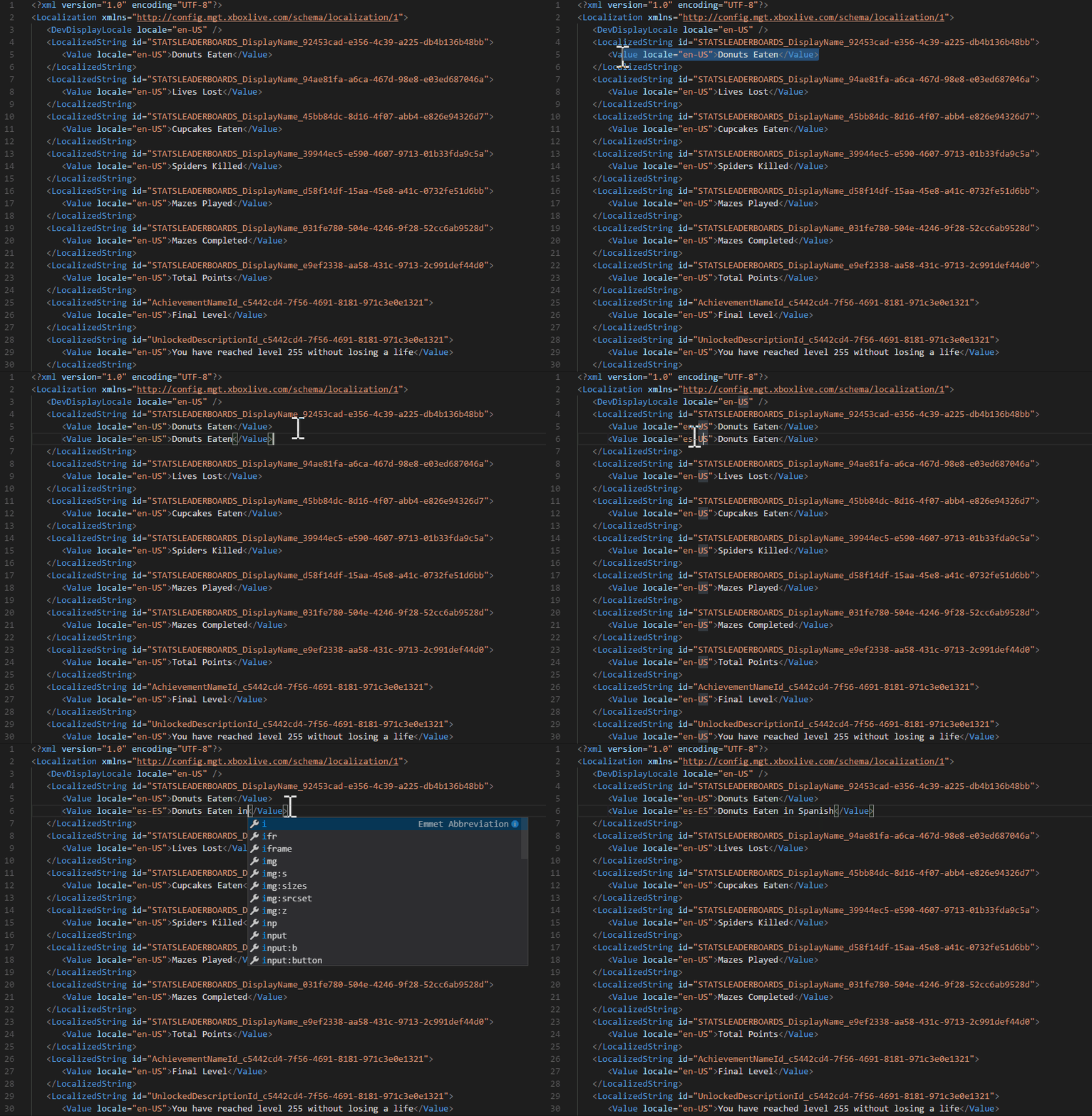
2. 选择 **Download**。localization.xml 文件将下载到您的本地计算机。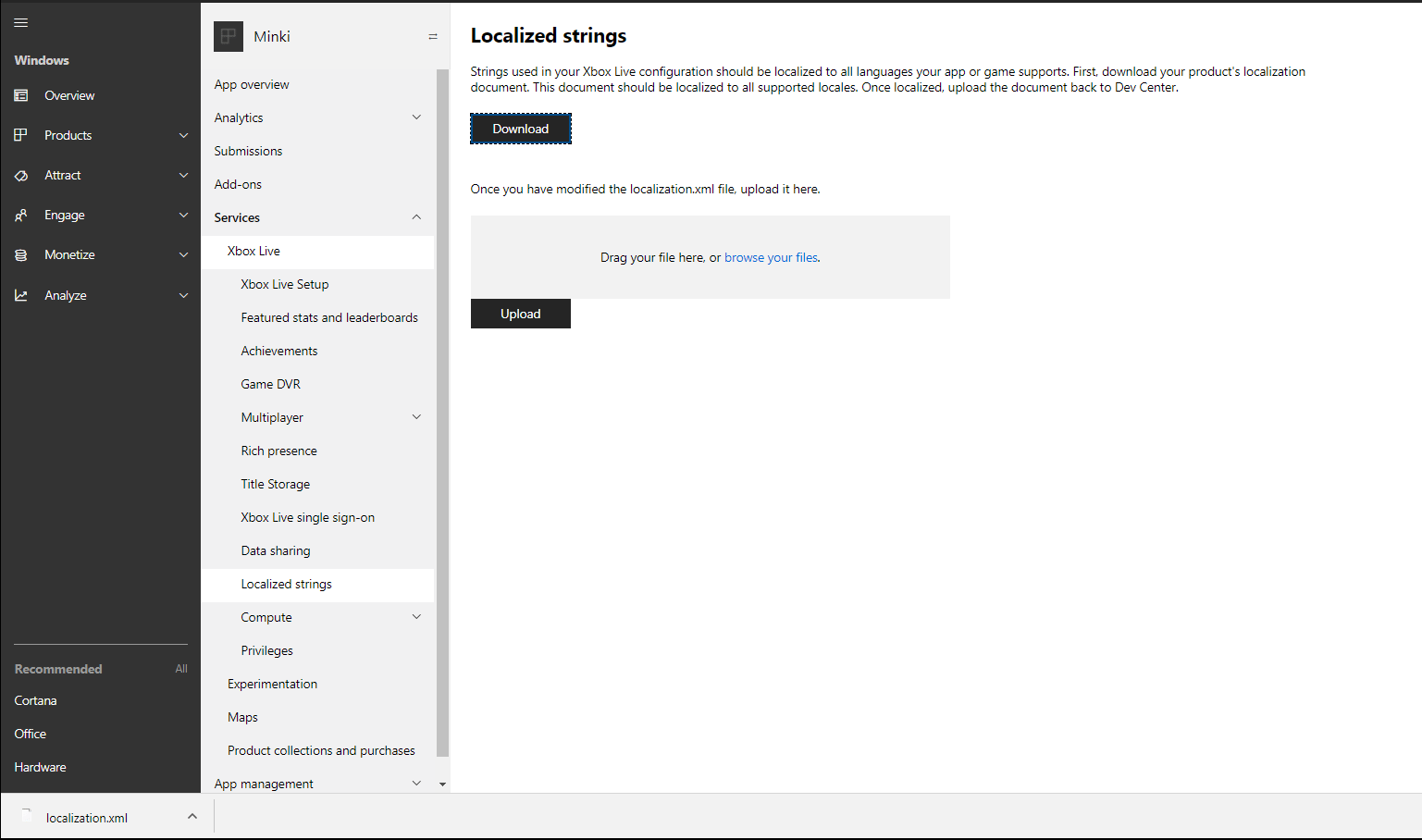 3. 在以下视频示例中,您可以通过复制 `Donuts Eaten` 标签并将区域值更改为您选择的语言以及本地化字符串的值来添加本地化字符串。为避免错误,开发者显示区域内至少必须有一个 `Value` 标签。`locale` 属性的值必须包含语言代码,后跟连字符 (-) 和国家/地区代码。例如,`locale="en-US"` 表示美国使用的英语。有关详细信息,请参阅 Partner Center supported languages and locales。
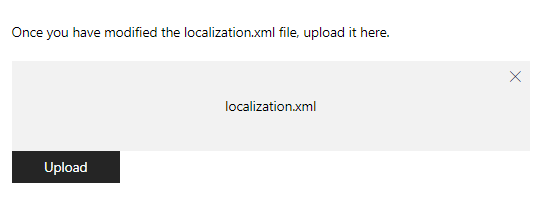
 4. 添加所有本地化字符串后,将 .xml 文件拖入提供的框中(如下所示)或浏览您的本地计算机来上传它。
 下表显示了当您上传 localization.xml 文件时可能出现的错误消息。
| 错误 | 原因 |
| --------------------------------------------------------------------------------------------------------------------------------------------------------------------------------------------------------------------------------------------------------------------------------------------------------------------------------------------------------------------------------- | ---------------------------------------------------------------------------- |
| Failed XSD Validation: The element 'LocalizedString' in namespace '[https://config.mgt.xboxlive.com/schema/localization/1](https://config.mgt.xboxlive.com/schema/localization/1)' cannot contain text. List of possible elements expected: 'Value' in namespace '[https://config.mgt.xboxlive.com/schema/localization/1](https://config.mgt.xboxlive.com/schema/localization/1)' | 当 XML 文档格式错误时会发生这种情况。 |
| Localization string is missing an entry for the developer display locale. | 当本地化字符串缺少区域与开发者显示区域不匹配的条目时会发生此错误。 |
| Failed XSD Validation: The 'locale' attribute is invalid - The value ' ' is invalid according to its datatype '[https://config.mgt.xboxlive.com/schema/localization/1:NonEmptyString](https://config.mgt.xboxlive.com/schema/localization/1:NonEmptyString)' - The Pattern constraint failed. | 当本地化字符串在 `` 标签中缺少区域值时会发生此错误。`locale` 属性的值必须包含语言代码,后跟连字符 (-) 和国家/地区代码。 |
## 另请参阅
[XBOX Live 语言回退](/services/xbox-services/community/localized-strings/live-language-fallback)
## Related topics
- [本地化字符串](/zh-CN/services/xbox-services/community/localized-strings/live-localized-strings-nav.md)
- [门户配置概述](/zh-CN/services/xbox-services/fundamentals/portal-config/live-portal-config-overview.md)
- [本地化与全球化概览](/zh-CN/build/game-principles/localization.md)
- [为游戏配置 XBOX 服务](/zh-CN/publishing/game-publishing/tutorial-xbox-managed/how-to-configure-xbox-services.md)
- [在合作伙伴中心配置 XBOX services 设置](/zh-CN/services/xbox-services/fundamentals/portal-config/live-config-xbl-setup.md)
下表显示了当您上传 localization.xml 文件时可能出现的错误消息。
| 错误 | 原因 |
| --------------------------------------------------------------------------------------------------------------------------------------------------------------------------------------------------------------------------------------------------------------------------------------------------------------------------------------------------------------------------------- | ---------------------------------------------------------------------------- |
| Failed XSD Validation: The element 'LocalizedString' in namespace '[https://config.mgt.xboxlive.com/schema/localization/1](https://config.mgt.xboxlive.com/schema/localization/1)' cannot contain text. List of possible elements expected: 'Value' in namespace '[https://config.mgt.xboxlive.com/schema/localization/1](https://config.mgt.xboxlive.com/schema/localization/1)' | 当 XML 文档格式错误时会发生这种情况。 |
| Localization string is missing an entry for the developer display locale. | 当本地化字符串缺少区域与开发者显示区域不匹配的条目时会发生此错误。 |
| Failed XSD Validation: The 'locale' attribute is invalid - The value ' ' is invalid according to its datatype '[https://config.mgt.xboxlive.com/schema/localization/1:NonEmptyString](https://config.mgt.xboxlive.com/schema/localization/1:NonEmptyString)' - The Pattern constraint failed. | 当本地化字符串在 `` 标签中缺少区域值时会发生此错误。`locale` 属性的值必须包含语言代码,后跟连字符 (-) 和国家/地区代码。 |
## 另请参阅
[XBOX Live 语言回退](/services/xbox-services/community/localized-strings/live-language-fallback)
## Related topics
- [本地化字符串](/zh-CN/services/xbox-services/community/localized-strings/live-localized-strings-nav.md)
- [门户配置概述](/zh-CN/services/xbox-services/fundamentals/portal-config/live-portal-config-overview.md)
- [本地化与全球化概览](/zh-CN/build/game-principles/localization.md)
- [为游戏配置 XBOX 服务](/zh-CN/publishing/game-publishing/tutorial-xbox-managed/how-to-configure-xbox-services.md)
- [在合作伙伴中心配置 XBOX services 设置](/zh-CN/services/xbox-services/fundamentals/portal-config/live-config-xbl-setup.md)