> ## Documentation Index
> Fetch the complete documentation index at: https://devdocs.xbox.com/llms.txt
> Use this file to discover all available pages before exploring further.
# 使用玩家页面
> 使用纯文本查找或对 PlayerProfile 列的 KQL 复杂查询来搜索 PlayFab Game Manager 玩家页面,以检查和筛选账户。
## 监控玩家
您可以使用 **Players** 页面检查游戏中的玩家。
* 转到 **Game Manager** 页面。
* 从左侧菜单中选择 **Players**。
* 选择 **Players** 选项卡。
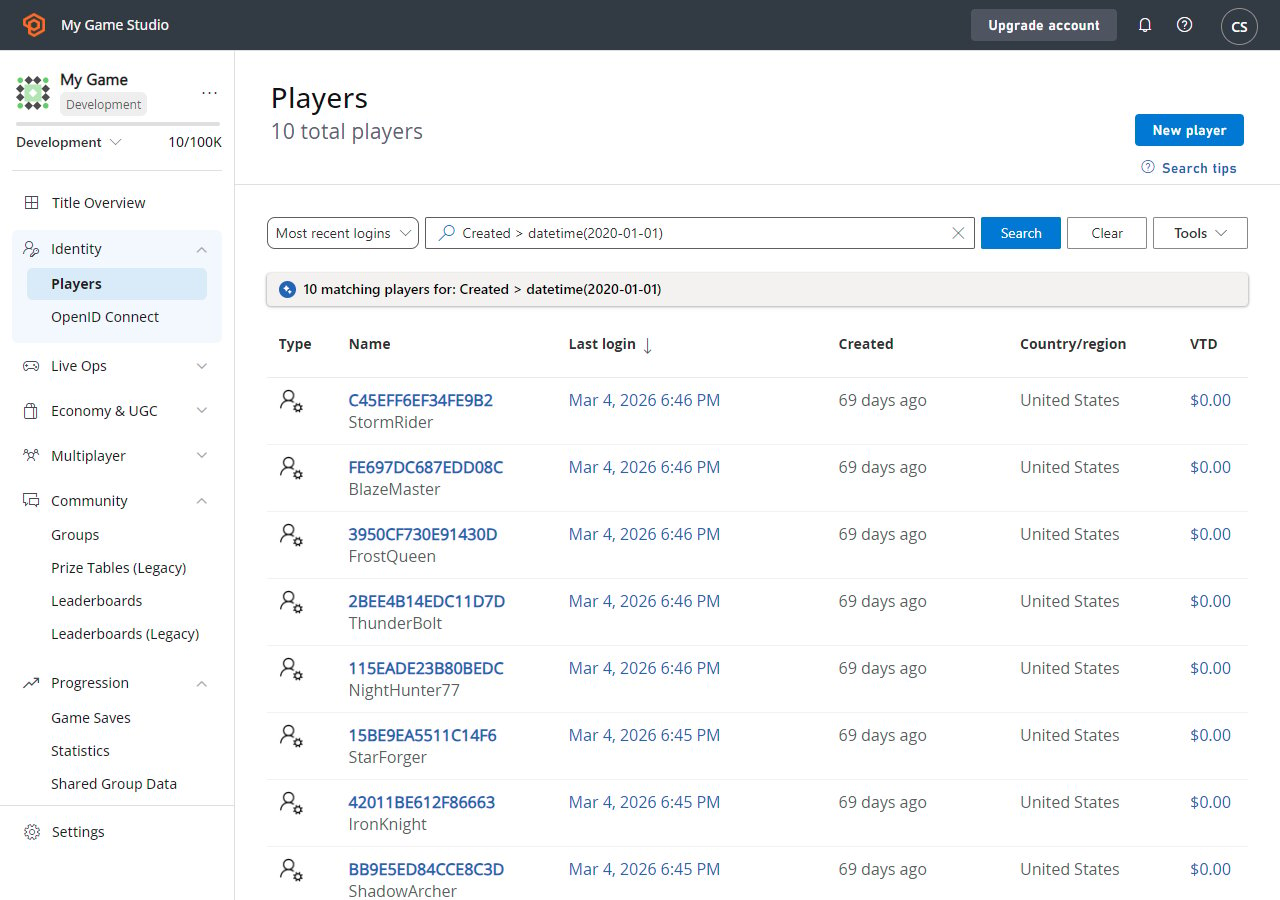 在此页面上,您可以以表格格式查看已注册玩家的列表。表格中包含有关玩家的一般信息。
您可以选择玩家 ID 标签(蓝色)以[检查特定玩家的详细信息](/services/playfab/player-progression/player-data/player-details)。您也可以使用 **Search Query** 字段来查找玩家。
## 搜索技术
**Search** 查询字段接受两种类型的查询:
1. **简单**:在搜索框中键入纯文本,以返回 ID 列上的字面字符串匹配。
2. **复杂**:使用 [KQL 语法](https://learn.microsoft.com/en-us/azure/data-explorer/kusto/query/)构造查询。
可以从右上角的 **Search Tips** 按钮访问示例复杂查询。选择示例查询将使用正确的 KQL 语法自动填充搜索框。然后,您可以编辑查询以适应您的用例。
玩家资料表包含许多属性,并非所有属性都在 UI 中可视化。但是,您可以使用复杂查询在任何这些 [PlayerProfile](/services/playfab/api-references/events/data-types/playerprofile) 列上进行搜索。
请记住 - 您可以使用任何[可搜索的玩家字段](/services/playfab/api-references/events/data-types/playerprofile)作为查询参数。
## Related topics
- [使用玩家详情](/zh-CN/services/playfab/player-progression/player-data/player-details.md)
- [使用玩家统计信息](/zh-CN/services/playfab/community/leaderboards/tournaments-leaderboards/using-player-statistics.md)
- [使用玩家自定义属性进行高级分段](/zh-CN/services/playfab/live-service-management/game-configuration/segmentation/advanced-segmentation.md)
- [使用玩家库存](/zh-CN/services/playfab/player-progression/player-data/player-inventory.md)
- [使用玩家发布者数据奖励多游戏游玩](/zh-CN/services/playfab/player-progression/player-data/using-player-publisher-data.md)
在此页面上,您可以以表格格式查看已注册玩家的列表。表格中包含有关玩家的一般信息。
您可以选择玩家 ID 标签(蓝色)以[检查特定玩家的详细信息](/services/playfab/player-progression/player-data/player-details)。您也可以使用 **Search Query** 字段来查找玩家。
## 搜索技术
**Search** 查询字段接受两种类型的查询:
1. **简单**:在搜索框中键入纯文本,以返回 ID 列上的字面字符串匹配。
2. **复杂**:使用 [KQL 语法](https://learn.microsoft.com/en-us/azure/data-explorer/kusto/query/)构造查询。
可以从右上角的 **Search Tips** 按钮访问示例复杂查询。选择示例查询将使用正确的 KQL 语法自动填充搜索框。然后,您可以编辑查询以适应您的用例。
玩家资料表包含许多属性,并非所有属性都在 UI 中可视化。但是,您可以使用复杂查询在任何这些 [PlayerProfile](/services/playfab/api-references/events/data-types/playerprofile) 列上进行搜索。
请记住 - 您可以使用任何[可搜索的玩家字段](/services/playfab/api-references/events/data-types/playerprofile)作为查询参数。
## Related topics
- [使用玩家详情](/zh-CN/services/playfab/player-progression/player-data/player-details.md)
- [使用玩家统计信息](/zh-CN/services/playfab/community/leaderboards/tournaments-leaderboards/using-player-statistics.md)
- [使用玩家自定义属性进行高级分段](/zh-CN/services/playfab/live-service-management/game-configuration/segmentation/advanced-segmentation.md)
- [使用玩家库存](/zh-CN/services/playfab/player-progression/player-data/player-inventory.md)
- [使用玩家发布者数据奖励多游戏游玩](/zh-CN/services/playfab/player-progression/player-data/using-player-publisher-data.md)