> ## Documentation Index
> Fetch the complete documentation index at: https://devdocs.xbox.com/llms.txt
> Use this file to discover all available pages before exploring further.
# 使用玩家库存
> 使用服务器权威的客户端和服务器 API 处理 PlayFab 玩家库存,以购买物品、发放货币并管理基于目录的内容。
# 玩家库存
## 要求
要使用玩家库存,你必须为你的游戏定义一个目录。有关更多信息,请阅读我们的[目录](/services/playfab/economy-monetization/economy/items/catalogs)教程。
可选地,你也可以为你的目录定义商店。
目录是游戏中所有可用物品的列表,而商店是目录中物品的一个子集,可以选择独有的定价方式。
每个目录可以定义多个商店,以便你可以根据用户细分或其他因素向玩家展示不同的物品集。
一旦你通过 [**Game Manager**](https://developer.playfab.com/) 或通过我们的管理 API 调用 **[SetCatalogItems](xref:titleid.playfabapi.com.admin.title-widedatamanagement.setcatalogitems)** 或 **[UpdateCatalogItems](xref:titleid.playfabapi.com.admin.title-widedatamanagement.updatecatalogitems)** 定义了目录,你就可以在客户端和服务器上使用各种库存 API 调用。
## API 概述
所有库存 API 调用都设计为*服务器权威*且安全。正确使用时,客户无法作弊或获得他们未赚取的物品。
**客户端**:
* 使用虚拟货币购买物品:**[PurchaseItem](xref:titleid.playfabapi.com.client.playeritemmanagement.purchaseitem)**
* 进行真实货币购买:**[StartPurchase](xref:titleid.playfabapi.com.client.playeritemmanagement.startpurchase)、[PayForPurchase](xref:titleid.playfabapi.com.client.playeritemmanagement.payforpurchase)、[ConfirmPurchase](xref:titleid.playfabapi.com.client.playeritemmanagement.confirmpurchase)**
* 可以查看玩家拥有的物品:**[GetUserInventory](xref:titleid.playfabapi.com.client.playeritemmanagement.getuserinventory)**
* 可以移除物品:**[ConsumeItem](xref:titleid.playfabapi.com.client.playeritemmanagement.consumeitem)、[UnlockContainerInstance](xref:titleid.playfabapi.com.client.playeritemmanagement.unlockcontainerinstance)**
* 可以交易物品:**[OpenTrade](xref:titleid.playfabapi.com.client.trading.opentrade)、[GetPlayerTrades](xref:titleid.playfabapi.com.client.trading.getplayertrades)、[AcceptTrade](xref:titleid.playfabapi.com.client.trading.accepttrade)、[CancelTrade](xref:titleid.playfabapi.com.client.trading.canceltrade)**
**服务器**:
* 可以赠送/发放物品:**[GrantItemsToUser](xref:titleid.playfabapi.com.server.playeritemmanagement.grantitemstouser)**
* 可以查看物品:**[GetUserInventory](xref:titleid.playfabapi.com.server.playeritemmanagement.getuserinventory)**
* 可以修改物品:**[ModifyItemUses](xref:titleid.playfabapi.com.server.playeritemmanagement.modifyitemuses)、[UpdateUserInventoryItemCustomData](xref:titleid.playfabapi.com.server.playeritemmanagement.updateuserinventoryitemcustomdata)**
* 可以移除物品:**[RevokeInventoryItem](xref:titleid.playfabapi.com.server.playeritemmanagement.revokeinventoryitem)、[ConsumeItem](xref:titleid.playfabapi.com.server.playeritemmanagement.consumeitem)、[UnlockContainerInstance](xref:titleid.playfabapi.com.server.playeritemmanagement.unlockcontainerinstance)**
下面显示的示例说明了调用这些 API 方法的代码块,并为玩家库存设置了基本用例。
作为参考,这些示例来自 **Unicorn Battle**,这是我们构建的用于演示 PlayFab 功能的示例游戏。
下面使用的 **AU** 虚拟货币是**金币**,这是一种通过击败怪物赚取的免费货币(请参阅我们的[货币](/services/playfab/economy-monetization/economy-v2/tutorials/currencies)教程)。
在开始之前,我们将定义几个实用函数,它们将在本指南的大多数示例中被使用和重复使用。
```csharp theme={null}
// **** Shared example utility functions ****
// This is typically NOT how you handle success
// You will want to receive a specific result-type for your API, and utilize the result parameters
void LogSuccess(PlayFabResultCommon result) {
var requestName = result.Request.GetType().Name;
Debug.Log(requestName + " successful");
}
// Error handling can be very advanced, such as retry mechanisms, logging, or other options
// The simplest possible choice is just to log it
void LogFailure(PlayFabError error) {
Debug.LogError(error.GenerateErrorReport());
}
```
## 仅客户端示例:购买并使用生命药水
客户端 API 调用顺序:[PurchaseItem](xref:titleid.playfabapi.com.client.playeritemmanagement.purchaseitem)、[GetUserInventory](xref:titleid.playfabapi.com.client.playeritemmanagement.getuserinventory)、[ConsumeItem](xref:titleid.playfabapi.com.server.playeritemmanagement.consumeitem)
首先,我们必须先在我们的目录中定义物品。
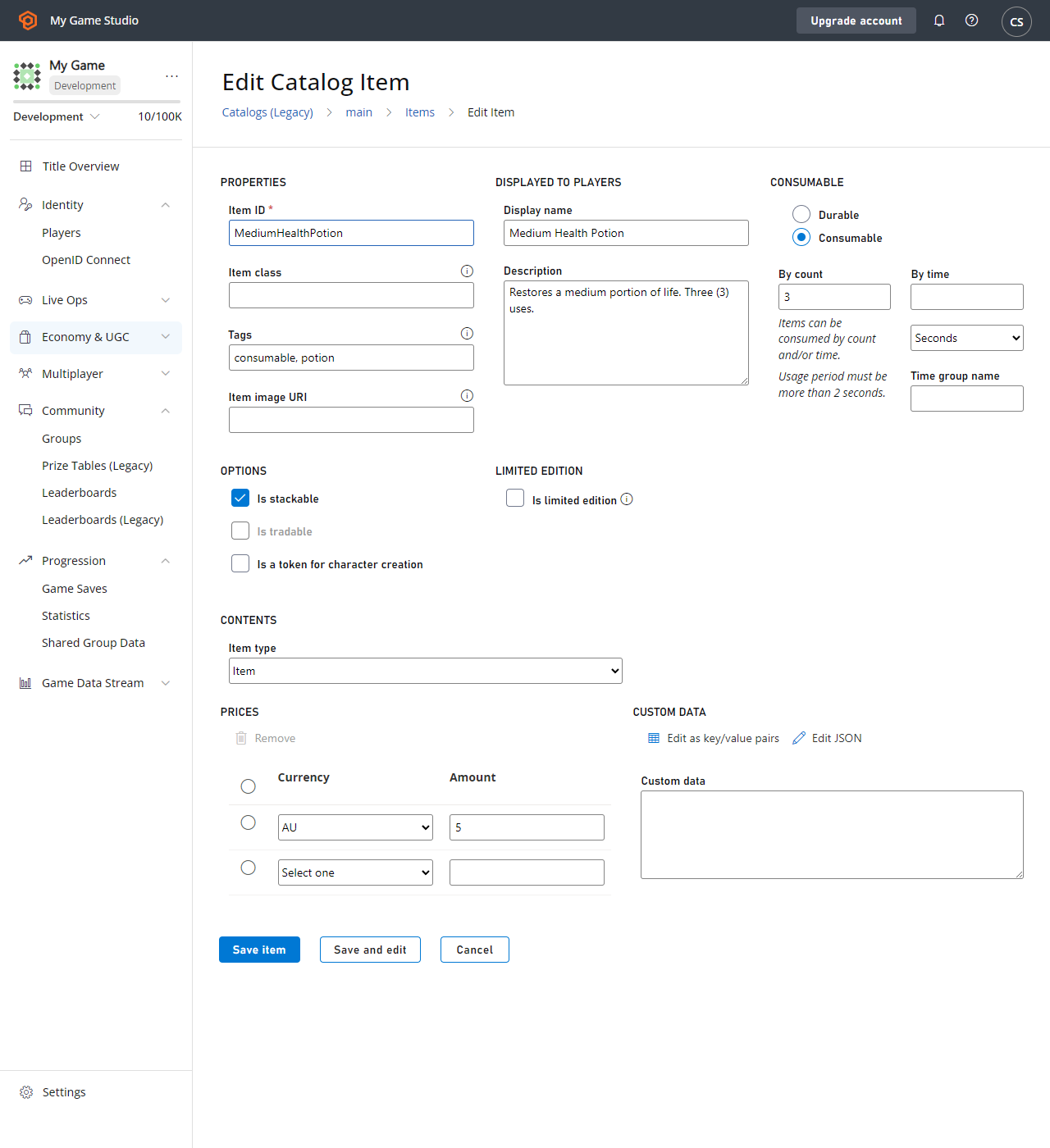 以下是**生命药水**的 `CatalogItem` 要求。
* `PurchaseItem` 需要一个正的物品价格(`5 AU`)。
* `ConsumeItem` 要求物品为 `Consumable`,并具有正的物品数量(`3`)。
* 进行购买的玩家必须在其虚拟货币余额中有 5 AU 可用。
下面提供了每个调用的代码。
```csharp theme={null}
void MakePurchase() {
PlayFabClientAPI.PurchaseItem(new PurchaseItemRequest {
// In your game, this should just be a constant matching your primary catalog
CatalogVersion = "CharacterClasses",
ItemId = "MediumHealthPotion",
Price = 5,
VirtualCurrency = "AU"
}, LogSuccess, LogFailure);
}
void GetInventory() {
PlayFabClientAPI.GetUserInventory(new GetUserInventoryRequest(), LogSuccess, LogFailure);
}
void ConsumePotion() {
PlayFabClientAPI.ConsumeItem(new ConsumeItemRequest {
ConsumeCount = 1,
// This is a hex-string value from the GetUserInventory result
ItemInstanceId = "potionInstanceId"
}, LogSuccess, LogFailure);
}
```
## 示例:玩家获得并打开容器
API 调用顺序:
* PlayFab 服务器 API [GrantItemsToUser](xref:titleid.playfabapi.com.server.playeritemmanagement.grantitemstouser)
* PlayFab 客户端 API [UnlockContainerInstance](xref:titleid.playfabapi.com.client.playeritemmanagement.unlockcontainerinstance)
首先,我们必须以目录中定义的容器开始。对于本示例中的容器,我们选择了 **CrystalContainer**。
此示例还演示了使用钥匙打开容器 - 一个*可选*的物品,必须也在玩家库存中,`UnlockContainerInstance` 调用才能成功。
以下是**生命药水**的 `CatalogItem` 要求。
* `PurchaseItem` 需要一个正的物品价格(`5 AU`)。
* `ConsumeItem` 要求物品为 `Consumable`,并具有正的物品数量(`3`)。
* 进行购买的玩家必须在其虚拟货币余额中有 5 AU 可用。
下面提供了每个调用的代码。
```csharp theme={null}
void MakePurchase() {
PlayFabClientAPI.PurchaseItem(new PurchaseItemRequest {
// In your game, this should just be a constant matching your primary catalog
CatalogVersion = "CharacterClasses",
ItemId = "MediumHealthPotion",
Price = 5,
VirtualCurrency = "AU"
}, LogSuccess, LogFailure);
}
void GetInventory() {
PlayFabClientAPI.GetUserInventory(new GetUserInventoryRequest(), LogSuccess, LogFailure);
}
void ConsumePotion() {
PlayFabClientAPI.ConsumeItem(new ConsumeItemRequest {
ConsumeCount = 1,
// This is a hex-string value from the GetUserInventory result
ItemInstanceId = "potionInstanceId"
}, LogSuccess, LogFailure);
}
```
## 示例:玩家获得并打开容器
API 调用顺序:
* PlayFab 服务器 API [GrantItemsToUser](xref:titleid.playfabapi.com.server.playeritemmanagement.grantitemstouser)
* PlayFab 客户端 API [UnlockContainerInstance](xref:titleid.playfabapi.com.client.playeritemmanagement.unlockcontainerinstance)
首先,我们必须以目录中定义的容器开始。对于本示例中的容器,我们选择了 **CrystalContainer**。
此示例还演示了使用钥匙打开容器 - 一个*可选*的物品,必须也在玩家库存中,`UnlockContainerInstance` 调用才能成功。
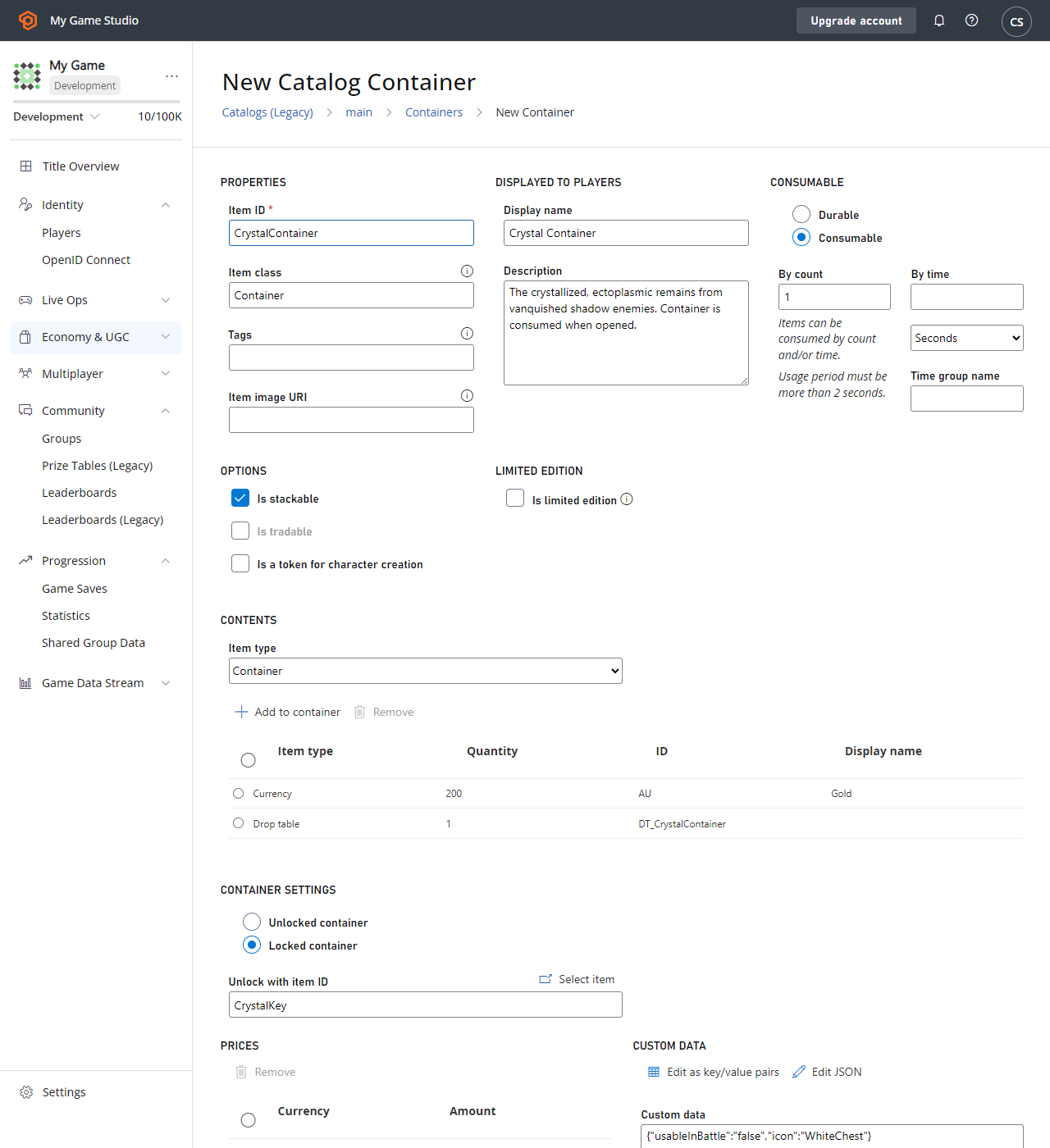 本示例中我们的 **CrystalContainer** 的 `CatalogItem` 要求包括:
* 将 **CrystalContainer** 定义为**容器**。
* **容器**可以选择性地定义一个**钥匙物品**,然后需要该物品来解锁**容器** - 在本例中是 **CrystalKey**。
* 强烈建议你的**容器**和任何**钥匙***都*是**可消耗的**,并具有正的使用次数,以便在使用后从玩家库存中移除。
### 服务器代码
```csharp theme={null}
void GrantItem() {
PlayFabServerAPI.GrantItemsToUser(new GrantItemsToUserRequest {
// In your game, this should just be a constant
CatalogVersion = "CharacterClasses",
// Servers must define which character they're modifying in every API call
PlayFabId = "playFabId",
ItemIds = new List { "CrystalContainer" }
}, LogSuccess, LogFailure);
}
```
### 客户端代码
```csharp theme={null}
void OpenContainer() {
PlayFabClientAPI.UnlockContainerInstance(new UnlockContainerInstanceRequest {
// In your game, this should just be a constant matching your primary catalog
CatalogVersion = "CharacterClasses",
ContainerItemInstanceId = "containerInstanceId",
KeyItemInstanceId = "keyInstanceId"
}, LogSuccess, LogFailure);
}
```
### 消耗钥匙和容器
在前面的示例中,建议钥匙和/或容器是*可消耗的*,尽管这只是一个建议。
但是,如果容器及其钥匙(如果有)*不可消耗*,则可以*无限次*重新打开容器,每次都将其内容授予玩家。
由于玩家库存容量*不是*无限的,因此强烈不鼓励这种模式。当解锁可消耗容器时,容器和使用的可消耗钥匙都会自动*减少*其使用次数,当使用次数达到零时将它们从玩家库存中移除。
### 可行选项
**可消耗容器**,无**钥匙**:最基本的模式,容器在打开时被消耗,并且没有钥匙。
**可消耗容器,可消耗钥匙**:简单的锁定容器情况,允许玩家使用钥匙打开容器。*两者*都被消耗,玩家只能使用还有剩余使用次数的钥匙打开还有剩余使用次数的容器。
**耐用容器,可消耗钥匙**:允许玩家在每次找到钥匙时打开容器。钥匙被消耗,而只有当钥匙还有剩余使用次数时才能打开容器。
**可消耗容器,耐用钥匙**:允许玩家保留一把可以打开*所有*该钥匙对应容器的钥匙。容器被消耗,但玩家保留了以后使用该钥匙打开容器的能力。
## 示例:从玩家处回购库存物品
没有用于从玩家处回购库存物品的内置 API,因为该过程与游戏相关。但是,你可以使用*现有*的 API 方法来打造自己的 **SellItem** 体验:
* PlayFab 服务器 API [RevokeInventoryItem](xref:titleid.playfabapi.com.server.playeritemmanagement.revokeinventoryitem) 允许你移除库存物品。
* PlayFab 服务器 API [AddUserVirtualCurrency](xref:titleid.playfabapi.com.server.playeritemmanagement.adduservirtualcurrency) 可以返回适量的虚拟货币。目前无法通过 PlayFab API 方法返回真实货币。
物品和虚拟货币有密切关系。有关更多信息,请参阅我们的[货币](/services/playfab/economy-monetization/economy-v2/tutorials/currencies)教程。
以下 CloudScript 函数将上述两个服务器调用组合到一个客户端可访问的调用中。
```javascript theme={null}
var SELL_PRICE_RATIO = 0.75;
function SellItem_internal(soldItemInstanceId, requestedVcType) {
var inventory = server.GetUserInventory({ PlayFabId: currentPlayerId });
var itemInstance = null;
for (var i = 0; i < inventory.Inventory.length; i++) {
if (inventory.Inventory[i].ItemInstanceId === soldItemInstanceId)
itemInstance = inventory.Inventory[i];
}
if (!itemInstance)
throw "Item instance not found"; // Protection against client providing incorrect data
var catalog = server.GetCatalogItems({ CatalogVersion: itemInstance.CatalogVersion });
var catalogItem = null;
for (var c = 0; c < catalog.Catalog.length; c++) {
if (itemInstance.ItemId === catalog.Catalog[c].ItemId)
catalogItem = catalog.Catalog[c];
}
if (!catalogItem)
throw "Catalog Item not found"; // Title catalog consistency check (You should never remove a catalog/catalogItem if any player owns that item
var buyPrice = 0;
if (catalogItem.VirtualCurrencyPrices.hasOwnProperty(requestedVcType))
buyPrice = catalogItem.VirtualCurrencyPrices[requestedVcType];
if (buyPrice <= 0)
throw "Cannot redeem this item for: " + requestedVcType; // The client requested a virtual currency which doesn't apply to this item
// Once we get here all safety checks are passed - Perform the sell
var sellPrice = Math.floor(buyPrice * SELL_PRICE_RATIO);
server.AddUserVirtualCurrency({ PlayFabId: currentPlayerId, Amount: sellPrice, VirtualCurrency: requestedVcType });
server.RevokeInventoryItem({ PlayFabId: currentPlayerId, ItemInstanceId: soldItemInstanceId });
}
handlers.SellItem = function (args) {
if (!args || !args.soldItemInstanceId || !args.requestedVcType)
throw "Invalid input parameters, expected soldItemInstanceId and requestedVcType";
SellItem_internal(args.soldItemInstanceId, args.requestedVcType);
};
```
### 最佳实践
* 在进行任何更改之前,请确保验证所有客户端输入信息是否*有效*。
* CloudScript 不是原子的,因此调用顺序很重要:**AddUserVirtualCurrency** 可能成功,而 **RevokeInventoryItem** 可能失败。
通常最好在此过程中给玩家一些他们*没有*赚到的东西,而不是在*没有*补偿的情况下拿走某些东西。
然后可以从客户端访问此 CloudScript 函数。
```csharp theme={null}
void SellItem()
{
PlayFabClientAPI.ExecuteCloudScript(new ExecuteCloudScriptRequest
{
// This must match "SellItem" from the "handlers.SellItem = ..." line in the CloudScript file
FunctionName = "SellItem",
FunctionParameter = new Dictionary{
// This is a hex-string value from the GetUserInventory result
{ "soldItemInstanceId", "sellItemInstanceId" },
// Which redeemable virtual currency should be used in your game
{ "requestedVcType", "AU" },
}
}, LogSuccess, LogFailure);
}
```
## Related topics
- [玩家库存快速入门](/zh-CN/services/playfab/economy-monetization/economy-v2/inventory/quickstart.md)
- [PlayFab 库存 API](/zh-CN/services/playfab/economy-monetization/economy-v2/inventory/index.md)
- [使用玩家自定义属性进行高级分段](/zh-CN/services/playfab/live-service-management/game-configuration/segmentation/advanced-segmentation.md)
- [Economy(旧版)快速入门](/zh-CN/services/playfab/economy-monetization/economy/quickstart.md)
- [使用玩家详情](/zh-CN/services/playfab/player-progression/player-data/player-details.md)
本示例中我们的 **CrystalContainer** 的 `CatalogItem` 要求包括:
* 将 **CrystalContainer** 定义为**容器**。
* **容器**可以选择性地定义一个**钥匙物品**,然后需要该物品来解锁**容器** - 在本例中是 **CrystalKey**。
* 强烈建议你的**容器**和任何**钥匙***都*是**可消耗的**,并具有正的使用次数,以便在使用后从玩家库存中移除。
### 服务器代码
```csharp theme={null}
void GrantItem() {
PlayFabServerAPI.GrantItemsToUser(new GrantItemsToUserRequest {
// In your game, this should just be a constant
CatalogVersion = "CharacterClasses",
// Servers must define which character they're modifying in every API call
PlayFabId = "playFabId",
ItemIds = new List { "CrystalContainer" }
}, LogSuccess, LogFailure);
}
```
### 客户端代码
```csharp theme={null}
void OpenContainer() {
PlayFabClientAPI.UnlockContainerInstance(new UnlockContainerInstanceRequest {
// In your game, this should just be a constant matching your primary catalog
CatalogVersion = "CharacterClasses",
ContainerItemInstanceId = "containerInstanceId",
KeyItemInstanceId = "keyInstanceId"
}, LogSuccess, LogFailure);
}
```
### 消耗钥匙和容器
在前面的示例中,建议钥匙和/或容器是*可消耗的*,尽管这只是一个建议。
但是,如果容器及其钥匙(如果有)*不可消耗*,则可以*无限次*重新打开容器,每次都将其内容授予玩家。
由于玩家库存容量*不是*无限的,因此强烈不鼓励这种模式。当解锁可消耗容器时,容器和使用的可消耗钥匙都会自动*减少*其使用次数,当使用次数达到零时将它们从玩家库存中移除。
### 可行选项
**可消耗容器**,无**钥匙**:最基本的模式,容器在打开时被消耗,并且没有钥匙。
**可消耗容器,可消耗钥匙**:简单的锁定容器情况,允许玩家使用钥匙打开容器。*两者*都被消耗,玩家只能使用还有剩余使用次数的钥匙打开还有剩余使用次数的容器。
**耐用容器,可消耗钥匙**:允许玩家在每次找到钥匙时打开容器。钥匙被消耗,而只有当钥匙还有剩余使用次数时才能打开容器。
**可消耗容器,耐用钥匙**:允许玩家保留一把可以打开*所有*该钥匙对应容器的钥匙。容器被消耗,但玩家保留了以后使用该钥匙打开容器的能力。
## 示例:从玩家处回购库存物品
没有用于从玩家处回购库存物品的内置 API,因为该过程与游戏相关。但是,你可以使用*现有*的 API 方法来打造自己的 **SellItem** 体验:
* PlayFab 服务器 API [RevokeInventoryItem](xref:titleid.playfabapi.com.server.playeritemmanagement.revokeinventoryitem) 允许你移除库存物品。
* PlayFab 服务器 API [AddUserVirtualCurrency](xref:titleid.playfabapi.com.server.playeritemmanagement.adduservirtualcurrency) 可以返回适量的虚拟货币。目前无法通过 PlayFab API 方法返回真实货币。
物品和虚拟货币有密切关系。有关更多信息,请参阅我们的[货币](/services/playfab/economy-monetization/economy-v2/tutorials/currencies)教程。
以下 CloudScript 函数将上述两个服务器调用组合到一个客户端可访问的调用中。
```javascript theme={null}
var SELL_PRICE_RATIO = 0.75;
function SellItem_internal(soldItemInstanceId, requestedVcType) {
var inventory = server.GetUserInventory({ PlayFabId: currentPlayerId });
var itemInstance = null;
for (var i = 0; i < inventory.Inventory.length; i++) {
if (inventory.Inventory[i].ItemInstanceId === soldItemInstanceId)
itemInstance = inventory.Inventory[i];
}
if (!itemInstance)
throw "Item instance not found"; // Protection against client providing incorrect data
var catalog = server.GetCatalogItems({ CatalogVersion: itemInstance.CatalogVersion });
var catalogItem = null;
for (var c = 0; c < catalog.Catalog.length; c++) {
if (itemInstance.ItemId === catalog.Catalog[c].ItemId)
catalogItem = catalog.Catalog[c];
}
if (!catalogItem)
throw "Catalog Item not found"; // Title catalog consistency check (You should never remove a catalog/catalogItem if any player owns that item
var buyPrice = 0;
if (catalogItem.VirtualCurrencyPrices.hasOwnProperty(requestedVcType))
buyPrice = catalogItem.VirtualCurrencyPrices[requestedVcType];
if (buyPrice <= 0)
throw "Cannot redeem this item for: " + requestedVcType; // The client requested a virtual currency which doesn't apply to this item
// Once we get here all safety checks are passed - Perform the sell
var sellPrice = Math.floor(buyPrice * SELL_PRICE_RATIO);
server.AddUserVirtualCurrency({ PlayFabId: currentPlayerId, Amount: sellPrice, VirtualCurrency: requestedVcType });
server.RevokeInventoryItem({ PlayFabId: currentPlayerId, ItemInstanceId: soldItemInstanceId });
}
handlers.SellItem = function (args) {
if (!args || !args.soldItemInstanceId || !args.requestedVcType)
throw "Invalid input parameters, expected soldItemInstanceId and requestedVcType";
SellItem_internal(args.soldItemInstanceId, args.requestedVcType);
};
```
### 最佳实践
* 在进行任何更改之前,请确保验证所有客户端输入信息是否*有效*。
* CloudScript 不是原子的,因此调用顺序很重要:**AddUserVirtualCurrency** 可能成功,而 **RevokeInventoryItem** 可能失败。
通常最好在此过程中给玩家一些他们*没有*赚到的东西,而不是在*没有*补偿的情况下拿走某些东西。
然后可以从客户端访问此 CloudScript 函数。
```csharp theme={null}
void SellItem()
{
PlayFabClientAPI.ExecuteCloudScript(new ExecuteCloudScriptRequest
{
// This must match "SellItem" from the "handlers.SellItem = ..." line in the CloudScript file
FunctionName = "SellItem",
FunctionParameter = new Dictionary{
// This is a hex-string value from the GetUserInventory result
{ "soldItemInstanceId", "sellItemInstanceId" },
// Which redeemable virtual currency should be used in your game
{ "requestedVcType", "AU" },
}
}, LogSuccess, LogFailure);
}
```
## Related topics
- [玩家库存快速入门](/zh-CN/services/playfab/economy-monetization/economy-v2/inventory/quickstart.md)
- [PlayFab 库存 API](/zh-CN/services/playfab/economy-monetization/economy-v2/inventory/index.md)
- [使用玩家自定义属性进行高级分段](/zh-CN/services/playfab/live-service-management/game-configuration/segmentation/advanced-segmentation.md)
- [Economy(旧版)快速入门](/zh-CN/services/playfab/economy-monetization/economy/quickstart.md)
- [使用玩家详情](/zh-CN/services/playfab/player-progression/player-data/player-details.md)