> ## Documentation Index
> Fetch the complete documentation index at: https://devdocs.xbox.com/llms.txt
> Use this file to discover all available pages before exploring further.
# PlayFab Multiplayer Servers 2.0 计费
> PlayFab Multiplayer Servers (Thunderhead) 的计费方式,该服务用于在 Azure 中运行可动态扩展的自定义游戏服务器池。
PlayFab Multiplayer Servers 按使用量计费。本文档介绍该计费方案。
## 基本 PlayFab 核心服务包包含哪些内容?
启用 MPS 后,您可以在有限容量内免费使用 Multiplayer Servers,以评估多人服务器游戏的构建。
| 服务 | 包含的免费额度 | 区域 |
| ------------- | -------------- | ------------ |
| Dasv4 VM 核心小时 | 750 Dasv4 核心小时 | East US |
| Dasv4 VM 核心小时 | 750 Dasv4 核心小时 | North Europe |
| 网络出口 | 10 GB | Zone 1 |
| 网络出口 | 10 GB | Zone 2 |
免费评估模式还对游戏服务器中同时激活的核心数施加限制。但是,付费模式允许游戏开发者为其游戏请求额外的服务器核心。
免费评估模式下的最大同时核心配额为:
| 服务 | 包含的免费额度 | 区域 |
| ------------ | ----------- | ------------ |
| 最大 Dasv4 核心数 | 24 Dasv4 核心 | East US |
| 最大 Dasv4 核心数 | 24 Dasv4 核心 | North Europe |
这通常*不足以*发布正式游戏,但可以帮助您评估该服务并开始使用。
若要详细了解这些不同的虚拟机,请参见 [Azure VM 规格](https://learn.microsoft.com/en-us/azure/virtual-machines/sizes)。
每月提供的免费评估容量取决于您的 PlayFab 计费模式,也基于核心小时数进行计算。这意味着如果您使用 **单核** Av2 系列 VM(如 A1v2),您有 750 小时免费时长。但如果您使用 **双核** Av2 系列 VM(如 A2v2),您只有 375 小时免费时长——750 除以 2 等于 375。
## PlayFab Multiplayer Servers 的消费定价
需要 Multiplayer Servers 的游戏必须通过 PlayFab 的消费定价方案购买额外容量。以下是用于计费服务器使用的 PlayFab 资源:
* **虚拟机实例小时** - 您的游戏服务器所使用的虚拟机时间小时数。不同的虚拟机和容器选项按不同费率计费。有关详细信息,请参见 [Multiplayer Servers 详细价格表](https://playfab.com/mps-detailed-pricing/)。
* **网络出口** - 您的游戏服务器向 Internet 传输的数据量(以千兆字节为单位)。网络出口根据源数据中心以不同费率计费。
一份典型的月度账单可能是:
| *项目* | 用量 | 单位 | 费率 | 小计 |
| --------------------------------------------- | ---- | ----- | ------- | ---------- |
| Multiplayer Servers - D2v2 - US East | 1000 | VM 小时 | \$0.252 | \$252.00 |
| Multiplayer Servers - D2v2 - US South Central | 1000 | VM 小时 | \$0.252 | \$252.00 |
| Multiplayer Servers - D2v2 - US West | 1000 | VM 小时 | \$0.252 | \$252.00 |
| Multiplayer Servers - D2v2 - West Europe | 1000 | VM 小时 | \$0.252 | \$252.00 |
| Multiplayer Servers - D2v2 - Australia East | 100 | VM 小时 | \$0.302 | \$30.20 |
| Multiplayer Servers - D2v2 - East Asia | 100 | VM 小时 | \$0.277 | \$27.70 |
| Multiplayer - 数据出口 - Zone 1 | 1000 | GB | \$0.05 | \$50.00 |
| Multiplayer - 数据出口 - Zone 2 | 100 | GB | \$0.08 | \$8.00 |
| *合计* | | | | \$1,124.90 |
## 以示例估算成本
您的多人服务器部署的主要输入为:
1. 多人游戏活动量(总用户分钟数)。
2. 单个会话中的用户数量。
3. 会话所需的计算、存储和网络资源。
4. 备用会话的开销。
一个示例:
| 输入 | 定义 |
| ----------- | ------------------- |
| 12 分钟 | 每位用户每月的平均多人游戏时长(分钟) |
| 100,000 名用户 | 每月的独立用户数 |
| 4 名用户 | 每个会话的平均用户数 |
```console theme={null}
12 User Minutes 100,000 Users 1 Session Session Minutes
------------------ × ----------------- × ------------ = 300,000 -----------------
User⁄Month Month 4 Users Month
```
对于 100,000 名用户,每人每月平均 12 用户分钟,得到 120 万用户分钟。将该数字除以每个会话的平均用户数 (4),结果为总共使用了 300,000 会话分钟。
在此示例中,我们在一台 **2 核 D2\_v3** 虚拟机上打包了 3 个服务器:
| 输入 | 定义 |
| ------ | ----------- |
| 3 个服务器 | 每台虚拟机的服务器数量 |
| D2\_v3 | 虚拟机规格 |
```console theme={null}
300,000 Server Minutes 1 D2_v3 VM 100,000 D2_v3 VM Minutes
----------------------- x ------------ = ------------------------
Month 3 Servers Month
```
由于我们在 **D2\_v3 VM** 上运行 3 个服务器,我们可以用总会话分钟数 (300,000) 除以服务器数 (3),得到本月大致使用了多少 **D2\_v3 VM** 分钟 (100,000)。
传统的多人服务器托管可能需要您为大量的开销容量付费,以应对玩家活动的自然波动。
游戏通常在周末和节假日会有更高级别的并发,这要求您为超出必要数量的服务器"预付费",如下所示。
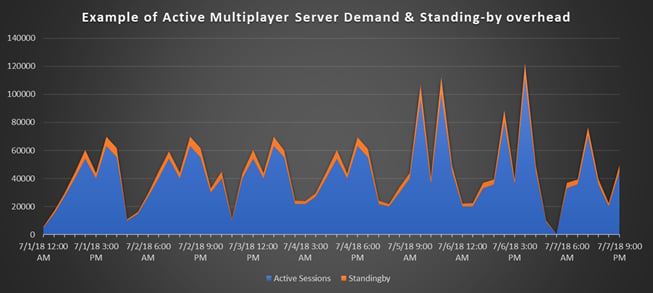 PlayFab Multiplayer Server 生成会随您的玩家基数自动扩展。通过调用 [RequestMultiplayerServer](xref:titleid.playfabapi.com.multiplayer.multiplayerserver.requestmultiplayerserver) 将服务器转换为活动状态,并在您的游戏服务器终止时(通常是"多人对局"结束时)稍后回收。
然而,以最小的分配延迟提供这种动态扩展需要一些开销,主要来自两个关键来源:
1. **备用服务器** - 玩家不想等待服务器,PlayFab 的目标是在 3 秒内响应服务器请求。PlayFab 维护一组备用服务器,以确保服务器立即可用。当新的分配消耗该备用池时,PlayFab 会初始化新的备用会话。所需的备用会话数量取决于在峰值使用期间新会话的请求速度,以及可以创建和初始化的速度。
2. **虚拟机碎片** - 如果您在单台虚拟机上托管多个会话,有时可能会因碎片而产生额外的备用容量。在我们每台虚拟机三个会话的示例中,一台虚拟机可能只有一个活动会话,剩余的两个"位置"被添加到备用池中。在活动会话终止之前,该虚拟机必须保持在线——即使不需要额外的备用容量。
通常,这些开销来源会使所需的计算小时数增加 *20%*。
### 计算网络流量
网络出口可能是一笔可观的支出,尤其是对于有许多同时连接玩家(32 名以上)的大型多人会话。在开发和测试期间,在本地运行您的服务器以估算其在游戏过程中的网络使用情况。
| 输入 | 定义 |
| -- | ------------------- |
| 1 | 服务器在活动游戏期间每秒传输的兆字节数 |
```console theme={null}
300,000 Session Minutes × 60 Seconds/Minute × 1 MBPS/Session = 18,000,000 MB
```
在此示例中,假设测试表明一次多人会话在活跃游戏中每秒发送 1 MB 数据。
由于我们之前计算了每月使用 300,000 服务器分钟,我们可以估算 300,000 名用户 x 每分钟 60 MB 等于每月发送 18,000,000 MB 数据。
## 如何付款
PlayFab 提供三种计费途径。
1. **通过信用卡付款。**
2. **通过 PlayFab 开票付款。** 这非常适合许多专业项目,但需要您联系我们的[客户服务小组](https://playfab.com/contact/)进行设置。
3. **通过 Azure 和 Microsoft 企业协议计费。** 这非常适合可能与 **Azure** 或其他 **Microsoft** 产品线有批量交易的组织。联系我们的[客户服务小组](https://playfab.com/contact/)或您的 **Azure** 解决方案专家以了解更多信息。
在所有这三个选项中,您都会在 Game Manager 中收到有关多人服务器活动的详细分析。但是——对于 Azure/EA 客户——通过 Azure 的最终开票已简化,将以美元计价显示这些高级项目:
* PlayFab Essential Services
* PlayFab Multiplayer Servers
## Related topics
- [PlayFab 服务的 Azure 企业协议 (EA) 计费](/zh-CN/services/playfab/multiplayer/servers/ea-billing.md)
- [Experiments 定价](/zh-CN/services/playfab/live-service-management/game-configuration/experiments/pricing.md)
- [PlayFabMultiplayerServer.OnServerLobbyLeaveAsServerCompleted](/zh-CN/services/playfab/multiplayer/lobby/unity-multiplayer-api-reference/PlayFab.Multiplayer/PlayFabMultiplayer.PlayFabMultiplayerServer/OnServerLobbyLeaveAsServerCompleted.md)
- [PlayFab 多人文档](/zh-CN/services/playfab/multiplayer/index.md)
- [PlayFab 2018 版本发布说明](/zh-CN/services/playfab/release-notes/2018.md)
PlayFab Multiplayer Server 生成会随您的玩家基数自动扩展。通过调用 [RequestMultiplayerServer](xref:titleid.playfabapi.com.multiplayer.multiplayerserver.requestmultiplayerserver) 将服务器转换为活动状态,并在您的游戏服务器终止时(通常是"多人对局"结束时)稍后回收。
然而,以最小的分配延迟提供这种动态扩展需要一些开销,主要来自两个关键来源:
1. **备用服务器** - 玩家不想等待服务器,PlayFab 的目标是在 3 秒内响应服务器请求。PlayFab 维护一组备用服务器,以确保服务器立即可用。当新的分配消耗该备用池时,PlayFab 会初始化新的备用会话。所需的备用会话数量取决于在峰值使用期间新会话的请求速度,以及可以创建和初始化的速度。
2. **虚拟机碎片** - 如果您在单台虚拟机上托管多个会话,有时可能会因碎片而产生额外的备用容量。在我们每台虚拟机三个会话的示例中,一台虚拟机可能只有一个活动会话,剩余的两个"位置"被添加到备用池中。在活动会话终止之前,该虚拟机必须保持在线——即使不需要额外的备用容量。
通常,这些开销来源会使所需的计算小时数增加 *20%*。
### 计算网络流量
网络出口可能是一笔可观的支出,尤其是对于有许多同时连接玩家(32 名以上)的大型多人会话。在开发和测试期间,在本地运行您的服务器以估算其在游戏过程中的网络使用情况。
| 输入 | 定义 |
| -- | ------------------- |
| 1 | 服务器在活动游戏期间每秒传输的兆字节数 |
```console theme={null}
300,000 Session Minutes × 60 Seconds/Minute × 1 MBPS/Session = 18,000,000 MB
```
在此示例中,假设测试表明一次多人会话在活跃游戏中每秒发送 1 MB 数据。
由于我们之前计算了每月使用 300,000 服务器分钟,我们可以估算 300,000 名用户 x 每分钟 60 MB 等于每月发送 18,000,000 MB 数据。
## 如何付款
PlayFab 提供三种计费途径。
1. **通过信用卡付款。**
2. **通过 PlayFab 开票付款。** 这非常适合许多专业项目,但需要您联系我们的[客户服务小组](https://playfab.com/contact/)进行设置。
3. **通过 Azure 和 Microsoft 企业协议计费。** 这非常适合可能与 **Azure** 或其他 **Microsoft** 产品线有批量交易的组织。联系我们的[客户服务小组](https://playfab.com/contact/)或您的 **Azure** 解决方案专家以了解更多信息。
在所有这三个选项中,您都会在 Game Manager 中收到有关多人服务器活动的详细分析。但是——对于 Azure/EA 客户——通过 Azure 的最终开票已简化,将以美元计价显示这些高级项目:
* PlayFab Essential Services
* PlayFab Multiplayer Servers
## Related topics
- [PlayFab 服务的 Azure 企业协议 (EA) 计费](/zh-CN/services/playfab/multiplayer/servers/ea-billing.md)
- [Experiments 定价](/zh-CN/services/playfab/live-service-management/game-configuration/experiments/pricing.md)
- [PlayFabMultiplayerServer.OnServerLobbyLeaveAsServerCompleted](/zh-CN/services/playfab/multiplayer/lobby/unity-multiplayer-api-reference/PlayFab.Multiplayer/PlayFabMultiplayer.PlayFabMultiplayerServer/OnServerLobbyLeaveAsServerCompleted.md)
- [PlayFab 多人文档](/zh-CN/services/playfab/multiplayer/index.md)
- [PlayFab 2018 版本发布说明](/zh-CN/services/playfab/release-notes/2018.md)