> ## Documentation Index
> Fetch the complete documentation index at: https://devdocs.xbox.com/llms.txt
> Use this file to discover all available pages before exploring further.
# 编写自定义 CloudScript
> 编写可从 Unity 客户端、PlayStream 规则和计划任务调用的自定义 PlayFab CloudScript JavaScript 函数,并附有 helloWorld 示例。
CloudScript 是 PlayFab 最灵活的功能之一。它允许客户端代码请求执行任何你能实现的自定义服务器端功能,并且几乎可以与*任何事物*配合使用。除了从客户端或服务器代码显式发起执行请求之外,CloudScript 也可以响应 PlayStream 事件(通过创建*规则*)执行,或者作为计划任务的一部分执行。
[使用 Azure Functions 的 CloudScript](/services/playfab/live-service-management/service-gateway/automation/cloudscript-af/quickstart) 在原本使 CloudScript 出色的基础上进一步改进,支持更多语言并提供更好的调试工作流。
本教程介绍如何编写你的 CloudScript 代码。如需将 CloudScript 文件上传到你的游戏,请参阅 [CloudScript 快速入门](/services/playfab/live-service-management/service-gateway/automation/cloudscript/quickstart)。
本教程演示 Unity 代码示例,但 CloudScript 在所有 SDK 中的工作方式类似。
本教程的先决条件:
* [已使用 PlayFab **Unity SDK** 设置好的 **Unity** 环境](/services/playfab/sdks/unity3d/quickstart)
* 已在 `PlayFabSharedSettings` 对象中设置游戏 ID。
* 项目可以成功登录一个用户。
## 入门:helloWorld
我们的 `helloWorld` 示例适用于全新的游戏,无需在 Game Manager 中进行任何修改。新游戏的默认 CloudScript 文件包含一个名为 `helloWorld` 的处理程序。它使用了一些基本功能:输入参数、日志记录、currentPlayerId 和返回参数。
以下示例展示了默认的 `helloWorld` 函数代码(不含注释)。
```javascript theme={null}
// CloudScript (JavaScript)
handlers.helloWorld = function (args, context) {
var message = "Hello " + currentPlayerId + "!";
log.info(message);
var inputValue = null;
if (args && args.hasOwnProperty("inputValue"))
inputValue = args.inputValue;
log.debug("helloWorld:", { input: inputValue });
return { messageValue: message };
}
```
### 剖析代码
handler 对象在 PlayFab CloudScript 环境中已预先定义。你应将任何 CloudScript 函数添加到此对象。
* `helloWorld` 是可供你的游戏和 SDK 使用的函数,因为它是在 handler 对象中定义的。
* `args` 是来自调用方的一个任意对象。它由 JSON 解析而来,可以以任何格式包含任意数据。
请参阅下一节中的 **FunctionParameter**。
你应以零信任的态度对待此对象。被入侵的客户端或恶意用户可以以*任何*格式在此处提供*任何*信息。
* `Context` 是一个高级参数。在此示例中,它为 *null*。此参数由服务器控制,是安全的。
* `currentPlayerId` 是一个全局变量,被设置为发起此调用的玩家的 PlayFabId。此参数由服务器控制,是安全的。**注意:** 使用 ExecuteEntityCloudScript API 时,除非该实体的实体链中包含 MasterPlayerID,否则此参数为 null。
* `log.info`:`log` 是一个全局对象。它主要用于调试你的 CloudScript。`log` 对象暴露以下方法:`info`、`debug` 和 `error`。本教程稍后有更多细节。
* `return`:你返回的任何对象都会被序列化为 JSON 并返回给调用方。你可以返回任何可 JSON 序列化的对象,以及你希望的任何数据。
如果你的 CloudScript 将机密数据返回到客户端,后果由你自行负责。即使你未在常规游戏过程中向用户显示,已被入侵的客户端或恶意用户也可以检查返回的数据。
## 从 Unity 游戏客户端执行 CloudScript 函数
从客户端调用 CloudScript 函数很简单。你首先需要创建一个 `ExecuteCloudScriptRequest`,并将 `ActionId` 属性设置为要执行的 CloudScript 函数的名称(在此为 `helloWorld`),然后通过我们的 API 将该对象发送到 PlayFab。
你只能调用附加到 handlers JavaScript 对象上的 CloudScript 方法。
若要执行 CloudScript 方法,你需要在客户端中包含以下代码行。
```csharp theme={null}
// Build the request object and access the API
private static void StartCloudHelloWorld()
{
PlayFabClientAPI.ExecuteCloudScript(new ExecuteCloudScriptRequest()
{
FunctionName = "helloWorld", // Arbitrary function name (must exist in your uploaded cloud.js file)
FunctionParameter = new { inputValue = "YOUR NAME" }, // The parameter provided to your function
GeneratePlayStreamEvent = true, // Optional - Shows this event in PlayStream
}, OnCloudHelloWorld, OnErrorShared);
}
// OnCloudHelloWorld defined in the next code block
```
### 剖析代码
[ExecuteCloudScriptRequest](xref:titleid.playfabapi.com.client.server-sidecloudscript.executecloudscript#executecloudscriptrequest) 是任何对 [PlayFabClientAPI.ExecuteCloudScript](xref:titleid.playfabapi.com.client.server-sidecloudscript.executecloudscript) 调用的请求类型。
* `ExecuteCloudScriptRequest.FunctionName` 是一个字符串。该值应与 CloudScript 中定义的函数名称匹配。在此为 `helloWorld`。
* `ExecuteCloudScriptRequest.FunctionParameter` 可以是能够序列化为 JSON 的任何对象。它会成为 `helloWorld` 函数中的第一个 args 参数(参考上一节中的 args)。
* `ExecuteCloudScriptRequest.GeneratePlayStreamEvent` 是可选的。如果为 true,则会向 PlayStream 发布一个事件,你可以在 Game Manager 中查看,或用于其他 PlayStream 触发器。
根据不同语言,`ExecuteCloudScript` 行的最后一部分涉及向 PlayFab CloudScript 服务器发出请求,以及处理特定于该语言的 *Result* 和 *Error*。
例如,在 Unity、JavaScript 或 AS3 中,错误和结果处理通过回调函数提供。
以下是错误处理方法的示例。
```csharp theme={null}
private static void OnCloudHelloWorld(ExecuteCloudScriptResult result) {
// CloudScript returns arbitrary results, so you have to evaluate them one step and one parameter at a time
Debug.Log(JsonWrapper.SerializeObject(result.FunctionResult));
JsonObject jsonResult = (JsonObject)result.FunctionResult;
object messageValue;
jsonResult.TryGetValue("messageValue", out messageValue); // note how "messageValue" directly corresponds to the JSON values set in CloudScript
Debug.Log((string)messageValue);
}
private static void OnErrorShared(PlayFabError error)
{
Debug.Log(error.GenerateErrorReport());
}
```
## 中级概览:全局对象和高级参数
CloudScript 是一组使用 V8 编译并托管在 PlayFab 服务器上的 JavaScript 函数。它可以访问在 [PlayFab API 参考文档](/services/playfab/api-references)中列出的任何服务器 API,以及一个*记录器*、发起 CloudScript 请求的玩家 PlayFab ID,以及请求中包含的任何信息,所有这些都以预设对象的形式提供。
CloudScript 函数本身是全局 handlers 对象的属性。下表列出了这些预定义变量的完整列表。
| 名称 | 用途 |
| :------------------ | :----------------------------------------------------------------------------------------------------------------------------------------------------------------------------------------- |
| **server** | 可以访问在 [PlayFab API 参考文档](/services/playfab/api-references)中列出的所有服务器端 API 调用。可以按以下方式(同步)调用它们:`var result = server.AuthenticateUserTicket(request);` |
| **http** | 执行同步 HTTP 请求,例如:`http.request(url, method, content, contentType, headers, logRequestAndResponse)`。`headers` 对象包含对应各种标头及其值的属性。`logRequestAndResponse` 是一个布尔值,决定该游戏是否应将请求中的任何错误作为响应的一部分记录下来。 |
| **log** | 创建日志语句并将其添加到响应中。日志有三个级别:`log.info()`、`log.debug()` 和 `log.error()`。这三个级别都接受消息字符串,以及一个可选对象,该对象包含要与日志一起包含的额外数据。例如,`log.info('hello!', { time: new Date() });` |
| **currentPlayerId** | 触发 CloudScript 调用的玩家的 PlayFab ID。 |
| **handlers** | 包含你的游戏所有 CloudScript 函数的全局对象。可以通过此对象添加或调用函数。例如,`handlers.pop = function() {};`、`handlers.pop();`。 |
| **script** | 包含 `Revision` 和 `titleId` 的全局对象。`Revision` 表示当前执行的 CloudScript 的**修订编号**,`titleId` 表示当前游戏的 ID。 |
此外,所有处理程序函数都会传入两个参数,详见下文。
| 名称 | 用途 |
| :---------- | :--------------------------------------------------------------------------------------------------------------------------------------------------------------------------------------------------------------------------------------------------------------- |
| **args** | 处理程序函数的第一个参数。`ExecuteCloudscript` 请求中 `FunctionParameter` 字段的对象表示。 |
| **context** | 处理程序函数的第二个参数。当请求由 PlayStream 事件操作触发时的附加信息,包括[触发该操作的事件数据](/services/playfab/api-references/events) (context.playStreamEvent),以及与之关联玩家的[配置文件数据](xref:titleid.playfabapi.com.client.accountmanagement.getplayerprofile#playerprofilemodel) (context.playerProfile)。 |
可以通过 `ExecuteCloudScript` API 或通过预设的 PlayStream 事件操作调用 CloudScript 函数。
有关 `ExecuteCloudScript` 响应的完整详细信息,请参阅 [ExecuteCloudScriptResult](xref:titleid.playfabapi.com.client.server-sidecloudscript.executecloudscript#executecloudscriptresult)。
## 中级:FunctionParameter 与 args
在上一节中,我们描述了如何填充 `request.FunctionParameter`,并在 `args` 参数中查看这些信息。[CloudScript 快速入门](/services/playfab/live-service-management/service-gateway/automation/cloudscript/quickstart)演示了如何上传新的 CloudScript。
将这两者结合,我们可以再举一个从客户端向 CloudScript 传递参数的示例。以前面的示例为例,并按以下方式修改 CloudScript 代码和客户端代码。
```javascript theme={null}
handlers.helloWorld = function (args) {
// ALWAYS validate args parameter passed in from clients (Better than we do here)
var message = "Hello " + args.name + "!"; // Utilize the name parameter sent from client
log.info(message);
return { messageValue: message };
}
```
```csharp theme={null}
// Build the request object and access the API
private static void StartCloudHelloWorld()
{
PlayFabClientAPI.ExecuteCloudScript(new ExecuteCloudScriptRequest()
{
FunctionName = "helloWorld", // Arbitrary function name (must exist in your uploaded cloud.js file)
FunctionParameter = new { name = "YOUR NAME" }, // The parameter provided to your function
GeneratePlayStreamEvent = true, // Optional - Shows this event in PlayStream
}, OnCloudHelloWorld, OnErrorShared);
}
private static void OnCloudHelloWorld(ExecuteCloudScriptResult result) {
// CloudScript returns arbitrary results, so you have to evaluate them one step and one parameter at a time
Debug.Log(JsonWrapper.SerializeObject(result.FunctionResult));
JsonObject jsonResult = (JsonObject)result.FunctionResult;
object messageValue;
jsonResult.TryGetValue("messageValue", out messageValue); // note how "messageValue" directly corresponds to the JSON values set in CloudScript
Debug.Log((string)messageValue);
}
private static void OnErrorShared(PlayFabError error)
{
Debug.Log(error.GenerateErrorReport());
}
```
进行这些更改后,你现在可以轻松地在 CloudScript 与你的客户端之间发送和接收数据。
需要指出,来自客户端的任何数据都容易受到黑客攻击和滥用。
在更新后端*之前*,你始终应该验证输入参数。验证输入参数的过程会因游戏而异,但最基本的验证会检查输入是否在可接受的范围和时间段内。
## 中级:调用服务器 API
如前所述,在 CloudScript 方法中,你可以访问完整的一组服务器 API 调用。这使你的云代码可以充当专用服务器。
常见的服务器任务:
* 更新玩家统计和数据。
* 授予物品和货币。
* 随机生成游戏数据。
* 安全地计算战斗结果等等...
有关所需参数和对象结构,请参阅我们[PlayFab API 参考文档](/services/playfab/api-references)中列出的服务器 API。
以下示例来自一个潜在的 CloudScript 处理程序。
```javascript theme={null}
// CloudScript (JavaScript)
//See: JSON.parse, JSON.stringify, parseInt and other built-in javascript helper functions for manipulating data
var currentState; // here we are calculating the current player's game state
// here we are fetching the "SaveState" key from PlayFab,
var playerData = server.GetUserReadOnlyData({"PlayFabId" : currentPlayerId, "Keys" : ["SaveState"]});
var previousState = {}; //if we return a matching key-value pair, then we can proceed otherwise we will need to create a new record.
if(playerData.Data.hasOwnProperty("SaveState"))
{
previousState = playerData.Data["SaveState"];
}
var writeToServer = {};
writeToServer["SaveState"] = previousState + currentState; // pseudo Code showing that the previous state is updated to the current state
var result = server.UpdateUserReadOnlyData({"PlayFabId" : currentPlayerId, "Data" : writeToServer, "Permission":"Public" });
if(result)
{
log.info(result);
}
else
{
log.error(result);
}
```
## 高级:PlayStream 事件操作
可以配置 CloudScript 函数以响应 PlayStream 事件运行。
1. 在任意浏览器中:
* 访问 **PlayFab Game Manager**。
* 找到你的**游戏**。
* 在侧边栏的 **Build** 下,转到 **Automation** 选项卡。
* 转到 **Rules** 选项卡。
页面看起来会像下面的示例。
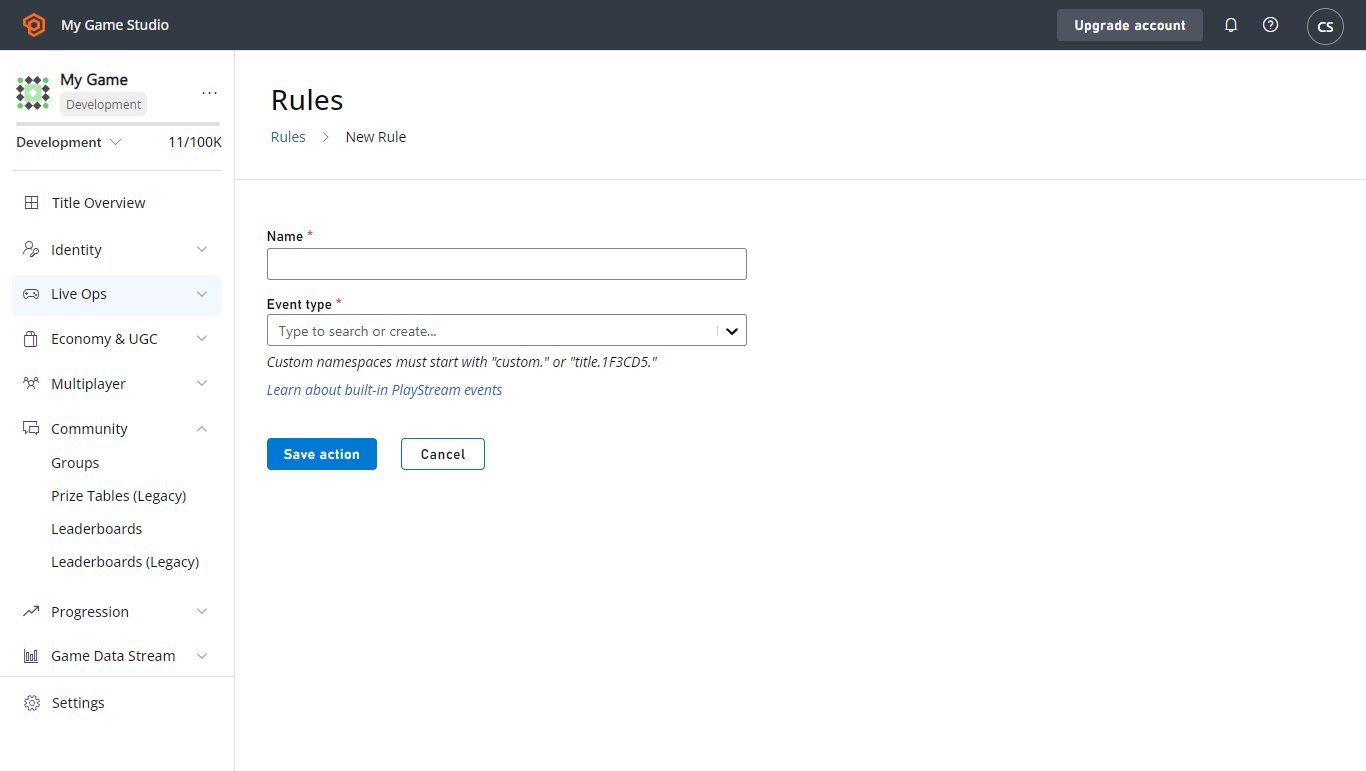
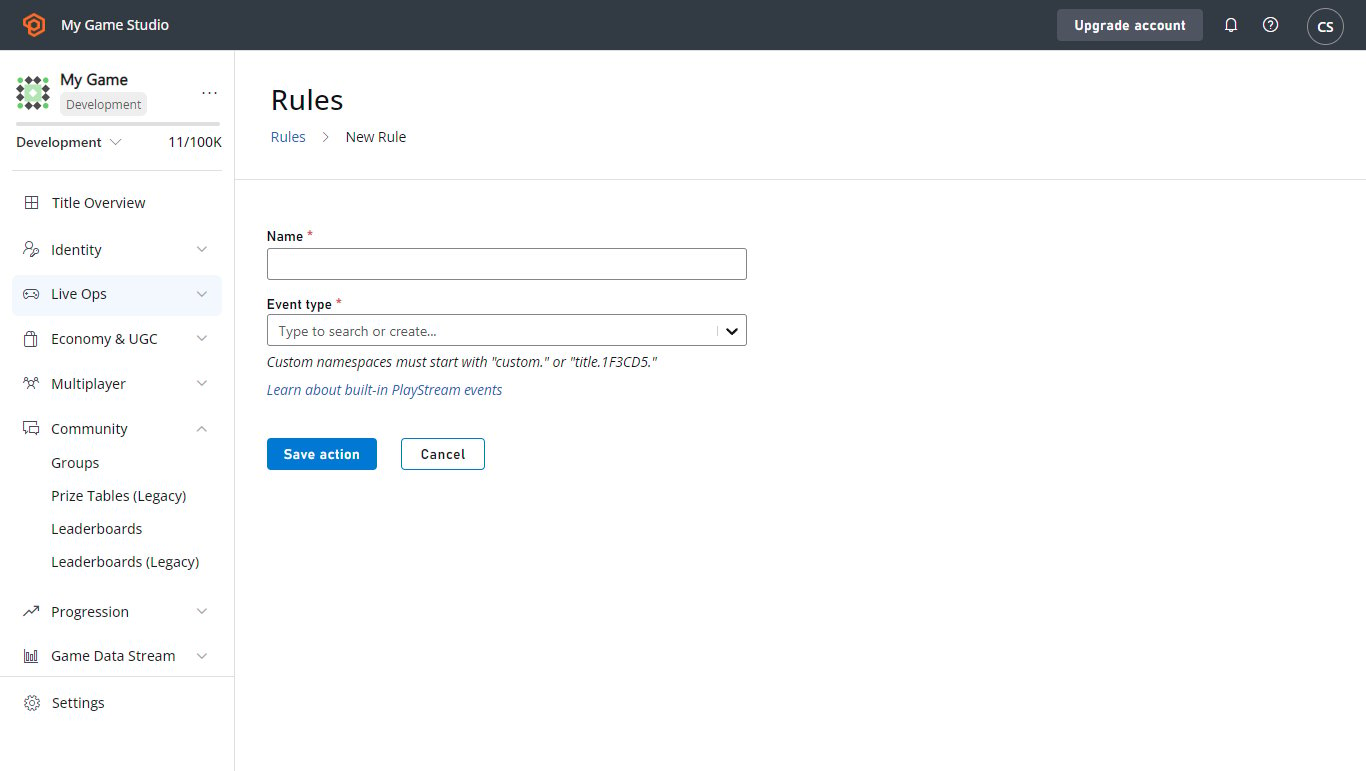 2. 使用 **New Rule** 按钮创建一个新规则。
* 为新的**规则**指定名称。
* 选择将用作条件或操作触发器的 **Event type**。
* 若要使**规则**触发 CloudScript 函数,请在该部分中通过按钮添加一个 **Action**。
* 然后在 **Type** 下拉菜单中选择相应选项。
* 在 **Cloud Script Function** 下拉菜单中选择 **helloWorld** 函数。
* 选择 **Save action** 按钮。
2. 使用 **New Rule** 按钮创建一个新规则。
* 为新的**规则**指定名称。
* 选择将用作条件或操作触发器的 **Event type**。
* 若要使**规则**触发 CloudScript 函数,请在该部分中通过按钮添加一个 **Action**。
* 然后在 **Type** 下拉菜单中选择相应选项。
* 在 **Cloud Script Function** 下拉菜单中选择 **helloWorld** 函数。
* 选择 **Save action** 按钮。
 3. 现在此**规则**已设置为在你所选类型的任何事件上触发。若要对其进行测试:
* 勾选 **Publish results as PlayStream Event** 复选框。
* 保存该 **Action**。
* 然后触发一个事件。
* 在 **PlayStream Monitor** 中应显示一个对应于 CloudScript 执行的新事件,其中包含相应信息。
* 有关在调试器中检查 PlayStream 事件的更多信息,请参阅[高级:调试 CloudScript](#advanced-debugging-cloudscript)一节。
事件操作在调用 CloudScript 函数时只能使用生产版本(live revision)。如果你在下拉菜单中找不到 **helloWorld** 函数,这可能是最有可能的原因。
## 高级:调试 CloudScript
使用[使用 Azure Functions 的 CloudScript](/services/playfab/live-service-management/service-gateway/automation/cloudscript-af) 进行调试要容易得多。详细了解如何[使用 Azure Functions 的 CloudScript 进行本地调试。](/services/playfab/live-service-management/service-gateway/automation/cloudscript-af/local-debugging-for-cloudscript-using-azure-functions)
### 日志记录
调试代码最重要的工具之一是*日志记录*。我们的 CloudScript 提供了执行该功能的工具。
它以 `log` 对象的形式提供,可以使用 `Info`、`Debug` 和 `Error` 方法记录任何期望的消息。
此外,如果将 `logRequestAndResponse` 参数设置为 true,HTTP 对象将记录它在发起请求过程中遇到的任何错误。虽然设置这些日志很简单,但访问它们需要*一点*技巧。
以下是使用全部 4 种日志类型的 CloudScript 函数示例。
```javascript theme={null}
handlers.logTest = function(args, context) {
log.info("This is a log statement!");
log.debug("This is a debug statement.");
log.error("This is... an error statement?");
// the last parameter indicates we want logging on errors
http.request('https://httpbin.org/status/404', 'post', '', 'text/plain', null, true);
};
```
若要运行此示例,请在继续之前将此函数添加到你的生产版本中。
可以按如下所示使用 `ExecuteCloudScript` 调用 `logTest` 函数。
```csharp theme={null}
// Invoke this on start of your application
void Login() {
PlayFabClientAPI.LoginWithCustomID(new LoginWithCustomIDRequest {
CreateAccount = true,
CustomId = "Starter"
}, result => RunLogTest(), null);
}
void RunLogTest() {
PlayFabClientAPI.ExecuteCloudScript(new ExecuteCloudScriptRequest {
FunctionName = "logTest",
// duplicates the response of the request to PlayStream
GeneratePlayStreamEvent = true
}, null, null);
}
// Logs evaluated in next code block
```
设置 `GeneratePlayStreamEvent` 后,CloudScript 函数调用会生成一个 PlayStream 事件,其中包含响应的内容。若要查找 PlayStream 事件的内容:
* 转到你**游戏**的 **Game Manager** 主页,或其 **PlayStream** 选项卡。
* **PlayStream Debugger** 会在事件到达时进行显示。
* 事件到达时,选择事件右上角的蓝色小 **Info** 图标,如下图所示。
3. 现在此**规则**已设置为在你所选类型的任何事件上触发。若要对其进行测试:
* 勾选 **Publish results as PlayStream Event** 复选框。
* 保存该 **Action**。
* 然后触发一个事件。
* 在 **PlayStream Monitor** 中应显示一个对应于 CloudScript 执行的新事件,其中包含相应信息。
* 有关在调试器中检查 PlayStream 事件的更多信息,请参阅[高级:调试 CloudScript](#advanced-debugging-cloudscript)一节。
事件操作在调用 CloudScript 函数时只能使用生产版本(live revision)。如果你在下拉菜单中找不到 **helloWorld** 函数,这可能是最有可能的原因。
## 高级:调试 CloudScript
使用[使用 Azure Functions 的 CloudScript](/services/playfab/live-service-management/service-gateway/automation/cloudscript-af) 进行调试要容易得多。详细了解如何[使用 Azure Functions 的 CloudScript 进行本地调试。](/services/playfab/live-service-management/service-gateway/automation/cloudscript-af/local-debugging-for-cloudscript-using-azure-functions)
### 日志记录
调试代码最重要的工具之一是*日志记录*。我们的 CloudScript 提供了执行该功能的工具。
它以 `log` 对象的形式提供,可以使用 `Info`、`Debug` 和 `Error` 方法记录任何期望的消息。
此外,如果将 `logRequestAndResponse` 参数设置为 true,HTTP 对象将记录它在发起请求过程中遇到的任何错误。虽然设置这些日志很简单,但访问它们需要*一点*技巧。
以下是使用全部 4 种日志类型的 CloudScript 函数示例。
```javascript theme={null}
handlers.logTest = function(args, context) {
log.info("This is a log statement!");
log.debug("This is a debug statement.");
log.error("This is... an error statement?");
// the last parameter indicates we want logging on errors
http.request('https://httpbin.org/status/404', 'post', '', 'text/plain', null, true);
};
```
若要运行此示例,请在继续之前将此函数添加到你的生产版本中。
可以按如下所示使用 `ExecuteCloudScript` 调用 `logTest` 函数。
```csharp theme={null}
// Invoke this on start of your application
void Login() {
PlayFabClientAPI.LoginWithCustomID(new LoginWithCustomIDRequest {
CreateAccount = true,
CustomId = "Starter"
}, result => RunLogTest(), null);
}
void RunLogTest() {
PlayFabClientAPI.ExecuteCloudScript(new ExecuteCloudScriptRequest {
FunctionName = "logTest",
// duplicates the response of the request to PlayStream
GeneratePlayStreamEvent = true
}, null, null);
}
// Logs evaluated in next code block
```
设置 `GeneratePlayStreamEvent` 后,CloudScript 函数调用会生成一个 PlayStream 事件,其中包含响应的内容。若要查找 PlayStream 事件的内容:
* 转到你**游戏**的 **Game Manager** 主页,或其 **PlayStream** 选项卡。
* **PlayStream Debugger** 会在事件到达时进行显示。
* 事件到达时,选择事件右上角的蓝色小 **Info** 图标,如下图所示。
 选择此选项将显示事件的原始 JSON,每个事件的详细信息见[此处](/services/playfab/api-references/events)。此 JSON 的示例可以在以下示例中看到。
* 如果我们将 `LogScript` MonoBehavior 添加到场景中,运行游戏将在 PlayStream 中产生以下结果。
选择此选项将显示事件的原始 JSON,每个事件的详细信息见[此处](/services/playfab/api-references/events)。此 JSON 的示例可以在以下示例中看到。
* 如果我们将 `LogScript` MonoBehavior 添加到场景中,运行游戏将在 PlayStream 中产生以下结果。
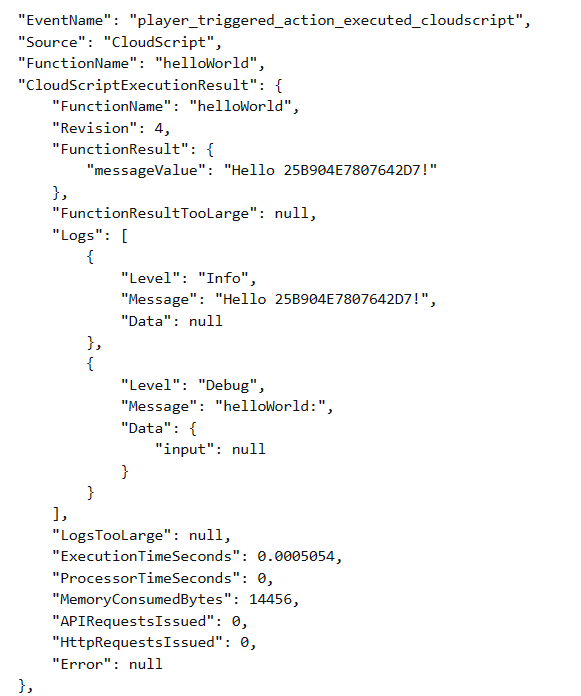 `ExecuteCloudScript` 调用的结果包含一个名为 `Logs` 的字段,它是 CloudScript 函数生成的日志对象列表。
你可以看到这三个日志调用,以及来自无效 HTTP 请求的日志。与 log 调用不同,HTTP 请求日志还使用了 `Data` 字段。
此字段是一个 JavaScript 对象,可以由与日志语句相关的任何信息填充。log 的调用也可以通过第二个参数使用此字段,如下所示。
```javascript theme={null}
handlers.logTest = function(args, context) {
log.info("This is a log statement!", { what: "Here on business." });
log.debug("This is a debug statement.", { who: "I am a doctor, sir" });
log.error("This is... an error statement?", { why: "I'm here to fix the plumbing. Probably.", errCode: 123 });
};
```
这些调用都会用它们的第二个参数填充结果中的 `Data` 字段。
由于日志包含在结果中,客户端代码可以根据日志语句做出响应。`logTest` 函数中的错误是被强制触发的,但客户端代码可以进行调整以对其做出响应。
```csharp theme={null}
void RunLogTest()
{
PlayFabClientAPI.ExecuteCloudScript(
new ExecuteCloudScriptRequest
{
FunctionName = "logTest",
// handy for logs because the response will be duplicated on PlayStream
GeneratePlayStreamEvent = true
},
result =>
{
var error123Present = false;
foreach (var log in result.Logs)
{
if (log.Level != "Error") continue;
var errData = (JsonObject) log.Data;
object errCode;
var errCodePresent = errData.TryGetValue("errCode", out errCode);
if (errCodePresent && (ulong) errCode == 123) error123Present = true;
}
if (error123Present)
Debug.Log("There was a bad, bad error!");
else
Debug.Log("Nice weather we're having.");
}, null);
}
```
如果运行此代码,输出应指示该错误的存在。实际的错误响应可能是将错误显示在 UI 中,或将值保存到日志文件中。
## 高级:错误
在开发中,CloudScript 错误通常不会像 `log.error` 那样手动触发。
幸运的是,[ExecuteCloudScript](xref:titleid.playfabapi.com.client.server-sidecloudscript.executecloudscript) 的响应包含一个 [ExecuteCloudScriptResult](xref:titleid.playfabapi.com.client.server-sidecloudscript.executecloudscript#executecloudscriptresult),其中包括一个 [ScriptExecutionError](xref:titleid.playfabapi.com.client.server-sidecloudscript.executecloudscript#scriptexecutionerror) 字段。将日志记录部分中的最后一个示例进行调整,我们可以按如下方式使用它。
```csharp theme={null}
void RunLogTest() {
PlayFabClientAPI.ExecuteCloudScript(new ExecuteCloudScriptRequest {
FunctionName = "logTest",
// handy for logs because the response will be duplicated on PlayStream
GeneratePlayStreamEvent = true
}, result => {
if(result.Error != null) {
Debug.Log(string.Format("There was error in the CloudScript function {0}:\n Error Code: {1}\n Message: {2}"
, result.FunctionName, result.Error.Error, result.Error.Message));
}
},
null);
}
```
如果发生某些错误,此代码会将其显示在日志中。
## Related topics
- [CloudScript 快速入门](/zh-CN/services/playfab/live-service-management/service-gateway/automation/cloudscript/quickstart.md)
- [PlayFab 在线运营管理文档](/zh-CN/services/playfab/live-service-management/index.md)
- [计划任务快速入门](/zh-CN/services/playfab/data-analytics/acting-data/scheduled-tasks/quickstart.md)
- [玩家封禁系统](/zh-CN/services/playfab/player-progression/player-data/player-bans.md)
- [Data Explorer 高级模式入门](/zh-CN/services/playfab/data-analytics/learn-data/data-explorer/getting-started-with-data-explorer-advanced.md)
`ExecuteCloudScript` 调用的结果包含一个名为 `Logs` 的字段,它是 CloudScript 函数生成的日志对象列表。
你可以看到这三个日志调用,以及来自无效 HTTP 请求的日志。与 log 调用不同,HTTP 请求日志还使用了 `Data` 字段。
此字段是一个 JavaScript 对象,可以由与日志语句相关的任何信息填充。log 的调用也可以通过第二个参数使用此字段,如下所示。
```javascript theme={null}
handlers.logTest = function(args, context) {
log.info("This is a log statement!", { what: "Here on business." });
log.debug("This is a debug statement.", { who: "I am a doctor, sir" });
log.error("This is... an error statement?", { why: "I'm here to fix the plumbing. Probably.", errCode: 123 });
};
```
这些调用都会用它们的第二个参数填充结果中的 `Data` 字段。
由于日志包含在结果中,客户端代码可以根据日志语句做出响应。`logTest` 函数中的错误是被强制触发的,但客户端代码可以进行调整以对其做出响应。
```csharp theme={null}
void RunLogTest()
{
PlayFabClientAPI.ExecuteCloudScript(
new ExecuteCloudScriptRequest
{
FunctionName = "logTest",
// handy for logs because the response will be duplicated on PlayStream
GeneratePlayStreamEvent = true
},
result =>
{
var error123Present = false;
foreach (var log in result.Logs)
{
if (log.Level != "Error") continue;
var errData = (JsonObject) log.Data;
object errCode;
var errCodePresent = errData.TryGetValue("errCode", out errCode);
if (errCodePresent && (ulong) errCode == 123) error123Present = true;
}
if (error123Present)
Debug.Log("There was a bad, bad error!");
else
Debug.Log("Nice weather we're having.");
}, null);
}
```
如果运行此代码,输出应指示该错误的存在。实际的错误响应可能是将错误显示在 UI 中,或将值保存到日志文件中。
## 高级:错误
在开发中,CloudScript 错误通常不会像 `log.error` 那样手动触发。
幸运的是,[ExecuteCloudScript](xref:titleid.playfabapi.com.client.server-sidecloudscript.executecloudscript) 的响应包含一个 [ExecuteCloudScriptResult](xref:titleid.playfabapi.com.client.server-sidecloudscript.executecloudscript#executecloudscriptresult),其中包括一个 [ScriptExecutionError](xref:titleid.playfabapi.com.client.server-sidecloudscript.executecloudscript#scriptexecutionerror) 字段。将日志记录部分中的最后一个示例进行调整,我们可以按如下方式使用它。
```csharp theme={null}
void RunLogTest() {
PlayFabClientAPI.ExecuteCloudScript(new ExecuteCloudScriptRequest {
FunctionName = "logTest",
// handy for logs because the response will be duplicated on PlayStream
GeneratePlayStreamEvent = true
}, result => {
if(result.Error != null) {
Debug.Log(string.Format("There was error in the CloudScript function {0}:\n Error Code: {1}\n Message: {2}"
, result.FunctionName, result.Error.Error, result.Error.Message));
}
},
null);
}
```
如果发生某些错误,此代码会将其显示在日志中。
## Related topics
- [CloudScript 快速入门](/zh-CN/services/playfab/live-service-management/service-gateway/automation/cloudscript/quickstart.md)
- [PlayFab 在线运营管理文档](/zh-CN/services/playfab/live-service-management/index.md)
- [计划任务快速入门](/zh-CN/services/playfab/data-analytics/acting-data/scheduled-tasks/quickstart.md)
- [玩家封禁系统](/zh-CN/services/playfab/player-progression/player-data/player-bans.md)
- [Data Explorer 高级模式入门](/zh-CN/services/playfab/data-analytics/learn-data/data-explorer/getting-started-with-data-explorer-advanced.md)