> ## Documentation Index
> Fetch the complete documentation index at: https://devdocs.xbox.com/llms.txt
> Use this file to discover all available pages before exploring further.

# 在 Azure 门户中调试 CloudScript Azure Functions

> 在 Azure 门户中打开你的 Functions 应用并从“监视”部分流式传输实时日志,以调试 PlayFab CloudScript Azure Functions。

# 教程:在 Azure 门户中使用 Azure Functions 调试 CloudScript

如果你在 [Azure 门户](https://portal.azure.com)中编辑 Azure Functions,可以直接在门户中获取日志。

若要查找日志,可以使用以下步骤:

1. 打开 [Azure 门户](https://portal.azure.com)
2. 导航到你的 Azure Functions 应用
3. 选择“Platform features”
4. 在“Monitoring”部分选择“Log Streaming”
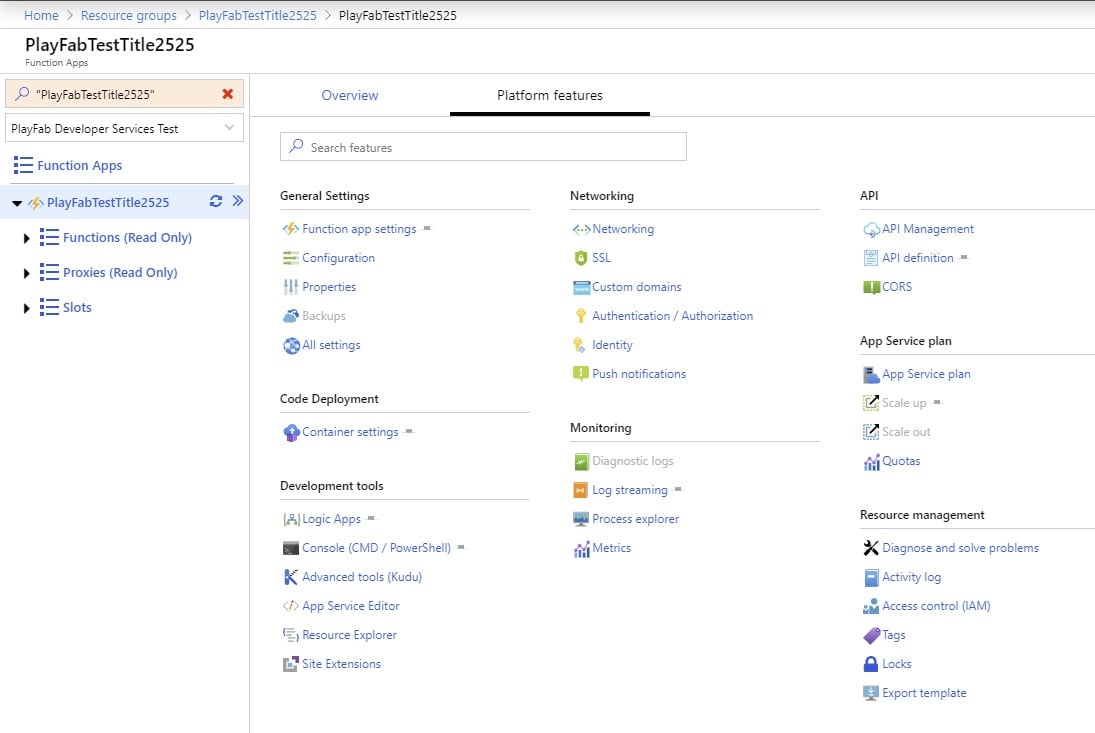
<img src="https://mintcdn.com/microsoft-4404708b/dqv53299jA1M-fNi/images/playfab/live-service-management/service-gateway/automation/cloudscript-af/CloudScript-AF-Azure-Debug-01.jpg?fit=max&auto=format&n=dqv53299jA1M-fNi&q=85&s=c3b5f2f8cb12511d549754512b356efb" alt="在 Azure 门户中使用 Azure Functions 调试 CloudScript 的第 1 步" width="1095" height="733" data-path="images/playfab/live-service-management/service-gateway/automation/cloudscript-af/CloudScript-AF-Azure-Debug-01.jpg" />

门户会打开一个显示调试输出的页面:

<img src="https://mintcdn.com/microsoft-4404708b/dqv53299jA1M-fNi/images/playfab/live-service-management/service-gateway/automation/cloudscript-af/CloudScript-AF-Azure-Debug-02.jpg?fit=max&auto=format&n=dqv53299jA1M-fNi&q=85&s=537a1c0adac0240fcf04e6a3a760be33" alt="在 Azure 门户中使用 Azure Functions 调试 CloudScript 的第 2 步" width="1532" height="246" data-path="images/playfab/live-service-management/service-gateway/automation/cloudscript-af/CloudScript-AF-Azure-Debug-02.jpg" />
