> ## Documentation Index
> Fetch the complete documentation index at: https://devdocs.xbox.com/llms.txt
> Use this file to discover all available pages before exploring further.
# 推送通知快速入门
> 通过 Game Manager 或 SetupPushNotification Admin API 使用 Amazon SNS 路由为 iOS APNS 和 Android GCM 通道设置 PlayFab 推送通知。
来自 PlayFab 的推送通知通过三个主要系统的链接来启用:
1. 玩家的设备操作系统(Android、iOS 等)
2. 供应商特定的通道(Google、Apple 等)
3. 跨平台消息路由(通过 Amazon Simple Notification Service (SNS) 的 PlayFab)。
如果这些系统中的任何一个未链接,客户端将停止收到通知。意外更改这三个系统之一并破坏链接相当容易。此外,很难在流程的任何单个点得知所有系统是否都正确配置。
## PlayFab 推送路由系统
每个 PlayFab title 在给定时间内可以启用一个 Google (GCM) 和一个 Apple Push (APNS、APNS\_SANDBOX) 通知通道。可以通过以下两种方式之一配置:
1. 使用 **Game Manager** 中 **Settings -> Push Notifications** 下的 UI。
2. 使用 **PlayFab Admin API** - [SetupPushNotification](xref:titleid.playfabapi.com.admin.title-widedatamanagement.setuppushnotification)。
有关更详细的设置信息,请阅读以下教程:
* [Android 推送通知](/services/playfab/live-service-management/game-configuration/title-communications/push-notifications/push-notifications-for-android)
* [iOS 推送通知](/services/playfab/live-service-management/game-configuration/title-communications/push-notifications/push-notifications-for-ios)
## 游戏内推送消息
推送消息将根据开发引擎/平台的不同而有所不同。但是,接收推送通知的最简单方法是使用带有我们的 SDK 的 Unity 项目和 Android 的 Firebase Cloud Messaging (FCM) 插件,或者 iOS 只使用 Unity。
* **在 Android 上接收推送** - 这需要一个插件。支持最好的插件是原生 FCM 插件。
* **在 iOS 上接收推送** - 对于基本推送消息,*不*需要插件。
有关如何设置 [FCM Unity 插件](https://firebase.google.com/docs/cloud-messaging/unity/client)或 [Android Studio](https://firebase.google.com/docs/cloud-messaging/android/client) 上的推送的说明,请参阅 FCM 文档。
## 测试设置
配置 title 和客户端后,你可以使用 PlayFab 服务器 API - [SendPushNotification](xref:titleid.playfabapi.com.server.accountmanagement.sendpushnotification) 测试你的配置。此 API 允许你无需额外费用发送任意数量的推送通知。
你可以将 PlayFab CloudScript 服务用作快速且安全的服务器 API 环境。从那里,可以根据需要发送推送通知。
要使用此方法测试你的配置,请上传或附加以下示例中的代码到你 title 的 CloudScript 中。
### 示例
考虑以下场景:
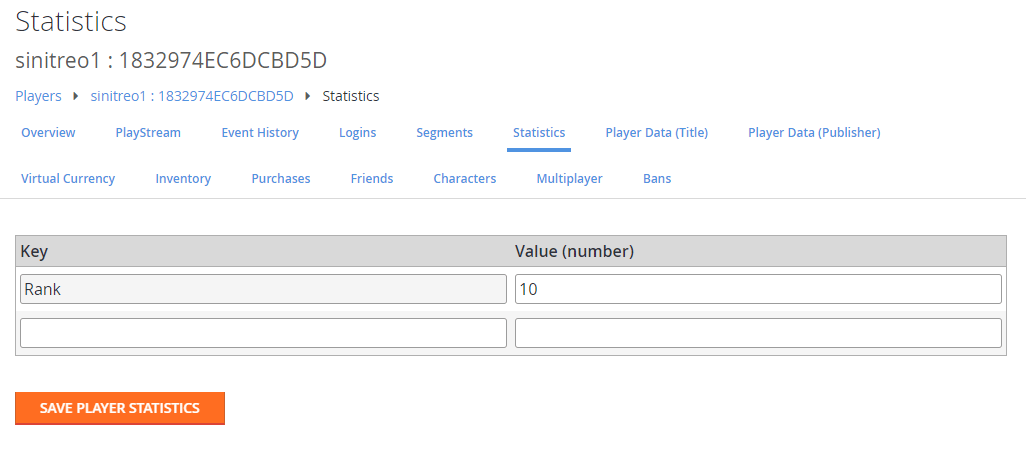
* 你 title 中的玩家可以基于排名统计信息访问排行榜。
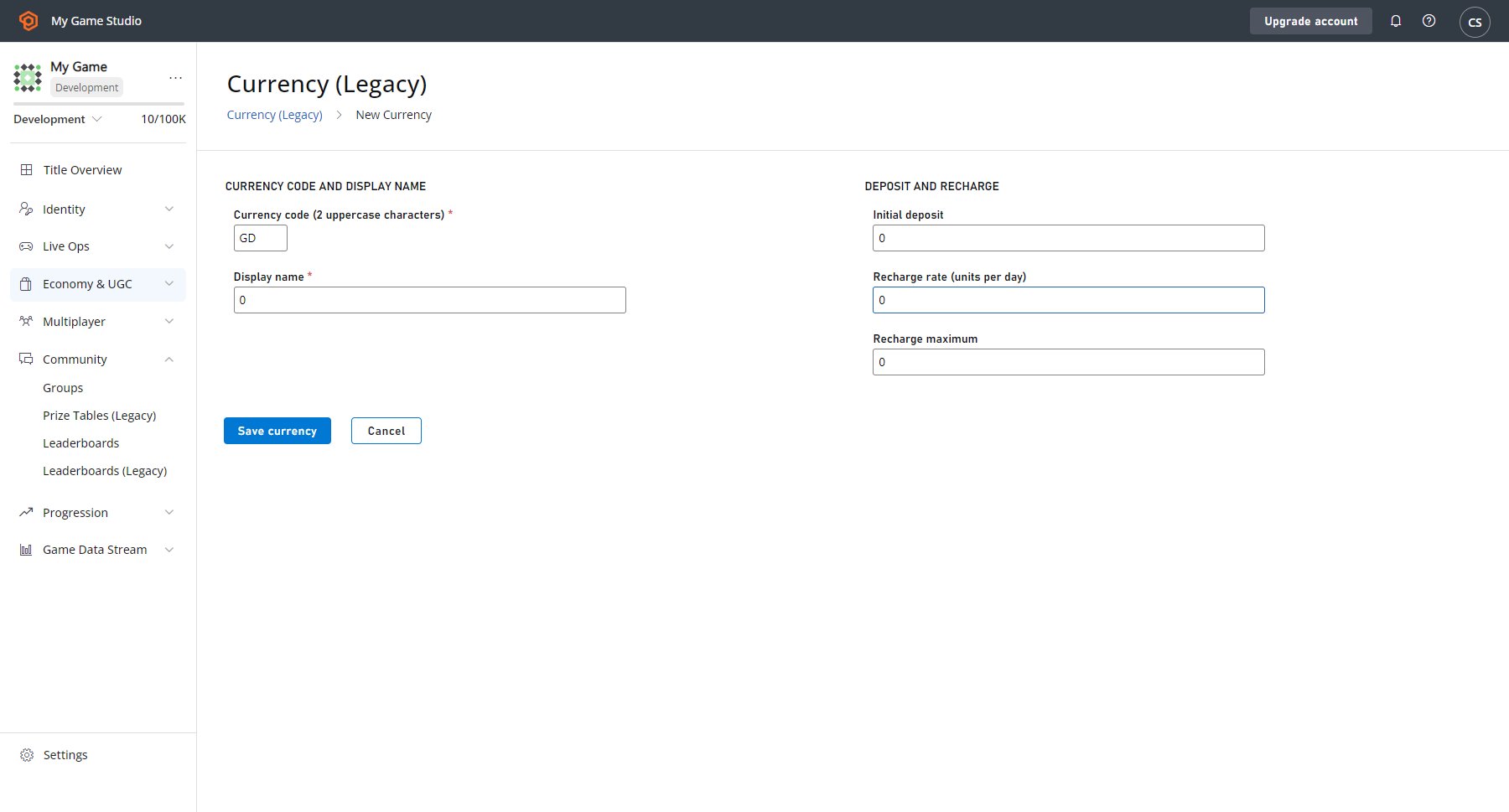
* 每位玩家可以支付 1 CH 货币,并挑战距离当前玩家最多 5 个位置的另一位玩家。
首先,考虑一个虚拟货币,如下面的示例屏幕截图所示(有关如何定义虚拟货币的信息,请参阅[货币](/services/playfab/economy-monetization/economy-v2/tutorials/currencies)教程)。
 现在,考虑为每位玩家定义的以下统计信息(有关如何生成测试排行榜的信息,请参阅[访问已归档的锦标赛结果](/services/playfab/community/leaderboards/tournaments-leaderboards/accessing-archived-tournament-results)教程)。
 设置这些先决条件后,你可以设置推送通知挑战系统。
以下客户端代码将调用 CloudScript `ChallengePlayer`。
```csharp theme={null}
public void ChallengeRandomClosePlayer(string currentPlayerId) {
PlayFabClientAPI.GetLeaderboardAroundPlayer(new GetLeaderboardAroundPlayerRequest() {
MaxResultsCount = 10,
StatisticName = "Rank",
PlayFabId = currentPlayerId,
}, result => OnLeaderboardLoaded(result,currentPlayerId),OnPlayFabError);
}
private void OnLeaderboardLoaded(GetLeaderboardAroundPlayerResult leaderboard, string currentPlayerId) {
var index = (int)(UnityEngine.Random.value * (leaderboard.Leaderboard.Count-1));
if (leaderboard.Leaderboard[index].PlayFabId == currentPlayerId)
index = (index + 1) % leaderboard.Leaderboard.Count;
var targetId = leaderboard.Leaderboard[index].PlayFabId;
PlayFabClientAPI.ExecuteCloudScript(new ExecuteCloudScriptRequest() {
FunctionName = "ChallengePlayer",
FunctionParameter = new Dictionary() {
{ "TargetId", targetId }
}
}, null, OnPlayFabError);
}
public void OnPlayFabError(PlayFabError obj) {
Debug.Log(obj.GenerateErrorReport());
}
```
`ChallengePlayer` CloudScript 代码将处理请求,验证排行榜状态,并向目标发送挑战推送通知。
```javascript theme={null}
handlers.ChallengePlayer = function (args) {
var targetId = args.TargetId;
var leaderboard = server.GetLeaderboardAroundUser({
MaxResultsCount : 10,
PlayFabId : currentPlayerId,
StatisticName : "Rank"
});
for(var i = 0; i < leaderboard.Leaderboard.length; i++) {
var target = leaderboard.Leaderboard[i];
if(target.PlayFabId !== targetId) continue;
// subtract virtual currency from current player
server.SubtractUserVirtualCurrency({
VirtualCurrency : "CH",
PlayFabId : currentPlayerId,
Amount : 1
});
// get current player profile
var profile = server.GetPlayerProfile({
PlayFabId : currentPlayerId
}).PlayerProfile;
// try to send push notification
try {
server.SendPushNotification({
Recipient : targetId,
Package : {
Message : `${profile.DisplayName} challenges you for a battle!`,
Title: "You have been challenged",
}
});
} catch (ex) {
// Target player has not registered for Push Notifications
}
return;
}
}
```
## 推送通知的使用
能够使用推送通知是一项强大的能力。但是,如果*滥用*,它可能导致用户选择退出未来的通知——甚至*完全离开游戏*。
不过,如果明智地使用,推送通知可以是构建和维护游戏社区的最佳工具之一。
推送通知是一种*即发即忘*消息协议,不保证送达。
请记住,*不保证*你的玩家会收到、打开或与你的消息互动。鉴于这一警告,将消息用作*额外*功能而不是游戏循环的关键部分是一个好做法。
对于 iOS 平台,应用会从操作系统获得一次性对话框提示,允许用户确定推送通知的状态。用户做出初始选择后,此设置将持续存在,直到:
* 应用被更新或重新安装。
* 用户从手机的设置菜单更改设置。
对于 Android 应用,通知默认启用,可以从客户端随意开启和关闭。
一个好做法是在每个会话时重新初始化你的通知监听器。
## 资源
以下资源提供了本快速入门中主题的其他信息:
* [Firebase Unity SDK](https://firebase.google.com/docs/unity/setup):Unity 的一体化 FCM 解决方案。此 SDK 除了所有其他功能外,还允许你接收和处理通过 FCM 发送的推送通知。
* [Push It Real Good: How to Get Players to Say Yes to Push Notifications](https://blog.playfab.com/blog/push-it-real-good-how-get-players-say-yes-push-notifications/):此博客文章详细介绍了使用推送通知的其他策略和技术。
* [Push Notifications](https://blog.playfab.com/blog/push-sep-17):此博客文章描述了推送功能的最新升级,以及切换到 FCM 作为 Android 的主要插件。
* [Postman 快速入门](/services/playfab/sdks/postman/postman-quickstart):此快速入门向你展示如何使用 Postman 测试我们的 API。
## Related topics
- [Android 推送通知](/zh-CN/services/playfab/live-service-management/game-configuration/title-communications/push-notifications/push-notifications-for-android.md)
- [iOS 推送通知](/zh-CN/services/playfab/live-service-management/game-configuration/title-communications/push-notifications/push-notifications-for-ios.md)
- [PFPlatformSpecificRegisterForIOSPushNotificationRequest](/zh-CN/services/playfab/api-references/c/pfplatformspecifictypes/structs/pfplatformspecificregisterforiospushnotificationrequest.md)
- [推送通知模板](/zh-CN/services/playfab/live-service-management/game-configuration/title-communications/push-notifications/push-notification-templates.md)
- [PlayFab 在线运营管理文档](/zh-CN/services/playfab/live-service-management/index.md)
设置这些先决条件后,你可以设置推送通知挑战系统。
以下客户端代码将调用 CloudScript `ChallengePlayer`。
```csharp theme={null}
public void ChallengeRandomClosePlayer(string currentPlayerId) {
PlayFabClientAPI.GetLeaderboardAroundPlayer(new GetLeaderboardAroundPlayerRequest() {
MaxResultsCount = 10,
StatisticName = "Rank",
PlayFabId = currentPlayerId,
}, result => OnLeaderboardLoaded(result,currentPlayerId),OnPlayFabError);
}
private void OnLeaderboardLoaded(GetLeaderboardAroundPlayerResult leaderboard, string currentPlayerId) {
var index = (int)(UnityEngine.Random.value * (leaderboard.Leaderboard.Count-1));
if (leaderboard.Leaderboard[index].PlayFabId == currentPlayerId)
index = (index + 1) % leaderboard.Leaderboard.Count;
var targetId = leaderboard.Leaderboard[index].PlayFabId;
PlayFabClientAPI.ExecuteCloudScript(new ExecuteCloudScriptRequest() {
FunctionName = "ChallengePlayer",
FunctionParameter = new Dictionary() {
{ "TargetId", targetId }
}
}, null, OnPlayFabError);
}
public void OnPlayFabError(PlayFabError obj) {
Debug.Log(obj.GenerateErrorReport());
}
```
`ChallengePlayer` CloudScript 代码将处理请求,验证排行榜状态,并向目标发送挑战推送通知。
```javascript theme={null}
handlers.ChallengePlayer = function (args) {
var targetId = args.TargetId;
var leaderboard = server.GetLeaderboardAroundUser({
MaxResultsCount : 10,
PlayFabId : currentPlayerId,
StatisticName : "Rank"
});
for(var i = 0; i < leaderboard.Leaderboard.length; i++) {
var target = leaderboard.Leaderboard[i];
if(target.PlayFabId !== targetId) continue;
// subtract virtual currency from current player
server.SubtractUserVirtualCurrency({
VirtualCurrency : "CH",
PlayFabId : currentPlayerId,
Amount : 1
});
// get current player profile
var profile = server.GetPlayerProfile({
PlayFabId : currentPlayerId
}).PlayerProfile;
// try to send push notification
try {
server.SendPushNotification({
Recipient : targetId,
Package : {
Message : `${profile.DisplayName} challenges you for a battle!`,
Title: "You have been challenged",
}
});
} catch (ex) {
// Target player has not registered for Push Notifications
}
return;
}
}
```
## 推送通知的使用
能够使用推送通知是一项强大的能力。但是,如果*滥用*,它可能导致用户选择退出未来的通知——甚至*完全离开游戏*。
不过,如果明智地使用,推送通知可以是构建和维护游戏社区的最佳工具之一。
推送通知是一种*即发即忘*消息协议,不保证送达。
请记住,*不保证*你的玩家会收到、打开或与你的消息互动。鉴于这一警告,将消息用作*额外*功能而不是游戏循环的关键部分是一个好做法。
对于 iOS 平台,应用会从操作系统获得一次性对话框提示,允许用户确定推送通知的状态。用户做出初始选择后,此设置将持续存在,直到:
* 应用被更新或重新安装。
* 用户从手机的设置菜单更改设置。
对于 Android 应用,通知默认启用,可以从客户端随意开启和关闭。
一个好做法是在每个会话时重新初始化你的通知监听器。
## 资源
以下资源提供了本快速入门中主题的其他信息:
* [Firebase Unity SDK](https://firebase.google.com/docs/unity/setup):Unity 的一体化 FCM 解决方案。此 SDK 除了所有其他功能外,还允许你接收和处理通过 FCM 发送的推送通知。
* [Push It Real Good: How to Get Players to Say Yes to Push Notifications](https://blog.playfab.com/blog/push-it-real-good-how-get-players-say-yes-push-notifications/):此博客文章详细介绍了使用推送通知的其他策略和技术。
* [Push Notifications](https://blog.playfab.com/blog/push-sep-17):此博客文章描述了推送功能的最新升级,以及切换到 FCM 作为 Android 的主要插件。
* [Postman 快速入门](/services/playfab/sdks/postman/postman-quickstart):此快速入门向你展示如何使用 Postman 测试我们的 API。
## Related topics
- [Android 推送通知](/zh-CN/services/playfab/live-service-management/game-configuration/title-communications/push-notifications/push-notifications-for-android.md)
- [iOS 推送通知](/zh-CN/services/playfab/live-service-management/game-configuration/title-communications/push-notifications/push-notifications-for-ios.md)
- [PFPlatformSpecificRegisterForIOSPushNotificationRequest](/zh-CN/services/playfab/api-references/c/pfplatformspecifictypes/structs/pfplatformspecificregisterforiospushnotificationrequest.md)
- [推送通知模板](/zh-CN/services/playfab/live-service-management/game-configuration/title-communications/push-notifications/push-notification-templates.md)
- [PlayFab 在线运营管理文档](/zh-CN/services/playfab/live-service-management/index.md)