> ## Documentation Index
> Fetch the complete documentation index at: https://devdocs.xbox.com/llms.txt
> Use this file to discover all available pages before exploring further.
# iOS 推送通知
> 通过创建 APNS 证书、将其导出为 .p12,并在 Game Manager 中上传以进行传送,配置 PlayFab 的 iOS 推送通知。
# iOS 推送通知
## 先决条件
本教程假设你熟悉我们[推送通知快速入门](/services/playfab/live-service-management/game-configuration/title-communications/push-notifications/quickstart)中介绍的概念。
## 配置 Apple 通知通道
1. 确保你拥有有效的 iOS 开发 (APNS\_SANDBOX) 或生产 (APNS) 证书。如果没有,请从 **Apple Developer Portal** 的 **Certificates, Identities and Profiles** 下创建一个。
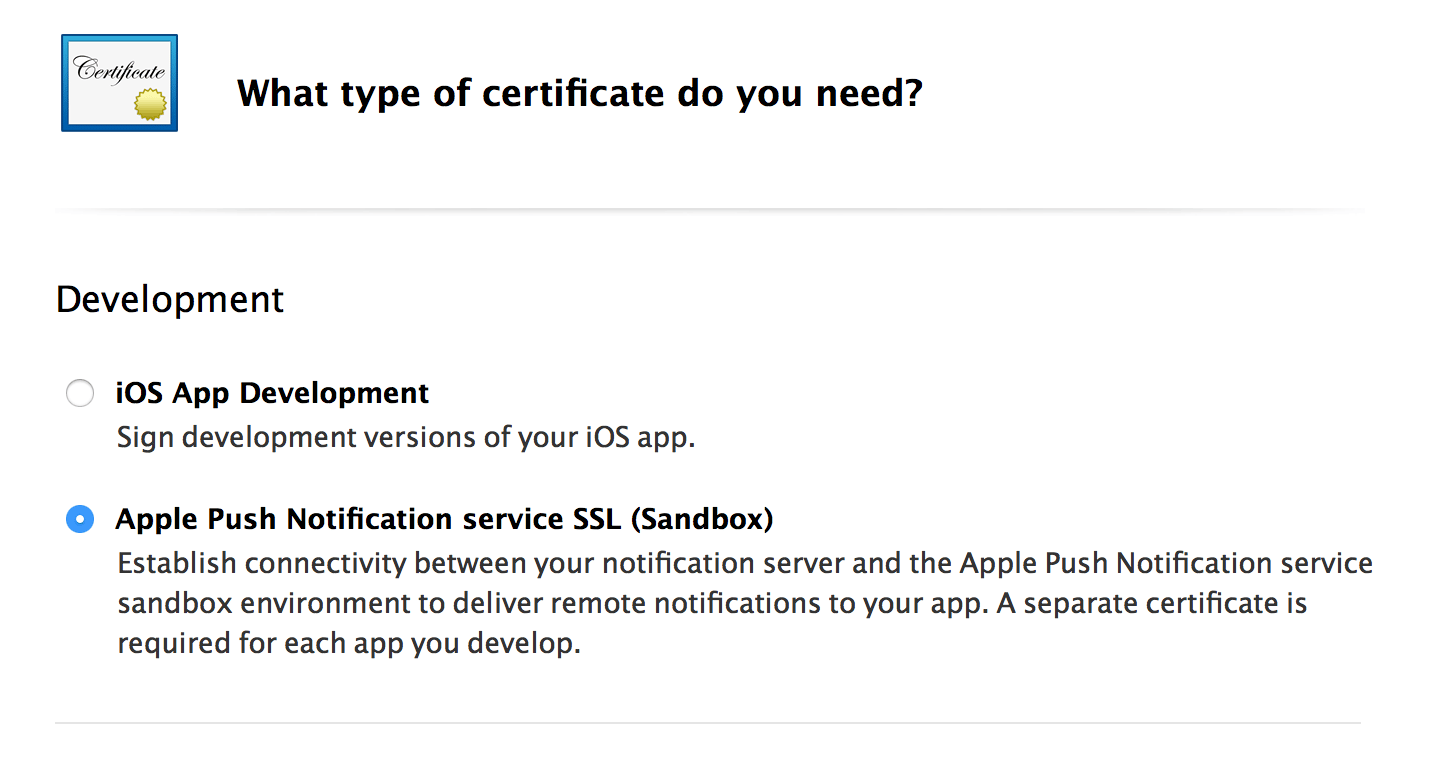 2. 导出你选择的证书(开发或生产):
* 首先从 **Apple Developer Portal** 的 **Certificates, Identities and Profiles** 下下载你的证书副本。这将创建一个 **.cer** 文件。
* 打开并将证书安装到你的 **Keychain Access** 中。
* 在 **Certificates** 子类别下查看已安装的证书。
* 将你的 **Keychain Access Certificate** 导出为 **.p12** 格式。
2. 导出你选择的证书(开发或生产):
* 首先从 **Apple Developer Portal** 的 **Certificates, Identities and Profiles** 下下载你的证书副本。这将创建一个 **.cer** 文件。
* 打开并将证书安装到你的 **Keychain Access** 中。
* 在 **Certificates** 子类别下查看已安装的证书。
* 将你的 **Keychain Access Certificate** 导出为 **.p12** 格式。
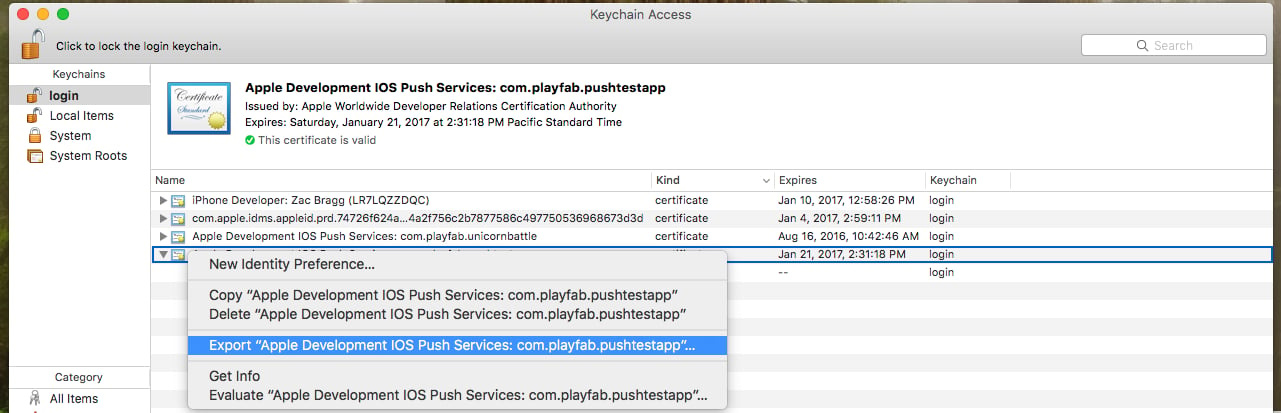 * 使用以下控制台命令将 **.p12 文件**转换为 **.pem 文件**:
* `openssl pkcs12 -in apns-dev-cert.p12 -out apns-dev-cert.pem -nodes -clcerts`
* 有了 **.pem 文件**后,你可以通过 PlayFab **Game Manager** 在你的 **Title 设置** > **Push Notifications** 下直接上传。
* 或者,使用下面的生成器为 `SetupPushNotification` 制作 JSON 请求。
### SetupPushNotification 的 JSON 请求生成器
请求生成器使用以下信息来创建 JSON 请求:
* **Platform** - 使用以下值之一:APNS (iOS)、APNS\_SANDBOX (iOS)、GCM (Android)
* **Application Name** - 输入发送消息的应用程序名称。
应用程序名称必须只由大写和小写 ASCII 字母、数字、下划线、连字符和句点组成,长度必须在 1 到 256 个字符之间。它们*也*必须是*唯一*的。
* **PEM Certificate / API Key** - 对于 iOS(APNS 或 APNS\_SANDBOX),使用你的 PEM 文件的完整内容。
生成 JSON 后,使用它执行对 `SetupPushNotification` 的调用。响应应类似于下面的示例。
```json theme={null}
{
"code" : 200,
"status" : "OK",
"data" :
{
"ARN" : "arn:*******/GCM/your_game_name"
}
}
```
恭喜!你现在已经配置了 title 的 iOS 消息通道。
## 注册你的 iOS 客户端以进行推送
对于 iOS,你必须依赖 iOS 处理推送通知的默认行为,因为 PlayFab 目前不提供 Unity 上的原生实现。
默认情况下,游戏在后台时收到的通知将被路由到**通知**区域。
或者,游戏为活动应用程序时收到的通知将被静默接收,并且不会在**通知**区域中显示。
* 示例中的以下代码在 `client Start()` 上运行。
```csharp theme={null}
// must be called before trying to obtain the push token
// an asynchronous call with no callback into native iOS code that takes a moment or two before
// the token is available. (so spin and wait, or call this one early on)
// this will always return null if your app is not signed
UnityEngine.iOS.NotificationServices.RegisterForNotifications(UnityEngine.iOS.NotificationType.Alert | UnityEngine.iOS.NotificationType.Badge | UnityEngine.iOS.NotificationType.Sound, true);
```
* 此时,如果用户已选择接收通知,我们可以调用 PlayFab API [RegisterForIOSPushNotification](xref:titleid.playfabapi.com.client.platformspecificmethods.registerforiospushnotification)。
```csharp theme={null}
byte[] token = UnityEngine.iOS.NotificationServices.deviceToken;
if(token != null)
{
RegisterForIOSPushNotificationRequest request = new RegisterForIOSPushNotificationRequest();
request.DeviceToken = System.BitConverter.ToString(token).Replace("-", "").ToLower();
PlayFabClientAPI.RegisterForIOSPushNotification(request, (RegisterForIOSPushNotificationResult result) =>
{
Debug.Log("Push Registration Successful");
}, OnPlayFabError);
}
else
{
Debug.Log("Push Token was null!");
}
```
* 如果没有错误发生,恭喜!你的 iOS 客户端已成功链接到你 title 的 Apple 通知通道。
## iOS 故障排除
* [验证你拥有有效的 .pem 文件](https://docs.aws.amazon.com/sns/latest/dg/mobile-push-apns.html)。
* 确保在 `SetupPushNotification` 中使用的相同证书被 XCode 用于签署你的 App。
* 验证 XCode 中你的构建已启用 Push Notification API。
* 验证你的签名证书与 PlayFab 平台匹配。运行 **[SetupPushNotification](xref:titleid.playfabapi.com.admin.title-widedatamanagement.setuppushnotification)** 时,使用 `OverwriteOldARN = true` 将通道重新绑定到新平台。给定时间内 title 上只能有*一个* iOS 环境(APNS 或 APNS\_SANDBOX)处于活动状态。
## 其他支持
如需帮助、示例 bug 和相关问题,请在我们的[论坛](https://community.playfab.com/index.html)上留言。
目前,我们仅支持本文档中描述的标准流程的服务。如果你的团队正在寻找其他常见推送服务或插件的其他功能,请告诉我们!我们喜欢从开发者社区获得反馈。
## Related topics
- [推送通知快速入门](/zh-CN/services/playfab/live-service-management/game-configuration/title-communications/push-notifications/quickstart.md)
- [推送通知](/zh-CN/services/playfab/live-service-management/game-configuration/title-communications/push-notifications/index.md)
- [推送通知模板](/zh-CN/services/playfab/live-service-management/game-configuration/title-communications/push-notifications/push-notification-templates.md)
- [Android 推送通知](/zh-CN/services/playfab/live-service-management/game-configuration/title-communications/push-notifications/push-notifications-for-android.md)
- [服务 C API 概览 - PFPushNotifications.h](/zh-CN/services/playfab/api-references/c/pfpushnotifications/pfpushnotifications_members.md)
* 使用以下控制台命令将 **.p12 文件**转换为 **.pem 文件**:
* `openssl pkcs12 -in apns-dev-cert.p12 -out apns-dev-cert.pem -nodes -clcerts`
* 有了 **.pem 文件**后,你可以通过 PlayFab **Game Manager** 在你的 **Title 设置** > **Push Notifications** 下直接上传。
* 或者,使用下面的生成器为 `SetupPushNotification` 制作 JSON 请求。
### SetupPushNotification 的 JSON 请求生成器
请求生成器使用以下信息来创建 JSON 请求:
* **Platform** - 使用以下值之一:APNS (iOS)、APNS\_SANDBOX (iOS)、GCM (Android)
* **Application Name** - 输入发送消息的应用程序名称。
应用程序名称必须只由大写和小写 ASCII 字母、数字、下划线、连字符和句点组成,长度必须在 1 到 256 个字符之间。它们*也*必须是*唯一*的。
* **PEM Certificate / API Key** - 对于 iOS(APNS 或 APNS\_SANDBOX),使用你的 PEM 文件的完整内容。
生成 JSON 后,使用它执行对 `SetupPushNotification` 的调用。响应应类似于下面的示例。
```json theme={null}
{
"code" : 200,
"status" : "OK",
"data" :
{
"ARN" : "arn:*******/GCM/your_game_name"
}
}
```
恭喜!你现在已经配置了 title 的 iOS 消息通道。
## 注册你的 iOS 客户端以进行推送
对于 iOS,你必须依赖 iOS 处理推送通知的默认行为,因为 PlayFab 目前不提供 Unity 上的原生实现。
默认情况下,游戏在后台时收到的通知将被路由到**通知**区域。
或者,游戏为活动应用程序时收到的通知将被静默接收,并且不会在**通知**区域中显示。
* 示例中的以下代码在 `client Start()` 上运行。
```csharp theme={null}
// must be called before trying to obtain the push token
// an asynchronous call with no callback into native iOS code that takes a moment or two before
// the token is available. (so spin and wait, or call this one early on)
// this will always return null if your app is not signed
UnityEngine.iOS.NotificationServices.RegisterForNotifications(UnityEngine.iOS.NotificationType.Alert | UnityEngine.iOS.NotificationType.Badge | UnityEngine.iOS.NotificationType.Sound, true);
```
* 此时,如果用户已选择接收通知,我们可以调用 PlayFab API [RegisterForIOSPushNotification](xref:titleid.playfabapi.com.client.platformspecificmethods.registerforiospushnotification)。
```csharp theme={null}
byte[] token = UnityEngine.iOS.NotificationServices.deviceToken;
if(token != null)
{
RegisterForIOSPushNotificationRequest request = new RegisterForIOSPushNotificationRequest();
request.DeviceToken = System.BitConverter.ToString(token).Replace("-", "").ToLower();
PlayFabClientAPI.RegisterForIOSPushNotification(request, (RegisterForIOSPushNotificationResult result) =>
{
Debug.Log("Push Registration Successful");
}, OnPlayFabError);
}
else
{
Debug.Log("Push Token was null!");
}
```
* 如果没有错误发生,恭喜!你的 iOS 客户端已成功链接到你 title 的 Apple 通知通道。
## iOS 故障排除
* [验证你拥有有效的 .pem 文件](https://docs.aws.amazon.com/sns/latest/dg/mobile-push-apns.html)。
* 确保在 `SetupPushNotification` 中使用的相同证书被 XCode 用于签署你的 App。
* 验证 XCode 中你的构建已启用 Push Notification API。
* 验证你的签名证书与 PlayFab 平台匹配。运行 **[SetupPushNotification](xref:titleid.playfabapi.com.admin.title-widedatamanagement.setuppushnotification)** 时,使用 `OverwriteOldARN = true` 将通道重新绑定到新平台。给定时间内 title 上只能有*一个* iOS 环境(APNS 或 APNS\_SANDBOX)处于活动状态。
## 其他支持
如需帮助、示例 bug 和相关问题,请在我们的[论坛](https://community.playfab.com/index.html)上留言。
目前,我们仅支持本文档中描述的标准流程的服务。如果你的团队正在寻找其他常见推送服务或插件的其他功能,请告诉我们!我们喜欢从开发者社区获得反馈。
## Related topics
- [推送通知快速入门](/zh-CN/services/playfab/live-service-management/game-configuration/title-communications/push-notifications/quickstart.md)
- [推送通知](/zh-CN/services/playfab/live-service-management/game-configuration/title-communications/push-notifications/index.md)
- [推送通知模板](/zh-CN/services/playfab/live-service-management/game-configuration/title-communications/push-notifications/push-notification-templates.md)
- [Android 推送通知](/zh-CN/services/playfab/live-service-management/game-configuration/title-communications/push-notifications/push-notifications-for-android.md)
- [服务 C API 概览 - PFPushNotifications.h](/zh-CN/services/playfab/api-references/c/pfpushnotifications/pfpushnotifications_members.md)