> ## Documentation Index
> Fetch the complete documentation index at: https://devdocs.xbox.com/llms.txt
> Use this file to discover all available pages before exploring further.
# 设置默认语言
> 配置 PlayFab title 默认语言和每位玩家的首选语言,使本地化字符串、电子邮件和新闻以正确的语言传达给玩家。
PlayFab 正在推出代表游戏开发者存储本地化字符串的支持。此外,我们正在添加必要的逻辑,以便为你的玩家提供他们偏好的语言的正确字符串。
为了实现这一点,我们将利用两个新的语言设置:一个与你的 title 关联,另一个存储在每位玩家的实体配置文件上:
1. **Title 默认语言**:指示你的 title 主要支持的语言。设置后,我们将要求你的 title 至少为使用本地化字符串的功能支持此语言。
2. **玩家语言**:指示玩家的首选语言。这可以按 title 单独设置。
使用这两个设置,PlayFab 逻辑将本地化字符串与偏好该语言的玩家匹配。没有语言偏好的玩家将收到你 title 指定的默认语言的字符串。
偏好你的 title *不*支持的语言的玩家*也*会根据你 title 的默认语言收到字符串。
本教程将引导你完成如何设置你的 title 的默认语言和玩家的首选语言。
## 要求
本教程假设你具有以下关于使用 PlayFab 的工作知识:
* 有关如何创建玩家的基本知识。这是必要的,因为在调用首选语言逻辑之前,玩家必须已经存在并具有用户名和密码。
* 你已阅读 [Game Manager 快速入门](/services/playfab/live-service-management/gamemanager/quickstart)。如果你不熟悉 Game Manager,这是查看语言信息的地方。
* 你了解如何处理玩家配置文件,因为需要确认已向玩家配置文件添加了首选语言。
* 请花点时间查看[获取玩家配置文件](/services/playfab/player-progression/player-data/getting-player-profiles)教程中提供的有关如何获取玩家配置文件的信息。
## 第 1 节 – 玩家的首选语言
在设置玩家的首选语言之前,弄清楚你想如何收集它。你有几个选项:
* 询问他们:在游戏菜单上添加一个选项。
* 推断他们的语言:通过调用提供的平台 API 使用玩家设备的语言(例如,Android 的 `Locale.getDefault.getLanguage()`)。
世界上有很多语言,你的 title *可能*不支持所有语言。虽然不是必需的,但我们建议为你的 title 提供未来保障,并存储玩家的实际偏好。如果你以后回来添加对该语言的支持,PlayFab 的逻辑将自动开始提供新的字符串(而不是默认字符串)。
### 步骤 1 – 设置语言
PlayFab 允许你从特定的支持语言列表中进行选择。你可以调用 `GetLanguageList()` 方法查看语言代码。
使用 `SetProfileLanguage` API 时,语言字符串必须以 ISO 639-1 格式指定(例如 "en"、"es" 或 "ja")。目前,不支持代码 "zh"。
首先,我们将更新玩家的配置文件,以包含他们希望从你的 title 获取内容的语言。
### C# 代码示例
```csharp theme={null}
void SetProfileLanguage(string language, int? profileExpectedVersion, EntityKey entity)
{
var request = new SetProfileLanguageRequest
{
Language = language,
ExpectedVersion = profileExpectedVersion,
Entity = entity
};
PlayFabProfilesAPI.SetProfileLanguage(request, res =>
{
Debug.Log("The language on the entity's profile has been updated.");
}, FailureCallback);
}
void FailureCallback(PlayFabError error)
{
Debug.LogWarning("Something went wrong with your API call. Here's some debug information:");
Debug.LogError(error.GenerateErrorReport());
}
```
### 步骤 2 – 查看语言是否已更新
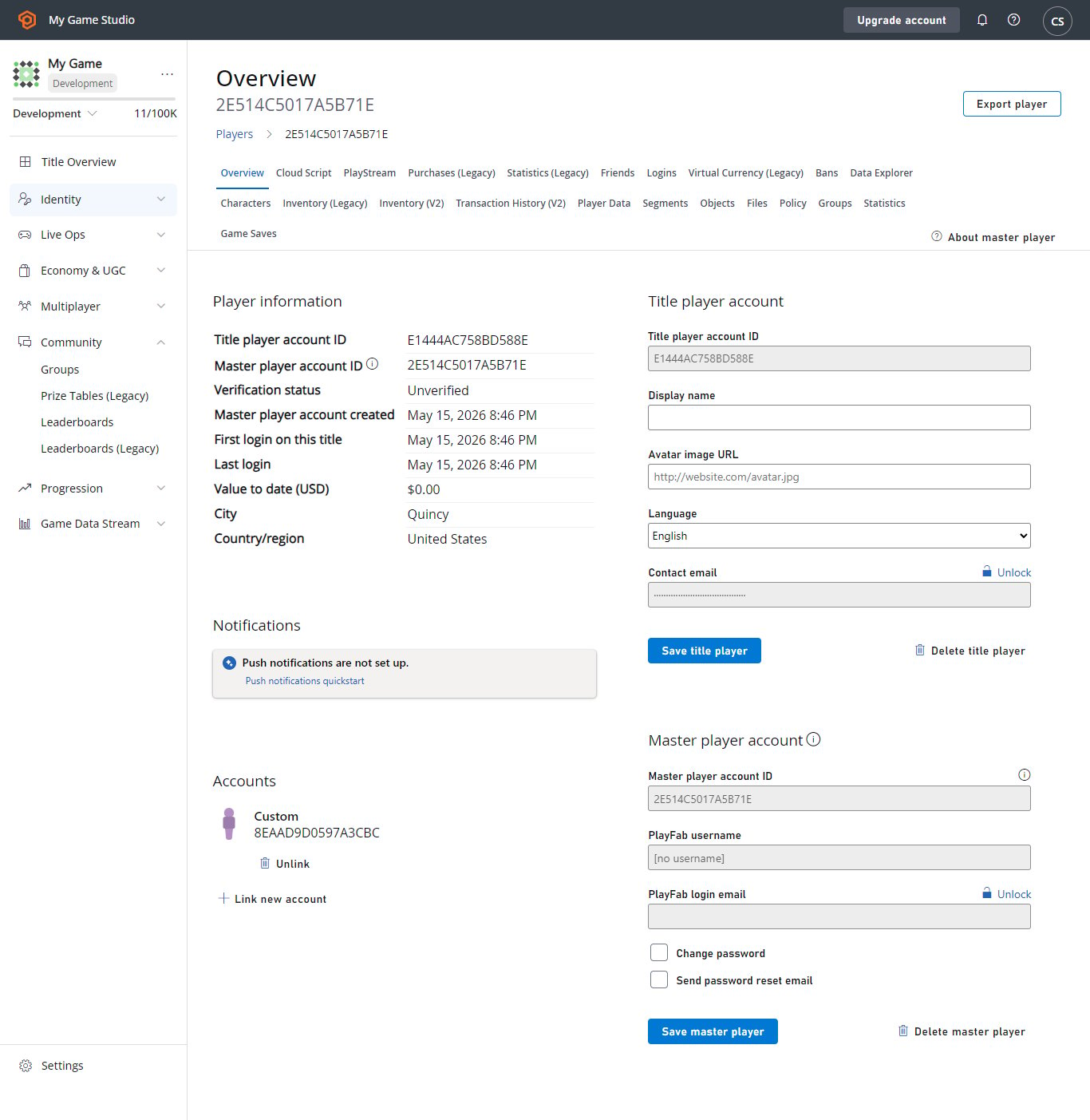
前往玩家的概述。在 Game Manager 中,前往 **Player** > **Overview**。检查其联系信息部分是否已更新为其首选语言。
也可以通过下图显示的 **Language** 下拉菜单更新语言。
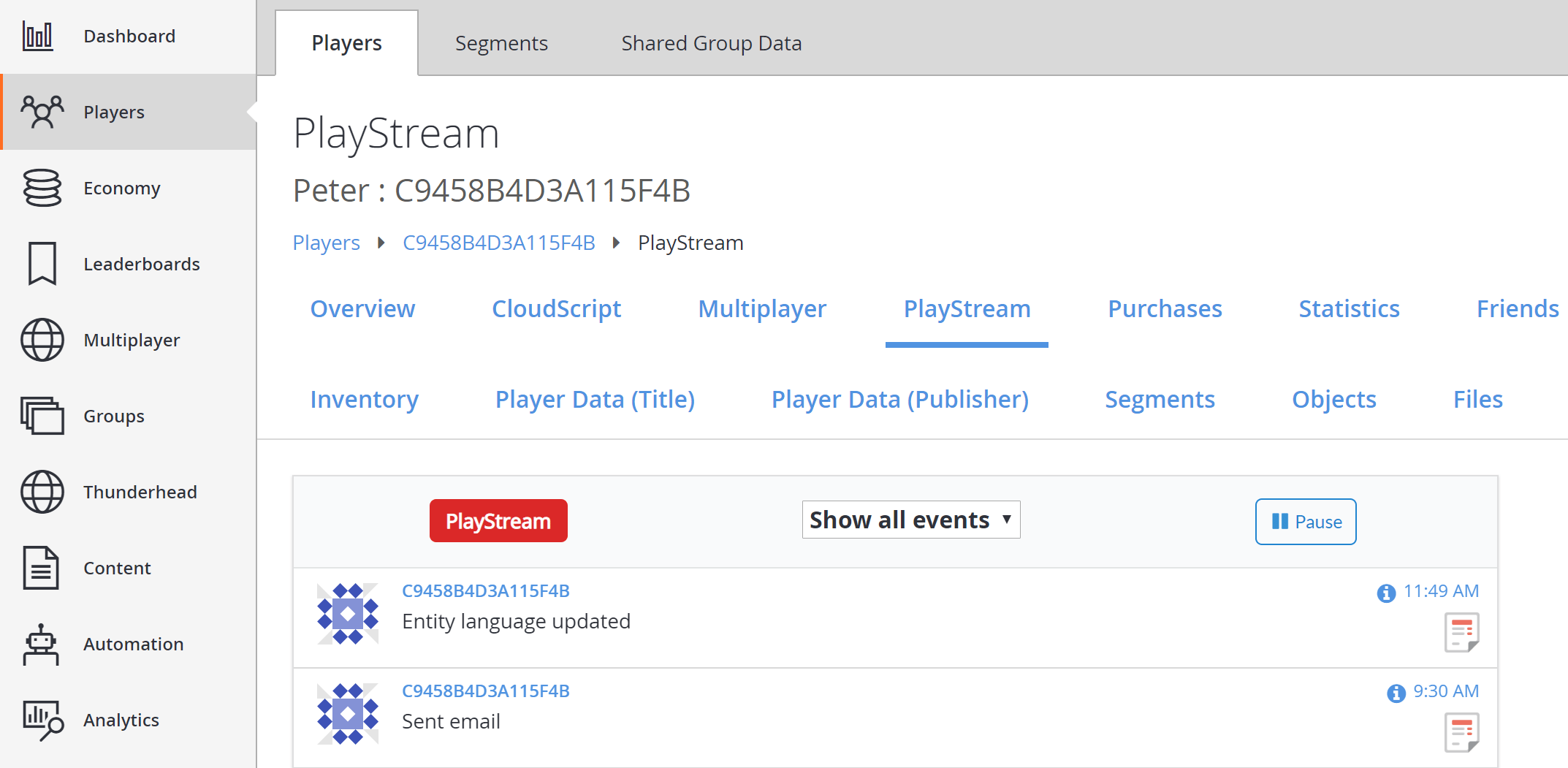
 接下来,导航到玩家的 **PlayStream**,它将显示一个 **Entity language updated** 事件。
 选择事件上的信息图标,看到类似于下面示例的 JSON。
```json theme={null}
{
"EventName": "entity_language_updated",
"Source": "PlayFab",
"Language": "en",
"EntityChain": "title_player_account!4CDA57A14A596E70//C9458B4D3A115F4B/36163DA3783B0C8A/",
"EntityLineage": {
"NamespaceId": "4CDA57A14A596E70",
"TitleId": "YourTitleId",
"MasterPlayerAccountId": "C9458B4D3A115F4B",
"TitlePlayerAccountId": "36163DA3783B0C8A",
"CharacterId": null,
"GroupId": null
},
"EventNamespace": "com.playfab",
"EventId": "f643e22a2a76462aaeaa3469afa31434",
"EntityType": "title_player_account",
"EntityId": "36163DA3783B0C8A",
"SourceType": "BackEnd",
"Timestamp": "2018-08-24T18:49:47.8755292Z",
"History": null,
"CustomTags": null,
"Reserved": null
}
```
## 第 2 节 – 设置 title 默认语言
接下来,为你的 title 设置默认语言。所有本地化功能现在将语言与内容的每个翻译版本关联。
title 需要默认语言。这可确保如果任何玩家的首选语言未设置或不受支持,玩家仍然可以接收内容的默认版本。
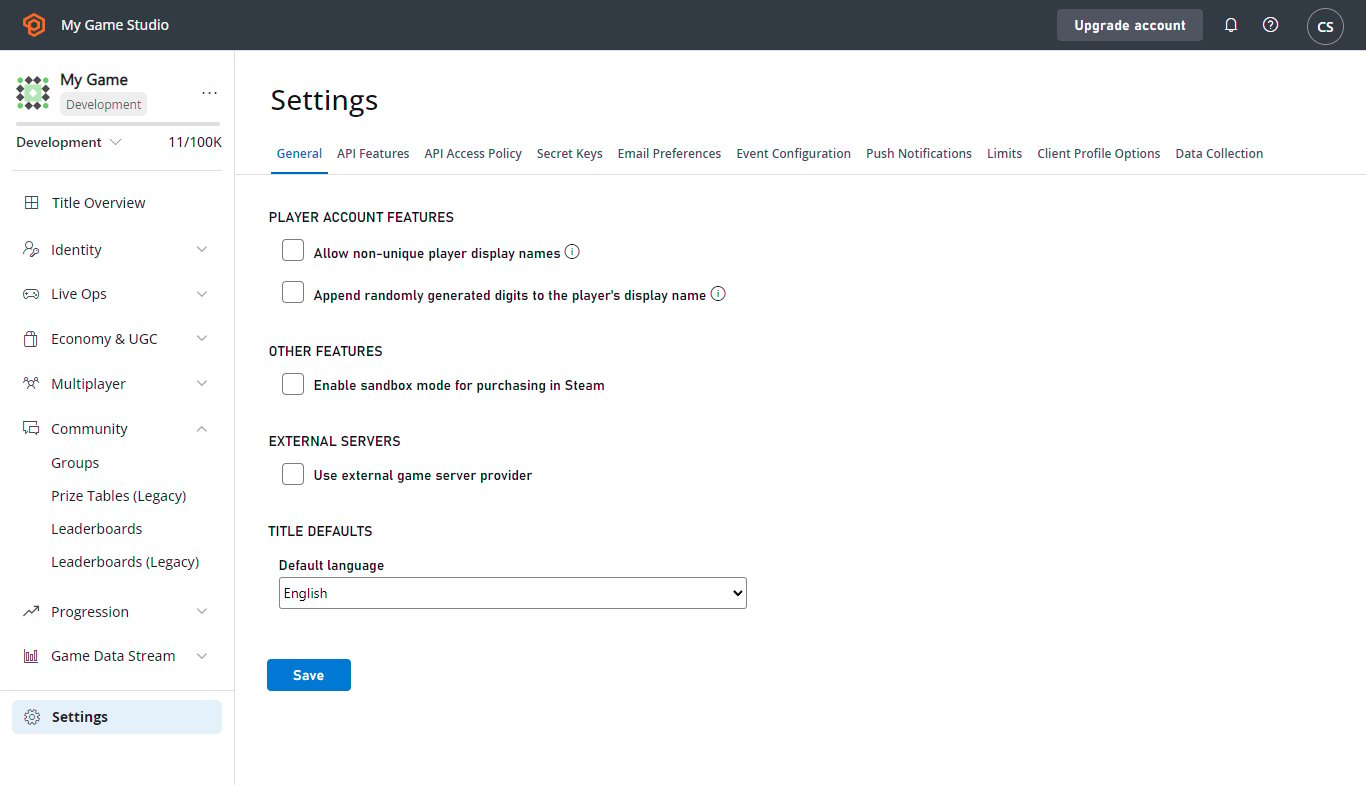
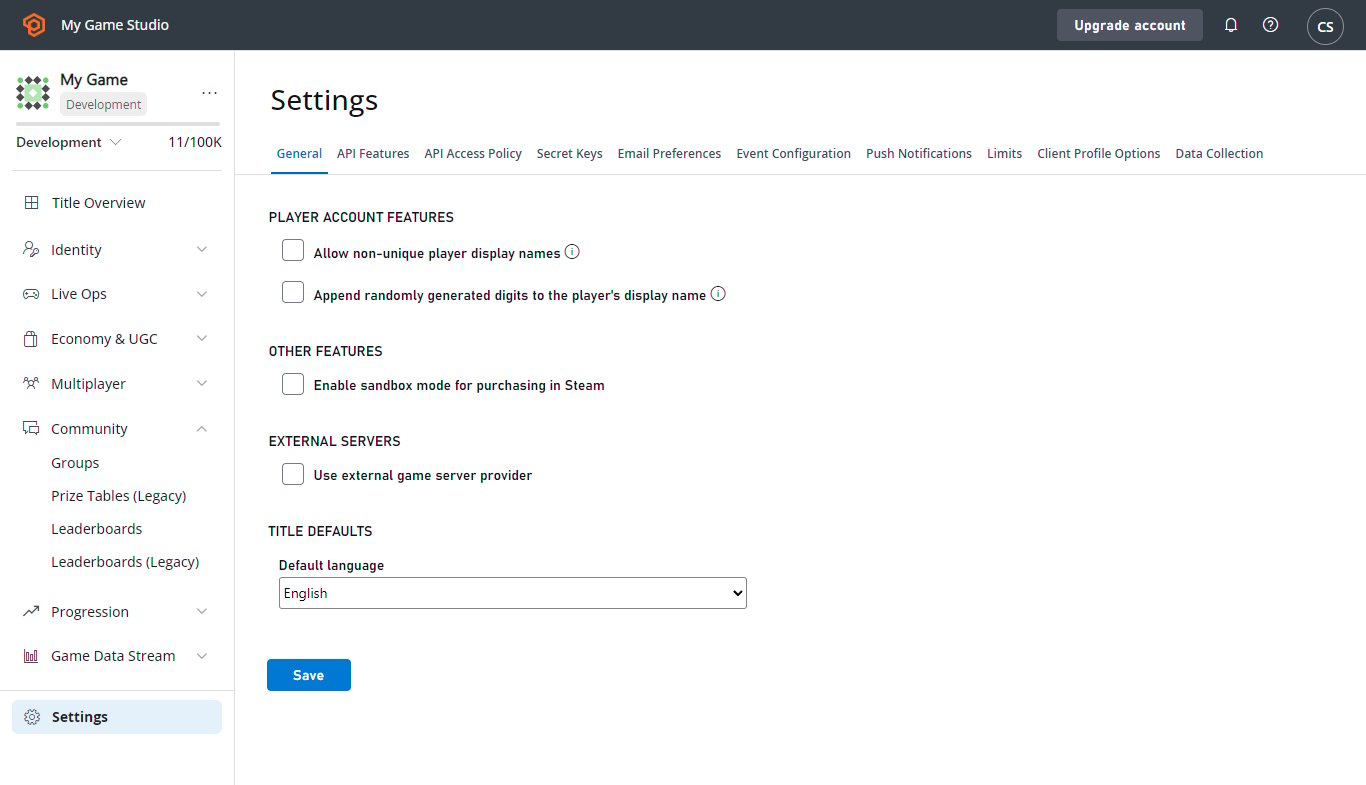
要开始,请选择左侧菜单中的 **Settings**,如下所示。
选择事件上的信息图标,看到类似于下面示例的 JSON。
```json theme={null}
{
"EventName": "entity_language_updated",
"Source": "PlayFab",
"Language": "en",
"EntityChain": "title_player_account!4CDA57A14A596E70//C9458B4D3A115F4B/36163DA3783B0C8A/",
"EntityLineage": {
"NamespaceId": "4CDA57A14A596E70",
"TitleId": "YourTitleId",
"MasterPlayerAccountId": "C9458B4D3A115F4B",
"TitlePlayerAccountId": "36163DA3783B0C8A",
"CharacterId": null,
"GroupId": null
},
"EventNamespace": "com.playfab",
"EventId": "f643e22a2a76462aaeaa3469afa31434",
"EntityType": "title_player_account",
"EntityId": "36163DA3783B0C8A",
"SourceType": "BackEnd",
"Timestamp": "2018-08-24T18:49:47.8755292Z",
"History": null,
"CustomTags": null,
"Reserved": null
}
```
## 第 2 节 – 设置 title 默认语言
接下来,为你的 title 设置默认语言。所有本地化功能现在将语言与内容的每个翻译版本关联。
title 需要默认语言。这可确保如果任何玩家的首选语言未设置或不受支持,玩家仍然可以接收内容的默认版本。
要开始,请选择左侧菜单中的 **Settings**,如下所示。
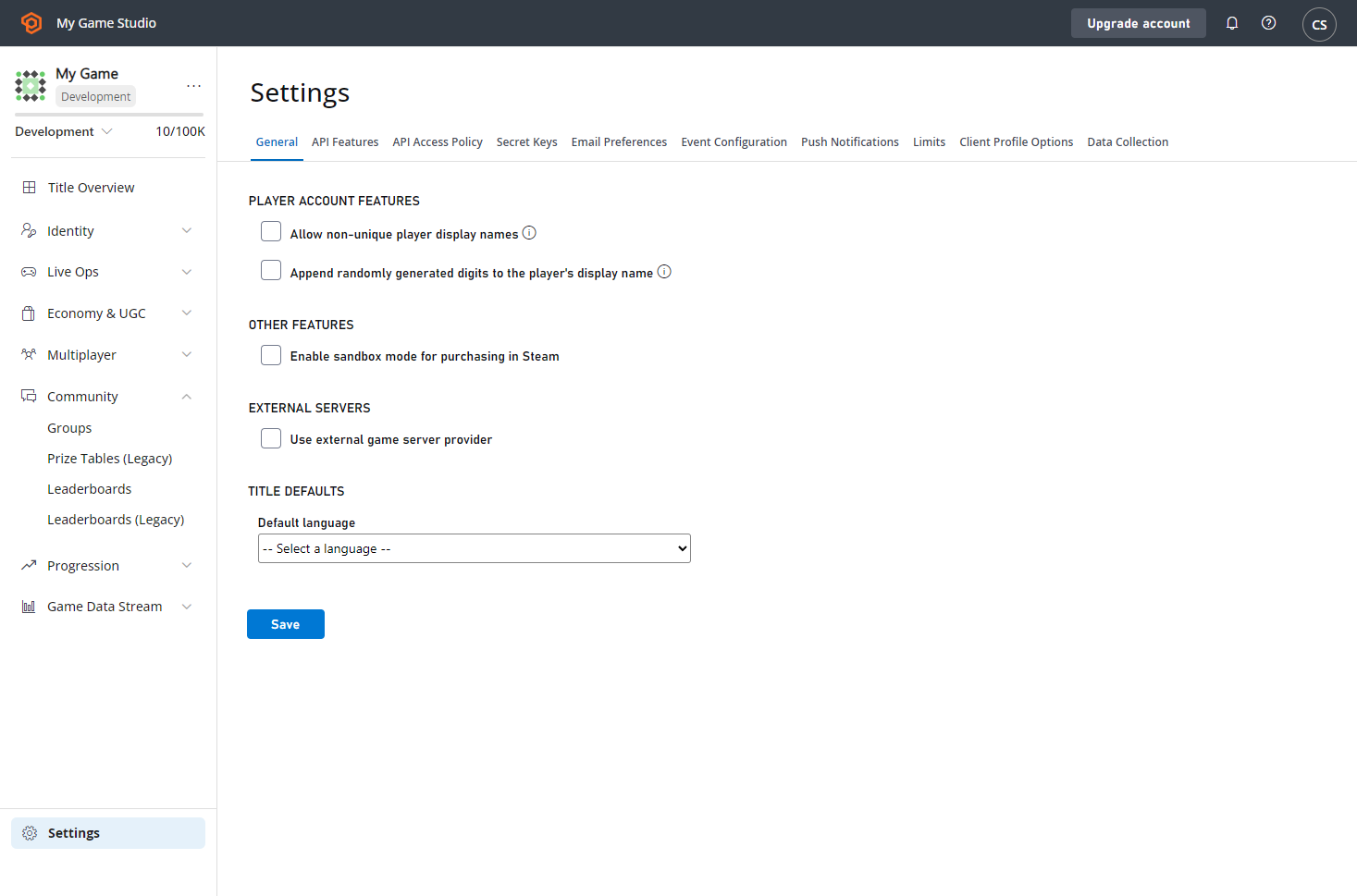 在 **General** 选项卡的新 **TITLE DEFAULTS** 标题下,找到 **Default language** 下拉列表。你必须先设置默认语言,然后才能使用任何添加本地化功能。
完成后,选择 **SAVE** 按钮。如果更新成功,将显示消息通知。
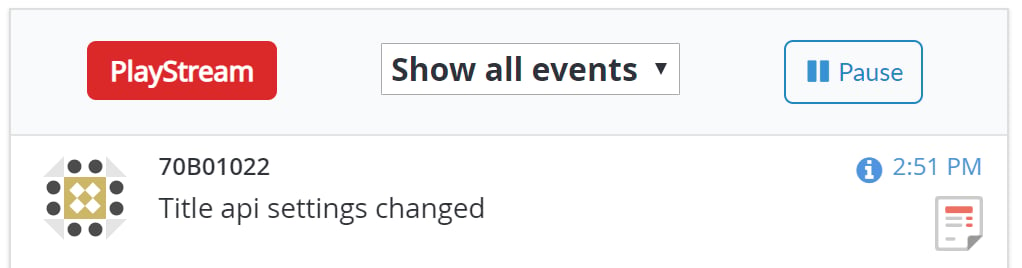
当你返回仪表板时,你将在 **PlayStream** 事件列表中看到 **Title API settings changed** 事件,如下所示。
在 **General** 选项卡的新 **TITLE DEFAULTS** 标题下,找到 **Default language** 下拉列表。你必须先设置默认语言,然后才能使用任何添加本地化功能。
完成后,选择 **SAVE** 按钮。如果更新成功,将显示消息通知。
当你返回仪表板时,你将在 **PlayStream** 事件列表中看到 **Title API settings changed** 事件,如下所示。
 选择事件上的信息图标,看到类似于下面示例的 JSON。
```json theme={null}
{
"EventName": "title_api_settings_changed",
"PreviousSettingsValues": {
"DefaultLanguage": null
},
"SettingsValues": {
"DefaultLanguage": "en"
},
"UserId": "EAF83D52E282C291",
"DeveloperId": null,
"EventNamespace": "com.playfab",
"EntityType": "title",
"Source": "PlayFab",
"EventId": "108849a5e1424051b42256bc75b2e34b",
"EntityId": "YourTitleId",
"SourceType": "BackEnd",
"Timestamp": "2018-08-24T21:51:02.2215614Z",
"History": null,
"CustomTags": null,
"Reserved": null
}
```
## 第 3 节 – 更新 title 默认语言
务必记住,为 title 设置默认语言告诉 PlayFab 在向*没有*设置首选语言或选择了不匹配你支持的语言的玩家发送通信时使用该语言。
因为 title 的默认语言用作*回退*语言,PlayFab 期望你的所有通信都支持你的默认语言。
你*总是*可以更改 title 默认语言,但 PlayFab 要求你当前的通信模板支持你要更改到的语言。
如果你更新 title 的默认语言,你会看到界面现在显示一个 **Edit** 链接。
选择事件上的信息图标,看到类似于下面示例的 JSON。
```json theme={null}
{
"EventName": "title_api_settings_changed",
"PreviousSettingsValues": {
"DefaultLanguage": null
},
"SettingsValues": {
"DefaultLanguage": "en"
},
"UserId": "EAF83D52E282C291",
"DeveloperId": null,
"EventNamespace": "com.playfab",
"EntityType": "title",
"Source": "PlayFab",
"EventId": "108849a5e1424051b42256bc75b2e34b",
"EntityId": "YourTitleId",
"SourceType": "BackEnd",
"Timestamp": "2018-08-24T21:51:02.2215614Z",
"History": null,
"CustomTags": null,
"Reserved": null
}
```
## 第 3 节 – 更新 title 默认语言
务必记住,为 title 设置默认语言告诉 PlayFab 在向*没有*设置首选语言或选择了不匹配你支持的语言的玩家发送通信时使用该语言。
因为 title 的默认语言用作*回退*语言,PlayFab 期望你的所有通信都支持你的默认语言。
你*总是*可以更改 title 默认语言,但 PlayFab 要求你当前的通信模板支持你要更改到的语言。
如果你更新 title 的默认语言,你会看到界面现在显示一个 **Edit** 链接。
 按照此链接,你将看到与之前相同的下拉菜单。但是,如果你尝试保存你的电子邮件模板不完全支持的默认语言,你将看到一个或多个类似下面显示的错误消息。
 如果有错误,你可以按照提供的链接更新你的内容以支持缺少的语言。解决所有错误后,将接受默认语言更改。
## 总结
在本教程中,你已了解如何设置和更新 title 的默认语言以及玩家的首选语言。
如果你对本教程有任何问题或反馈,请通过我们的[论坛](https://community.playfab.com/questions/ask.html)或 Slack 频道联系我们。
## Related topics
- [本地化电子邮件模板](/zh-CN/services/playfab/live-service-management/game-configuration/title-communications/emails/localized-email-templates.md)
- [Title News 快速入门](/zh-CN/services/playfab/live-service-management/game-configuration/title-communications/news/quickstart.md)
- [推送通知模板](/zh-CN/services/playfab/live-service-management/game-configuration/title-communications/push-notifications/push-notification-templates.md)
- [XBOX Manager:管理测试账户](/zh-CN/tools/tools-console/xbom/manager-tool-profiles.md)
- [XBOX Manager:管理主机和主机组](/zh-CN/tools/tools-console/xbom/manager-tool-groups.md)
如果有错误,你可以按照提供的链接更新你的内容以支持缺少的语言。解决所有错误后,将接受默认语言更改。
## 总结
在本教程中,你已了解如何设置和更新 title 的默认语言以及玩家的首选语言。
如果你对本教程有任何问题或反馈,请通过我们的[论坛](https://community.playfab.com/questions/ask.html)或 Slack 频道联系我们。
## Related topics
- [本地化电子邮件模板](/zh-CN/services/playfab/live-service-management/game-configuration/title-communications/emails/localized-email-templates.md)
- [Title News 快速入门](/zh-CN/services/playfab/live-service-management/game-configuration/title-communications/news/quickstart.md)
- [推送通知模板](/zh-CN/services/playfab/live-service-management/game-configuration/title-communications/push-notifications/push-notification-templates.md)
- [XBOX Manager:管理测试账户](/zh-CN/tools/tools-console/xbom/manager-tool-profiles.md)
- [XBOX Manager:管理主机和主机组](/zh-CN/tools/tools-console/xbom/manager-tool-groups.md)