> ## Documentation Index
> Fetch the complete documentation index at: https://devdocs.xbox.com/llms.txt
> Use this file to discover all available pages before exploring further.
# 实体快速入门
> 使用 Unity C# 开始使用 PlayFab 实体:进行身份验证以获取 EntityKey,然后使用 SDK 示例读取和写入实体对象和实体文件。
本实体快速入门演示如何处理实体对象和实体文件。
有关从旧账户和数据系统迁移到 PlayFab 实体的信息,请参阅[实体迁移信息](/services/playfab/live-service-management/game-configuration/entities/migration-information)。
## 要求
* [PlayFab 开发者账户](https://developer.playfab.com)。
* 已安装的 Unity Editor 副本。有关安装 Unity Editor 的信息,请参阅 Unity 文档中的[安装 Unity](https://docs.unity3d.com/Manual/GettingStartedInstallingUnity.html)。你还可以使用 Visual Studio 功能安装程序安装 Unity 版本。
PlayFab Unity3D SDK 支持 Unity Editor 5.3 及更高版本。
* 一个 Unity 项目。有关创建 Unity 项目的信息,请参阅[快速入门指南](https://docs.unity3d.com/Manual/Quickstart3D.html)。
如果你不熟悉 Unity,最近的安装包为你提供了安装游戏创建演练的选项。你可以使用其中一个演练来创建一个用于以下快速入门的示例游戏。
* PlayFab Unity3D SDK。
本文中的 C# 示例是为 Unity SDK 编写的。Unity SDK 使用事件驱动模型来处理非同步任务。要使用 C# SDK 运行示例代码,你必须修改代码以使用 async Task 模型。必须修改的方法在签名中的方法名称后附加 Async。例如,Unity SDK 中的 SetObject 在 C# SDK 中变为 SetObjectAsync。有关详细信息,请参阅[使用 async 和 await 的异步编程](https://learn.microsoft.com/en-us/dotnet/csharp/programming-guide/concepts/async/)。
## 术语
实体是可以包含数据的任何 PlayFab 概念。内置的实体类型有:
* **title** - title 包含对所有玩家可用的全局信息。这类似于 [TitleData](xref:titleid.playfabapi.com.client.title-widedatamanagement.gettitledata)。它由游戏/应用程序的 title ID (`TitleId`) 标识。
* **master\_player\_account** - 此实体 Type 允许你在命名空间内的多个游戏之间共享有关某位玩家的信息。它由玩家的 player ID (`PlayFabId`) 标识,该 ID 会作为任何登录或任何检索玩家账户信息的调用(例如 PlayFab Client API [GetAccountInfo](xref:titleid.playfabapi.com.client.accountmanagement.getaccountinfo))的一部分返回。
* **title\_player\_account** - 标识一个玩家账户,其中包含当前 title 的一些信息。这由 entity ID (`EntityKey.Id`) 标识,你可以在任何登录时在 [EntityKey](xref:titleid.playfabapi.com.authentication.authentication.getentitytoken#entitykey) 对象上获得该 ID。
* **character** - 标识玩家拥有的角色,其中包含你可以检索的信息。它由角色的 character ID (`CharacterId`) 标识。
有关内置实体类型的详细信息,请参阅[可用的内置实体类型](/services/playfab/live-service-management/game-configuration/entities/available-built-in-entity-types)。
## 实体初始化
要调用任何 Entity API,你必须获取实体 `ID` 和实体 `Type`。你使用 `ID` 和 `Type` 调用其他 Entity API 方法。这些是 [EntityKey](xref:titleid.playfabapi.com.authentication.authentication.getentitytoken#entitykey) 对象的成员。
你通过调用任何登录方法(例如 `LoginWithCustomID`)来执行此操作。
```csharp theme={null}
void Login()
{
var request = new PlayFab.ClientModels.LoginWithCustomIDRequest
{
CustomId = SystemInfo.deviceUniqueIdentifier,
CreateAccount = true,
};
PlayFabClientAPI.LoginWithCustomID(request, OnLogin, OnSharedFailure);
}
void OnLogin(PlayFab.ClientModels.LoginResult result)
{
entityId = result.EntityToken.Entity.Id;
// The expected entity type is title_player_account.
entityType = result.EntityToken.Entity.Type;
}
```
你也可以通过调用 [GetEntityToken](xref:titleid.playfabapi.com.authentication.authentication.getentitytoken) 方法获取实体 `ID` 和实体 `Type`。
```csharp theme={null}
PlayFabAuthenticationAPI.GetEntityToken(new GetEntityTokenRequest(),
(entityResult) =>
{
var entityId = entityResult.Entity.Id;
var entityType = entityResult.Entity.Type;
}, OnPlayFabError); // Define your own OnPlayFabError function to report errors
```
从客户端调用时,这通常代表登录的玩家。从游戏服务器调用时,这代表你的 title。
## 实体对象
实体对象允许你读取和写入附加到实体的小型 JSON 可序列化对象。所有实体类型都支持 `GetObjects` 和 `SetObjects` 方法。
以下代码段显示了如何在 `title_player_account` 实体上设置和读取一个 `Object`。
使用 [SetObjects](xref:titleid.playfabapi.com.data.object.setobjects) 方法在玩家或 title 上设置实体对象。
```csharp theme={null}
var data = new Dictionary()
{
{"Health", 100},
{"Mana", 10000}
};
var dataList = new List()
{
new SetObject()
{
ObjectName = "PlayerData",
DataObject = data
},
// A free-tier customer may store up to 3 objects on each entity
};
PlayFabDataAPI.SetObjects(new SetObjectsRequest()
{
Entity = new EntityKey {Id = entityId, Type = entityType}, // Saved from GetEntityToken, or a specified key created from a titlePlayerId, CharacterId, etc
Objects = dataList,
}, (setResult) => {
Debug.Log(setResult.ProfileVersion);
}, OnPlayFabError);
```
使用 [GetObjects](xref:titleid.playfabapi.com.data.object.getobjects) 方法检索玩家或 title 上的实体对象。
```csharp theme={null}
var getRequest = new GetObjectsRequest {Entity = new EntityKey {Id = entityId, Type = entityType}};
PlayFabDataAPI.GetObjects(getRequest,
result => { var objs = result.Objects; },
OnPlayFabError
);
```
## 实体文件
实体文件允许你以任何格式读取和写入附加到实体的文件。
使用 [GetFiles](xref:titleid.playfabapi.com.data.file.getfiles) 方法检索实体文件。
```csharp theme={null}
void LoadAllFiles()
{
if (GlobalFileLock != 0)
throw new Exception("This example overly restricts file operations for safety. Careful consideration must be made when doing multiple file operations in parallel to avoid conflict.");
GlobalFileLock += 1; // Start GetFiles
var request = new PlayFab.DataModels.GetFilesRequest { Entity = new PlayFab.DataModels.EntityKey { Id = entityId, Type = entityType } };
PlayFabDataAPI.GetFiles(request, OnGetFileMeta, OnSharedFailure);
}
```
使用 [initiatefileuploads](xref:titleid.playfabapi.com.data.file.initiatefileuploads) 方法启动向实体配置文件的文件上传。
```csharp theme={null}
void UploadFile(string fileName)
{
if (GlobalFileLock != 0)
throw new Exception("This example overly restricts file operations for safety. Careful consideration must be made when doing multiple file operations in parallel to avoid conflict.");
ActiveUploadFileName = fileName;
GlobalFileLock += 1; // Start InitiateFileUploads
var request = new PlayFab.DataModels.InitiateFileUploadsRequest
{
Entity = new PlayFab.DataModels.EntityKey { Id = entityId, Type = entityType },
FileNames = new List { ActiveUploadFileName },
};
PlayFabDataAPI.InitiateFileUploads(request, OnInitFileUpload, OnInitFailed);
}
```
使用 [AbortFileUploads](xref:titleid.playfabapi.com.data.file.abortfileuploads) 方法中止向实体配置文件的挂起文件上传。
```csharp theme={null}
void OnInitFailed(PlayFabError error)
{
if (error.Error == PlayFabErrorCode.EntityFileOperationPending)
{
// This is an error you should handle when calling InitiateFileUploads, but your resolution path may vary
GlobalFileLock += 1; // Start AbortFileUploads
var request = new PlayFab.DataModels.AbortFileUploadsRequest
{
Entity = new PlayFab.DataModels.EntityKey { Id = entityId, Type = entityType },
FileNames = new List { ActiveUploadFileName },
};
PlayFabDataAPI.AbortFileUploads(request, (result) => { GlobalFileLock -= 1; UploadFile(ActiveUploadFileName); }, OnSharedFailure); GlobalFileLock -= 1; // Finish AbortFileUploads
GlobalFileLock -= 1; // Failed InitiateFileUploads
}
else
OnSharedFailure(error);
}
```
使用 [FinalizeFileUploads](xref:titleid.playfabapi.com.data.file.finalizefileuploads) 方法完成向实体配置文件的文件上传。实体系统不会将文件上传视为完成,也不会将任何更改反映给其他调用者,直到原子上传操作成功完成。
```csharp theme={null}
void FinalizeUpload(byte[] data)
{
GlobalFileLock += 1; // Start FinalizeFileUploads
var request = new PlayFab.DataModels.FinalizeFileUploadsRequest
{
Entity = new PlayFab.DataModels.EntityKey { Id = entityId, Type = entityType },
FileNames = new List { ActiveUploadFileName },
};
PlayFabDataAPI.FinalizeFileUploads(request, OnUploadSuccess, OnSharedFailure);
GlobalFileLock -= 1; // Finish SimplePutCall
}
```
下面显示的示例演示了完整的实体文件循环,从登录、加载文件到上传新文件。
这些步骤如下:
* 登录并检索实体 `ID` 和实体 `Type`。
* 初始化原子上传操作。
* 上传所有文件。
* 完成原子上传操作。
为简单起见,此示例一次保存一个文件,但可以以原子方式集合上传文件。
该示例假设你熟悉使用 Unity 3D 引擎。
```csharp theme={null}
#if !DISABLE_PLAYFABENTITY_API && !DISABLE_PLAYFABCLIENT_API
using PlayFab;
using PlayFab.Internal;
using System;
using System.Collections.Generic;
using System.Text;
using UnityEngine;
public class EntityFileExample : MonoBehaviour
{
public string entityId; // Id representing the logged in player
public string entityType; // entityType representing the logged in player
private readonly Dictionary _entityFileJson = new Dictionary();
private readonly Dictionary _tempUpdates = new Dictionary();
public string ActiveUploadFileName;
public string NewFileName;
// GlobalFileLock provides is a simplistic way to avoid file collisions, specifically designed for this example.
public int GlobalFileLock = 0;
void OnSharedFailure(PlayFabError error)
{
Debug.LogError(error.GenerateErrorReport());
GlobalFileLock -= 1;
}
// OnGUI provides a way to build a Unity GUI entirely within script.
// Your GUI will be game-specific.
void OnGUI()
{
if (!PlayFabClientAPI.IsClientLoggedIn() && GUI.Button(new Rect(0, 0, 100, 30), "Login"))
Login();
if (PlayFabClientAPI.IsClientLoggedIn() && GUI.Button(new Rect(0, 0, 100, 30), "LogOut"))
PlayFabClientAPI.ForgetAllCredentials();
if (PlayFabClientAPI.IsClientLoggedIn() && GUI.Button(new Rect(100, 0, 100, 30), "(re)Load Files"))
LoadAllFiles();
if (PlayFabClientAPI.IsClientLoggedIn())
{
// Display existing files
_tempUpdates.Clear();
var index = 0;
foreach (var each in _entityFileJson)
{
GUI.Label(new Rect(100 * index, 60, 100, 30), each.Key);
var tempInput = _entityFileJson[each.Key];
var tempOutput = GUI.TextField(new Rect(100 * index, 90, 100, 30), tempInput);
if (tempInput != tempOutput)
_tempUpdates[each.Key] = tempOutput;
if (GUI.Button(new Rect(100 * index, 120, 100, 30), "Save " + each.Key))
UploadFile(each.Key);
index++;
}
// Apply any changes
foreach (var each in _tempUpdates)
_entityFileJson[each.Key] = each.Value;
// Add a new file
NewFileName = GUI.TextField(new Rect(100 * index, 60, 100, 30), NewFileName);
if (GUI.Button(new Rect(100 * index, 90, 100, 60), "Create " + NewFileName))
UploadFile(NewFileName);
}
}
void Login()
{
var request = new PlayFab.ClientModels.LoginWithCustomIDRequest
{
CustomId = SystemInfo.deviceUniqueIdentifier,
CreateAccount = true,
};
PlayFabClientAPI.LoginWithCustomID(request, OnLogin, OnSharedFailure);
}
void OnLogin(PlayFab.ClientModels.LoginResult result)
{
entityId = result.EntityToken.Entity.Id;
entityType = result.EntityToken.Entity.Type;
}
void LoadAllFiles()
{
if (GlobalFileLock != 0)
throw new Exception("This example overly restricts file operations for safety. Careful consideration must be made when doing multiple file operations in parallel to avoid conflict.");
GlobalFileLock += 1; // Start GetFiles
var request = new PlayFab.DataModels.GetFilesRequest { Entity = new PlayFab.DataModels.EntityKey { Id = entityId, Type = entityType } };
PlayFabDataAPI.GetFiles(request, OnGetFileMeta, OnSharedFailure);
}
void OnGetFileMeta(PlayFab.DataModels.GetFilesResponse result)
{
Debug.Log("Loading " + result.Metadata.Count + " files");
_entityFileJson.Clear();
foreach (var eachFilePair in result.Metadata)
{
_entityFileJson.Add(eachFilePair.Key, null);
GetActualFile(eachFilePair.Value);
}
GlobalFileLock -= 1; // Finish GetFiles
}
void GetActualFile(PlayFab.DataModels.GetFileMetadata fileData)
{
GlobalFileLock += 1; // Start Each SimpleGetCall
PlayFabHttp.SimpleGetCall(fileData.DownloadUrl,
result => { _entityFileJson[fileData.FileName] = Encoding.UTF8.GetString(result); GlobalFileLock -= 1; }, // Finish Each SimpleGetCall
error => { Debug.Log(error); }
);
}
void UploadFile(string fileName)
{
if (GlobalFileLock != 0)
throw new Exception("This example overly restricts file operations for safety. Careful consideration must be made when doing multiple file operations in parallel to avoid conflict.");
ActiveUploadFileName = fileName;
GlobalFileLock += 1; // Start InitiateFileUploads
var request = new PlayFab.DataModels.InitiateFileUploadsRequest
{
Entity = new PlayFab.DataModels.EntityKey { Id = entityId, Type = entityType },
FileNames = new List { ActiveUploadFileName },
};
PlayFabDataAPI.InitiateFileUploads(request, OnInitFileUpload, OnInitFailed);
}
void OnInitFailed(PlayFabError error)
{
if (error.Error == PlayFabErrorCode.EntityFileOperationPending)
{
// This is an error you should handle when calling InitiateFileUploads, but your resolution path may vary
GlobalFileLock += 1; // Start AbortFileUploads
var request = new PlayFab.DataModels.AbortFileUploadsRequest
{
Entity = new PlayFab.DataModels.EntityKey { Id = entityId, Type = entityType },
FileNames = new List { ActiveUploadFileName },
};
PlayFabDataAPI.AbortFileUploads(request, (result) => { GlobalFileLock -= 1; UploadFile(ActiveUploadFileName); }, OnSharedFailure); GlobalFileLock -= 1; // Finish AbortFileUploads
GlobalFileLock -= 1; // Failed InitiateFileUploads
}
else
OnSharedFailure(error);
}
void OnInitFileUpload(PlayFab.DataModels.InitiateFileUploadsResponse response)
{
string payloadStr;
if (!_entityFileJson.TryGetValue(ActiveUploadFileName, out payloadStr))
payloadStr = "{}";
var payload = Encoding.UTF8.GetBytes(payloadStr);
GlobalFileLock += 1; // Start SimplePutCall
PlayFabHttp.SimplePutCall(response.UploadDetails[0].UploadUrl,
payload,
FinalizeUpload,
error => { Debug.Log(error); }
);
GlobalFileLock -= 1; // Finish InitiateFileUploads
}
void FinalizeUpload(byte[] data)
{
GlobalFileLock += 1; // Start FinalizeFileUploads
var request = new PlayFab.DataModels.FinalizeFileUploadsRequest
{
Entity = new PlayFab.DataModels.EntityKey { Id = entityId, Type = entityType },
FileNames = new List { ActiveUploadFileName },
};
PlayFabDataAPI.FinalizeFileUploads(request, OnUploadSuccess, OnSharedFailure);
GlobalFileLock -= 1; // Finish SimplePutCall
}
void OnUploadSuccess(PlayFab.DataModels.FinalizeFileUploadsResponse result)
{
Debug.Log("File upload success: " + ActiveUploadFileName);
GlobalFileLock -= 1; // Finish FinalizeFileUploads
}
}
#endif
```
每个文件操作需要许多步骤和多个 API 调用,因此不要尝试同时以多种方式访问同一文件。如果你非常小心,可能不需要锁定机制。如果你想做一些复杂的事情,你的锁定机制可能会复杂得多。
## Game Manager 和实体
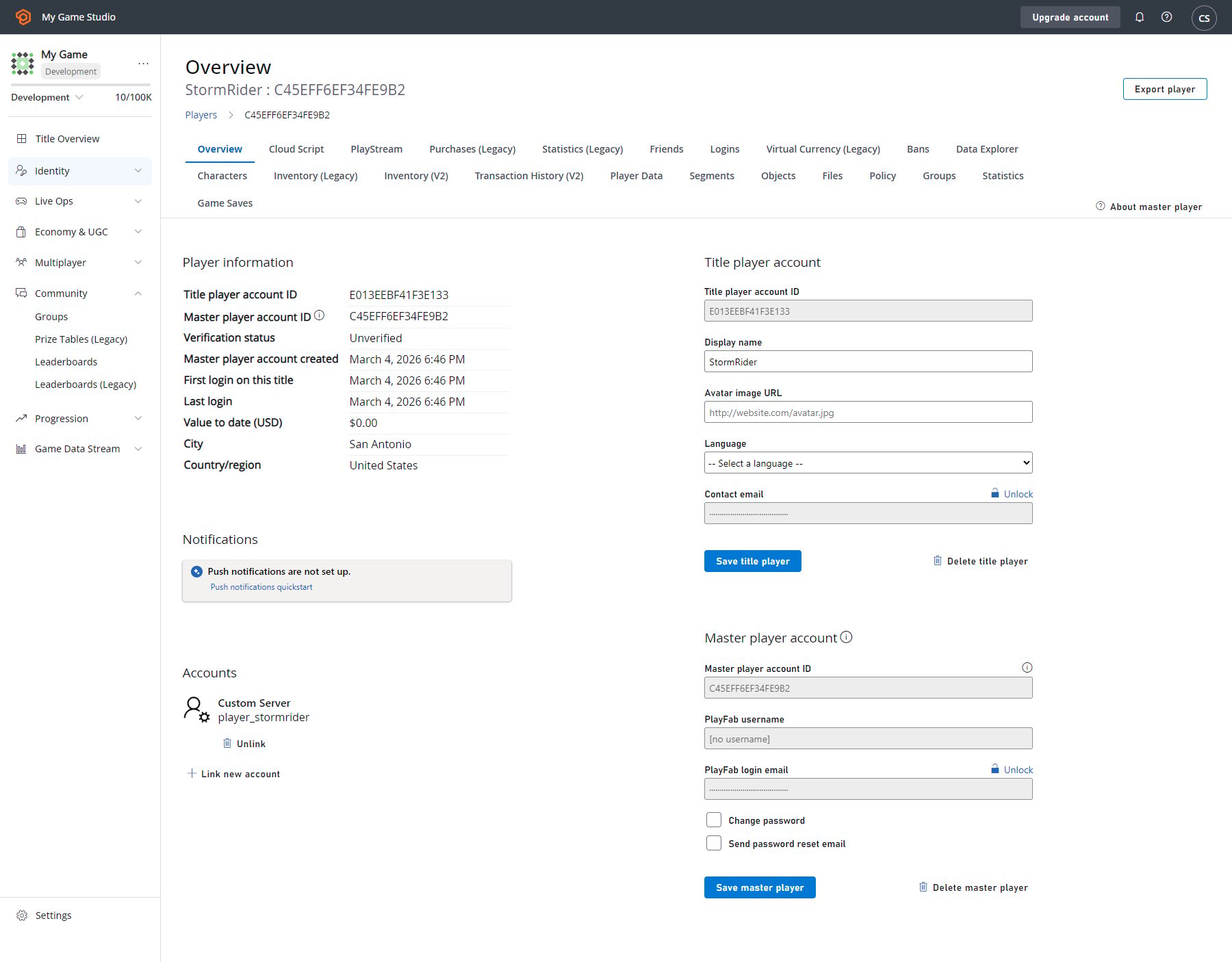
Game Manager 允许你为玩家操作对象和文件。玩家概览同时显示 title player 和 master player account 信息。
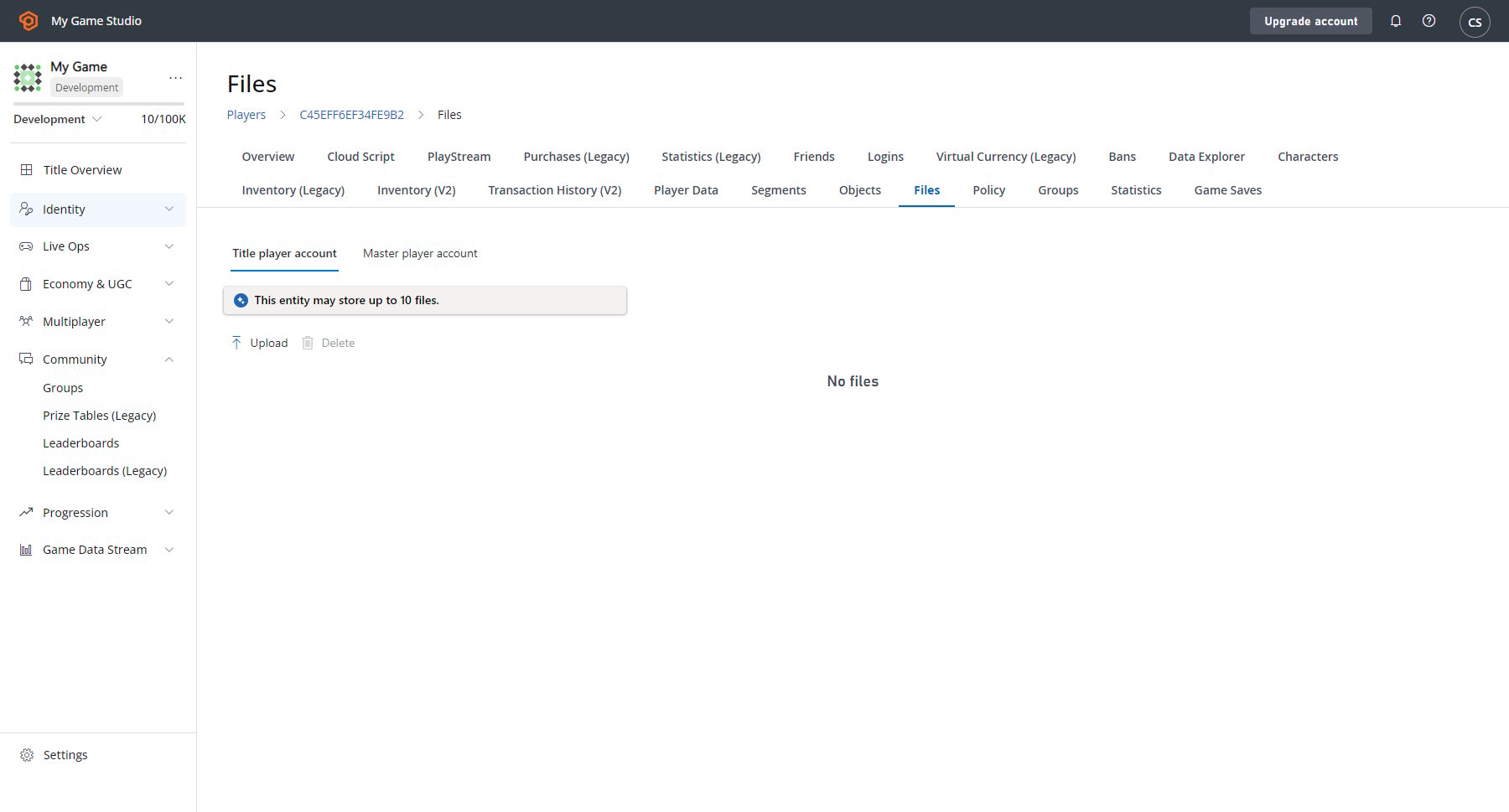
 此外,文件和对象现在在 **Players** 选项卡中拥有自己的部分。
 ## 另请参阅
PlayFab 博客上的 [Introducing Entities, Objects and Files](https://blog.playfab.com/blog/introducing-entities-objects-and-files)。
## Related topics
- [排行榜快速入门](/zh-CN/services/playfab/community/leaderboards/quickstart-leaderboards.md)
- [PlayFab 在线运营管理文档](/zh-CN/services/playfab/live-service-management/index.md)
- [快速入门](/zh-CN/services/playfab/economy-monetization/economy-v2/quickstart.md)
- [Matchmaking SDK 快速入门](/zh-CN/services/playfab/multiplayer/matchmaking/quickstart-client-sdk.md)
- [Lobby SDK 快速入门](/zh-CN/services/playfab/multiplayer/lobby/lobby-getting-started.md)
## 另请参阅
PlayFab 博客上的 [Introducing Entities, Objects and Files](https://blog.playfab.com/blog/introducing-entities-objects-and-files)。
## Related topics
- [排行榜快速入门](/zh-CN/services/playfab/community/leaderboards/quickstart-leaderboards.md)
- [PlayFab 在线运营管理文档](/zh-CN/services/playfab/live-service-management/index.md)
- [快速入门](/zh-CN/services/playfab/economy-monetization/economy-v2/quickstart.md)
- [Matchmaking SDK 快速入门](/zh-CN/services/playfab/multiplayer/matchmaking/quickstart-client-sdk.md)
- [Lobby SDK 快速入门](/zh-CN/services/playfab/multiplayer/lobby/lobby-getting-started.md)