> ## Documentation Index
> Fetch the complete documentation index at: https://devdocs.xbox.com/llms.txt
> Use this file to discover all available pages before exploring further.
# XBOX Live Title 关联
> 通过将 Partner Center 产品 ID 链接到 title ID,在 PlayFab 中为 LoginWithXbox 及相关 API 配置作用域 XBOX Live 令牌验证。
# 在 PlayFab 中设置 XBOX Live title 关联
了解如何通过将 Partner Center 产品 ID 链接到 PlayFab title ID 来配置作用域令牌验证。
## 概述
在本教程中,你将学习如何通过指定 PlayFab API 使用 XBOX Live 令牌参数时接受哪些 XBOX Live title 令牌来配置令牌验证——从而让你更好地控制集成行为并启用作用域令牌接受。这些 API 包括 `Client/loginwithxbox`、`Client/LinkXboxAccount`、`Client/UnlinkXboxAccount`、`Client/ConsumeXboxEntitlement`、`Client/GetFriendLeaderboard`、`Client/GetFriendLeaderboardAroundCurrentUser`、`Client/GetFriendLeaderboardAroundPlayer`、`Client/ConsumeMicrosoftStoreEntitlements`、`Server/loginwithxbox`、`Server/LinkXboxAccount`、`Server/UnlinkXboxAccount`、`Server/GetFriendLeaderboard`、`Server/GetFriendsList`、`Server/GetFriendLeaderboardForEntity`、`Lobby/GetFriendLobbies`、`Server/GetFriendLeaderboardAroundPlayer`、`Inventory/RedeemMicrosoftStoreInventoryItems` 和 `Inventory/Redeem`。
## 要求
* 已注册的 [PlayFab](https://developer.playfab.com/) title。
* 具有已启用 XBOX Live title 的 [Partner Center](https://partner.microsoft.com/) 账户。
## Partner Center 产品 ID 和 XBOX Live Title ID
首先导航到 Partner Center title 的产品页面。
1. 在 Partner Center 仪表板中,导航到 [Apps and Games](https://partner.microsoft.com/dashboard/apps-and-games/overview)。
2. 找到并选择你希望与 PlayFab 关联的已启用 XBOX Live 的 Partner Center title。
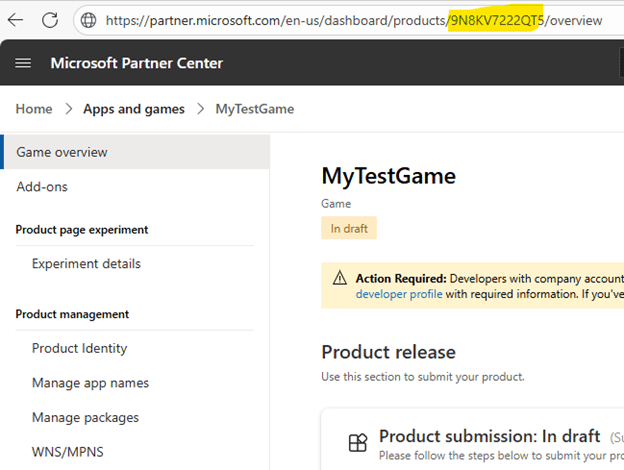
3. 在游戏的 URL 中找到并复制 Product ID。
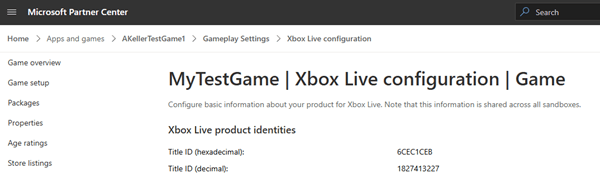
 4. 接下来找到并复制 XBOX Live Title ID。导航到 **XBOX services > XBOX Settings** 并复制 **Title ID (decimal)** 值。
 ## 安装 XBOX Live 附加组件
前往你的 title 的 [PlayFab Game Manager](https://developer.playfab.com/) 页面。
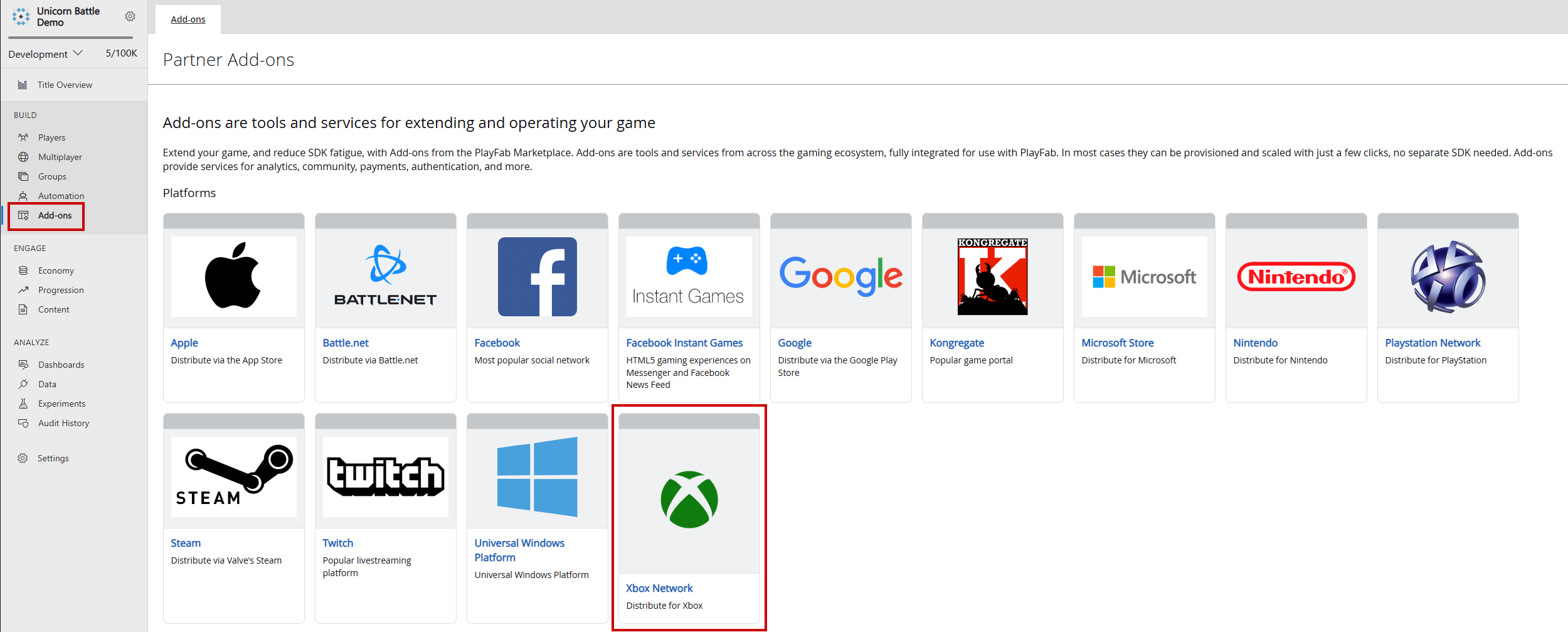
1. 在菜单中导航到 **Add-ons**。
2. 找到并选择 **XBOX Live** 附加组件图标/链接。
## 安装 XBOX Live 附加组件
前往你的 title 的 [PlayFab Game Manager](https://developer.playfab.com/) 页面。
1. 在菜单中导航到 **Add-ons**。
2. 找到并选择 **XBOX Live** 附加组件图标/链接。
 3. 使用 **Seller ID** 下拉菜单从 Partner Center 中选择正确的 Seller ID。如果你没有看到正确的 Seller ID,请选择 **Sign in with a different partner center account** 并使用正确的用户登录。
4. 使用 **Product ID** 下拉菜单找到将链接到 PlayFab title 的 Partner Center Product ID。确认 XBOX Live Title ID 与 Partner Center 中的预期 XBOX Live Title ID 匹配。
3. 使用 **Seller ID** 下拉菜单从 Partner Center 中选择正确的 Seller ID。如果你没有看到正确的 Seller ID,请选择 **Sign in with a different partner center account** 并使用正确的用户登录。
4. 使用 **Product ID** 下拉菜单找到将链接到 PlayFab title 的 Partner Center Product ID。确认 XBOX Live Title ID 与 Partner Center 中的预期 XBOX Live Title ID 匹配。
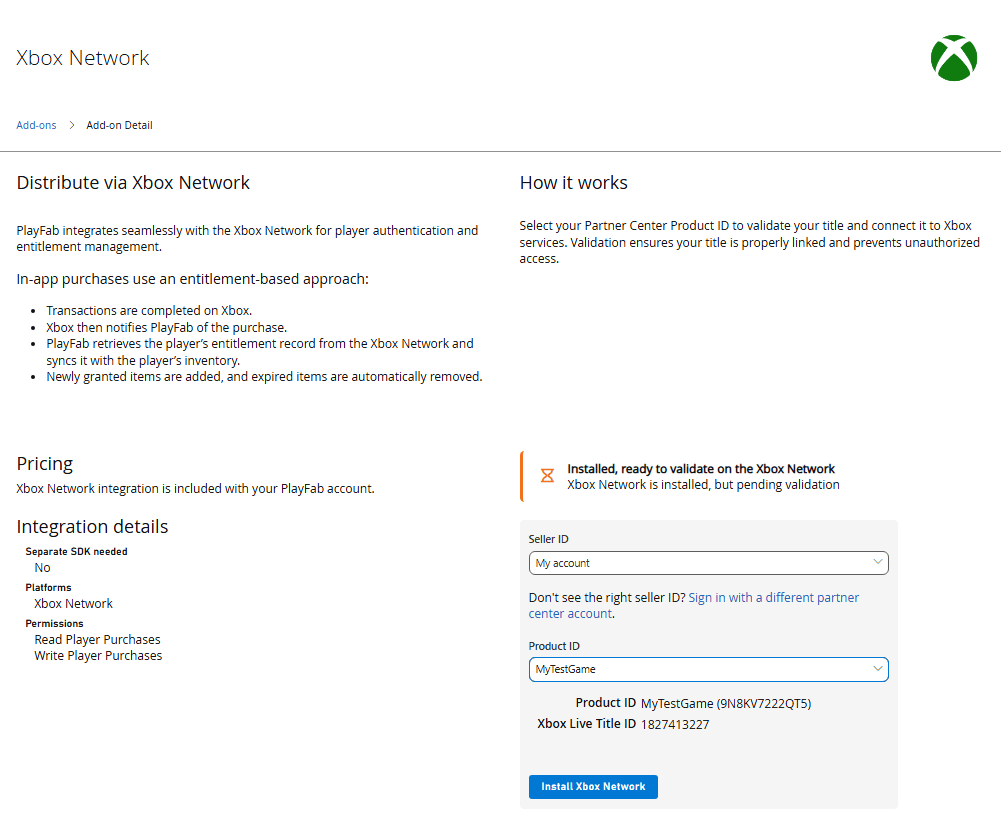 5. 选择 **Install XBOX Network** 以保存设置并将 API 调用限制到所选的 XBOX Live Title ID。
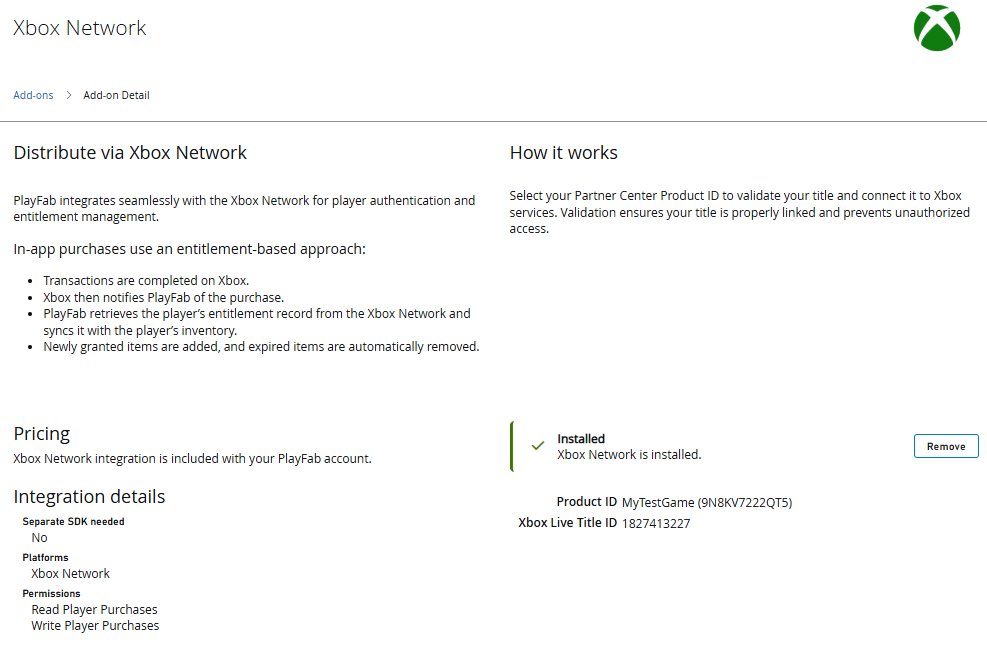 通过按照这些步骤,你可以自信地在 PlayFab 中配置作用域 XBOX Live 令牌验证,确保只接受来自指定 Partner Center title 的令牌。这种设置简化了跨平台身份验证,加强了特定于 title 的安全性,并使开发者能够在支持 XBOX 的服务中提供无缝、可信的玩家体验。
## 延伸阅读
* [PlayFab 身份验证概述](/services/playfab/identity/player-identity/authentication)
* [登录基础和最佳实践](/services/playfab/identity/player-identity/login/login-basics-best-practices)
## Related topics
- [PlayFab Identity 文档](/zh-CN/services/playfab/identity/index.md)
- [PFAccountManagementGetTitlePlayersFromXboxLiveIDsAsync](/zh-CN/services/playfab/api-references/c/pfaccountmanagement/functions/pfaccountmanagementgettitleplayersfromxboxliveidsasync.md)
- [PFAccountManagementGetTitlePlayersFromXboxLiveIDsRequest](/zh-CN/services/playfab/api-references/c/pfaccountmanagementtypes/structs/pfaccountmanagementgettitleplayersfromxboxliveidsrequest.md)
- [PartyXblManager::GetEntityIdsFromXboxLiveUserIds](/zh-CN/services/playfab/multiplayer/networking/xblreference/classes/PartyXblManager/methods/partyxblmanager_getentityidsfromxboxliveuserids.md)
- [适用于 PlayFab Party 的 XBOX Live 辅助库](/zh-CN/services/playfab/multiplayer/networking/party-xbox-live-guide.md)
通过按照这些步骤,你可以自信地在 PlayFab 中配置作用域 XBOX Live 令牌验证,确保只接受来自指定 Partner Center title 的令牌。这种设置简化了跨平台身份验证,加强了特定于 title 的安全性,并使开发者能够在支持 XBOX 的服务中提供无缝、可信的玩家体验。
## 延伸阅读
* [PlayFab 身份验证概述](/services/playfab/identity/player-identity/authentication)
* [登录基础和最佳实践](/services/playfab/identity/player-identity/login/login-basics-best-practices)
## Related topics
- [PlayFab Identity 文档](/zh-CN/services/playfab/identity/index.md)
- [PFAccountManagementGetTitlePlayersFromXboxLiveIDsAsync](/zh-CN/services/playfab/api-references/c/pfaccountmanagement/functions/pfaccountmanagementgettitleplayersfromxboxliveidsasync.md)
- [PFAccountManagementGetTitlePlayersFromXboxLiveIDsRequest](/zh-CN/services/playfab/api-references/c/pfaccountmanagementtypes/structs/pfaccountmanagementgettitleplayersfromxboxliveidsrequest.md)
- [PartyXblManager::GetEntityIdsFromXboxLiveUserIds](/zh-CN/services/playfab/multiplayer/networking/xblreference/classes/PartyXblManager/methods/partyxblmanager_getentityidsfromxboxliveuserids.md)
- [适用于 PlayFab Party 的 XBOX Live 辅助库](/zh-CN/services/playfab/multiplayer/networking/party-xbox-live-guide.md)