> ## Documentation Index
> Fetch the complete documentation index at: https://devdocs.xbox.com/llms.txt
> Use this file to discover all available pages before exploring further.
# Google Sign-in 到 Play Games 登录的迁移回退方案
> 在升级 Play Games Plugin for Unity 插件后,对于仍未使用 Google Play Games 身份的玩家的回退方法。
# 在 Play Games Plugin for Unity v0.11.x 上使用 LoginWithGoogleAccount 的修复
本文描述了在升级到某个版本的 Play Games Plugin for Unity 后使用 **LoginWithGoogleAccount** API 时收到错误的解决方法。
当你已将 [Play Games Plugin for Unity](https://github.com/playgameservices/play-games-plugin-for-unity) 升级到大于或等于 v0.11.x 的版本后,现有玩家未[迁移到使用 LoginWithGooglePlayGamesServices](/services/playfab/identity/player-identity/platform-specific-authentication/google-play-games-sign-in-migration-details#migration-steps)时会发生该错误。原因是 Google 在大于或等于 0.11.x 的插件版本上删除了添加额外作用域的可能性。
由于必须通过浏览器登录可能会影响玩家的体验,因此此解决方法应被视为回退方案。
## 开始之前
按照以下高层步骤在使用最新版本的插件时修复身份验证。
1. 手动调用 Google OAuth2 API
2. 在浏览器选项卡中执行玩家的身份验证
3. 使用 Android 深度链接将重定向 auth code 返回到游戏。
## 建议
在你仍使用插件的 0.10.x 版本时,[将你的用户迁移到使用 LoginWithGooglePlayGamesServices](/services/playfab/identity/player-identity/platform-specific-authentication/google-play-games-sign-in-migration-details#migration-steps) API。升级到插件的 0.11.x 或更高版本后,将以下步骤用作剩余玩家的回退方法。
## 修复步骤
1. 使用深度链接向你的游戏添加 Android intent。(步骤改编自 [Unity - Manual: Deep linking on Android (unity3d.com)](https://docs.unity3d.com/2021.2/Documentation/Manual/deep-linking-android.html))
a. 在 Project 窗口中,转到 **Assets > Plugins > Android**。
b. 创建一个新文件并将其命名为 **AndroidManifest.xml**。Unity 在构建你的应用程序时自动处理此文件。
c. 将以下清单示例复制到新文件,用你应用的 URI 更新 data 元素并保存。有关如何构建正确的 data 标签的更多信息,请参阅[本文](https://developer.android.com/guide/topics/manifest/data-element)。
```xml theme={null}
```
d. 确保 intent-filter 标签上存在 **autoVerify** 属性。
2. 为了让深度链接工作,从 Android 12 开始,Google 现在要求开发者在一个知名位置托管 assetlinks.json 文件,以便成功重定向到你的应用。
例如,如果你的重定向 URI 是 [https://mytestapp.com/path1/subpath,你应在](https://mytestapp.com/path1/subpath,你应在) [https://mytestapp.com/.well-known/assetlinks.json](https://mytestapp.com/.well-known/assetlinks.json) 处托管一个有效的 assetlinks.json 文件,否则深度链接将不起作用,你将无法被重定向回你的应用继续操作。
有关如何创建 assetlinks.json 文件的详细信息,请参阅[验证 Android 应用链接](https://developer.android.com/training/app-links/verify-android-applinks)。
3. 向你的游戏添加深度链接处理。(步骤改编自 [Unity - Manual: Deep linking (unity3d.com)](https://docs.unity3d.com/2021.2/Documentation/Manual/deep-linking.html#using-deep-links))。
```csharp theme={null}
using GooglePlayGames;
using GooglePlayGames.BasicApi;
using PlayFab;
using PlayFab.ClientModels;
using System;
using UnityEngine;
using UnityEngine.UI;
public class ProcessDeepLinkMngr : MonoBehaviour
{
public static ProcessDeepLinkMngr Instance { get; private set; }
private void Awake()
{
if (Instance == null)
{
Instance = this;
Application.deepLinkActivated += onDeepLinkActivated;
if (!string.IsNullOrEmpty(Application.absoluteURL))
{
// Cold start and Application.absoluteURL not null so process Deep Link.
onDeepLinkActivated(Application.absoluteURL);
}
DontDestroyOnLoad(gameObject);
}
else
{
Destroy(gameObject);
}
}
private void onDeepLinkActivated(string url)
{
Debug.Log("Got Deeplink Activated: " + url);
// Decode the URL to extract auth code.
string queryParams = url.Split("?"[0])[1];
string[] keyValuePairs = queryParams.Split("&");
string authCode = string.Empty;
foreach (string s in keyValuePairs)
{
if (s.StartsWith("code"))
{
authCode = s.Split("=")[1];
break;
}
}
if (!string.IsNullOrEmpty(authCode))
{
// Call the LoginWithGoogleAccount using the auth code
Debug.Log("Authenticating to PlayFab using LoginWithGoogleAccount...");
// Make sure to unescape string
authCode = Uri.UnescapeDataString(authCode);
var request = new LoginWithGoogleAccountRequest
{
ServerAuthCode = authCode,
CreateAccount = true,
TitleId = PlayFabSettings.TitleId
};
PlayFabClientAPI.LoginWithGoogleAccount(request,
(LoginResult result) => {
Debug.Log("PlayFab LoginWithGoogleAccount Success.");
},
(PlayFabError error) => {
Debug.Log("PlayFab LoginWithGoogleAccount Failure: " + error.GenerateErrorReport());
}
);
}
else
{
Debug.Log("Error when getting Auth Code.");
}
}
}
```
4. 添加一些代码以将浏览器启动到 Google OAuth2 API,并让玩家通过浏览器登录。如果玩家已经在浏览器中登录,则转换是无缝的,否则他们需要输入其凭据。
```csharp theme={null}
private string authorizationEndpoint = "https://accounts.google.com/o/oauth2/v2/auth";
private string redirectURI = "[APPLICATION-REDIRECT-URI]";
private object clientID = "[WEB-APPLICATION-CLIENT-ID]";
private string scopes = "profile";
private void LaunchBrowserAuth()
{
string authorizationRequest = string.Format("{0}?response_type=code&scope={1}&redirect_uri={2}&client_id={3}",
authorizationEndpoint,
scopes,
Uri.EscapeDataString(redirectURI),
clientID);
Application.OpenURL(authorizationRequest);
}
```
重定向 URI 必须与我们在步骤 1 中添加的 Android intent 筛选器匹配。因此,当用户完成身份验证时,浏览器将导航到该重定向 URI,并且浏览器应询问用户是否要导航回应用程序。
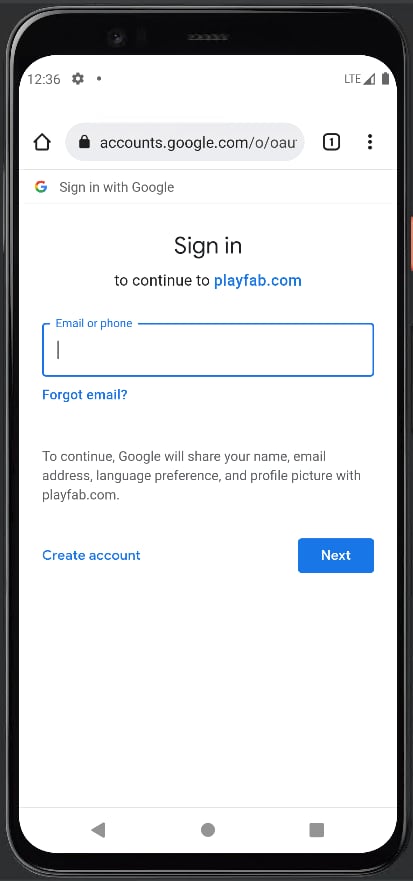
5. 现在,你应该准备好测试它了。因此,当你触发身份验证时,应打开浏览器,用户必须相应地登录。除非浏览器数据被删除,否则此步骤应该是一次性过程。
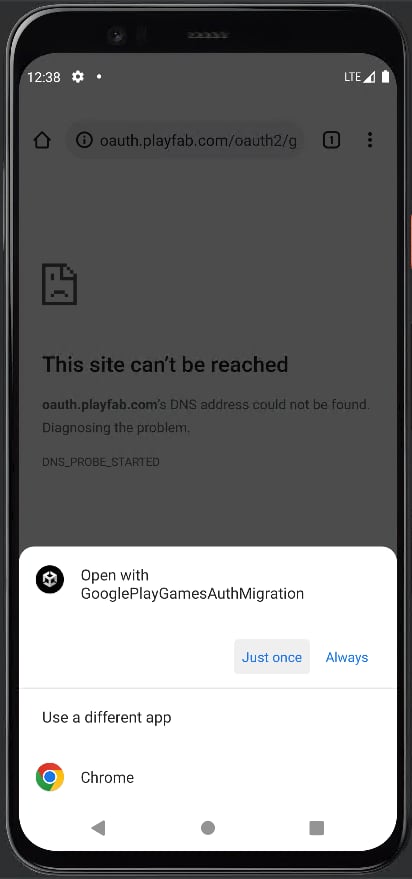
 6. 用户完成身份验证后,浏览器将询问在哪个应用程序上打开重定向 URL。
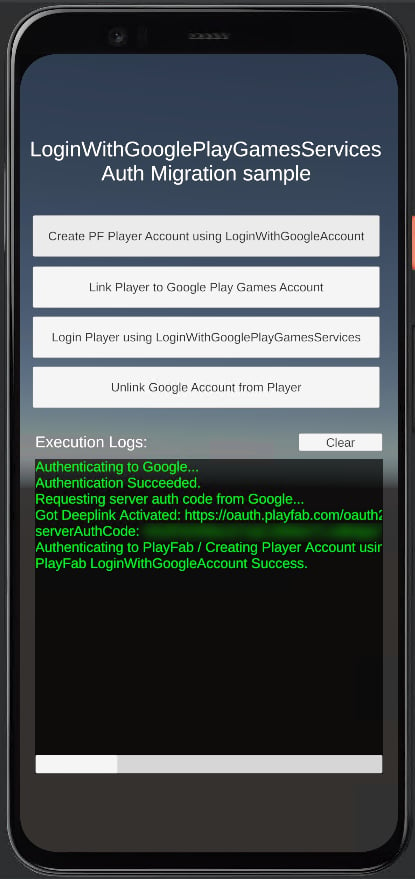
 7. 此操作会导航回我们的应用程序,我们可以从重定向 URL 上的查询参数获取代码,并继续调用 LoginWithGoogleAccount。
 8. 最后,我们建议将此方法用作使用[迁移步骤](/services/playfab/identity/player-identity/platform-specific-authentication/google-play-games-sign-in-migration-details#migration-steps)无法迁移的任何用户的回退方案。
***请记住,你应跟踪哪些用户已经迁移到使用 LoginWithGooglePlayGamesServices,并优先使用插件提供的自动登录机制,将此用作尚未被迁移的用户的解决方法。***
## Related topics
- [将 Unity 游戏迁移到 Google Play Games 登录](/zh-CN/services/playfab/identity/player-identity/platform-specific-authentication/google-play-games-sign-in-migration.md)
- [在 Unity 中从 Google Sign-in 迁移到 Google Play Games](/zh-CN/services/playfab/identity/player-identity/platform-specific-authentication/google-play-games-sign-in-migration-details.md)
- [IXtfUserClient::SigninUser](/zh-CN/reference/tools/xtf/xtfuser/classes/IXtfUserClient/methods/signinuser-ixtfuserclient-xtfuser-xbox-windows-m.md)
- [IXtfUserClient::SigninUserId](/zh-CN/reference/tools/xtf/xtfuser/classes/IXtfUserClient/methods/signinuserid-ixtfuserclient-xtfuser-xbox-windows-m.md)
- [登录 Game Manager](/zh-CN/services/playfab/live-service-management/gamemanager/game-manager-login.md)
8. 最后,我们建议将此方法用作使用[迁移步骤](/services/playfab/identity/player-identity/platform-specific-authentication/google-play-games-sign-in-migration-details#migration-steps)无法迁移的任何用户的回退方案。
***请记住,你应跟踪哪些用户已经迁移到使用 LoginWithGooglePlayGamesServices,并优先使用插件提供的自动登录机制,将此用作尚未被迁移的用户的解决方法。***
## Related topics
- [将 Unity 游戏迁移到 Google Play Games 登录](/zh-CN/services/playfab/identity/player-identity/platform-specific-authentication/google-play-games-sign-in-migration.md)
- [在 Unity 中从 Google Sign-in 迁移到 Google Play Games](/zh-CN/services/playfab/identity/player-identity/platform-specific-authentication/google-play-games-sign-in-migration-details.md)
- [IXtfUserClient::SigninUser](/zh-CN/reference/tools/xtf/xtfuser/classes/IXtfUserClient/methods/signinuser-ixtfuserclient-xtfuser-xbox-windows-m.md)
- [IXtfUserClient::SigninUserId](/zh-CN/reference/tools/xtf/xtfuser/classes/IXtfUserClient/methods/signinuserid-ixtfuserclient-xtfuser-xbox-windows-m.md)
- [登录 Game Manager](/zh-CN/services/playfab/live-service-management/gamemanager/game-manager-login.md)