> ## Documentation Index
> Fetch the complete documentation index at: https://devdocs.xbox.com/llms.txt
> Use this file to discover all available pages before exploring further.
# 在 Unity 中从 Google Sign-in 迁移到 Google Play Games
> 将 Unity 玩家从 Google 帐户登录切换到 LoginWithGooglePlayGamesServices 的详细迁移步骤,包括关联和验证。
# LoginWithGooglePlayGamesServices API 迁移过程
迁移包括切换到 LoginWithGooglePlayGamesServices,因为 Google 正在鼓励开发者迁移到这种身份验证方式。迁移玩家后,将不再依赖 LoginWithGoogleAccount API,开发者应该能够升级到最新的插件版本。
有关更多信息,请参阅 [Google 官方文档](https://developers.google.com/games/services/android/signin#migrate_to_play_games_services_sign_in_v2)。
## 高层步骤
1. 选择合适版本的“Play Games Plugin for Unity”。
2. 初始化 Play Games Platform 并对用户进行身份验证。
3. 使用 LoginWithGoogleAccount 登录到 PlayFab。
4. 将你的 Google Play Games 配置文件与 PlayFab 玩家账户关联。
5. 验证用户可以使用 LoginWithGooglePlayGamesServices API 登录。
6. (可选)从 PlayFab 玩家账户取消关联你的 Google 账户配置文件。
## 迁移步骤
### 选择合适版本的“Play Games Plugin for Unity”
最新版本的插件不适合迁移,因为 Google 不再允许请求额外的作用域,所以 PlayFab 的 LoginWithGoogleAccount API 不再有效。
这些迁移步骤使用“Play Games Plugin for Unity”0.10.14 版本进行了测试和记录,可以在这里找到:[playgameservices/play-games-plugin-for-unity at v10.14 (github.com)](https://github.com/playgameservices/play-games-plugin-for-unity/tree/v10.14)
有关插件安装和配置步骤,请参阅插件的 [README](https://github.com/playgameservices/play-games-plugin-for-unity/blob/v10.14/README.md)
### 初始化 Play Games Platform 并对玩家进行身份验证
参考 [README 中的 Configuration & Initialization Play Games Services 部分](https://github.com/playgameservices/play-games-plugin-for-unity/blob/v10.14/README.md#configuration--initialization-play-game-services),并在 PlayGamesClientConfiguration 中请求“profile”作用域。
```csharp theme={null}
PlayGamesClientConfiguration config = new PlayGamesClientConfiguration.Builder()
.AddOauthScope("profile")
.RequestServerAuthCode(false)
.Build();
PlayGamesPlatform.InitializeInstance(config);
// recommended for debugging:
PlayGamesPlatform.DebugLogEnabled = true;
// Activate the Google Play Games platform
PlayGamesPlatform.Activate();
// authenticate user:
PlayGamesPlatform.Instance.Authenticate(SignInInteractivity.CanPromptOnce, (SignInStatus result) => {
if (result == SignInStatus.Success)
{
Debug.Log("Authentication Succeeded.");
}
else
{
Debug.Log("Authentication Failed. SignInStatus: " + result);
}
});
```
### 使用 LoginWithGoogleAccount 登录到 PlayFab
使用 [LoginWithGoogleAccount](https://learn.microsoft.com/en-us/rest/api/playfab/client/authentication/login-with-google-account?view=playfab-rest) 身份验证 API 登录到现有玩家的账户。为了成功登录,你需要提供一个 Server Auth Token,可以通过 GetServerAuthCode 方法请求。
```csharp theme={null}
public void PlayFabLoginWithGoogleAccount()
{
var serverAuthCode = PlayGamesPlatform.Instance.GetServerAuthCode();
var request = new LoginWithGoogleAccountRequest
{
ServerAuthCode = serverAuthCode,
TitleId = PlayFabSettings.TitleId
};
PlayFabClientAPI.LoginWithGoogleAccount(request, OnLoginWithGoogleAccountSuccess, OnLoginWithGoogleAccountFailure);
}
private void OnLoginWithGoogleAccountSuccess(LoginResult result)
{
Debug.Log("PlayFab LoginWithGoogleAccount Success.");
}
private void OnLoginWithGoogleAccountFailure(PlayFabError error)
{
Debug.Log("PlayFab LoginWithGoogleAccount Failure: " + error.GenerateErrorReport());
}
```
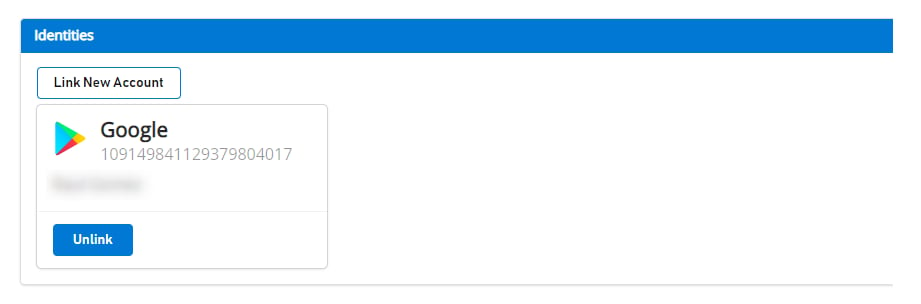
在进行任何迁移之前,关联到 Google 账户的用户在 [Game Manager](https://developer.playfab.com) 上会像这样显示:
 ### 将玩家的 Google Play Games 配置文件与 PlayFab 玩家账户关联
在此步骤中,你将玩家的 Google Play Games 账户与之前仅关联到 Google 账户的现有玩家 PlayFab 账户关联起来。
```csharp theme={null}
public void LinkGooglePlayGamesAccount()
{
PlayGamesPlatform.Instance.GetAnotherServerAuthCode(true, (serverAuthCode) => {
var linkRequest = new LinkGooglePlayGamesServicesAccountRequest
{
ServerAuthCode = serverAuthCode
};
PlayFabClientAPI.LinkGooglePlayGamesServicesAccount(linkRequest, OnLinkGooglePlayGamesServicesAccountSuccess, OnLinkGooglePlayGamesServicesAccountFailure);
});
}
private void OnLinkGooglePlayGamesServicesAccountSuccess(LinkGooglePlayGamesServicesAccountResult result)
{
Debug.Log("PlayFab LinkGooglePlayGamesServicesAccount Success");
}
private void OnLinkGooglePlayGamesServicesAccountFailure(PlayFabError error)
{
Debug.Log("PlayFab LinkGooglePlayGamesServicesAccount Failure: " + error.GenerateErrorReport());
}
```
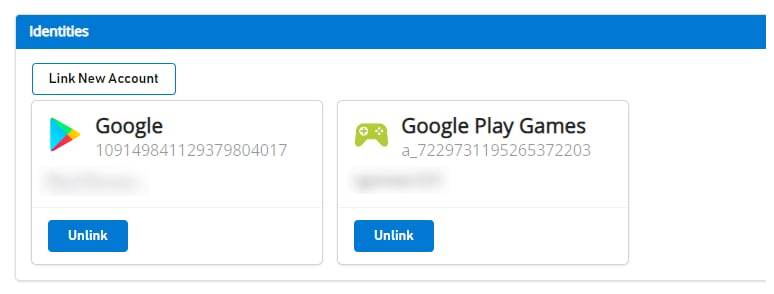
完成此步骤后,玩家应在 PlayFab 端关联了两个账户配置文件,从现在开始应该能够使用 [LoginWithGooglePlayGamesServices](https://learn.microsoft.com/en-us/rest/api/playfab/client/authentication/login-with-google-play-games-services?view=playfab-rest) 身份验证 API。
如果你导航到 [Game Manager](https://developer.playfab.com),你会看到两个账户都关联到该玩家,如下所示:
### 将玩家的 Google Play Games 配置文件与 PlayFab 玩家账户关联
在此步骤中,你将玩家的 Google Play Games 账户与之前仅关联到 Google 账户的现有玩家 PlayFab 账户关联起来。
```csharp theme={null}
public void LinkGooglePlayGamesAccount()
{
PlayGamesPlatform.Instance.GetAnotherServerAuthCode(true, (serverAuthCode) => {
var linkRequest = new LinkGooglePlayGamesServicesAccountRequest
{
ServerAuthCode = serverAuthCode
};
PlayFabClientAPI.LinkGooglePlayGamesServicesAccount(linkRequest, OnLinkGooglePlayGamesServicesAccountSuccess, OnLinkGooglePlayGamesServicesAccountFailure);
});
}
private void OnLinkGooglePlayGamesServicesAccountSuccess(LinkGooglePlayGamesServicesAccountResult result)
{
Debug.Log("PlayFab LinkGooglePlayGamesServicesAccount Success");
}
private void OnLinkGooglePlayGamesServicesAccountFailure(PlayFabError error)
{
Debug.Log("PlayFab LinkGooglePlayGamesServicesAccount Failure: " + error.GenerateErrorReport());
}
```
完成此步骤后,玩家应在 PlayFab 端关联了两个账户配置文件,从现在开始应该能够使用 [LoginWithGooglePlayGamesServices](https://learn.microsoft.com/en-us/rest/api/playfab/client/authentication/login-with-google-play-games-services?view=playfab-rest) 身份验证 API。
如果你导航到 [Game Manager](https://developer.playfab.com),你会看到两个账户都关联到该玩家,如下所示:
 ### 验证玩家可以使用 LoginWithGooglePlayGamesServices API 登录
```csharp theme={null}
public void PFLoginWithGooglePlayGames()
{
PlayGamesPlatform.Instance.GetAnotherServerAuthCode(true, (serverAuthCode) => {
var request = new LoginWithGooglePlayGamesServicesRequest
{
ServerAuthCode = serverAuthCode,
CreateAccount = false,
TitleId = PlayFabSettings.TitleId
};
PlayFabClientAPI.LoginWithGooglePlayGamesServices(request, OnLoginWithGooglePlayGamesServicesSuccess, OnLoginWithGooglePlayGamesServicesFailure);
});
}
private void OnLoginWithGooglePlayGamesServicesSuccess(LoginResult result)
{
Debug.Log("PlayFab LoginWithGooglePlayGamesServices Success.");
}
private void OnLoginWithGooglePlayGamesServicesFailure(PlayFabError error)
{
Debug.Log("PlayFab LoginWithGooglePlayGamesServices Failure: " + error.GenerateErrorReport());
}
```
### (可选)从 PlayFab 玩家账户取消关联你的 Google 账户配置文件
此步骤是可选的。但是,如果你已经确认 Google Play Games Services 配置文件已关联到玩家账户,并且可以成功登录到 PlayFab,则你可能希望使用 [UnlinkGoogleAccount](https://learn.microsoft.com/en-us/rest/api/playfab/client/account-management/unlink-google-account?view=playfab-rest) API 取消关联之前关联到玩家配置文件的任何 Google 账户配置文件,并转向仅使用 [LoginWithGooglePlayGamesServices](https://learn.microsoft.com/en-us/rest/api/playfab/client/authentication/login-with-google-play-games-services?view=playfab-rest) API。
```csharp theme={null}
public void UnlinkGoogleAccountFromPlayer()
{
PlayFabClientAPI.UnlinkGoogleAccount(new UnlinkGoogleAccountRequest(), OnUnlinkGoogleAccountSuccess, OnUnlinkGoogleAccountFailure);
}
private void OnUnlinkGoogleAccountSuccess(UnlinkGoogleAccountResult result)
{
Debug.Log("PlayFab UnlinkGoogleAccount Success.");
}
private void OnUnlinkGoogleAccountFailure(PlayFabError error)
{
Debug.Log("PlayFab UnlinkGoogleAccount Failure: " + error.GenerateErrorReport());
}
```
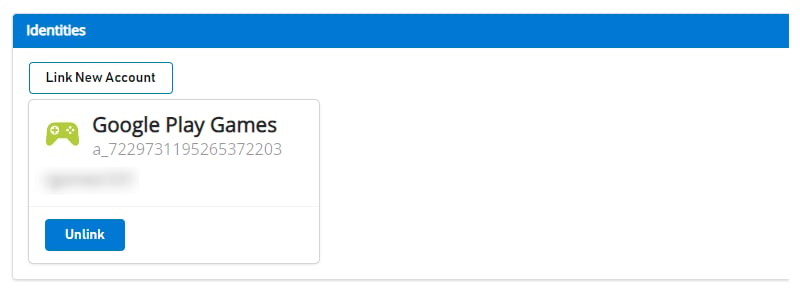
取消关联后,你应该只在 [Game Manager](https://developer.playfab.com) 上看到该玩家的 Google Play Games Identity:
### 验证玩家可以使用 LoginWithGooglePlayGamesServices API 登录
```csharp theme={null}
public void PFLoginWithGooglePlayGames()
{
PlayGamesPlatform.Instance.GetAnotherServerAuthCode(true, (serverAuthCode) => {
var request = new LoginWithGooglePlayGamesServicesRequest
{
ServerAuthCode = serverAuthCode,
CreateAccount = false,
TitleId = PlayFabSettings.TitleId
};
PlayFabClientAPI.LoginWithGooglePlayGamesServices(request, OnLoginWithGooglePlayGamesServicesSuccess, OnLoginWithGooglePlayGamesServicesFailure);
});
}
private void OnLoginWithGooglePlayGamesServicesSuccess(LoginResult result)
{
Debug.Log("PlayFab LoginWithGooglePlayGamesServices Success.");
}
private void OnLoginWithGooglePlayGamesServicesFailure(PlayFabError error)
{
Debug.Log("PlayFab LoginWithGooglePlayGamesServices Failure: " + error.GenerateErrorReport());
}
```
### (可选)从 PlayFab 玩家账户取消关联你的 Google 账户配置文件
此步骤是可选的。但是,如果你已经确认 Google Play Games Services 配置文件已关联到玩家账户,并且可以成功登录到 PlayFab,则你可能希望使用 [UnlinkGoogleAccount](https://learn.microsoft.com/en-us/rest/api/playfab/client/account-management/unlink-google-account?view=playfab-rest) API 取消关联之前关联到玩家配置文件的任何 Google 账户配置文件,并转向仅使用 [LoginWithGooglePlayGamesServices](https://learn.microsoft.com/en-us/rest/api/playfab/client/authentication/login-with-google-play-games-services?view=playfab-rest) API。
```csharp theme={null}
public void UnlinkGoogleAccountFromPlayer()
{
PlayFabClientAPI.UnlinkGoogleAccount(new UnlinkGoogleAccountRequest(), OnUnlinkGoogleAccountSuccess, OnUnlinkGoogleAccountFailure);
}
private void OnUnlinkGoogleAccountSuccess(UnlinkGoogleAccountResult result)
{
Debug.Log("PlayFab UnlinkGoogleAccount Success.");
}
private void OnUnlinkGoogleAccountFailure(PlayFabError error)
{
Debug.Log("PlayFab UnlinkGoogleAccount Failure: " + error.GenerateErrorReport());
}
```
取消关联后,你应该只在 [Game Manager](https://developer.playfab.com) 上看到该玩家的 Google Play Games Identity:
 ## Related topics
- [Google Sign-in 到 Play Games 登录的迁移回退方案](/zh-CN/services/playfab/identity/player-identity/platform-specific-authentication/google-play-games-sign-in-migration-fallback.md)
- [将 Unity 游戏迁移到 Google Play Games 登录](/zh-CN/services/playfab/identity/player-identity/platform-specific-authentication/google-play-games-sign-in-migration.md)
- [在 Unity 中使用 Google Play Games 登录进行 PlayFab 身份验证](/zh-CN/services/playfab/identity/player-identity/platform-specific-authentication/google-sign-in-unity.md)
- [将 XDK 网络迁移到 XBOX GDK](/zh-CN/build/console-features/networking/xdk-migration/index.md)
- [使用 Google 和 HTML5 设置 PlayFab 身份验证](/zh-CN/services/playfab/identity/player-identity/platform-specific-authentication/google-html5.md)
## Related topics
- [Google Sign-in 到 Play Games 登录的迁移回退方案](/zh-CN/services/playfab/identity/player-identity/platform-specific-authentication/google-play-games-sign-in-migration-fallback.md)
- [将 Unity 游戏迁移到 Google Play Games 登录](/zh-CN/services/playfab/identity/player-identity/platform-specific-authentication/google-play-games-sign-in-migration.md)
- [在 Unity 中使用 Google Play Games 登录进行 PlayFab 身份验证](/zh-CN/services/playfab/identity/player-identity/platform-specific-authentication/google-sign-in-unity.md)
- [将 XDK 网络迁移到 XBOX GDK](/zh-CN/build/console-features/networking/xdk-migration/index.md)
- [使用 Google 和 HTML5 设置 PlayFab 身份验证](/zh-CN/services/playfab/identity/player-identity/platform-specific-authentication/google-html5.md)