> ## Documentation Index
> Fetch the complete documentation index at: https://devdocs.xbox.com/llms.txt
> Use this file to discover all available pages before exploring further.

# 使用 Facebook 和 HTML5 设置 PlayFab 身份验证

> 使用 HTML5 和 JavaScript 向 PlayFab title 添加 Facebook 登录的分步教程，涵盖 Facebook 应用注册和玩家身份验证。

本教程旨在指导你使用 Facebook 和 HTML5/JavaScript 进行 PlayFab 身份验证。

## 要求

* 一个用于测试的 [Facebook 账户](https://www.facebook.com/)。
* 已注册的 [PlayFab](https://developer.playfab.com/) title。
* 熟悉[登录基础和最佳实践](/services/playfab/identity/player-identity/login/login-basics-best-practices)。
* 最小服务器，具有有效的域名以提供静态 HTML 文件。

<Note>
  如果你不确定是否具备此活动的适当要求，请参阅[为测试运行 HTTP 服务器](/services/playfab/identity/player-identity/platform-specific-authentication/running-an-http-server-for-testing)教程。
</Note>

## 服务器和域名

作为设置 PlayFab 身份验证要求的一部分，你必须有一个具有有效域名的服务器才能跟随。如果你还没有注册域名和远程 Web 服务器，请按照我们的[为测试运行 HTTP 服务器](/services/playfab/identity/player-identity/platform-specific-authentication/running-an-http-server-for-testing)教程，运行一个具有有效域名的本地 Web 服务器。

在本指南中，我们假设你的域名是 `['http://playfab.example'](http://playfab.example)`。

## 注册 Facebook 应用程序

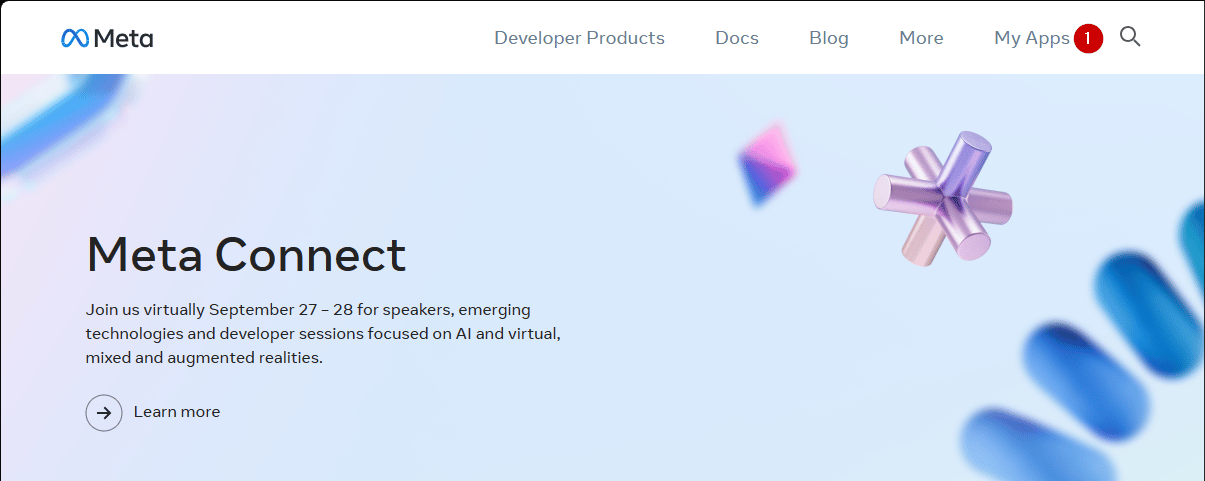
首先导航到 [Facebook Developer Portal](https://developers.facebook.com/)。

1. 选择 **My Apps** 按钮。

<img src="https://mintcdn.com/microsoft-4404708b/mLCHf0iQv3VidfBe/images/playfab/identity/player-identity/platform-specific-authentication/tutorials/facebook-html5/my-apps.png?fit=max&auto=format&n=mLCHf0iQv3VidfBe&q=85&s=c533fd072cd7b47233fd2c7eb8c431a6" alt="Facebook add a new app" width="1205" height="481" data-path="images/playfab/identity/player-identity/platform-specific-authentication/tutorials/facebook-html5/my-apps.png" />

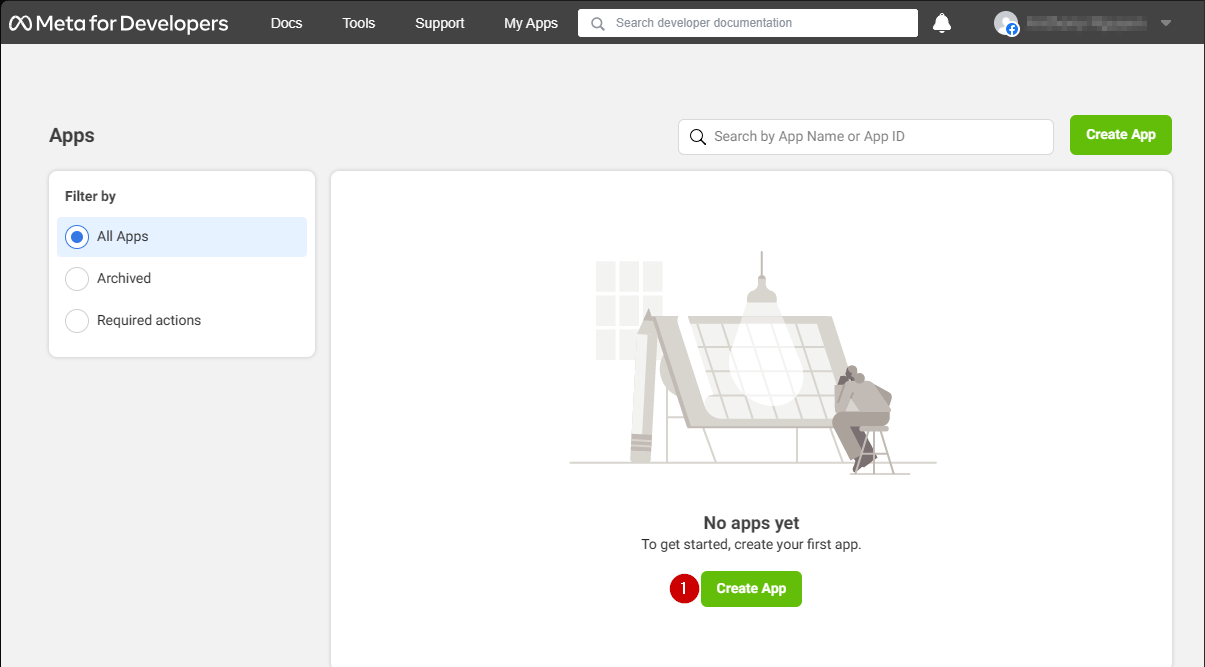
1. 选择 **Create App** 创建新应用。

<img src="https://mintcdn.com/microsoft-4404708b/mLCHf0iQv3VidfBe/images/playfab/identity/player-identity/platform-specific-authentication/tutorials/facebook-html5/facebook-add-a-new-app.png?fit=max&auto=format&n=mLCHf0iQv3VidfBe&q=85&s=ab8793987c97a532fa9e970436afe2a3" alt="Facebook create a new app" width="1205" height="667" data-path="images/playfab/identity/player-identity/platform-specific-authentication/tutorials/facebook-html5/facebook-add-a-new-app.png" />

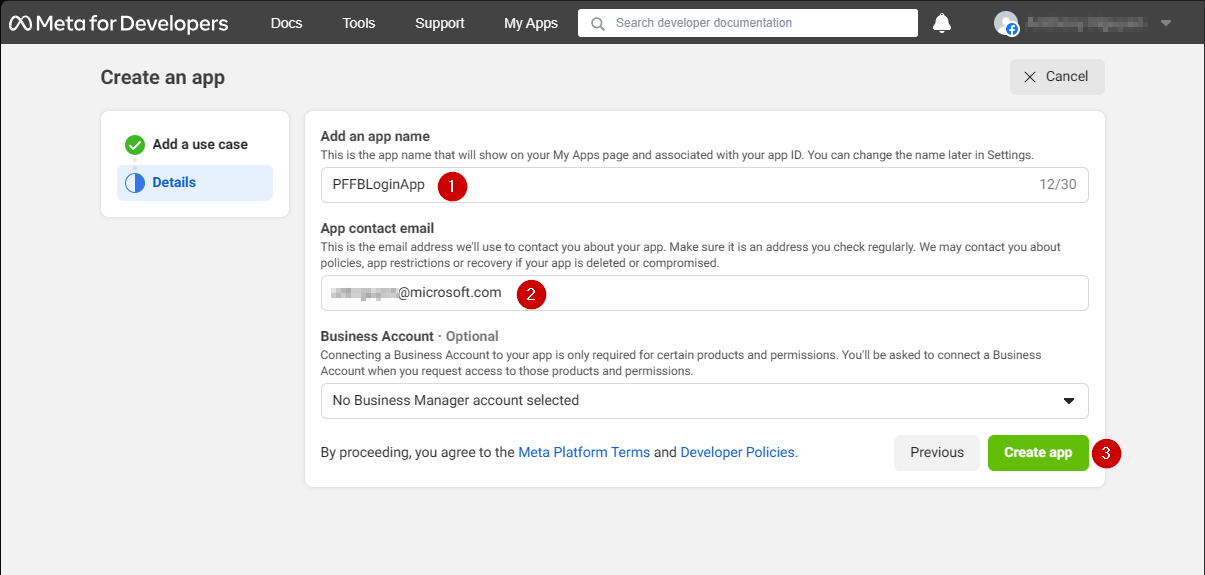
一个新的 **Application** 弹窗打开。

1. 在 **Add an app name** 下的字段中输入你的**应用程序**的名称。
2. 在 **App contact email** 下的字段中输入联系人电子邮件地址。
3. 选择 **Create app** 按钮以保存。
<Note>
  请务必设计你自己的唯一应用程序名称和电子邮件，如下面提供的示例所示。
</Note>

<img src="https://mintcdn.com/microsoft-4404708b/mLCHf0iQv3VidfBe/images/playfab/identity/player-identity/platform-specific-authentication/tutorials/facebook-html5/facebook-new-app-id.png?fit=max&auto=format&n=mLCHf0iQv3VidfBe&q=85&s=43a15fe0906efcfb030b98c375ef610f" alt="Facebook new app ID" width="1205" height="575" data-path="images/playfab/identity/player-identity/platform-specific-authentication/tutorials/facebook-html5/facebook-new-app-id.png" />

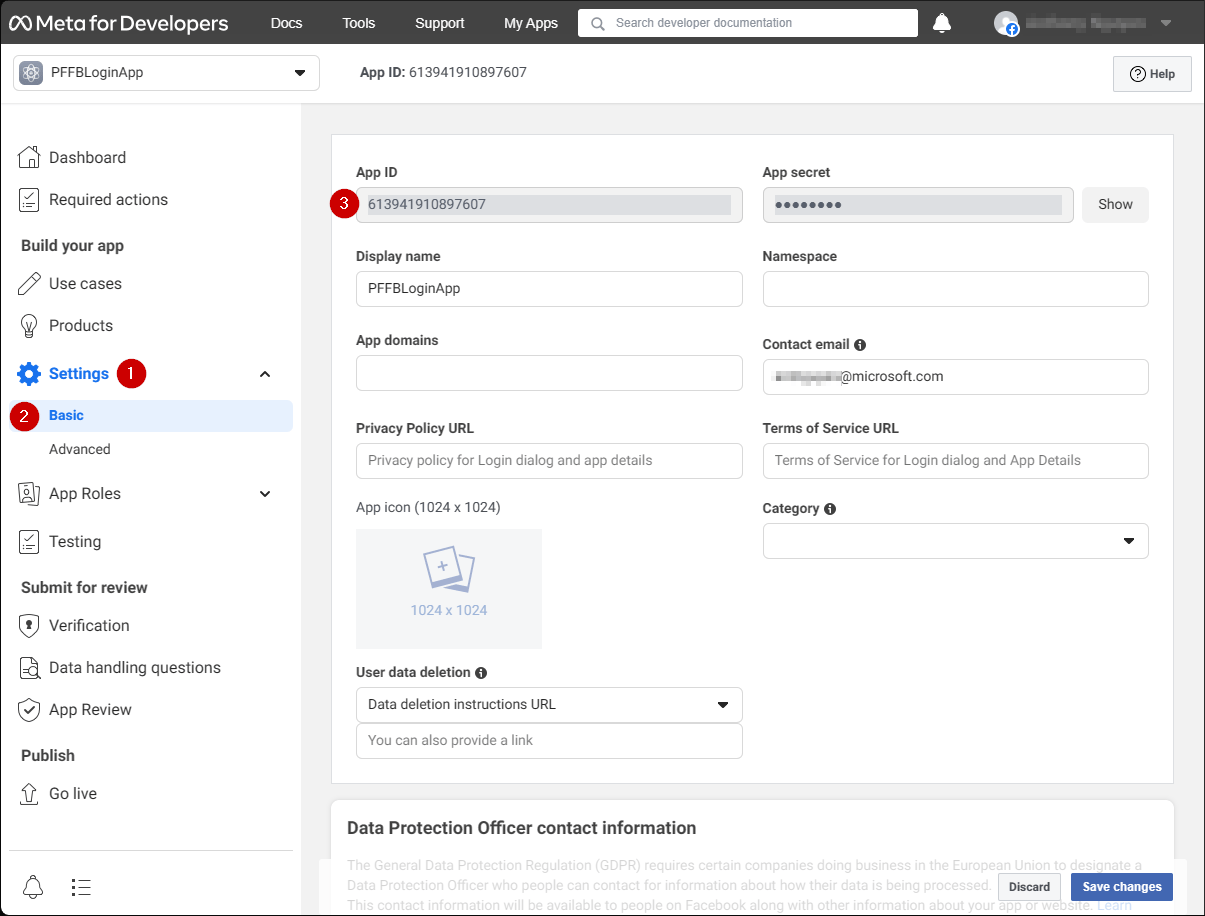
1. 导航到 **Settings** 选项卡。
2. 选择 **Basic** 子选项卡。
3. 找到你的 **App ID**。
<Note>
  将 **App ID** 复制到安全的位置，我们稍后将使用它设置 **Facebook SDK**。
</Note>

<img src="https://mintcdn.com/microsoft-4404708b/mLCHf0iQv3VidfBe/images/playfab/identity/player-identity/platform-specific-authentication/tutorials/facebook-html5/facebook-save-app-id.png?fit=max&auto=format&n=mLCHf0iQv3VidfBe&q=85&s=724d5c403c24e3077b1fe09f59791f46" alt="Facebook save app ID" width="1205" height="916" data-path="images/playfab/identity/player-identity/platform-specific-authentication/tutorials/facebook-html5/facebook-save-app-id.png" />

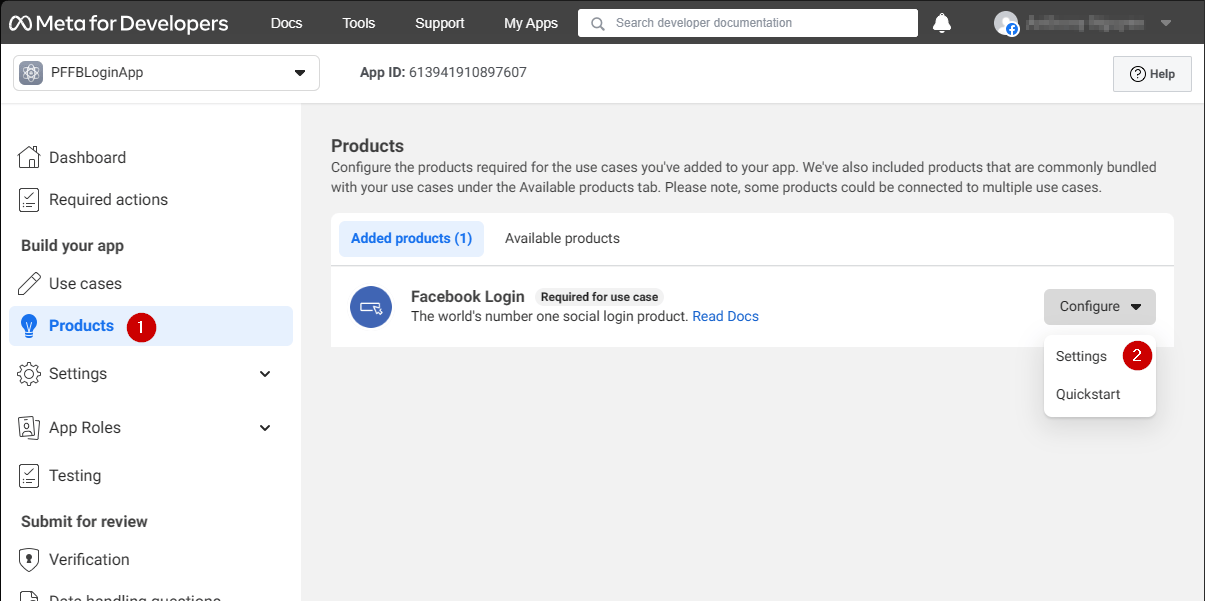
1. 转到屏幕左侧的菜单并选择 **Products** 项。
2. 在 **Facebook Login** 区域找到 **Configure** 并从下拉菜单中选择 **Settings**。
<img src="https://mintcdn.com/microsoft-4404708b/mLCHf0iQv3VidfBe/images/playfab/identity/player-identity/platform-specific-authentication/tutorials/facebook-html5/login-get-started.png?fit=max&auto=format&n=mLCHf0iQv3VidfBe&q=85&s=bd346c82af2a1914bd8dfca79653f5c6" alt="Facebook login get started" width="1205" height="601" data-path="images/playfab/identity/player-identity/platform-specific-authentication/tutorials/facebook-html5/login-get-started.png" />

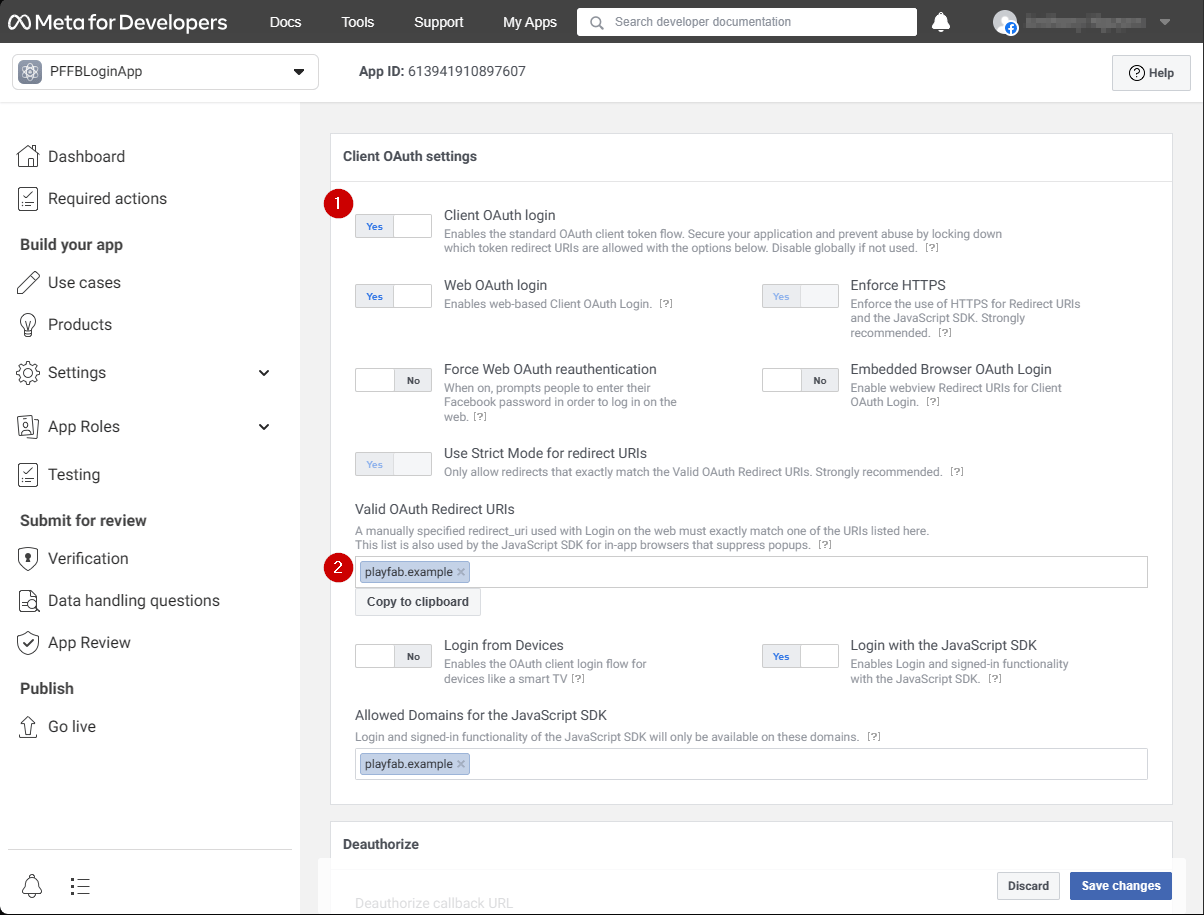
该页面应打开并显示下面所示的示例。

1. 验证 **Client OAuth** 和 **Web OAuth** 都已开启（标记为 **Yes**）。
2. 将 **Valid OAuth redirect URIs** 设置为你自己的 auth 页面 **URI**。
<Note>
  在你的情况下，这将是 `playfab.example`。
</Note>

<img src="https://mintcdn.com/microsoft-4404708b/mLCHf0iQv3VidfBe/images/playfab/identity/player-identity/platform-specific-authentication/tutorials/facebook-html5/login-product-settings.png?fit=max&auto=format&n=mLCHf0iQv3VidfBe&q=85&s=493c1ca8600489493ca47ced5c579204" alt="Facebook login product settings" width="1204" height="915" data-path="images/playfab/identity/player-identity/platform-specific-authentication/tutorials/facebook-html5/login-product-settings.png" />

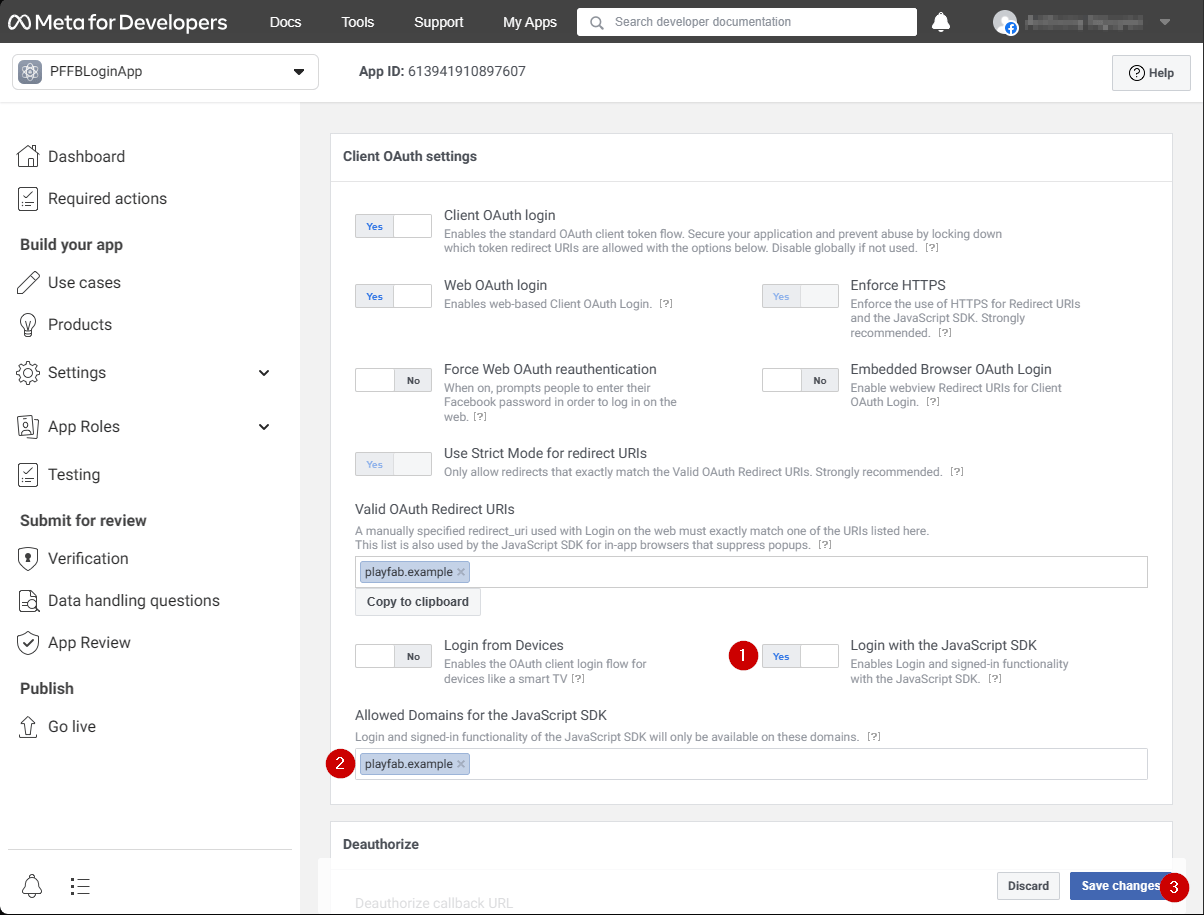
在 **Client OAuth Settings** 屏幕中：

1. 验证 **Login with the JavaScript SDK** 已开启（标记为 **Yes**）
2. 将 **Valid OAuth redirect URIs** 设置为你自己的 auth 页面 **URI**。
<Note>
  在你的情况下，这将是 `playfab.example`。
</Note>

3. 选择 **Save Changes** 提交。

<img src="https://mintcdn.com/microsoft-4404708b/mLCHf0iQv3VidfBe/images/playfab/identity/player-identity/platform-specific-authentication/tutorials/facebook-html5/set-oauth-redirect.png?fit=max&auto=format&n=mLCHf0iQv3VidfBe&q=85&s=1d900349086b3efc854d19e7e394bbfa" alt="Facebook set OAuth redirect URI" width="1204" height="915" data-path="images/playfab/identity/player-identity/platform-specific-authentication/tutorials/facebook-html5/set-oauth-redirect.png" />

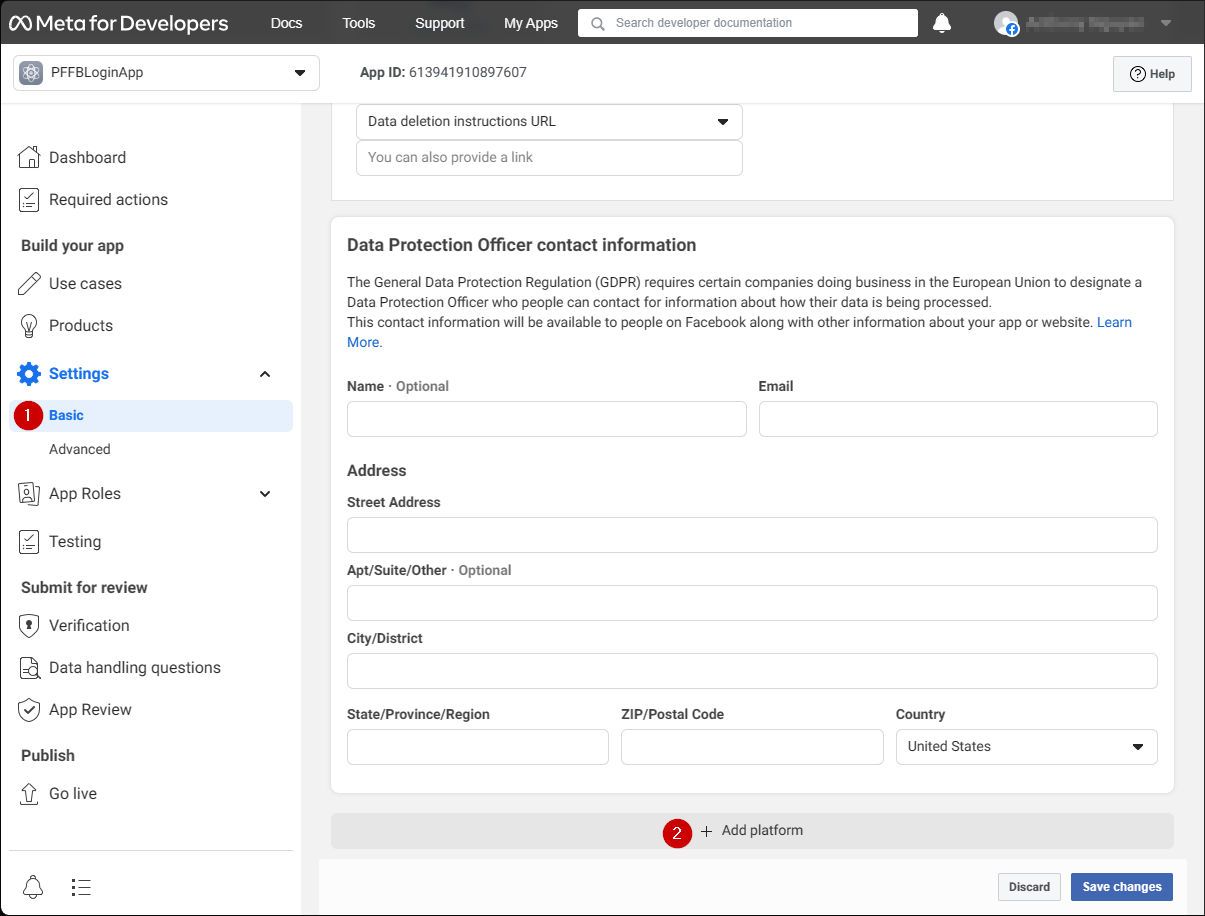
在 **Application Manager** 页面上：

* 在你的菜单中打开 **Settings/Basic (1)**。
* 选择 **Add Platform (2)** 按钮。
<img src="https://mintcdn.com/microsoft-4404708b/mLCHf0iQv3VidfBe/images/playfab/identity/player-identity/platform-specific-authentication/tutorials/facebook-html5/add-platform.png?fit=max&auto=format&n=mLCHf0iQv3VidfBe&q=85&s=d715322d7bdb36fdb0cca082e6394fd7" alt="Facebook Application Manager Add Platform" width="1205" height="916" data-path="images/playfab/identity/player-identity/platform-specific-authentication/tutorials/facebook-html5/add-platform.png" />

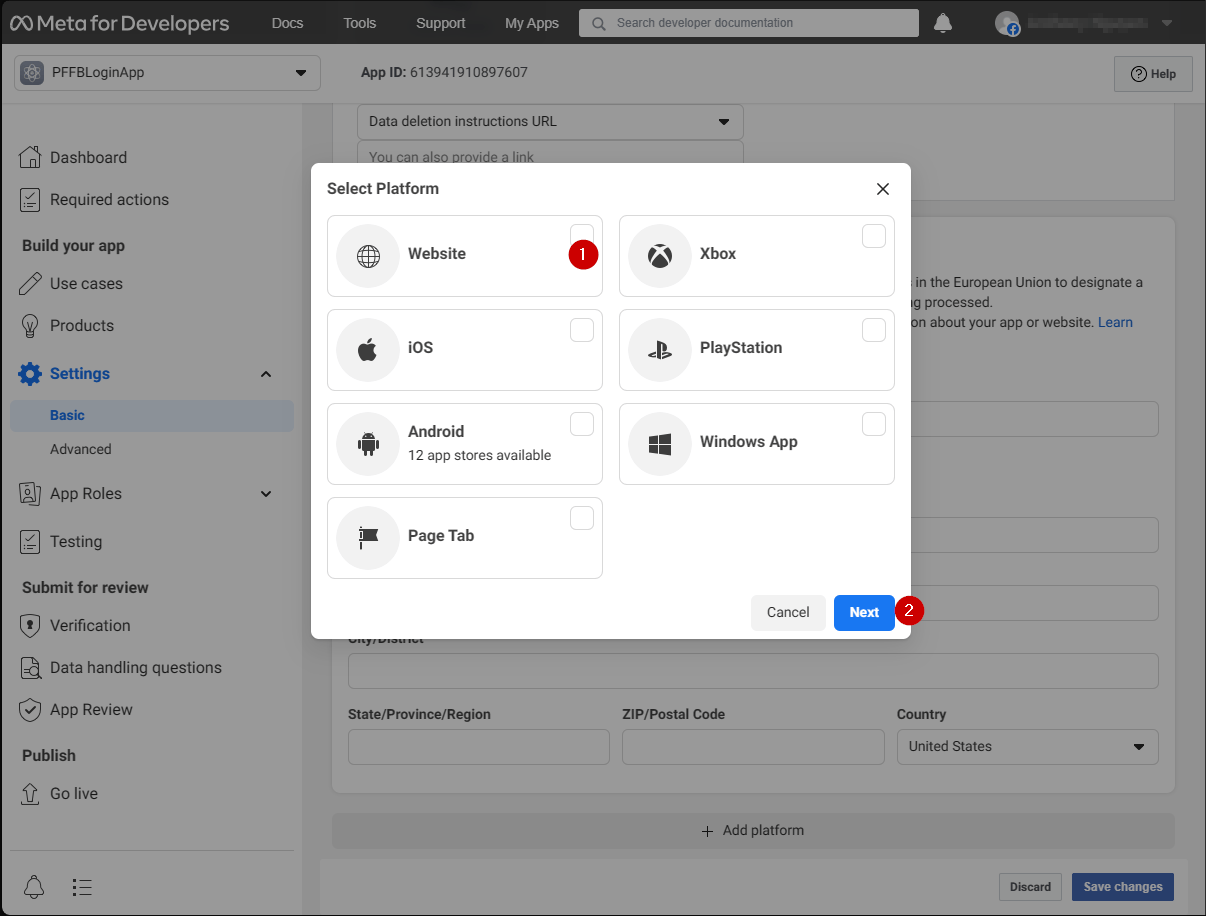
一个弹窗出现在你的屏幕上：

1. 选择 **Website 图标**。
2. 然后选择 **Next**。
<img src="https://mintcdn.com/microsoft-4404708b/mLCHf0iQv3VidfBe/images/playfab/identity/player-identity/platform-specific-authentication/tutorials/facebook-html5/website-options.png?fit=max&auto=format&n=mLCHf0iQv3VidfBe&q=85&s=96645e531316bffa3730f606c1b799ce" alt="Facebook Select Platform Website options" width="1206" height="916" data-path="images/playfab/identity/player-identity/platform-specific-authentication/tutorials/facebook-html5/website-options.png" />

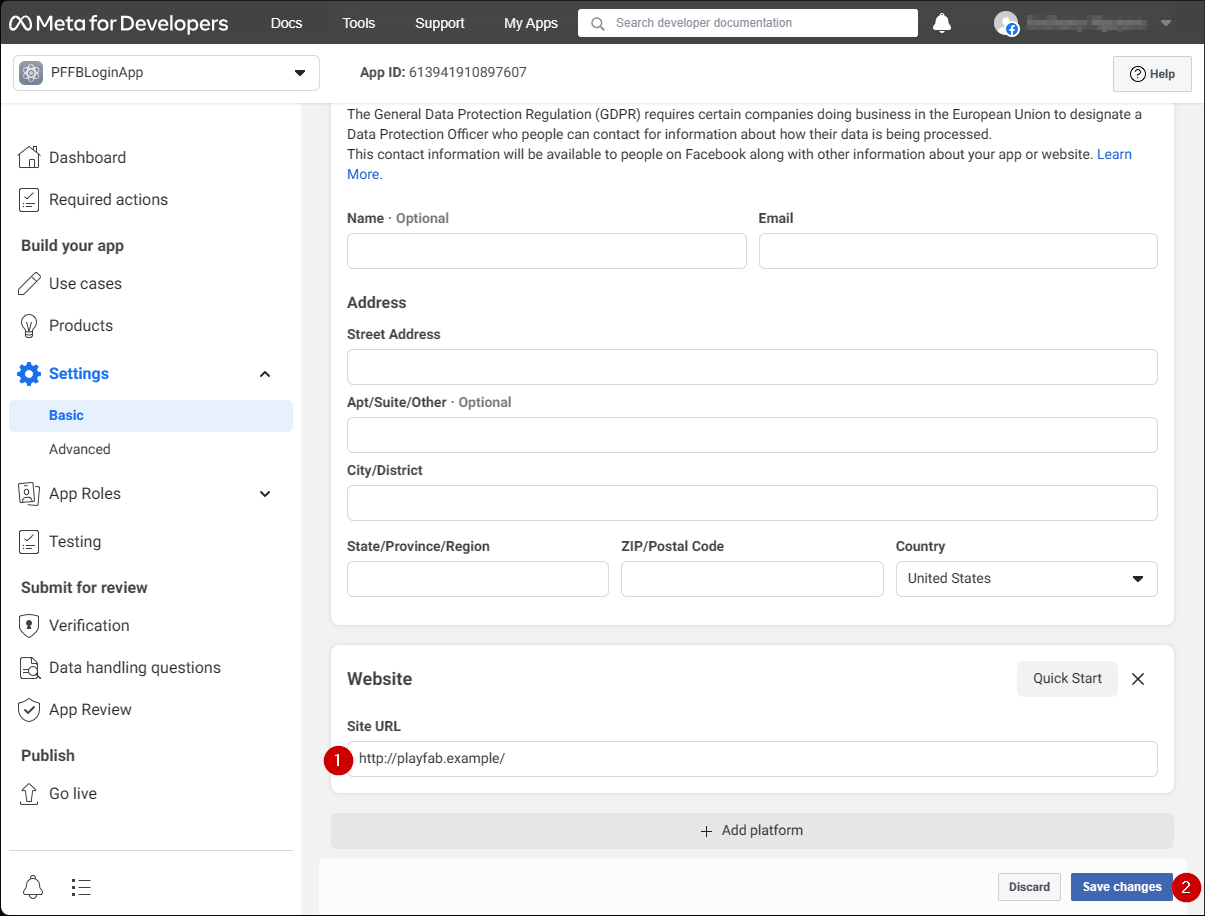
**Website** 配置面板现在应该出现。

1. 在 **Site URL** 字段中，输入你的 auth 页面 **URL**（在你的情况下这是 `playfab.example`）。
2. 选择 **Save changes** 以提交。

<img src="https://mintcdn.com/microsoft-4404708b/mLCHf0iQv3VidfBe/images/playfab/identity/player-identity/platform-specific-authentication/tutorials/facebook-html5/website-configuration.png?fit=max&auto=format&n=mLCHf0iQv3VidfBe&q=85&s=ef19a6ad2bf003e8e58802abeea329c5" alt="Facebook website configuration panel" width="1205" height="916" data-path="images/playfab/identity/player-identity/platform-specific-authentication/tutorials/facebook-html5/website-configuration.png" />

## 测试

使用以下 HTML 文件测试使用 Facebook 的 PlayFab 身份验证。

<Note>
  请务必用你自己的替换 **YOUR-APPLICATION-ID** 和 **YOUR-PLAYFAB-TITLE**。
</Note>

```html theme={null}
<!DOCTYPE html>
<html>
<head>
   <script>
        // This function will be called when Facebook SDK is loaded
        window.fbAsyncInit = function() {

            // Make sure to use your own App ID for the configuration
            FB.init({
                appId      : 'YOUR-APPLICATION-ID',
                xfbml      : true,
                version    : 'v2.9'
            });

            // Record PageView event for analytics
            FB.AppEvents.logPageView();
        };

        // Facebook SDK loader. Creates a script entry to load the SDK
        (function(d, s, id){
            var js, fjs = d.getElementsByTagName(s)[0];
            if (d.getElementById(id)) {return;}
            js = d.createElement(s); js.id = id;
            js.src = "//connect.facebook.net/en_US/sdk.js";
            fjs.parentNode.insertBefore(js, fjs);
        }(document, 'script', 'facebook-jssdk'));
    </script>
    <script src="https://download.playfab.com/PlayFabClientApi.js"></script>
</head>
<body>
    <p>Facebook Auth Example</p>
    <button onclick="loginWithFacebook()">Log In with Facebook</button>
    <script>
        // This method is invoked when you press the button
        function loginWithFacebook() {
            logLine("Logging in via Facebook...");

            // Standard practice: make call to FB.login.
            // This will show Facebook popup window. To prevent browsers from locking it,
            // always make sure to call it from Button click event
            FB.login(function(response){
                if(!response.authResponse){
                    logLine("Problem authenticating via Facebook!");
                } else {
                    loginWithPlayfab(response.authResponse.accessToken);
                }
            });
        }

        function loginWithPlayfab(accessToken){

            logLine("Logging in via PlayFab...");

            // When given accessToken, make call to LoginWithFacebook API Call
            // Make sure to use your own PlayFab Title ID
            PlayFabClientSDK.LoginWithFacebook({
                AccessToken: accessToken,
                TitleId: "YOUR-PLAYFAB-TITLE",
                CreateAccount: true
            }, onPlayFabResponse);
        }

        // Handles response from playfab.
        function onPlayFabResponse(response, error) {
            if (response)
                logLine("Response: " + JSON.stringify(response));
            if (error)
                logLine("Error: " + JSON.stringify(error));
        }

        function logLine(message) {
            var textnode = document.createTextNode(message);
            document.body.appendChild(textnode);
            var br = document.createElement("br");
            document.body.appendChild(br);
        }
    </script>
</body>
</html>
```

使用你在 **Facebook Application** 配置期间设置的域名（在我们的情况下是 `playfab.example`）从你的服务器请求以下文件。

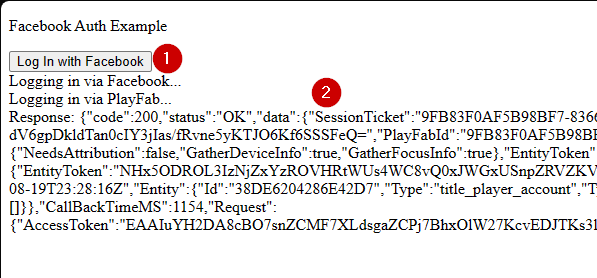
1. **Facebook Auth Example** 页面打开后，选择 **Log In with Facebook** 按钮。
2. 按照弹窗中的任何 Facebook 说明操作。

观察输出。
<img src="https://mintcdn.com/microsoft-4404708b/mLCHf0iQv3VidfBe/images/playfab/identity/player-identity/platform-specific-authentication/tutorials/facebook-html5/facebook-auth-example.png?fit=max&auto=format&n=mLCHf0iQv3VidfBe&q=85&s=e6f77a4ce2fae3bfd5dfcc97acd2e88b" alt="Facebook Auth Example" width="597" height="278" data-path="images/playfab/identity/player-identity/platform-specific-authentication/tutorials/facebook-html5/facebook-auth-example.png" />

你将获得一个 PlayFab 会话票据。至此，你已成功使用 HTML5 和 JavaScript 配置 PlayFab 和 Facebook 身份验证。