> ## Documentation Index
> Fetch the complete documentation index at: https://devdocs.xbox.com/llms.txt
> Use this file to discover all available pages before exploring further.
# 服务器端匿名登录身份验证
> 使用 CustomID 身份验证设置带服务器端玩家创建的 PlayFab 匿名登录,保护 HTML5 和 JavaScript title 免受未经授权的注册。
# 使用匿名登录设置 PlayFab 身份验证
本指南向你展示如何使用匿名登录 API 并借助服务器端保护实现 PlayFab 身份验证,仅关注使用 HTML5/JavaScript 的 CustomID 身份验证。
## 概述
2025 年 6 月 30 日,所有新创建的 title 将禁用通过匿名 API 进行的玩家创建。
为了增强匿名登录的安全性,PlayFab 实施了一项关键的安全功能,将玩家创建功能在客户端和服务器端 API 之间分离。
1. **禁用客户端玩家创建**:
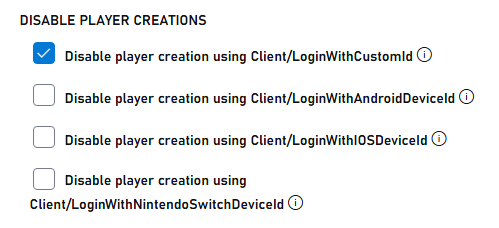
* 对于新创建的 title,客户端所有匿名登录 API(`LoginWithCustomID`、`LoginWithAndroidDeviceID`、`LoginWithIOSDeviceID`、`LoginWithNintendoSwitchDeviceId`)不再自动创建新玩家账户。2025 年 6 月 30 日之前创建的 title 可以通过 [Game Manager 配置](/services/playfab/identity/player-identity/platform-specific-authentication/anonymous-login#configuring-player-creation-settings)禁用匿名登录。
* 禁用客户端玩家创建可防止未经授权的账户直接从未经授权的客户端创建。
* 只有现有玩家可以通过客户端 API 登录。
2. **启用服务器端玩家创建**:
* 玩家账户创建现在通过服务器端 API(`LoginWithCustomID`、`LoginWithAndroidDeviceID`、`LoginWithIOSDeviceID`、`LoginWithNintendoDeviceId`)处理。
* 这确保所有账户创建都在安全、受控的环境中进行。
## 先决条件
* 玩家的唯一标识符 (CustomID)
* 已注册的 [PlayFab](https://developer.playfab.com/) title
* 你的 PlayFab title 密钥
* 熟悉[登录基础和最佳实践](/services/playfab/identity/player-identity/login/login-basics-best-practices)
* 具有有效域名以提供静态 HTML 文件的服务器
如果你需要有关设置服务器的帮助,请参阅[为测试运行 HTTP 服务器](/services/playfab/identity/player-identity/platform-specific-authentication/running-an-http-server-for-testing)教程。在本指南中,我们将假设你的域名是 `http://playfab.example`。
## 身份验证流程
1. **服务器端账户创建**:
* 使用带 server API 的 `Server/LoginWithCustomID` 创建新玩家
* 需要 title 密钥
* 参考:[Server API - Login With Custom ID](xref:titleid.playfabapi.com.server.authentication.loginwithcustomid)
2. **客户端登录**:
* 使用带 client API 的 `Client/LoginWithCustomID` 让现有玩家登录
* 参考:[Client API - Login With Custom ID](xref:titleid.playfabapi.com.client.authentication.loginwithcustomid)
## 实现步骤
### 1. 设置你的开发环境
1. 从 [JavaScript SDK 文档](/services/playfab/sdks/javascript/)下载 JavaScript SDK
2. 安装所需的 Node.js 包:
```bash theme={null}
npm install playfab-sdk
```
### 2. 服务器端实现 (Node.js)
保持你的 title 密钥安全,永远不要在客户端代码中暴露它。密钥应仅在安全的服务器环境中使用。
```javascript theme={null}
const { create } = require('domain');
const http = require('http');
const PlayFab = require('playfab-sdk');
const PlayFabServer = require('playfab-sdk/Scripts/PlayFab/PlayFabServer');
// Initialize PlayFab settings
PlayFab.settings.titleId = "YOUR_TITLE_ID"; // Replace with your actual PlayFab Title ID
PlayFab.settings.developerSecretKey = "YOUR_SECRET_KEY"; // Replace with your actual secret key
// Callback function for PlayFab API responses
function onPlayFabResponse(error, result) {
if (error) {
console.error("PlayFab Error:", error);
return;
}
console.log("PlayFab Success:", result);
}
// Function to create user with custom ID
function createUserWithCustomId(customId, callback) {
PlayFab.PlayFabServer.LoginWithCustomID({
CreateAccount: true,
CustomId: customId,
}, (error, result) => {
if (error) {
console.error("PlayFab Error:", error);
callback(error);
return;
}
console.log("PlayFab Success:", result);
callback(null, result.data);
});
}
const customId = "YOUR_CUSTOM_ID"; // Replace with your actual custom ID
const server = http.createServer((req, res) => {
res.writeHead(200, {'Content-Type': 'application/json'});
createUserWithCustomId(customId, (error, result) => {
if (error) {
res.end(JSON.stringify({ error: error }));
return;
}
res.end(JSON.stringify({ success: result }));
});
});
const port = 3000;
server.listen(port, () => {
console.log(`Server running at http://localhost:${port}/`);
});
```
### 3. 客户端实现 (HTML)
```html theme={null}
Server LoginWithCustomId Auth Example
```
## 配置玩家创建设置
### 对于现有 title
1. 导航到 PlayFab 开发者门户并选择你的 title
2. 转到 **Settings**。
3. 选择 **API Features** 选项卡。
4. 选中该复选框以阻止通过匿名登录 API 创建新玩家账户
 ### 对于新 title
为匿名登录 API 启用自动玩家创建可能会危及安全性。仅在开发或测试期间临时启用此功能。在转到生产之前始终禁用它。
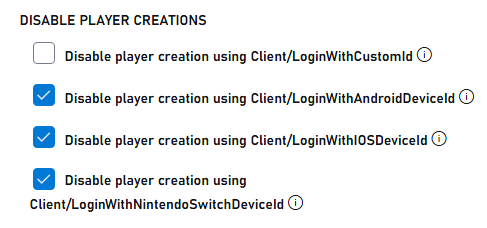
新 title 默认禁用通过匿名 API 进行的玩家创建。要启用测试,请执行以下操作:
1. 导航到 PlayFab 开发者门户并选择你的 title
2. 转到 **Settings**。
3. 选择 **API Features** 选项卡。
4. 取消选中该复选框以允许通过匿名登录 API 创建新玩家账户
### 对于新 title
为匿名登录 API 启用自动玩家创建可能会危及安全性。仅在开发或测试期间临时启用此功能。在转到生产之前始终禁用它。
新 title 默认禁用通过匿名 API 进行的玩家创建。要启用测试,请执行以下操作:
1. 导航到 PlayFab 开发者门户并选择你的 title
2. 转到 **Settings**。
3. 选择 **API Features** 选项卡。
4. 取消选中该复选框以允许通过匿名登录 API 创建新玩家账户
 ## 测试和响应示例
### 服务器响应示例
通过服务器 API 成功创建用户时,你会收到类似的响应:
```json theme={null}
{
"code": 200,
"status": "OK",
"data": {
"PlayFabId": "PLAYFAB_ID",
"SessionTicket": "SESSION_TICKET",
"NewlyCreated": true
}
}
```
### 客户端响应示例
尝试从客户端 API 创建新账户(该功能现已禁用)时,你会收到错误:
```json theme={null}
{
"code": 400,
"status": "BadRequest",
"error": "PlayerCreationDisabled"
}
```
通过客户端 API 成功登录现有用户时:
```json theme={null}
{
"code": 200,
"status": "OK",
"data": {
"PlayFabId": "PLAYFAB_ID",
"SessionTicket": "SESSION_TICKET",
"NewlyCreated": false
}
}
```
## 进一步阅读
* [PlayFab 身份验证概述](/services/playfab/identity/player-identity/authentication)
* [登录基础和最佳实践](/services/playfab/identity/player-identity/login/login-basics-best-practices)
* [为测试运行 HTTP 服务器](/services/playfab/identity/player-identity/platform-specific-authentication/running-an-http-server-for-testing)
## 测试和响应示例
### 服务器响应示例
通过服务器 API 成功创建用户时,你会收到类似的响应:
```json theme={null}
{
"code": 200,
"status": "OK",
"data": {
"PlayFabId": "PLAYFAB_ID",
"SessionTicket": "SESSION_TICKET",
"NewlyCreated": true
}
}
```
### 客户端响应示例
尝试从客户端 API 创建新账户(该功能现已禁用)时,你会收到错误:
```json theme={null}
{
"code": 400,
"status": "BadRequest",
"error": "PlayerCreationDisabled"
}
```
通过客户端 API 成功登录现有用户时:
```json theme={null}
{
"code": 200,
"status": "OK",
"data": {
"PlayFabId": "PLAYFAB_ID",
"SessionTicket": "SESSION_TICKET",
"NewlyCreated": false
}
}
```
## 进一步阅读
* [PlayFab 身份验证概述](/services/playfab/identity/player-identity/authentication)
* [登录基础和最佳实践](/services/playfab/identity/player-identity/login/login-basics-best-practices)
* [为测试运行 HTTP 服务器](/services/playfab/identity/player-identity/platform-specific-authentication/running-an-http-server-for-testing)