> ## Documentation Index
> Fetch the complete documentation index at: https://devdocs.xbox.com/llms.txt
> Use this file to discover all available pages before exploring further.
# Economy(旧版)中的商店和促销
> 使用你的目录构建 PlayFab 旧版 Economy 商店,并针对特定物品运行带有自定义虚拟货币或真实货币定价的限时促销。
# 商店和促销(旧版 Economy)
Economy v1 API 处于维护模式,不会接收任何新功能,只有 bug 修复。\*\*v1 API 在可预见的将来将持续维护。\*\*参见 [Economy v2 概览](/services/playfab/economy-monetization/economy-v2/overview),了解有关 PlayFab Economy 下一版本的更多信息!
在 PlayFab 中,**Stores** 构建在[目录](/services/playfab/economy-monetization/economy/items/catalogs)和[货币](/services/playfab/economy-monetization/economy/tutorials/currencies)之上。你的主目录应定义你游戏中的所有物品,并使用你创建的货币为它们分配价格。
商店应定义你的目录中物品的子集,并以特定的、可能与目录价格不同的价格供购买。
商店允许你挑选出一组特定的物品,并在设定的时间段内以特定价格提供。
本教程说明基于虚拟货币和真实货币定义商店的最佳实践。
## 要求
* 熟悉 PlayFab [Game Manager](/services/playfab/live-service-management/gamemanager/quickstart)。
* 你必须已定义一种或多种[虚拟货币](/services/playfab/economy-monetization/economy/tutorials/currencies)。本教程后面的示例使用:
* **SP**(**Silver Pieces**)
* **GP**(**Gold Pieces**)。
* 你必须有一个定义了一个或多个物品的\_主目录\_。
* 第一个示例使用多个物品/捆绑包,类似于[掉落表](/services/playfab/economy-monetization/economy/tutorials/drop-tables)教程中描述的那些。
* 本教程的第二个示例使用小型、中型和大型生命药水。
### 最佳实践
目录价格应长期固定——它们定义了物品的\_真实\_价格。
商店应是\_临时的\_,根据你的 LiveOps 策略进行添加和移除。
预计你的大部分收入将来自循环商店,以及将物品在活动商店内外移动。
## 关于商店和目录定价的一般信息
* **定价**:目录中定义的价格应定义为物品的\_常规\_价格。商店允许你为物品定义临时促销价格,利用常见的零售策略。或者,商店可以为通常根本无法出售的物品提供临时价格。
* **零成本**:如果特定货币下的物品价格未设置(**null**)或**零**,则无论目录还是商店都无法使用该货币购买。零成本允许你通过将其他货币的条目留空或将其重置为**零**,使物品仅可用于免费货币或仅可用于高级货币。
* **真实货币**:**RM** 货币在所有目录和商店中都可用。RM 是一种受限货币键,表示\_仅限真实货币交易\_。你应仅为具有显著价值的物品,或带有高级货币的捆绑包/容器收取 RM。
* **价格是二选一**:如果在一个物品上定义了两种价格,则该物品可以以其中任一价格购买。*不可能*要求单个物品使用两种货币。
## 定义真实货币商店
在你的 **Game Manager** 中:
* 导航到你的 **Title**。
* 从左侧菜单中选择 **Economy**。
* 在 **Catalogs** 选项卡上,选择你的主目录并选择 **Stores**。
* 选择 **New Store** 按钮。
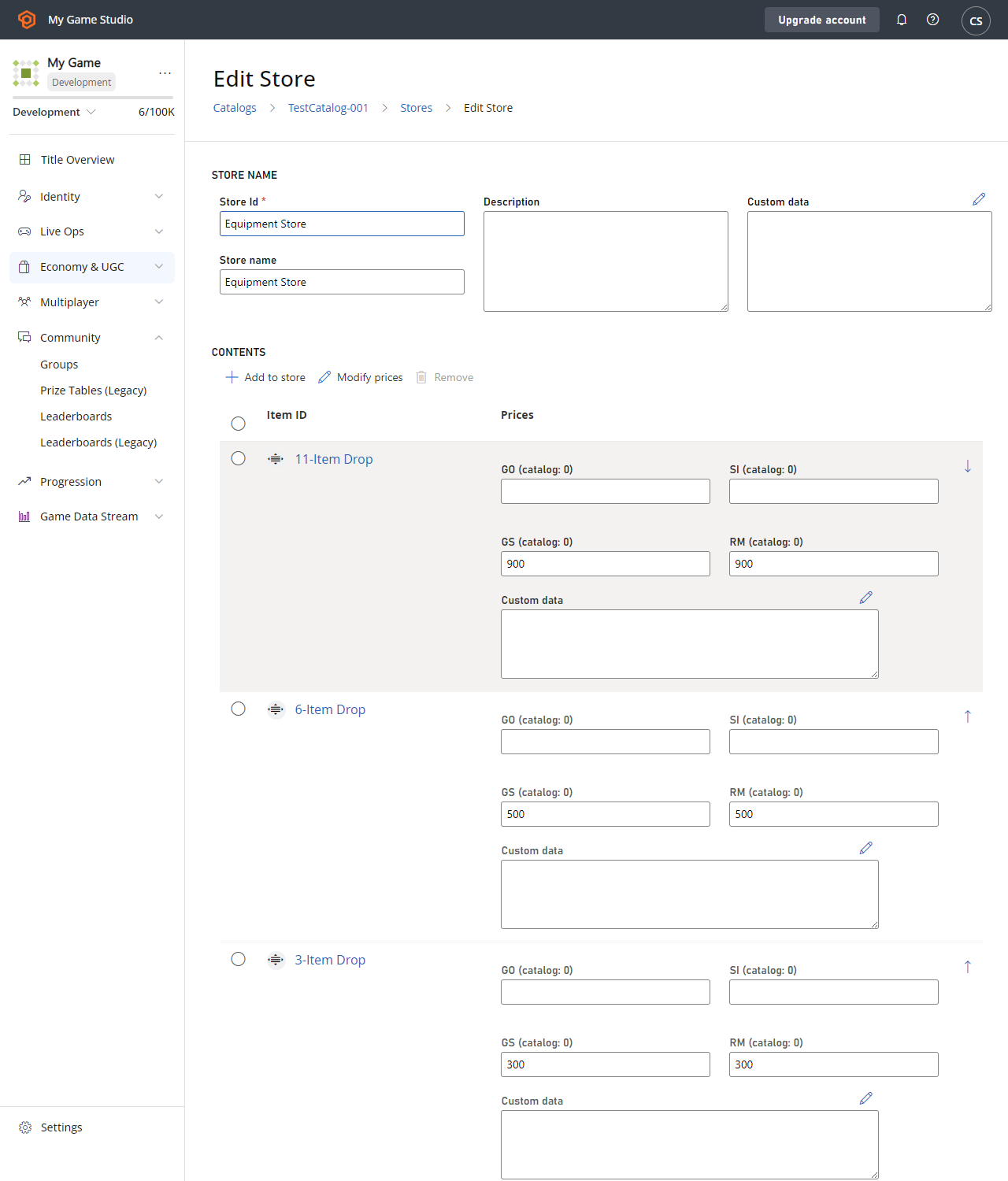
在[掉落表](/services/playfab/economy-monetization/economy/tutorials/drop-tables)示例中,我们创建了一个 11 物品掉落捆绑包。对于此示例,我们将在真实货币商店中提供三个类似的捆绑包。
任何物品都可以以真实货币出售,但最佳做法是仅使\_特定\_有价值的物品或捆绑包直接可用。
下面提供的屏幕截图显示了一个完整的新 **Store**,其中包含三个可用于**真实货币**的**物品捆绑包**。
 完成真实货币购买的具体细节在我们的高级教程[非收据支付处理](/services/playfab/economy-monetization/economy/tutorials/non-receipt-payment-processing)中介绍。
### 真实货币商店的最佳实践
你如何使用真实货币在很大程度上取决于你游戏的具体设计。直接购买游戏内物品是有效的,但不太常见。
更典型的是,你的游戏应允许使用真实货币购买一种高级虚拟货币。你可以循环使用具有不同高级货币与真实货币比率的多个商店。
主要要点是——确保你的玩家\_始终\_可以给你付款。
## 定义虚拟货币商店
让我们进入使用虚拟货币购买游戏内物品的细节和代码。
初始步骤与上一个示例几乎相同:
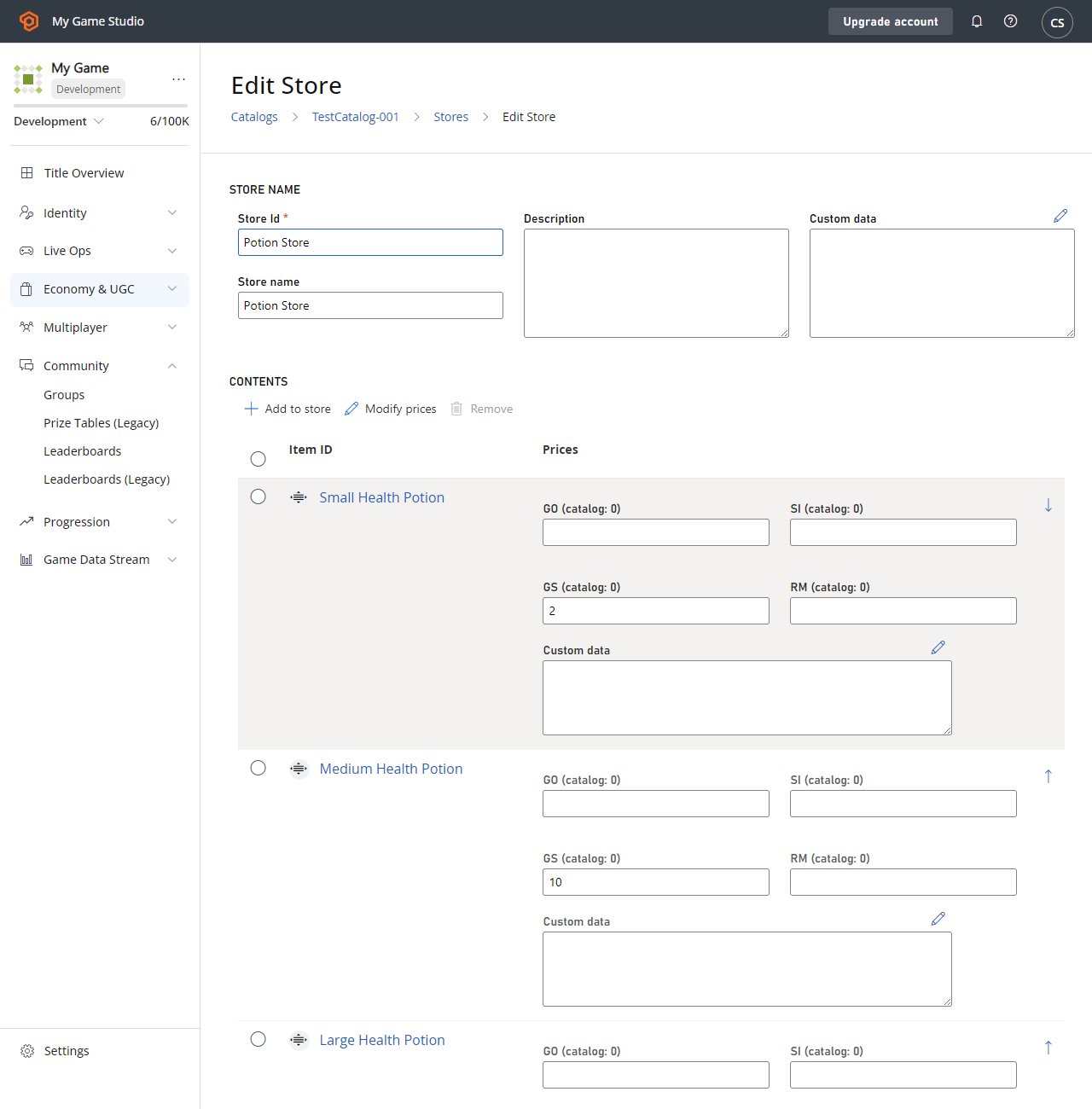
1. 创建三个新物品:**Small**、**Medium** 和 **Large Health Potions**,具有\_免费\_**货币**价格和\_高级\_**货币**价格。
2. 使用促销物品创建一个新商店。
完成真实货币购买的具体细节在我们的高级教程[非收据支付处理](/services/playfab/economy-monetization/economy/tutorials/non-receipt-payment-processing)中介绍。
### 真实货币商店的最佳实践
你如何使用真实货币在很大程度上取决于你游戏的具体设计。直接购买游戏内物品是有效的,但不太常见。
更典型的是,你的游戏应允许使用真实货币购买一种高级虚拟货币。你可以循环使用具有不同高级货币与真实货币比率的多个商店。
主要要点是——确保你的玩家\_始终\_可以给你付款。
## 定义虚拟货币商店
让我们进入使用虚拟货币购买游戏内物品的细节和代码。
初始步骤与上一个示例几乎相同:
1. 创建三个新物品:**Small**、**Medium** 和 **Large Health Potions**,具有\_免费\_**货币**价格和\_高级\_**货币**价格。
2. 使用促销物品创建一个新商店。
 ## 在一次购买中购买多个物品
要使用虚拟货币购买单个物品,请使用 [PurchaseItem](xref:titleid.playfabapi.com.client.playeritemmanagement.purchaseitem) 方法,如我们的[商店快速入门](/services/playfab/economy-monetization/economy/stores/quickstart)中所述。本教程介绍在一次购买中购买多个物品。
此过程的第一步应该是获取商店,并将其显示给用户。
```csharp theme={null}
void GetVcStore()
{
var primaryCatalogName = "TestCatalog-001"; // In your game, this should just be a constant matching your primary catalog
var storeId = "Potion Store"; // In your game, this should be a constant for a permanent store, or retrieved from titleData for a time-sensitive store
var request = new GetStoreItemsRequest
{
CatalogVersion = primaryCatalogName,
StoreId = storeId
};
PlayFabClientAPI.GetStoreItems(request, LogSuccess, LogFailure);
}
```
此示例中的 `LogSuccess` 回调接收一个 [GetStoreItemsResult](xref:titleid.playfabapi.com.client.title-widedatamanagement.getstoreitems#getstoreitemsresult),其中包含商店中所有物品的完整描述、它们的\_商店\_价格以及商店本身包含的任何元数据。
### 展示商店的最佳实践
带有商店的游戏应使用 [GetCatalogItems](xref:titleid.playfabapi.com.server.title-widedatamanagement.getcatalogitems) 方法调用并缓存其主目录。你可以同时显示目录价格和商店价格,以及在促销物品旁边显示 10% OFF 或类似的奖励装饰。
玩家更有可能购买促销物品,尤其是当促销是限时优惠时。
此时,你的 GUI 代码负责向用户展示选择他们希望购买哪些物品以及数量的机会。
* 在你的游戏与 PlayFab 之间,剩下的步骤是几个单独的 API 调用,但你可以让多个调用的序列对玩家不可见。
* 提前收集有关购买的所有信息,并在收集\_所有\_玩家输入后进行完整的调用序列。
```csharp theme={null}
void DefinePurchase()
{
var primaryCatalogName = "TestCatalog-001"; // In your game, this should just be a constant matching your primary catalog.
var storeId = "Potion Store"; // At this point in the process, it's just maintaining the same storeId used above.
var request = new StartPurchaseRequest
{
CatalogVersion = primaryCatalogName,
StoreId = storeId,
Items = new List {
// The presence of these lines are based on the results from GetStoreItems, and user selection - Yours will be more generic.
new ItemPurchaseRequest { ItemId = "Small Health Potion", Quantity = 20,},
new ItemPurchaseRequest { ItemId = "Medium Health Potion", Quantity = 100,},
new ItemPurchaseRequest { ItemId = "Large Health Potion", Quantity = 2,},
}
};
PlayFabClientAPI.StartPurchase(request, result => { Debug.Log("Purchase started: " + result.OrderId); }, LogFailure);
}
```
在物品选择过程中,你必须允许用户选择他们希望为这些物品花费哪种货币。在此示例中,所有物品都有 **SP** 和 **GP** 的成本,这意味着用户可以选择花费哪种货币。
上面代码示例中 `StartPurchase` API 的[结果](xref:titleid.playfabapi.com.client.playeritemmanagement.startpurchase#startpurchaseresult)包含 `PaymentOptions` 列表。每个 payment option 包含可用于进行购买的 `Currency`、`Price` 和 `ProviderName`。
### 限制
单次购买中只允许\_一种\_虚拟货币。所有选定的物品必须能用\_单一货币\_购买。
调用中必须指定货币,当有多种可能的货币时,这一点很重要。如果请求中有物品在所选货币中没有对应的成本,序列将失败。
调用中还必须指定 `ProviderName`。对于真实货币购买,provider name 是用来为购买提供资金的人,例如 Facebook、PayPal 或 Steam。对于 VC 购买,它将是基于你的 title ID 的字符串。`ProviderName` 可以从 [StartPurchaseResult](xref:titleid.playfabapi.com.client.playeritemmanagement.startpurchase#startpurchaseresult) 的 `PaymentOptions` 字段中获取,如前面的**注意**中所述。
对于 VC 购买,你游戏的 `ProviderName` 是由“Title”这个词与你十六进制 `TitleId` 的十进制等值连接而成的字符串。例如,“Title123456”。
### 展示商店物品的最佳实践
通过确保商店中的所有物品具有一致的选项来避免玩家的困惑。
真实货币物品应与高级 VC 物品在不同的商店中,同样与免费 VC 物品在不同的商店中。如果单个商店允许多种货币,那么该商店中的\_所有\_物品都应始终使用相同的多种货币集。根据需要创建尽可能多的商店,以提供顺畅的客户体验。
```csharp theme={null}
void DefinePaymentCurrency(string orderId, string currencyKey, string providerName)
{
var request =new PayForPurchaseRequest {
OrderId = orderId, // orderId comes from StartPurchase above.
Currency = currencyKey, // User defines which currency they wish to use to pay for this purchase (all items must have a defined/non-zero cost in this currency).
ProviderName = providerName // providerName comes from the PaymentOptions in the result from StartPurchase above.
};
PlayFabClientAPI.PayForPurchase(request, LogSuccess, LogFailure);
}
```
最后,一旦购买完全定义好,你可以完成该过程,如下所示。
```csharp theme={null}
// Unity/C#
void FinishPurchase(string orderId)
{
var request = new ConfirmPurchaseRequest { OrderId = orderId };
PlayFabClientAPI.ConfirmPurchase(request, LogSuccess, LogFailure);
}
```
### 处理 API 失败结果的最佳实践
任何单个 API 调用都可能由于许多原因失败。手机等无线设备通常可能存在间歇性连接,任何互联网调用都可能因随机延迟而失败。
每个调用都应检查多个失败条件。如果响应显示请求无效(例如,无法使用单一货币购买多个物品),你应该中止。可能是你的商店设计有问题。
如果响应指示连接失败,你可以在指数退避延迟后重试。
## 结论
商店是鼓励玩家购买物品的绝佳机制。
商店适用于任何类型的虚拟货币。商店也可以通过一组备用 API 方法与真实货币一起使用。
* 你可以通过 [PurchaseItem](xref:titleid.playfabapi.com.client.playeritemmanagement.purchaseitem) 使用 VC 设置单物品购买。
* 你可以通过以下序列使用真实货币或 VC 设置多物品购买:
* [StartPurchase](xref:titleid.playfabapi.com.client.playeritemmanagement.startpurchase)
* [PayForPurchase](xref:titleid.playfabapi.com.client.playeritemmanagement.payforpurchase)
* [ConfirmPurchase](xref:titleid.playfabapi.com.client.playeritemmanagement.confirmpurchase)
有关真实货币购买的更多信息,请参阅[非收据支付处理](/services/playfab/economy-monetization/economy/tutorials/non-receipt-payment-processing)。
有关高级商店用法,请参阅[玩家分组的自定义商店](/services/playfab/economy-monetization/economy/tutorials/custom-stores-for-player-segments)教程。
## Related topics
- [Economy(旧版)中的优惠券和促销](/zh-CN/services/playfab/economy-monetization/economy/tutorials/coupons-and-promotions.md)
- [Economy(旧版)中的商店分组最佳实践](/zh-CN/services/playfab/economy-monetization/economy/tutorials/best-practices-for-store-segmentation.md)
- [Economy(旧版)中的玩家分组自定义商店](/zh-CN/services/playfab/economy-monetization/economy/tutorials/custom-stores-for-player-segments.md)
- [Economy(旧版)快速入门](/zh-CN/services/playfab/economy-monetization/economy/quickstart.md)
- [商店(旧版 Economy)快速入门](/zh-CN/services/playfab/economy-monetization/economy/stores/quickstart.md)
## 在一次购买中购买多个物品
要使用虚拟货币购买单个物品,请使用 [PurchaseItem](xref:titleid.playfabapi.com.client.playeritemmanagement.purchaseitem) 方法,如我们的[商店快速入门](/services/playfab/economy-monetization/economy/stores/quickstart)中所述。本教程介绍在一次购买中购买多个物品。
此过程的第一步应该是获取商店,并将其显示给用户。
```csharp theme={null}
void GetVcStore()
{
var primaryCatalogName = "TestCatalog-001"; // In your game, this should just be a constant matching your primary catalog
var storeId = "Potion Store"; // In your game, this should be a constant for a permanent store, or retrieved from titleData for a time-sensitive store
var request = new GetStoreItemsRequest
{
CatalogVersion = primaryCatalogName,
StoreId = storeId
};
PlayFabClientAPI.GetStoreItems(request, LogSuccess, LogFailure);
}
```
此示例中的 `LogSuccess` 回调接收一个 [GetStoreItemsResult](xref:titleid.playfabapi.com.client.title-widedatamanagement.getstoreitems#getstoreitemsresult),其中包含商店中所有物品的完整描述、它们的\_商店\_价格以及商店本身包含的任何元数据。
### 展示商店的最佳实践
带有商店的游戏应使用 [GetCatalogItems](xref:titleid.playfabapi.com.server.title-widedatamanagement.getcatalogitems) 方法调用并缓存其主目录。你可以同时显示目录价格和商店价格,以及在促销物品旁边显示 10% OFF 或类似的奖励装饰。
玩家更有可能购买促销物品,尤其是当促销是限时优惠时。
此时,你的 GUI 代码负责向用户展示选择他们希望购买哪些物品以及数量的机会。
* 在你的游戏与 PlayFab 之间,剩下的步骤是几个单独的 API 调用,但你可以让多个调用的序列对玩家不可见。
* 提前收集有关购买的所有信息,并在收集\_所有\_玩家输入后进行完整的调用序列。
```csharp theme={null}
void DefinePurchase()
{
var primaryCatalogName = "TestCatalog-001"; // In your game, this should just be a constant matching your primary catalog.
var storeId = "Potion Store"; // At this point in the process, it's just maintaining the same storeId used above.
var request = new StartPurchaseRequest
{
CatalogVersion = primaryCatalogName,
StoreId = storeId,
Items = new List {
// The presence of these lines are based on the results from GetStoreItems, and user selection - Yours will be more generic.
new ItemPurchaseRequest { ItemId = "Small Health Potion", Quantity = 20,},
new ItemPurchaseRequest { ItemId = "Medium Health Potion", Quantity = 100,},
new ItemPurchaseRequest { ItemId = "Large Health Potion", Quantity = 2,},
}
};
PlayFabClientAPI.StartPurchase(request, result => { Debug.Log("Purchase started: " + result.OrderId); }, LogFailure);
}
```
在物品选择过程中,你必须允许用户选择他们希望为这些物品花费哪种货币。在此示例中,所有物品都有 **SP** 和 **GP** 的成本,这意味着用户可以选择花费哪种货币。
上面代码示例中 `StartPurchase` API 的[结果](xref:titleid.playfabapi.com.client.playeritemmanagement.startpurchase#startpurchaseresult)包含 `PaymentOptions` 列表。每个 payment option 包含可用于进行购买的 `Currency`、`Price` 和 `ProviderName`。
### 限制
单次购买中只允许\_一种\_虚拟货币。所有选定的物品必须能用\_单一货币\_购买。
调用中必须指定货币,当有多种可能的货币时,这一点很重要。如果请求中有物品在所选货币中没有对应的成本,序列将失败。
调用中还必须指定 `ProviderName`。对于真实货币购买,provider name 是用来为购买提供资金的人,例如 Facebook、PayPal 或 Steam。对于 VC 购买,它将是基于你的 title ID 的字符串。`ProviderName` 可以从 [StartPurchaseResult](xref:titleid.playfabapi.com.client.playeritemmanagement.startpurchase#startpurchaseresult) 的 `PaymentOptions` 字段中获取,如前面的**注意**中所述。
对于 VC 购买,你游戏的 `ProviderName` 是由“Title”这个词与你十六进制 `TitleId` 的十进制等值连接而成的字符串。例如,“Title123456”。
### 展示商店物品的最佳实践
通过确保商店中的所有物品具有一致的选项来避免玩家的困惑。
真实货币物品应与高级 VC 物品在不同的商店中,同样与免费 VC 物品在不同的商店中。如果单个商店允许多种货币,那么该商店中的\_所有\_物品都应始终使用相同的多种货币集。根据需要创建尽可能多的商店,以提供顺畅的客户体验。
```csharp theme={null}
void DefinePaymentCurrency(string orderId, string currencyKey, string providerName)
{
var request =new PayForPurchaseRequest {
OrderId = orderId, // orderId comes from StartPurchase above.
Currency = currencyKey, // User defines which currency they wish to use to pay for this purchase (all items must have a defined/non-zero cost in this currency).
ProviderName = providerName // providerName comes from the PaymentOptions in the result from StartPurchase above.
};
PlayFabClientAPI.PayForPurchase(request, LogSuccess, LogFailure);
}
```
最后,一旦购买完全定义好,你可以完成该过程,如下所示。
```csharp theme={null}
// Unity/C#
void FinishPurchase(string orderId)
{
var request = new ConfirmPurchaseRequest { OrderId = orderId };
PlayFabClientAPI.ConfirmPurchase(request, LogSuccess, LogFailure);
}
```
### 处理 API 失败结果的最佳实践
任何单个 API 调用都可能由于许多原因失败。手机等无线设备通常可能存在间歇性连接,任何互联网调用都可能因随机延迟而失败。
每个调用都应检查多个失败条件。如果响应显示请求无效(例如,无法使用单一货币购买多个物品),你应该中止。可能是你的商店设计有问题。
如果响应指示连接失败,你可以在指数退避延迟后重试。
## 结论
商店是鼓励玩家购买物品的绝佳机制。
商店适用于任何类型的虚拟货币。商店也可以通过一组备用 API 方法与真实货币一起使用。
* 你可以通过 [PurchaseItem](xref:titleid.playfabapi.com.client.playeritemmanagement.purchaseitem) 使用 VC 设置单物品购买。
* 你可以通过以下序列使用真实货币或 VC 设置多物品购买:
* [StartPurchase](xref:titleid.playfabapi.com.client.playeritemmanagement.startpurchase)
* [PayForPurchase](xref:titleid.playfabapi.com.client.playeritemmanagement.payforpurchase)
* [ConfirmPurchase](xref:titleid.playfabapi.com.client.playeritemmanagement.confirmpurchase)
有关真实货币购买的更多信息,请参阅[非收据支付处理](/services/playfab/economy-monetization/economy/tutorials/non-receipt-payment-processing)。
有关高级商店用法,请参阅[玩家分组的自定义商店](/services/playfab/economy-monetization/economy/tutorials/custom-stores-for-player-segments)教程。
## Related topics
- [Economy(旧版)中的优惠券和促销](/zh-CN/services/playfab/economy-monetization/economy/tutorials/coupons-and-promotions.md)
- [Economy(旧版)中的商店分组最佳实践](/zh-CN/services/playfab/economy-monetization/economy/tutorials/best-practices-for-store-segmentation.md)
- [Economy(旧版)中的玩家分组自定义商店](/zh-CN/services/playfab/economy-monetization/economy/tutorials/custom-stores-for-player-segments.md)
- [Economy(旧版)快速入门](/zh-CN/services/playfab/economy-monetization/economy/quickstart.md)
- [商店(旧版 Economy)快速入门](/zh-CN/services/playfab/economy-monetization/economy/stores/quickstart.md)