> ## Documentation Index
> Fetch the complete documentation index at: https://devdocs.xbox.com/llms.txt
> Use this file to discover all available pages before exploring further.
# Economy(旧版)中的掉落表
> 在 PlayFab 旧版 Economy 中使用 Game Manager 创建加权和顺序掉落表,从你的目录中授予随机战利品和玩家奖励。
# 掉落表(旧版 Economy)
Economy v1 API 处于维护模式,不会接收任何新功能,只有 bug 修复。\*\*v1 API 在可预见的将来将持续维护。\*\*参见 [Economy v2 概览](/services/playfab/economy-monetization/economy-v2/overview),了解有关 PlayFab Economy 下一版本的更多信息!
本教程向你展示使用 PlayFab Game Manager 创建掉落表的步骤。
掉落表允许你随机生成[库存物品](/services/playfab/player-progression/player-data/player-inventory),*顺序*掉落表可以为玩家奖励提供一些随机性。
* 我们假设你已经熟悉[目录](/services/playfab/economy-monetization/economy/items/catalogs)、[库存](/services/playfab/player-progression/player-data/player-inventory)以及 PlayFab [Game Manager](/services/playfab/live-service-management/gamemanager/quickstart)。
* 你必须有一个*主目录*——包含标准的、非捆绑包/非容器物品。
* 你必须定义了至少*一种*虚拟货币,你将其用作游戏内的“免费”货币。
你可以使用你自己的物品集,但我们的目标是创建物品的重叠分类。
作为示例,我们将使用以下物品表:
| | Accessory | Armor | Sword |
| ------------- | :------------------ | :-------------- | :-------------- |
| **Common** | Common Accessory | Common Armor | Common Sword |
| **Uncommon** | Uncommon Accessory | Uncommon Armor | Uncommon Sword |
| **Rare** | Rare Accessory | Rare Armor | Rare Sword |
| **Legendary** | Legendary Accessory | Legendary Armor | Legendary Sword |
在你的目录中设置类似的一组物品后,我们就可以开始构建掉落表了。
## 构建掉落表
在 Game Manager 中:
1. 导航到你的 **Title**。
2. 从左侧菜单中选择 **Economy**。
3. 转到 **Catalogs** 选项卡并选择你的主目录。
4. 选择 **Drop Tables**。
你的屏幕应类似于此示例。
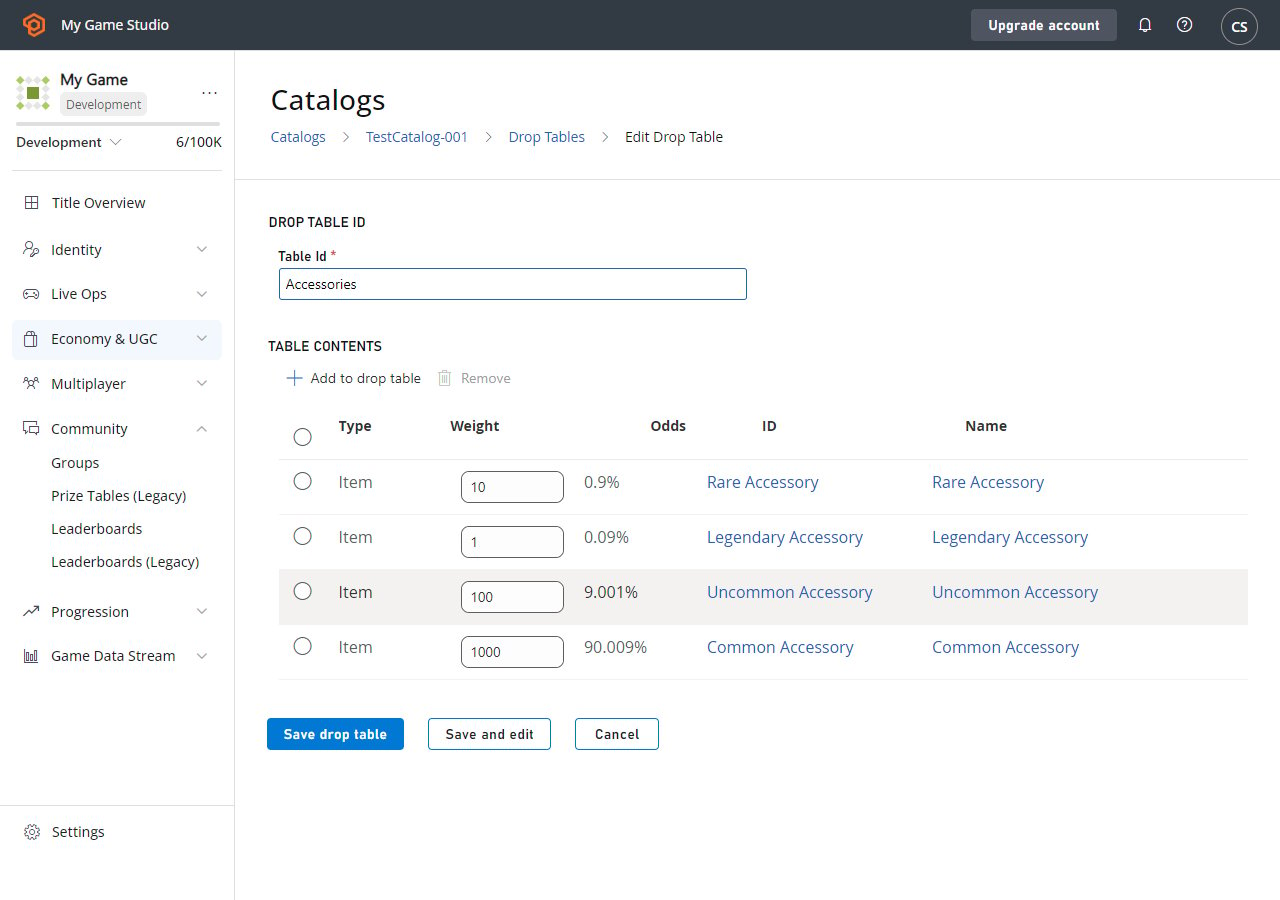
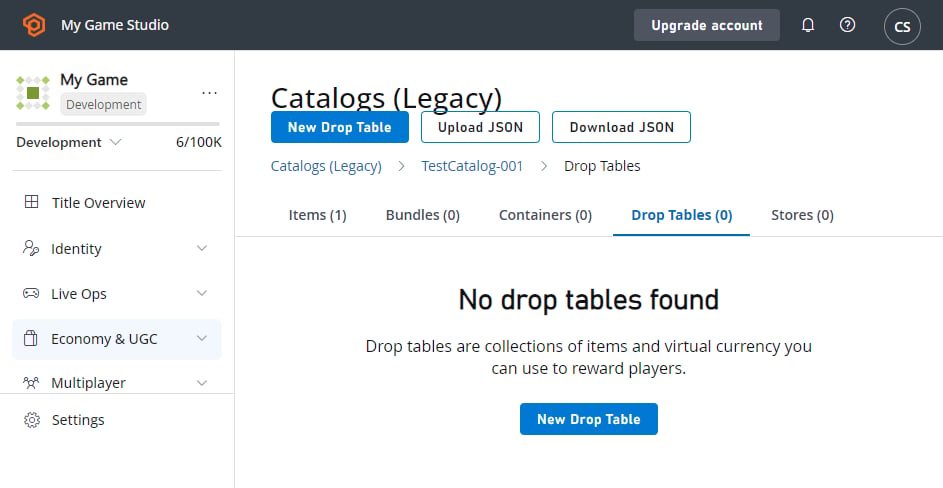 开始基于你的每个物品描述符构建 **Drop Tables**。我们的第一个分类是 **Equipment Type**,所以我们将创建一个名为 **Accessories** 的新 **Drop Table**。
1. 选择 **New Drop Table** 按钮。
2. 将 **Table Id** 设置为 **Accessories**。
3. 选择 **ADD TO DROP TABLE**。**Pick multiple items** 弹出窗口将出现。
4. 通过选择每个物品 **ID** 旁边的 **Add** 按钮来添加以下物品:
* **Common Accessory**
* **Uncommon Accessory**
* **Rare Accessory**
* **Legendary Accessory**
5. 选择 **Close** 按钮。
6. 根据稀有度调整物品的 **Weight** 值:
* **Common**:1000
* **Uncommon**:100
* **Rare**:10
* **Legendary**:1
权重表示物品相对彼此的掉落频率。对于此处显示的示例,你每掉落一个 **Legendary** 就会掉落约 **1000 个 Common**。
7. 选择 **SAVE DROP TABLE**。
开始基于你的每个物品描述符构建 **Drop Tables**。我们的第一个分类是 **Equipment Type**,所以我们将创建一个名为 **Accessories** 的新 **Drop Table**。
1. 选择 **New Drop Table** 按钮。
2. 将 **Table Id** 设置为 **Accessories**。
3. 选择 **ADD TO DROP TABLE**。**Pick multiple items** 弹出窗口将出现。
4. 通过选择每个物品 **ID** 旁边的 **Add** 按钮来添加以下物品:
* **Common Accessory**
* **Uncommon Accessory**
* **Rare Accessory**
* **Legendary Accessory**
5. 选择 **Close** 按钮。
6. 根据稀有度调整物品的 **Weight** 值:
* **Common**:1000
* **Uncommon**:100
* **Rare**:10
* **Legendary**:1
权重表示物品相对彼此的掉落频率。对于此处显示的示例,你每掉落一个 **Legendary** 就会掉落约 **1000 个 Common**。
7. 选择 **SAVE DROP TABLE**。
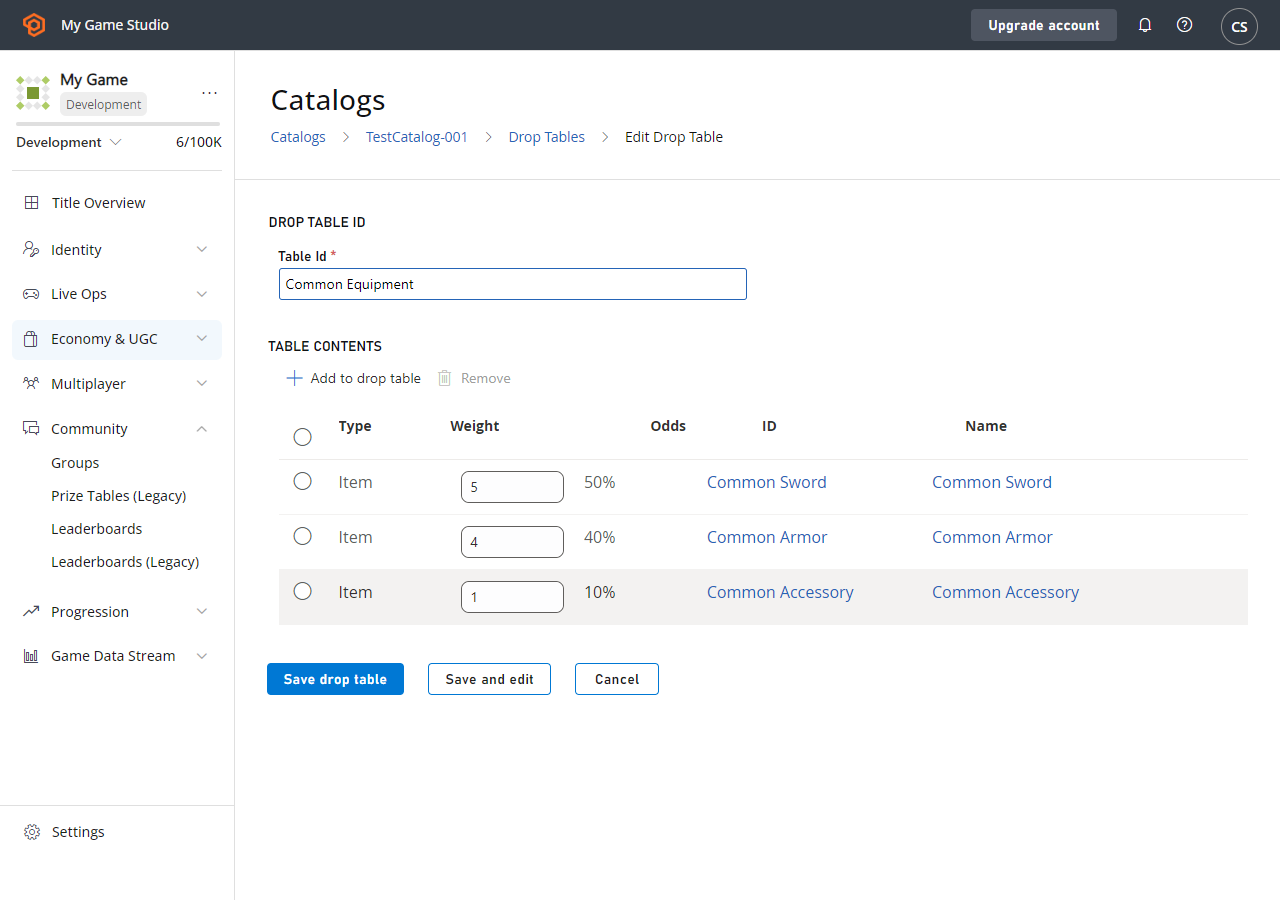
 **Accessories** 完成后,按相同步骤为 **Armors** 和 **Weapons** 创建掉落表。
我们的另一个分类是按稀有度,所以我们将创建一组备用表,从 **Common Equipment** 开始。
1. 选择 **New Drop Table** 按钮。
2. 将 **Table Id** 设置为 **Common Equipment**。
3. 选择 **ADD TO DROP TABLE**。**Pick multiple items** 弹出窗口将出现。
4. 通过选择每个物品 **ID** 旁边的 **Add** 按钮来添加以下物品:
* **Common Accessory**
* **Common Armor**
* **Common Sword**
5. 选择 **Close** 按钮。
6. 根据 **Common Equipment** 选项在该位置的分布调整物品的 **Weight** 值:
* **Common Accessory**:1
* **Common Armor**:4
* **Common Sword**:5
7. 选择 **SAVE DROP TABLE**。
**Accessories** 完成后,按相同步骤为 **Armors** 和 **Weapons** 创建掉落表。
我们的另一个分类是按稀有度,所以我们将创建一组备用表,从 **Common Equipment** 开始。
1. 选择 **New Drop Table** 按钮。
2. 将 **Table Id** 设置为 **Common Equipment**。
3. 选择 **ADD TO DROP TABLE**。**Pick multiple items** 弹出窗口将出现。
4. 通过选择每个物品 **ID** 旁边的 **Add** 按钮来添加以下物品:
* **Common Accessory**
* **Common Armor**
* **Common Sword**
5. 选择 **Close** 按钮。
6. 根据 **Common Equipment** 选项在该位置的分布调整物品的 **Weight** 值:
* **Common Accessory**:1
* **Common Armor**:4
* **Common Sword**:5
7. 选择 **SAVE DROP TABLE**。
 ### 使用掉落表
你可以使用以下两个 PlayFab Server API 方法以编程方式访问掉落表:
1. [GetRandomResultTables](xref:titleid.playfabapi.com.server.playeritemmanagement.getrandomresulttables)
2. [EvaluateRandomResultTable](xref:titleid.playfabapi.com.server.playeritemmanagement.evaluaterandomresulttable)
使用 [GetRandomResultTables](xref:titleid.playfabapi.com.server.playeritemmanagement.getrandomresulttables),你可以读取我们在 Game Manager 中输入的原始掉落表数据。
**`GetRandomResultTables`** *不*会掷随机值或授予结果。该 API 让你读取数据并按你认为合适的方式解析信息。
### 选项 1
```csharp theme={null}
public void ReadDropTableData() {
PlayFabServerAPI.GetRandomResultTables(new GetRandomResultTablesRequest() {
TableIDs = new List { "Accessories", "Common Equipment" }
}, result => {
Debug.Log("Completed getting drop tables");
}, error => {
Debug.LogError(error.GenerateErrorReport());
});
}
```
结果处理程序将接收我们创建的掉落表的结构信息,格式为 [GetRandomResultTablesResult](xref:titleid.playfabapi.com.server.playeritemmanagement.getrandomresulttables#getrandomresulttablesresult)。
或者,你可以让 PlayFab *为你*评估表并使用 [EvaluateRandomResultTable](xref:titleid.playfabapi.com.server.playeritemmanagement.evaluaterandomresulttable) API 为你提供单一物品结果。这样做会返回可用于按提供的权重生成单个物品的 `itemId`。
然后你可以进行第二次调用,创建物品并授予玩家。
### 选项 2
```csharp theme={null}
public void Grant(string playFabId, string tableId) {
// First, roll a random number and evaluate the drop table
PlayFabServerAPI.EvaluateRandomResultTable(new EvaluateRandomResultTableRequest()
{
TableId = tableId
}, result => OnRandomResultTableResponse(result, playFabId), OnError);
}
public void OnRandomResultTableResponse(EvaluateRandomResultTableResult tableResult, string playFabId) {
// Second, take the result and grant it to the player
PlayFabServerAPI.GrantItemsToUser(new GrantItemsToUserRequest {
PlayFabId = playFabId,
ItemIds = new List { tableResult.ResultItemId }
}, result =>
{
// Handle Result
}, OnError);
}
public void OnError(PlayFabError error) {
Debug.LogError(error.GenerateErrorReport());
}
```
总结:
**选项 1** - 允许你加载数据一次、缓存它,并在你自己的游戏服务器上*自行*执行掷骰。由于对 PlayFab 的调用较少,此选项延迟较低,并允许你根据特定于游戏的逻辑自定义掷骰。
**选项 2** - 让 PlayFab 做更多工作,但要记住——多次 API 调用意味着*更高*的延迟。
### 高级掉落表用法(设置战利品箱)
掉落表可以从捆绑包和容器链接。捆绑包对于虚拟货币商店来说是一个不错的选择,其中单次购买会产生一堆随机物品。
例如,假设我们有一个具有特定掉落规则的**11 物品捆绑包**。在这种情况下,作为面向客户的卖点,我们将保证一个 legendary 物品。我们还将*限制*它,以防玩家运气*太*好而收到 **11 个 legendary**。
### 新建掉落表
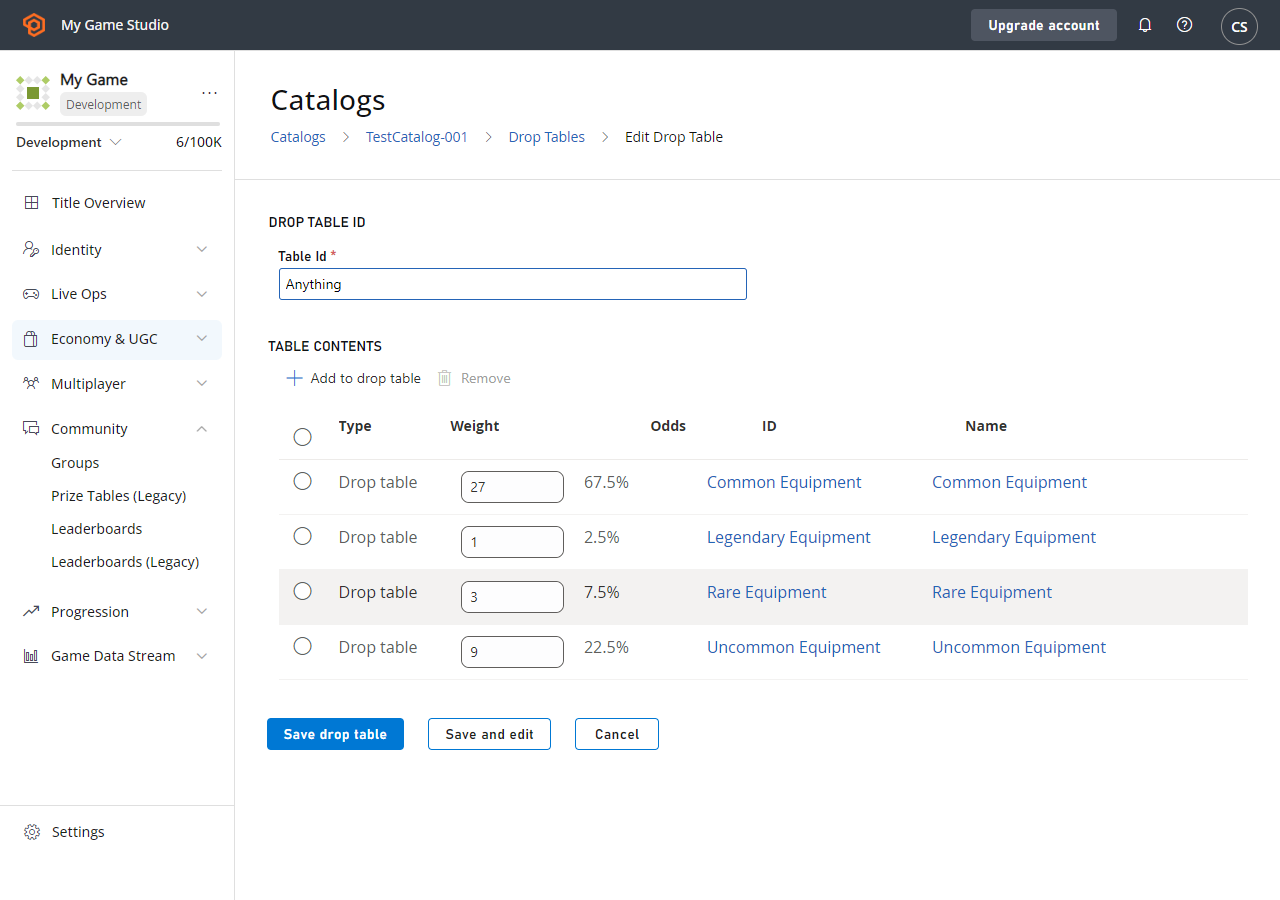
让我们构建一个可以真正掉落*任何东西*的掉落表——实际上,我们将其称为 **Anything**。
创建此掉落表时,将*其他*掉落表作为其选项(在 **Pick multiple items** 弹出窗口中,选择 **Drop Tables** 选项卡以添加其他掉落表),并为它们分配适当的权重。
### 使用掉落表
你可以使用以下两个 PlayFab Server API 方法以编程方式访问掉落表:
1. [GetRandomResultTables](xref:titleid.playfabapi.com.server.playeritemmanagement.getrandomresulttables)
2. [EvaluateRandomResultTable](xref:titleid.playfabapi.com.server.playeritemmanagement.evaluaterandomresulttable)
使用 [GetRandomResultTables](xref:titleid.playfabapi.com.server.playeritemmanagement.getrandomresulttables),你可以读取我们在 Game Manager 中输入的原始掉落表数据。
**`GetRandomResultTables`** *不*会掷随机值或授予结果。该 API 让你读取数据并按你认为合适的方式解析信息。
### 选项 1
```csharp theme={null}
public void ReadDropTableData() {
PlayFabServerAPI.GetRandomResultTables(new GetRandomResultTablesRequest() {
TableIDs = new List { "Accessories", "Common Equipment" }
}, result => {
Debug.Log("Completed getting drop tables");
}, error => {
Debug.LogError(error.GenerateErrorReport());
});
}
```
结果处理程序将接收我们创建的掉落表的结构信息,格式为 [GetRandomResultTablesResult](xref:titleid.playfabapi.com.server.playeritemmanagement.getrandomresulttables#getrandomresulttablesresult)。
或者,你可以让 PlayFab *为你*评估表并使用 [EvaluateRandomResultTable](xref:titleid.playfabapi.com.server.playeritemmanagement.evaluaterandomresulttable) API 为你提供单一物品结果。这样做会返回可用于按提供的权重生成单个物品的 `itemId`。
然后你可以进行第二次调用,创建物品并授予玩家。
### 选项 2
```csharp theme={null}
public void Grant(string playFabId, string tableId) {
// First, roll a random number and evaluate the drop table
PlayFabServerAPI.EvaluateRandomResultTable(new EvaluateRandomResultTableRequest()
{
TableId = tableId
}, result => OnRandomResultTableResponse(result, playFabId), OnError);
}
public void OnRandomResultTableResponse(EvaluateRandomResultTableResult tableResult, string playFabId) {
// Second, take the result and grant it to the player
PlayFabServerAPI.GrantItemsToUser(new GrantItemsToUserRequest {
PlayFabId = playFabId,
ItemIds = new List { tableResult.ResultItemId }
}, result =>
{
// Handle Result
}, OnError);
}
public void OnError(PlayFabError error) {
Debug.LogError(error.GenerateErrorReport());
}
```
总结:
**选项 1** - 允许你加载数据一次、缓存它,并在你自己的游戏服务器上*自行*执行掷骰。由于对 PlayFab 的调用较少,此选项延迟较低,并允许你根据特定于游戏的逻辑自定义掷骰。
**选项 2** - 让 PlayFab 做更多工作,但要记住——多次 API 调用意味着*更高*的延迟。
### 高级掉落表用法(设置战利品箱)
掉落表可以从捆绑包和容器链接。捆绑包对于虚拟货币商店来说是一个不错的选择,其中单次购买会产生一堆随机物品。
例如,假设我们有一个具有特定掉落规则的**11 物品捆绑包**。在这种情况下,作为面向客户的卖点,我们将保证一个 legendary 物品。我们还将*限制*它,以防玩家运气*太*好而收到 **11 个 legendary**。
### 新建掉落表
让我们构建一个可以真正掉落*任何东西*的掉落表——实际上,我们将其称为 **Anything**。
创建此掉落表时,将*其他*掉落表作为其选项(在 **Pick multiple items** 弹出窗口中,选择 **Drop Tables** 选项卡以添加其他掉落表),并为它们分配适当的权重。
 ## 添加捆绑包
至此,我们完成了掉落表,我们将添加一个 **Bundle**。
1. 从左侧菜单中选择 **Economy**。
2. 转到 **Catalogs** 选项卡并选择你的主目录。
3. 选择 **Bundles** 并选择 **New Bundle**。
4. 将 **Item Id** 设置为 **11-Item Drop**,选择 **Consumable** 并选择 **By time** **15 Seconds**。
5. 选择 **ADD TO BUNDLE**。
6. 在 **Pick multiple items** 弹出窗口中,选择 **Drop tables** 选项卡。
7. 通过选择每个掉落表 **ID** 旁边的 **Add** 按钮来添加掉落表。
8. 将 **Quantity** 字段设置为下图中所示的值。
9. 选择 **SAVE BUNDLE**。
## 添加捆绑包
至此,我们完成了掉落表,我们将添加一个 **Bundle**。
1. 从左侧菜单中选择 **Economy**。
2. 转到 **Catalogs** 选项卡并选择你的主目录。
3. 选择 **Bundles** 并选择 **New Bundle**。
4. 将 **Item Id** 设置为 **11-Item Drop**,选择 **Consumable** 并选择 **By time** **15 Seconds**。
5. 选择 **ADD TO BUNDLE**。
6. 在 **Pick multiple items** 弹出窗口中,选择 **Drop tables** 选项卡。
7. 通过选择每个掉落表 **ID** 旁边的 **Add** 按钮来添加掉落表。
8. 将 **Quantity** 字段设置为下图中所示的值。
9. 选择 **SAVE BUNDLE**。
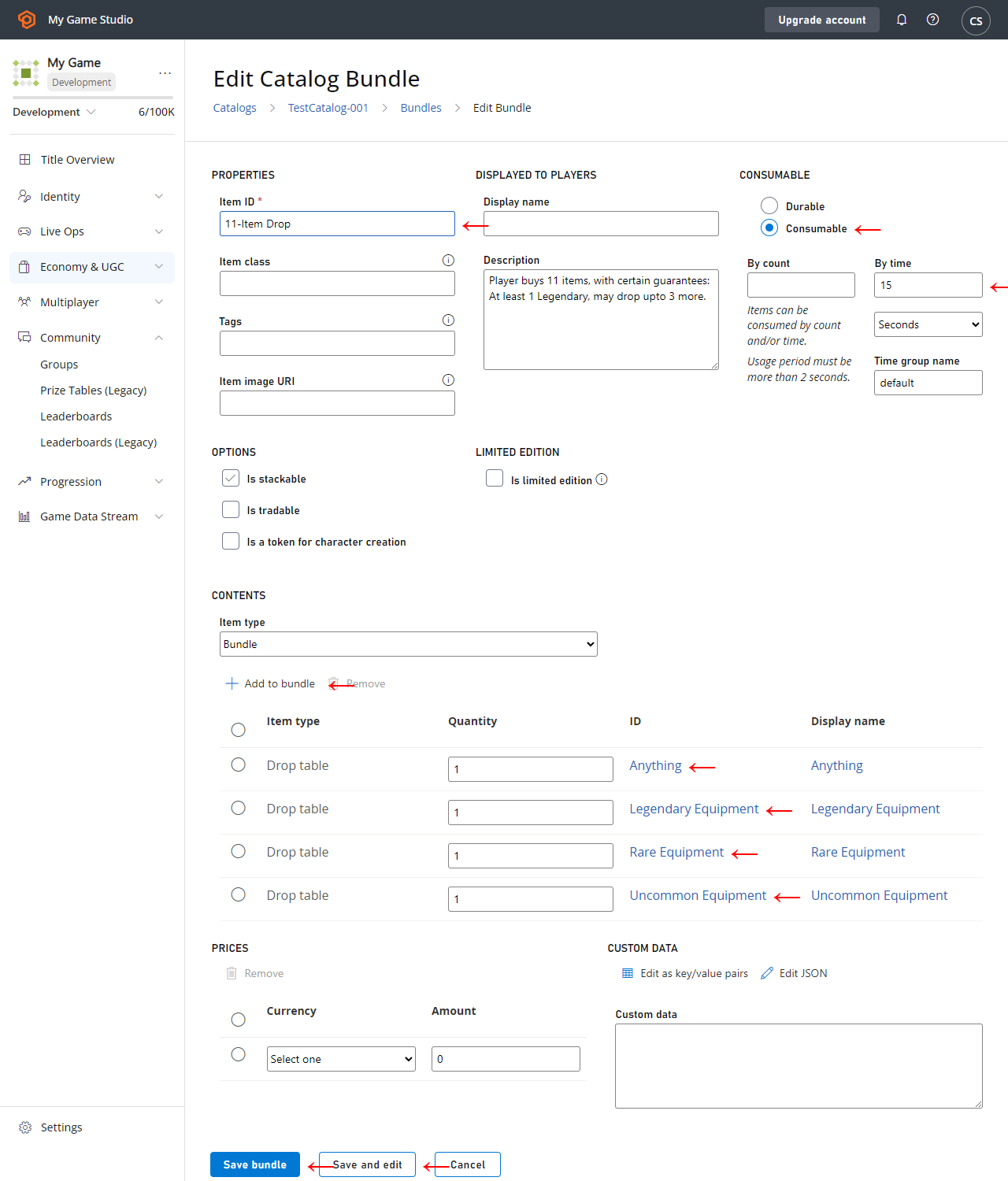 我们为此示例创建的 **Bundle** 使用了几个功能:
* *任何*类型的所有物品都必须有 **Item ID**。
* **Bundle** 算作自己的一个 Item,其内容在被授予的同时交付。因此,我们将 **Bundle** 本身设为可消耗,交付 15 秒后过期。
* 我们添加不同数量的不同 **Drop tables**,确保交付 **11 个物品**,但不同物品在不同表上掷骰。
* 首先,我们至少保证 **1 个 legendary 物品**,因此第一个位置将在 **Legendary Equipment** 上掷骰。
* 接下来的 3 个位置在 **Anything** 上掷骰,可能掷出更多 **Legendary**,或掷出不那么受欢迎的普通装备。这些掷骰将定义*好*掷骰与*差*掷骰的差别,因为这三个物品差异很大。
* 最后,我们用保证的 **Rare** 和 **Uncommon** 物品填充剩余位置,确保 **11 物品**掷骰不会*太*好或*太*差。
## 结论
掉落表从潜在物品列表和权重中随机生成单个物品。捆绑包和容器可能是使用掉落表向玩家交付一个或多个物品的最简单方式之一。
你可以从 [CloudScript](/services/playfab/live-service-management/service-gateway/automation/cloudscript/writing-custom-cloudscript) 手动使用掉落表,使用以下其中一个 Server API 方法:
1. [GetRandomResultTables](xref:titleid.playfabapi.com.server.playeritemmanagement.getrandomresulttables)
2. [EvaluateRandomResultTable](xref:titleid.playfabapi.com.server.playeritemmanagement.evaluaterandomresulttable)
## Related topics
- [Economy v2 中的掉落表和随机战利品](/zh-CN/services/playfab/economy-monetization/economy-v2/tutorials/drop-tables-and-randomized-loot.md)
- [目录(旧版 Economy)](/zh-CN/services/playfab/economy-monetization/economy/items/catalogs.md)
- [Economy(旧版)中的商店和促销](/zh-CN/services/playfab/economy-monetization/economy/tutorials/stores-and-sales.md)
- [Economy(旧版)中的优惠券和促销](/zh-CN/services/playfab/economy-monetization/economy/tutorials/coupons-and-promotions.md)
- [Economy(旧版)快速入门](/zh-CN/services/playfab/economy-monetization/economy/quickstart.md)
我们为此示例创建的 **Bundle** 使用了几个功能:
* *任何*类型的所有物品都必须有 **Item ID**。
* **Bundle** 算作自己的一个 Item,其内容在被授予的同时交付。因此,我们将 **Bundle** 本身设为可消耗,交付 15 秒后过期。
* 我们添加不同数量的不同 **Drop tables**,确保交付 **11 个物品**,但不同物品在不同表上掷骰。
* 首先,我们至少保证 **1 个 legendary 物品**,因此第一个位置将在 **Legendary Equipment** 上掷骰。
* 接下来的 3 个位置在 **Anything** 上掷骰,可能掷出更多 **Legendary**,或掷出不那么受欢迎的普通装备。这些掷骰将定义*好*掷骰与*差*掷骰的差别,因为这三个物品差异很大。
* 最后,我们用保证的 **Rare** 和 **Uncommon** 物品填充剩余位置,确保 **11 物品**掷骰不会*太*好或*太*差。
## 结论
掉落表从潜在物品列表和权重中随机生成单个物品。捆绑包和容器可能是使用掉落表向玩家交付一个或多个物品的最简单方式之一。
你可以从 [CloudScript](/services/playfab/live-service-management/service-gateway/automation/cloudscript/writing-custom-cloudscript) 手动使用掉落表,使用以下其中一个 Server API 方法:
1. [GetRandomResultTables](xref:titleid.playfabapi.com.server.playeritemmanagement.getrandomresulttables)
2. [EvaluateRandomResultTable](xref:titleid.playfabapi.com.server.playeritemmanagement.evaluaterandomresulttable)
## Related topics
- [Economy v2 中的掉落表和随机战利品](/zh-CN/services/playfab/economy-monetization/economy-v2/tutorials/drop-tables-and-randomized-loot.md)
- [目录(旧版 Economy)](/zh-CN/services/playfab/economy-monetization/economy/items/catalogs.md)
- [Economy(旧版)中的商店和促销](/zh-CN/services/playfab/economy-monetization/economy/tutorials/stores-and-sales.md)
- [Economy(旧版)中的优惠券和促销](/zh-CN/services/playfab/economy-monetization/economy/tutorials/coupons-and-promotions.md)
- [Economy(旧版)快速入门](/zh-CN/services/playfab/economy-monetization/economy/quickstart.md)