> ## Documentation Index
> Fetch the complete documentation index at: https://devdocs.xbox.com/llms.txt
> Use this file to discover all available pages before exploring further.
# 将 Power BI 连接到 Insights
> 使用 Microsoft Entra ID 身份验证将 Power BI Desktop 连接到旧版 PlayFab Insights,并基于你的游戏数据构建可视化、仪表板和报表。
# 教程:将 Power BI 连接到 Insights
本指南可帮助你开始将 Power BI 与 Insights 结合使用。连接后,你可以使用 Power BI 创建游戏数据的可视化等。要了解可与 Insights 连接的其他工具,请参阅[将外部工具连接到 Insights](/services/playfab/data-analytics/legacy/connectivity)。
PlayFab Insights Management 已于 2026 年 3 月 31 日退役。我们建议使用 [Azure Data Explorer (ADX) 连接](/services/playfab/data-analytics/export-data/data-connection-adx)以便今后管理你的性能和成本。如果你的标题仍在使用 **Insights**,请继续查看本文以了解实现详情。有关更多信息,请参阅 [PlayFab Digest:3 月功能更新](https://developer.microsoft.com/en-us/games/articles/2026/04/playfab-digest-march-feature-updates/)。
## 先决条件
### 使用 AAD 认证的 PlayFab 账户
你需要一个 PlayFab 账户或用户,其身份验证提供商设置为 Microsoft。Microsoft 身份验证提供商使用 Azure Active Directory (AAD) 进行身份验证,这是使用 Azure 服务所必需的。有关创建 AAD 认证账户或用户的说明,请参阅 [Game Manager 的 Azure Active Directory 身份验证](/services/playfab/identity/dev-identity/authentication/aad-authentication)。
要验证账户或用户是否设置为使用 Microsoft 身份验证提供商:
* 导航到 [developer.playfab.com](https://developer.playfab.com)。
* 选择 **Sign in with Microsoft** 以访问你的 PlayFab 账户。
如果你可以登录,则该账户已设置为使用 Microsoft 身份验证提供商。
### Insights 的 Game Manager 权限
你需要为你的账户分配启用以下 Game Manager 权限的[用户角色](/services/playfab/identity/dev-identity/permissions/playfab-user-roles):
* 管理员状态。
* 访问 Explorer 选项卡和关联数据。
* 对 Analytics 数据的读写访问。
你可以创建新的用户角色,也可以向现有角色添加这些权限。
### 其他先决条件
* [Power BI Desktop](https://powerbi.microsoft.com/desktop/)
需要 Power BI Desktop。Power BI Web 门户不支持此场景。
## 使用 Power BI 连接
在本地计算机上打开 Power BI。
1. 在 **Power BI Desktop** 窗口中,选择 **Get Data** > **Azure Data Explorer (Kusto)**。
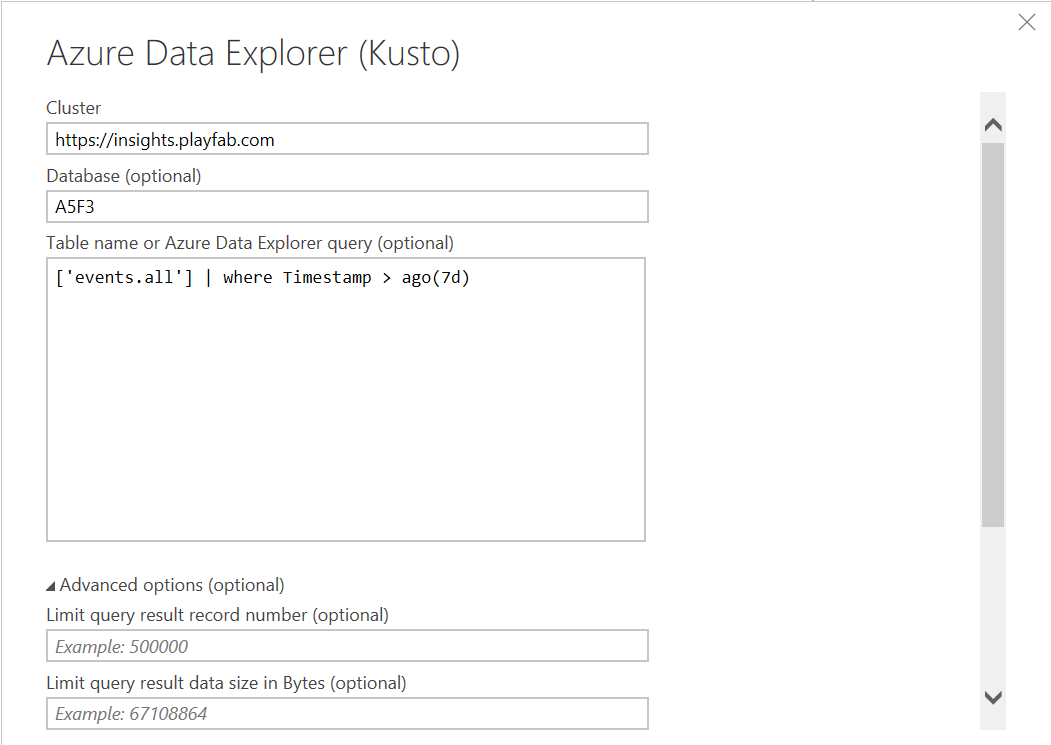
2. 在 **Azure Data Explorer (Kusto)** 对话框中执行以下步骤:
* 在 **Cluster** 下输入 PlayFab API 端点,即 `https://insights.playfab.com`。
* 在 **Database** 下输入全部大写的标题 ID,因为数据库名称区分大小写。
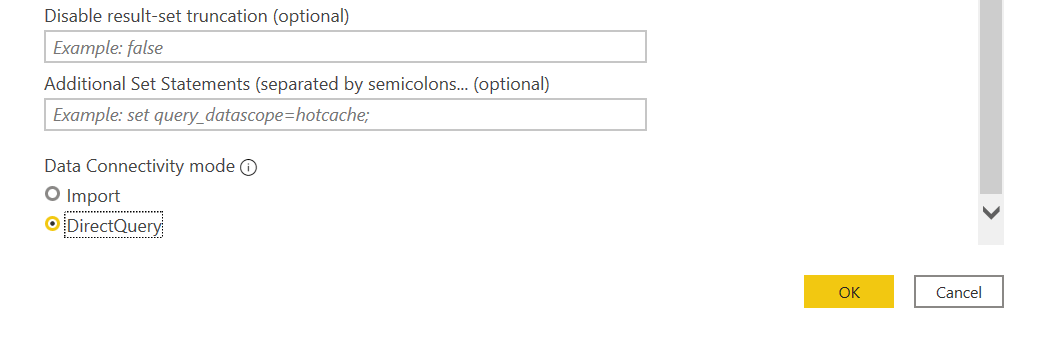
* 向下滚动,在 **Data Connectivity mode** 下选择 **DirectQuery**。可选,输入表名或查询。你可以设置最大记录数或最大大小的限制。如果你的查询超出这些限制,将返回 `PartialQueryFailure` 错误以及说明你超出限制的消息。下面的示例指定了针对 `events.all` 表的查询,返回过去 7 天内发生的事件。
 3. 选择 **OK**。你现在可以对数据库执行查询和命令。
## 其他资源
* [Power BI 文档](https://learn.microsoft.com/en-us/power-bi/)
* 要了解连接到 Insights 的其他工具,请参阅[将外部工具连接到 Insights](/services/playfab/data-analytics/legacy/connectivity)
## Related topics
- [将外部工具与 Insights 连接](/zh-CN/services/playfab/data-analytics/legacy/connectivity/index.md)
- [将 Python 连接到 Insights](/zh-CN/services/playfab/data-analytics/legacy/connectivity/connecting-python-to-insights.md)
- [将 Grafana 连接到 Insights](/zh-CN/services/playfab/data-analytics/legacy/connectivity/connecting-grafana-to-insights.md)
- [将 Kusto C# SDK 连接到 Insights](/zh-CN/services/playfab/data-analytics/legacy/connectivity/connecting-kusto-csharp-to-insights.md)
- [将 Kusto Explorer 连接到 Insights](/zh-CN/services/playfab/data-analytics/legacy/connectivity/connecting-kusto-explorer-to-insights.md)
3. 选择 **OK**。你现在可以对数据库执行查询和命令。
## 其他资源
* [Power BI 文档](https://learn.microsoft.com/en-us/power-bi/)
* 要了解连接到 Insights 的其他工具,请参阅[将外部工具连接到 Insights](/services/playfab/data-analytics/legacy/connectivity)
## Related topics
- [将外部工具与 Insights 连接](/zh-CN/services/playfab/data-analytics/legacy/connectivity/index.md)
- [将 Python 连接到 Insights](/zh-CN/services/playfab/data-analytics/legacy/connectivity/connecting-python-to-insights.md)
- [将 Grafana 连接到 Insights](/zh-CN/services/playfab/data-analytics/legacy/connectivity/connecting-grafana-to-insights.md)
- [将 Kusto C# SDK 连接到 Insights](/zh-CN/services/playfab/data-analytics/legacy/connectivity/connecting-kusto-csharp-to-insights.md)
- [将 Kusto Explorer 连接到 Insights](/zh-CN/services/playfab/data-analytics/legacy/connectivity/connecting-kusto-explorer-to-insights.md)