> ## Documentation Index
> Fetch the complete documentation index at: https://devdocs.xbox.com/llms.txt
> Use this file to discover all available pages before exploring further.
# 使用奖品表
> 创建 PlayFab 奖品表,可在排行榜重置时向顶级排名授予虚拟货币、库存物品、推送通知或 CloudScript 操作。
本教程将引导你了解如何创建奖品表,该表在[可重置排行榜](/services/playfab/community/leaderboards/tournaments-leaderboards/using-resettable-statistics-and-leaderboards)中对一系列排名内的一组玩家触发一组操作。
具体来说,这是在排行榜重置时触发电子邮件、发送推送通知、授予[库存物品](/services/playfab/player-progression/player-data/player-inventory)和[虚拟货币](/services/playfab/economy-monetization/economy/tutorials/currencies),或执行 [CloudScript](/services/playfab/live-service-management/service-gateway/automation/cloudscript/writing-custom-cloudscript) 函数的一种方式。
在此示例中,我们向你展示如何创建奖品表锦标赛结束奖品,该奖品在执行重置后,根据 5 名玩家在排行榜上的排名向他们授予虚拟货币。
## 要求
这是一个*高级*教程。请确保满足下面显示的所有要求,否则你将*无法*完成本教程。
* 需要了解如何创建玩家的基本知识,因为在排行榜可以对这些玩家执行任何操作之前,需要有玩家在排行榜中。
* 如果你不熟悉 Game Manager,也值得阅读 [Game Manager 快速入门](/services/playfab/live-service-management/gamemanager/quickstart),因为它是创建奖品表的地方。
* 为了使用奖品表,你必须对可重置排行榜的工作方式有一般的了解。请阅读我们教程中关于排行榜的内容:[使用可重置的统计信息和排行榜](/services/playfab/community/leaderboards/tournaments-leaderboards/using-resettable-statistics-and-leaderboards)。
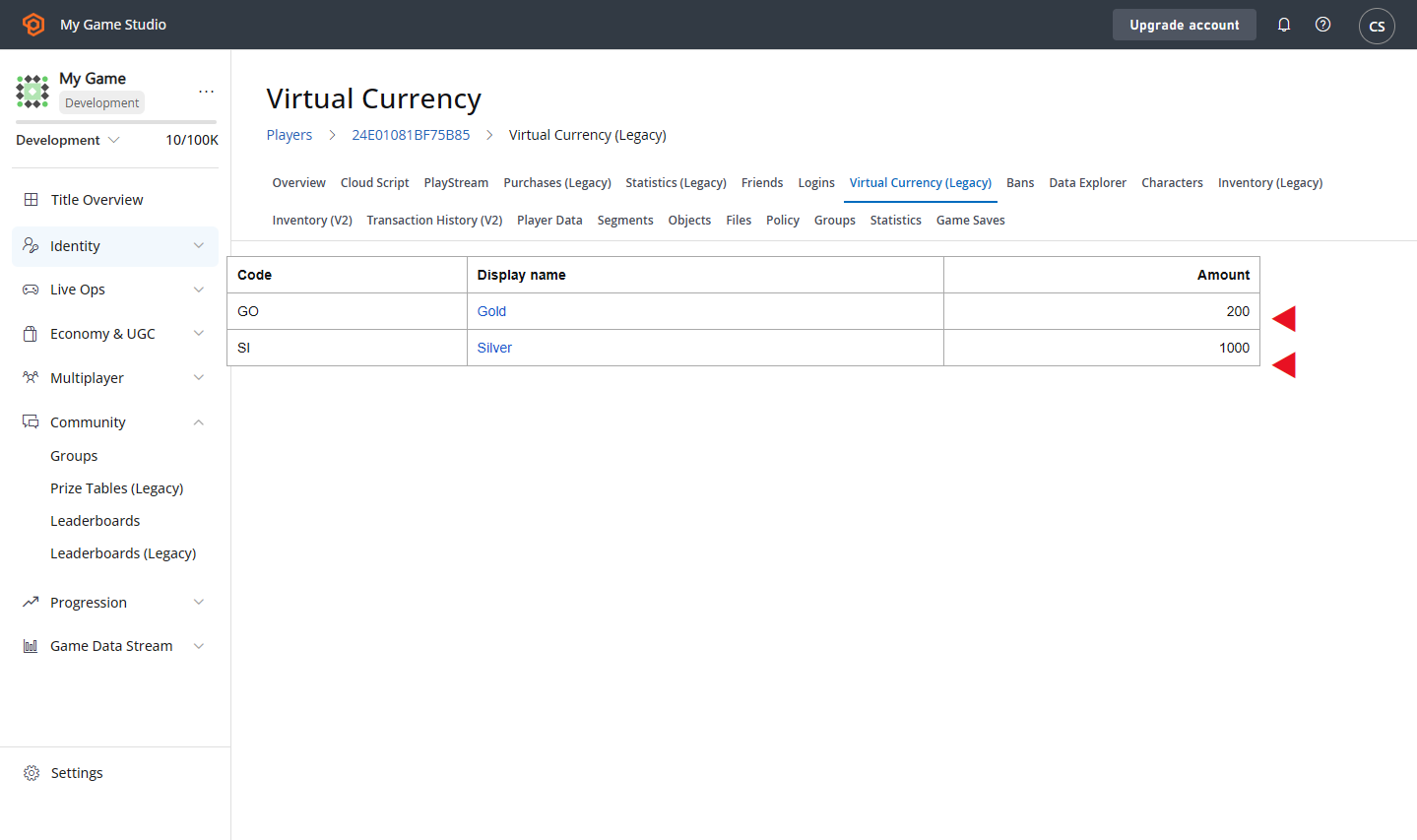
* 此外,必须设置虚拟货币。请阅读我们关于[货币](/services/playfab/economy-monetization/economy/tutorials/currencies)的教程,并使用以下参数设置两种货币:
* **Currency code**:GO
* **Display name**:Gold
* **Initial deposit**:200
* **Currency code**:SI
* **Display name**:Silver
* **Initial deposit**:1000
## 步骤 1 - 创建排行榜
在 Game Manager 中:
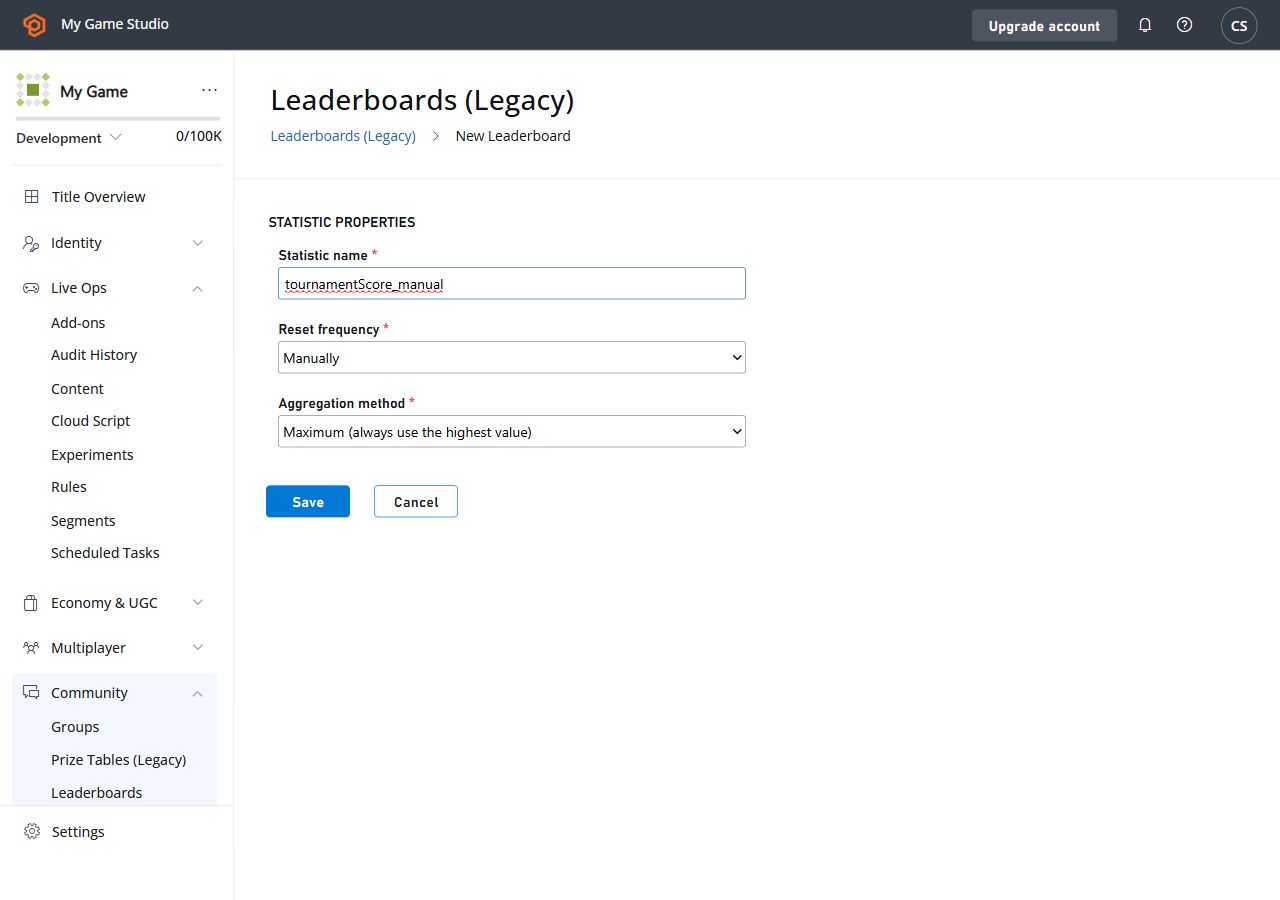
* 转到左侧菜单中的 **Leaderboards**。
* 选择 **New Leaderboard**。
* 在 **Statistic name** 字段中添加名为 **tournamentScore\_manual** 的 **Leaderboard**。
* 使用提供的下拉菜单,将 **Reset frequency** 字段设置为 **Manually**。
* 转到 **Aggregation method** 字段,从提供的下拉菜单中选择 **Maximum (always use the highest value)**。
 ## 步骤 2 - 为排行榜创建奖品表
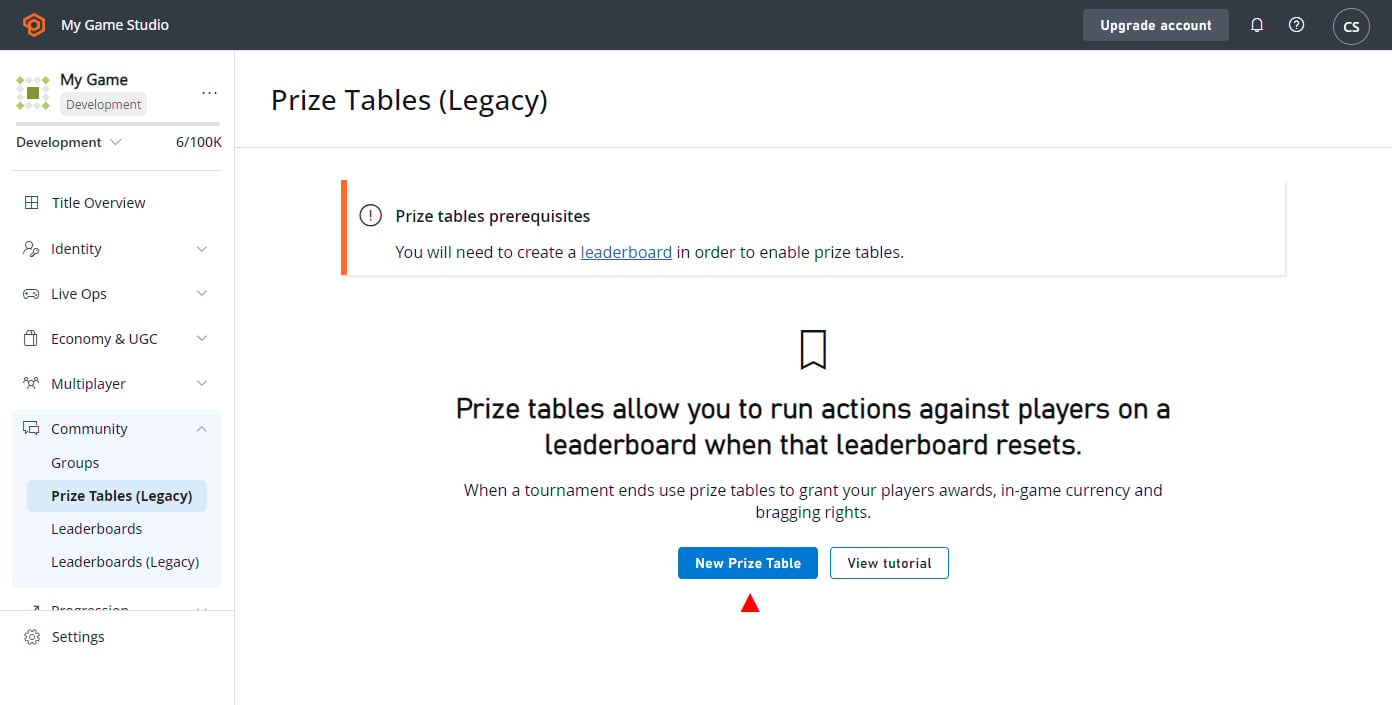
现在已经创建了排行榜,可以将奖品表与之关联。转到:
* 左侧菜单中的 **Leaderboards**。
* 选择 **Prize Tables** 选项卡。
* 选择 **NEW PRIZE TABLE** 按钮以进入 **New Prize Table** 视图。
## 步骤 2 - 为排行榜创建奖品表
现在已经创建了排行榜,可以将奖品表与之关联。转到:
* 左侧菜单中的 **Leaderboards**。
* 选择 **Prize Tables** 选项卡。
* 选择 **NEW PRIZE TABLE** 按钮以进入 **New Prize Table** 视图。
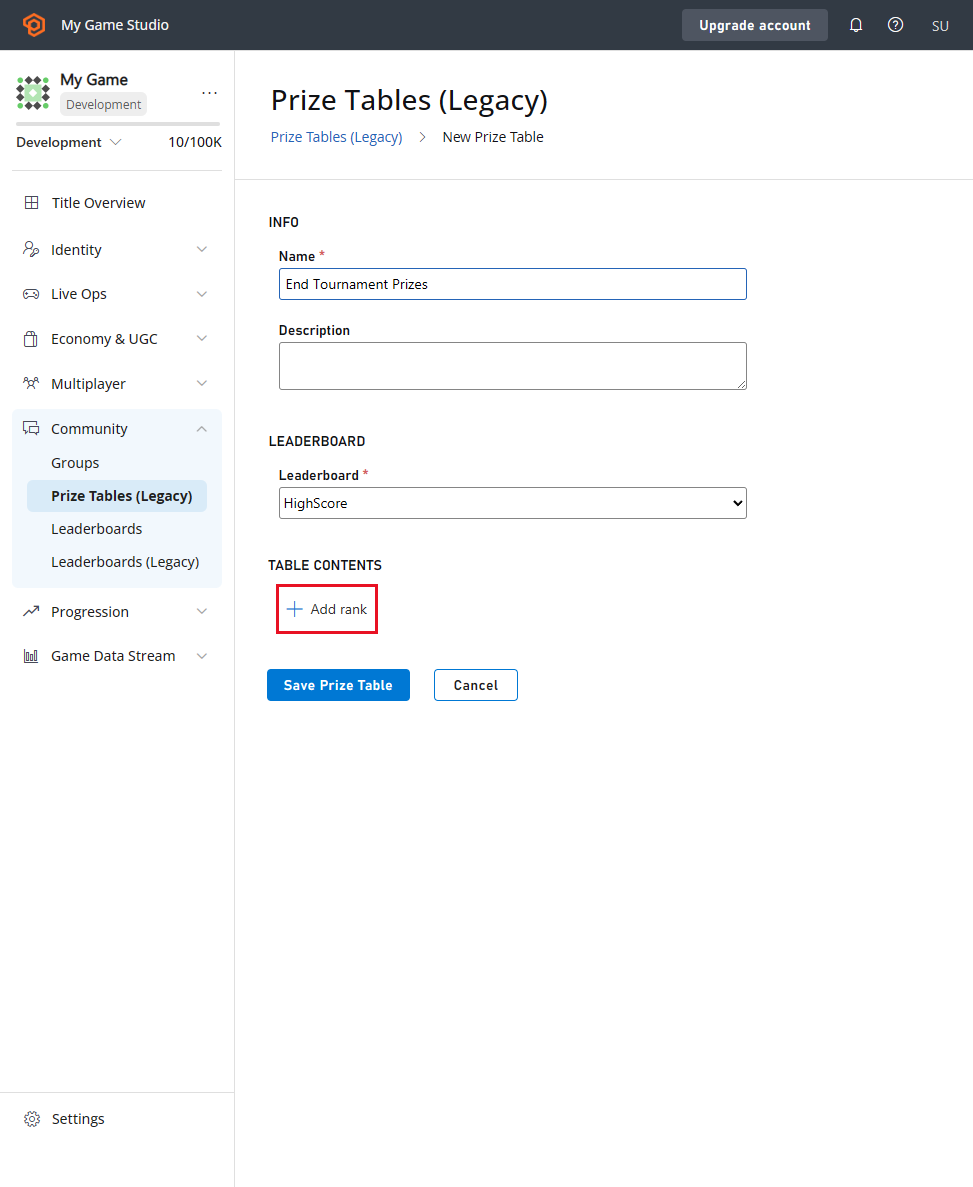
 在 **New Prize Table** 视图中:
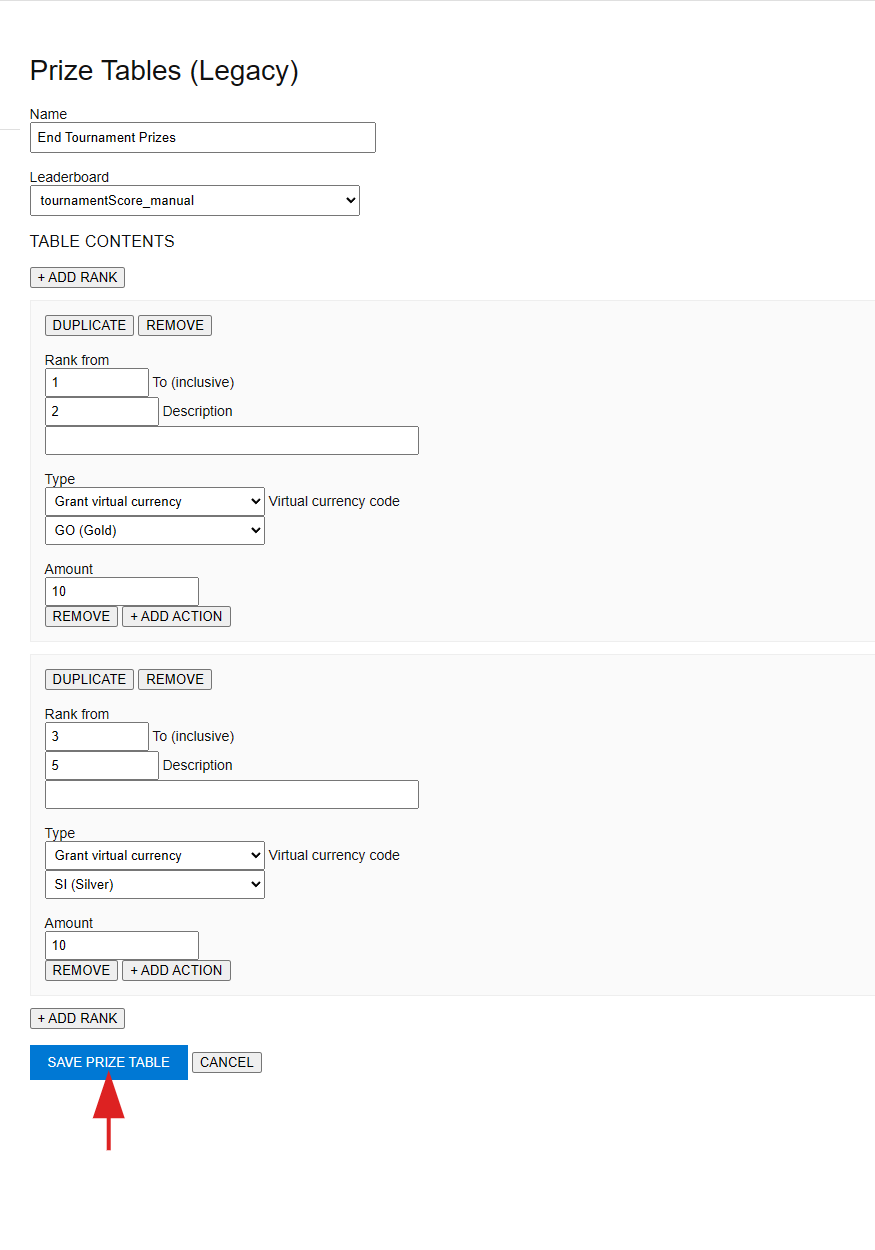
* 转到 **INFO** 区域,然后输入 **New Prize Table** 的 **Name**,命名为 **End Tournament Prizes**。
* 从 **Leaderboard** 下拉菜单中选择 **tournamentScore\_manual**。
为了让此奖品表执行某些操作,需要设置排名。为此:
* 在 **TABLE CONTENTS** 部分下选择 **+ ADD RANK**。
* 将出现 **Rank** 表单。
在 **New Prize Table** 视图中:
* 转到 **INFO** 区域,然后输入 **New Prize Table** 的 **Name**,命名为 **End Tournament Prizes**。
* 从 **Leaderboard** 下拉菜单中选择 **tournamentScore\_manual**。
为了让此奖品表执行某些操作,需要设置排名。为此:
* 在 **TABLE CONTENTS** 部分下选择 **+ ADD RANK**。
* 将出现 **Rank** 表单。
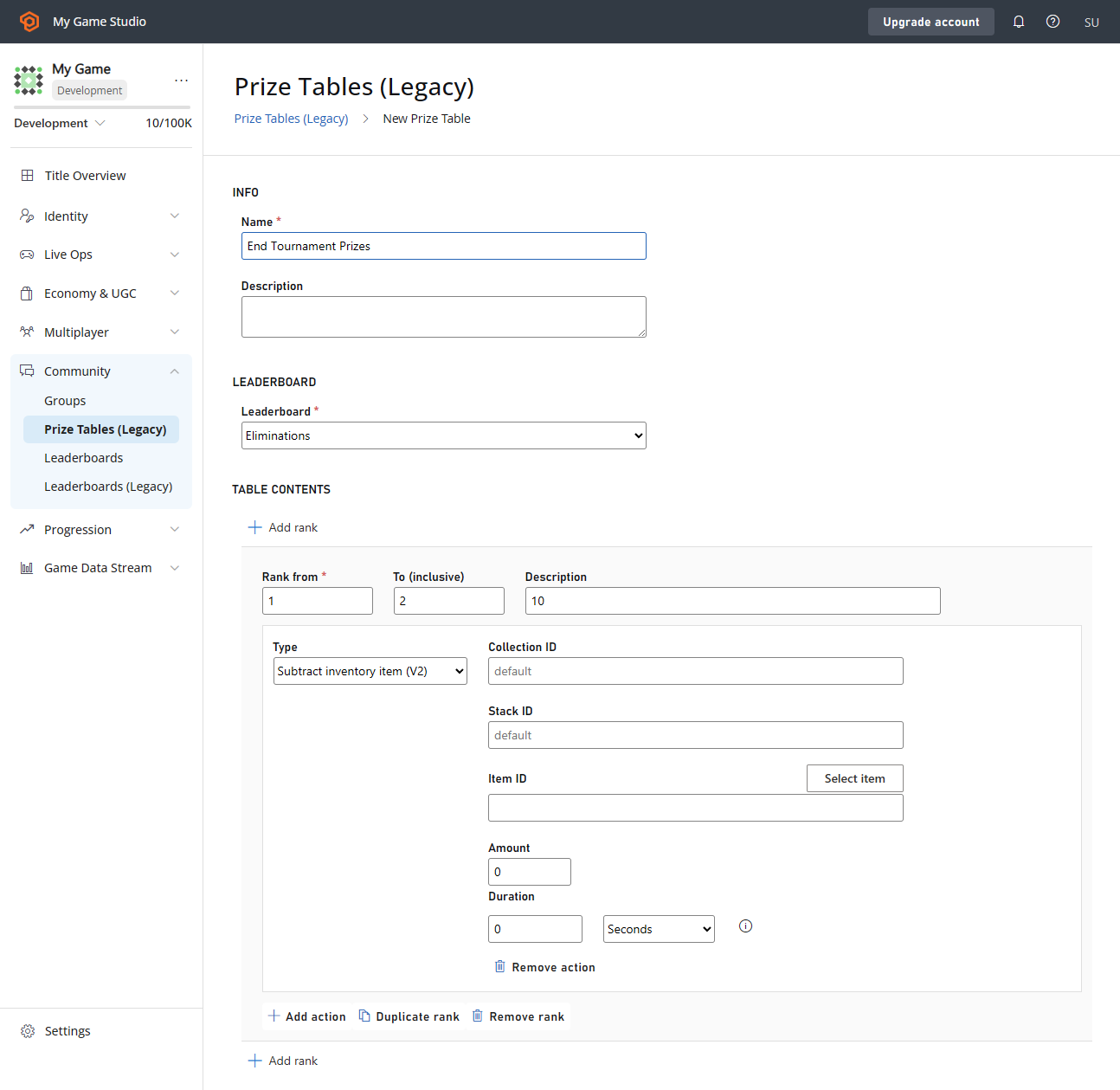
 在 **Rank** 表单中:
* 确认 **Rank from** 字段的值为 **1**。
* 确认 **To (inclusive)** 字段的值为 **2**。
* 在 **Type** 下拉菜单中,选择 **Grant virtual currency**。
* 在 **virtual currency code** 下拉菜单中,选择 **GO (Gold)**,数量为 **10**。
在 **Rank** 表单中:
* 确认 **Rank from** 字段的值为 **1**。
* 确认 **To (inclusive)** 字段的值为 **2**。
* 在 **Type** 下拉菜单中,选择 **Grant virtual currency**。
* 在 **virtual currency code** 下拉菜单中,选择 **GO (Gold)**,数量为 **10**。
 现在,我们将添加第二个排名范围:
* 在 **TABLE CONTENTS** 部分下选择 **+ADD RANK**(底部还有一个*第二个*,也可以工作)。
* 在出现的 **Rank** 表单中,确保 **Rank from** 字段的值为 **3**,**To (inclusive)** 字段的值为 **5**。
* 在 **Virtual currency code** 下拉菜单中,选择 **SI**(**Silver**),数量为 **10**。
现在,我们将添加第二个排名范围:
* 在 **TABLE CONTENTS** 部分下选择 **+ADD RANK**(底部还有一个*第二个*,也可以工作)。
* 在出现的 **Rank** 表单中,确保 **Rank from** 字段的值为 **3**,**To (inclusive)** 字段的值为 **5**。
* 在 **Virtual currency code** 下拉菜单中,选择 **SI**(**Silver**),数量为 **10**。
 ## 步骤 3 - 用玩家填充排行榜
现在已经创建了排行榜以及与之关联的奖品表。下一步是用玩家填充排行榜。
要创建玩家,我们将使用 [LoginWithCustomID](xref:titleid.playfabapi.com.client.authentication.loginwithcustomid)。然后,我们将使用玩家通过 [UpdatePlayerStatistics](xref:titleid.playfabapi.com.client.playerdatamanagement.updateplayerstatistics) 填充排行榜。
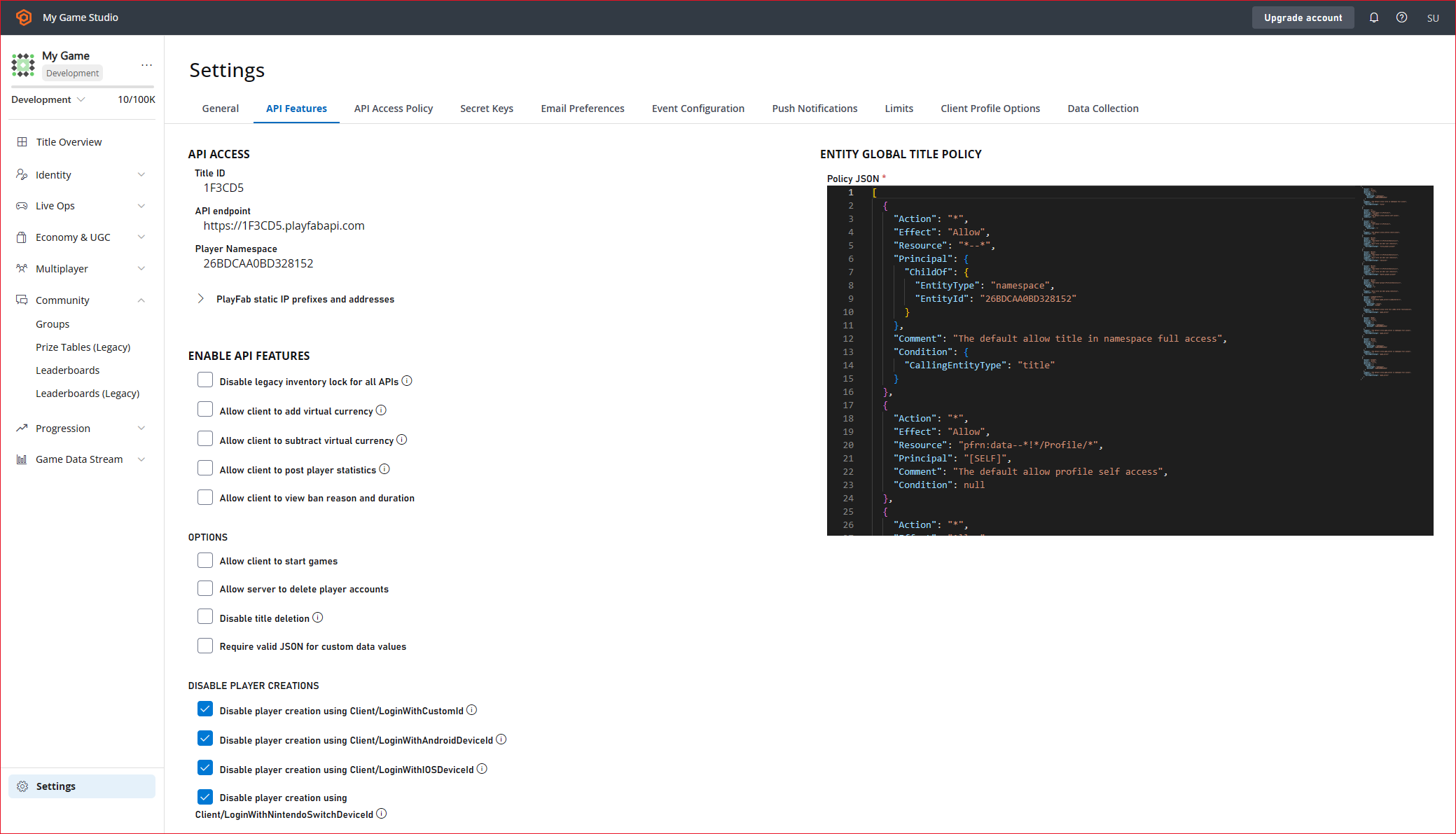
在我们可以使用 [UpdatePlayerStatistics](xref:titleid.playfabapi.com.client.playerdatamanagement.updateplayerstatistics) 之前,必须在 API Features 中启用它。
* 在左侧菜单中选择 **Settings**。
* 选择 **API Features** 选项卡。
* 选中 **Allow client to post player statistics** 的复选框。
* 然后选择屏幕底部的 **SAVE API FEATURES** 按钮。
## 步骤 3 - 用玩家填充排行榜
现在已经创建了排行榜以及与之关联的奖品表。下一步是用玩家填充排行榜。
要创建玩家,我们将使用 [LoginWithCustomID](xref:titleid.playfabapi.com.client.authentication.loginwithcustomid)。然后,我们将使用玩家通过 [UpdatePlayerStatistics](xref:titleid.playfabapi.com.client.playerdatamanagement.updateplayerstatistics) 填充排行榜。
在我们可以使用 [UpdatePlayerStatistics](xref:titleid.playfabapi.com.client.playerdatamanagement.updateplayerstatistics) 之前,必须在 API Features 中启用它。
* 在左侧菜单中选择 **Settings**。
* 选择 **API Features** 选项卡。
* 选中 **Allow client to post player statistics** 的复选框。
* 然后选择屏幕底部的 **SAVE API FEATURES** 按钮。
 ### C# 代码示例
以下 **C#** 代码示例创建 5 名玩家,并使用 [LoginWithCustomID](xref:titleid.playfabapi.com.client.authentication.loginwithcustomid) 使他们登录。
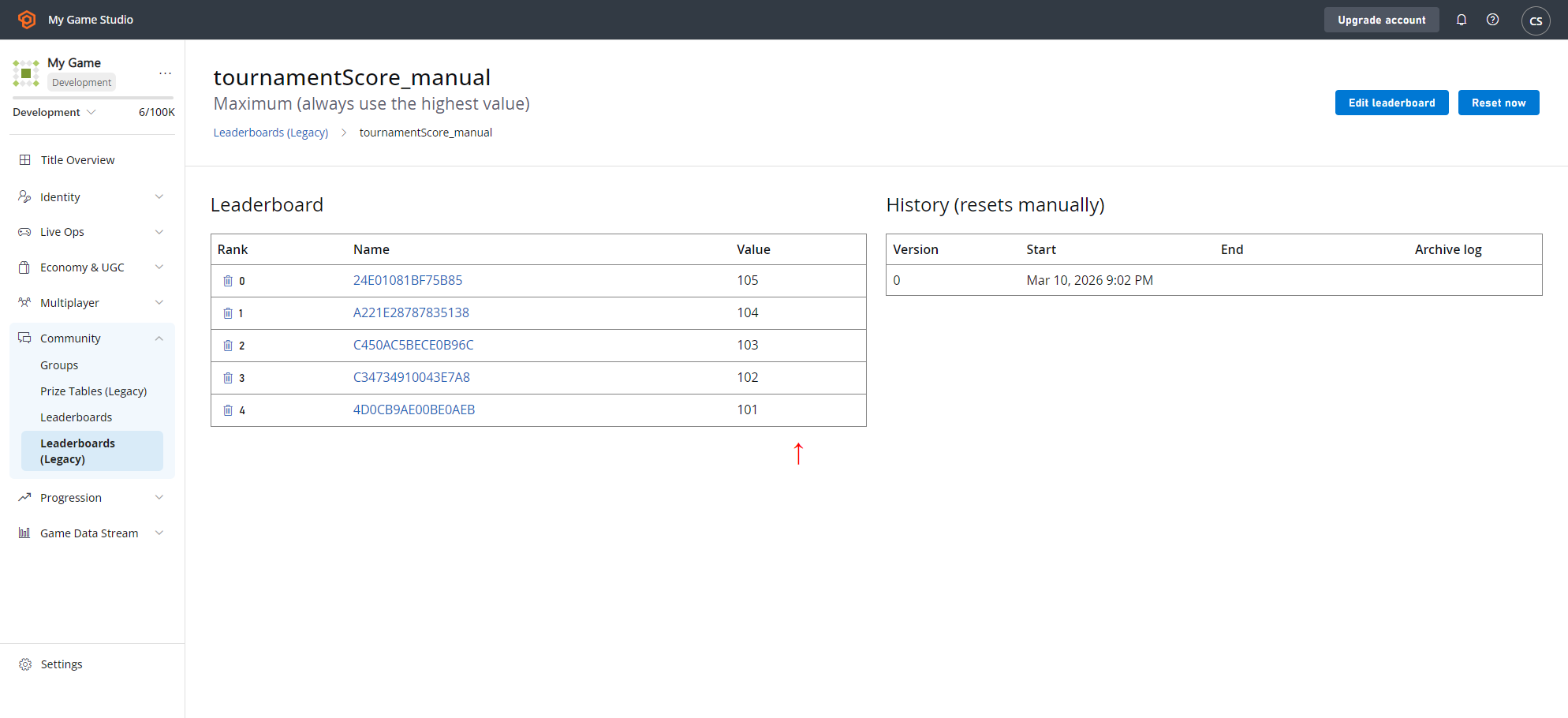
然后使用 [UpdatePlayerStatistics](xref:titleid.playfabapi.com.client.playerdatamanagement.updateplayerstatistics) 用 5 名玩家填充你之前创建的排行榜 (`tournamentScore_manual`),值分别为:**105**、**104**、**103**、**102** 和 **101**。
```csharp theme={null}
// Note: This is a recursive function. Invoke it initially with no parameter
public void CreatePlayerAndPopulateLeaderboard(int playerIndex = 5) {
if (playerIndex <= 0) return;
const string leaderboardName = "tournamentScore_manual";
PlayFabClientAPI.LoginWithCustomID(new LoginWithCustomIDRequest {
CustomId = playerIndex.ToString(),
CreateAccount = true
}, result => OnLoggedIn(result,playerIndex,leaderboardName), FailureCallback);
}
private void OnLoggedIn(LoginResult loginResult, int playerIndex, string leaderboardName) {
Debug.Log("Player has successfully logged in with " + loginResult.PlayFabId);
PlayFabClientAPI.UpdatePlayerStatistics(new UpdatePlayerStatisticsRequest {
Statistics = new List {
new StatisticUpdate {
StatisticName = leaderboardName,
Value = playerIndex + 100
}
}
}, result=> OnStatisticsUpdated(result,playerIndex), FailureCallback);
}
private void OnStatisticsUpdated(UpdatePlayerStatisticsResult updateResult, int playerIndex) {
Debug.Log("Successfully updated player statistic");
// Recursively invoke for next player
CreatePlayerAndPopulateLeaderboard(playerIndex - 1);
}
private void FailureCallback(PlayFabError error){
Debug.LogWarning("Something went wrong with your API call. Here's some debug information:");
Debug.LogError(error.GenerateErrorReport());
}
```
### 检查 C# 代码示例的结果
要检查排行榜中是否填充了 5 名玩家,其值是否正确:
* 从左侧菜单中选择 **Leaderboards**。
* 在 **Leaderboards** 选项卡上,返回 **Leaderboard** 列表视图。
* 选择 **tournamentScore\_manual**,应该有 5 名 **Players**,其值分别为 **105**、**104**、**103**、**102** 和 **101**。
### C# 代码示例
以下 **C#** 代码示例创建 5 名玩家,并使用 [LoginWithCustomID](xref:titleid.playfabapi.com.client.authentication.loginwithcustomid) 使他们登录。
然后使用 [UpdatePlayerStatistics](xref:titleid.playfabapi.com.client.playerdatamanagement.updateplayerstatistics) 用 5 名玩家填充你之前创建的排行榜 (`tournamentScore_manual`),值分别为:**105**、**104**、**103**、**102** 和 **101**。
```csharp theme={null}
// Note: This is a recursive function. Invoke it initially with no parameter
public void CreatePlayerAndPopulateLeaderboard(int playerIndex = 5) {
if (playerIndex <= 0) return;
const string leaderboardName = "tournamentScore_manual";
PlayFabClientAPI.LoginWithCustomID(new LoginWithCustomIDRequest {
CustomId = playerIndex.ToString(),
CreateAccount = true
}, result => OnLoggedIn(result,playerIndex,leaderboardName), FailureCallback);
}
private void OnLoggedIn(LoginResult loginResult, int playerIndex, string leaderboardName) {
Debug.Log("Player has successfully logged in with " + loginResult.PlayFabId);
PlayFabClientAPI.UpdatePlayerStatistics(new UpdatePlayerStatisticsRequest {
Statistics = new List {
new StatisticUpdate {
StatisticName = leaderboardName,
Value = playerIndex + 100
}
}
}, result=> OnStatisticsUpdated(result,playerIndex), FailureCallback);
}
private void OnStatisticsUpdated(UpdatePlayerStatisticsResult updateResult, int playerIndex) {
Debug.Log("Successfully updated player statistic");
// Recursively invoke for next player
CreatePlayerAndPopulateLeaderboard(playerIndex - 1);
}
private void FailureCallback(PlayFabError error){
Debug.LogWarning("Something went wrong with your API call. Here's some debug information:");
Debug.LogError(error.GenerateErrorReport());
}
```
### 检查 C# 代码示例的结果
要检查排行榜中是否填充了 5 名玩家,其值是否正确:
* 从左侧菜单中选择 **Leaderboards**。
* 在 **Leaderboards** 选项卡上,返回 **Leaderboard** 列表视图。
* 选择 **tournamentScore\_manual**,应该有 5 名 **Players**,其值分别为 **105**、**104**、**103**、**102** 和 **101**。
 ## 步骤 4 - 检查玩家的初始货币
在检查任何内容之前:
* 返回步骤 2 中左侧菜单中的 **Players**。
* 转到 **Players** 选项卡,找到在步骤 3 中放入 **tournamentScore\_manual** **Leaderboard** 的玩家。
* 选择 **Player ID**,然后选择该玩家的 **Virtual Currency** 选项卡。
* 记录该玩家的 **GO**(**Gold**)和 **SI**(**Silver**)**Currencies** 的值。
在检查任何内容之前,返回步骤 2 中的测试 **Players**。
* 转到 **Players**,找到在步骤 3 中放入 **tournamentScore\_manual Leaderboard** 的玩家。
* 选择 **Player ID** 和该玩家的 **Virtual Currency** 选项卡。
* 记录该玩家的 **GO**(**Gold**)和 **SI**(**Silver**)货币的值。
* 现在对在步骤 3 中放入 **tournamentScore\_manual Leaderboard** 的 5 名玩家中的其余 4 名执行此操作。
* 确保记录他们的 **GO**(**Gold**)和 **SI**(**Silver**)货币的值(这些对于确认重置后奖品表是否有效非常重要)。
## 步骤 4 - 检查玩家的初始货币
在检查任何内容之前:
* 返回步骤 2 中左侧菜单中的 **Players**。
* 转到 **Players** 选项卡,找到在步骤 3 中放入 **tournamentScore\_manual** **Leaderboard** 的玩家。
* 选择 **Player ID**,然后选择该玩家的 **Virtual Currency** 选项卡。
* 记录该玩家的 **GO**(**Gold**)和 **SI**(**Silver**)**Currencies** 的值。
在检查任何内容之前,返回步骤 2 中的测试 **Players**。
* 转到 **Players**,找到在步骤 3 中放入 **tournamentScore\_manual Leaderboard** 的玩家。
* 选择 **Player ID** 和该玩家的 **Virtual Currency** 选项卡。
* 记录该玩家的 **GO**(**Gold**)和 **SI**(**Silver**)货币的值。
* 现在对在步骤 3 中放入 **tournamentScore\_manual Leaderboard** 的 5 名玩家中的其余 4 名执行此操作。
* 确保记录他们的 **GO**(**Gold**)和 **SI**(**Silver**)货币的值(这些对于确认重置后奖品表是否有效非常重要)。
 ## 步骤 5 - 重置排行榜以授予奖励
现在转到 **Leaderboards**。
* 返回 **Leaderboards** 列表视图。
* 选择 **tournamentScore\_manual**。
* 记下 **Leaderboard** 上 **Players** 的位置(这些是*从零索引*的,因此位置 **0** 是*第一名*)。
* 选择 **RESET NOW** 按钮。
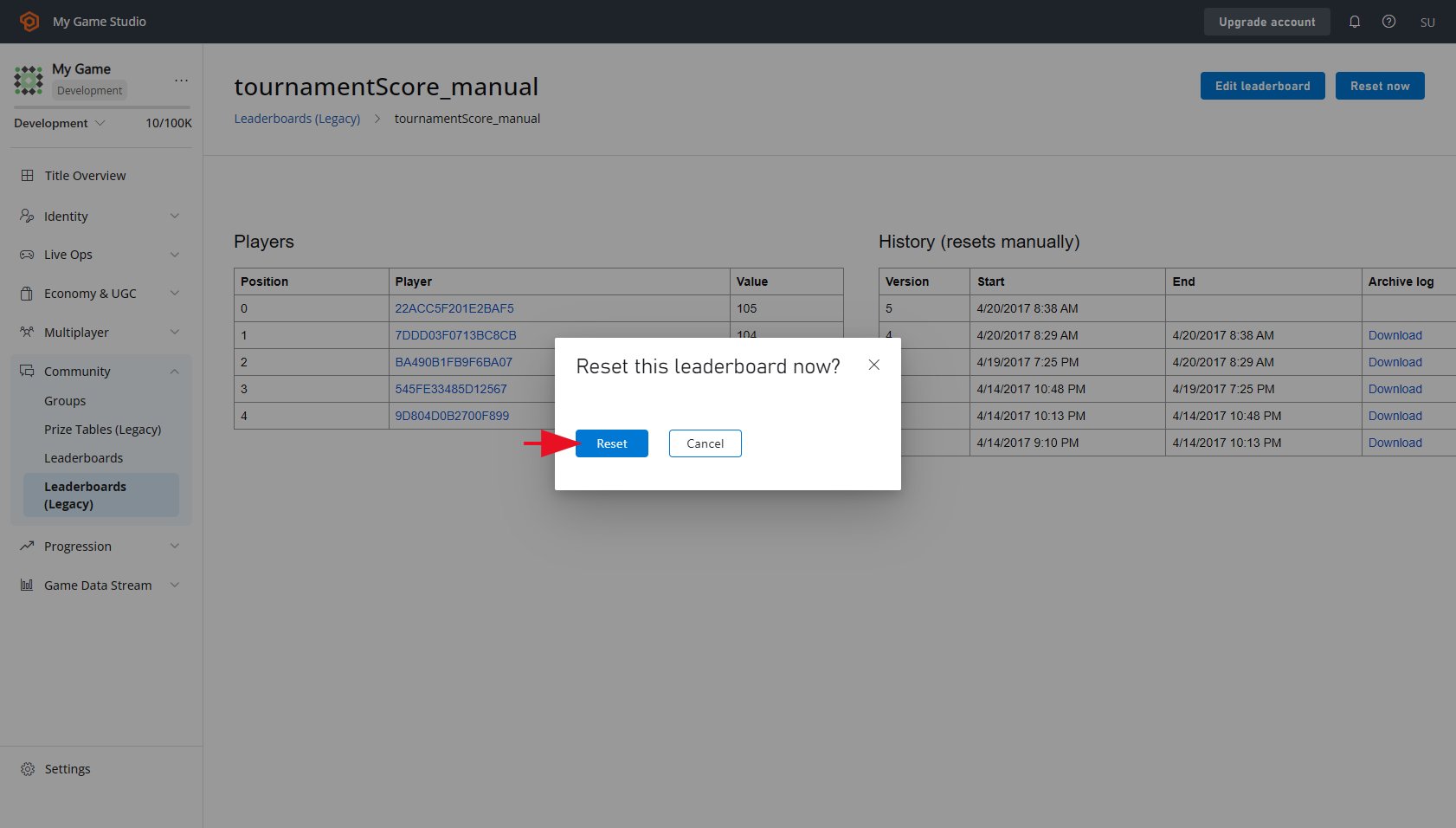
* 选择 **RESET** 按钮以确认重置 **Leaderboard**
* 这将清空 **Players** 列表。
## 步骤 5 - 重置排行榜以授予奖励
现在转到 **Leaderboards**。
* 返回 **Leaderboards** 列表视图。
* 选择 **tournamentScore\_manual**。
* 记下 **Leaderboard** 上 **Players** 的位置(这些是*从零索引*的,因此位置 **0** 是*第一名*)。
* 选择 **RESET NOW** 按钮。
* 选择 **RESET** 按钮以确认重置 **Leaderboard**
* 这将清空 **Players** 列表。
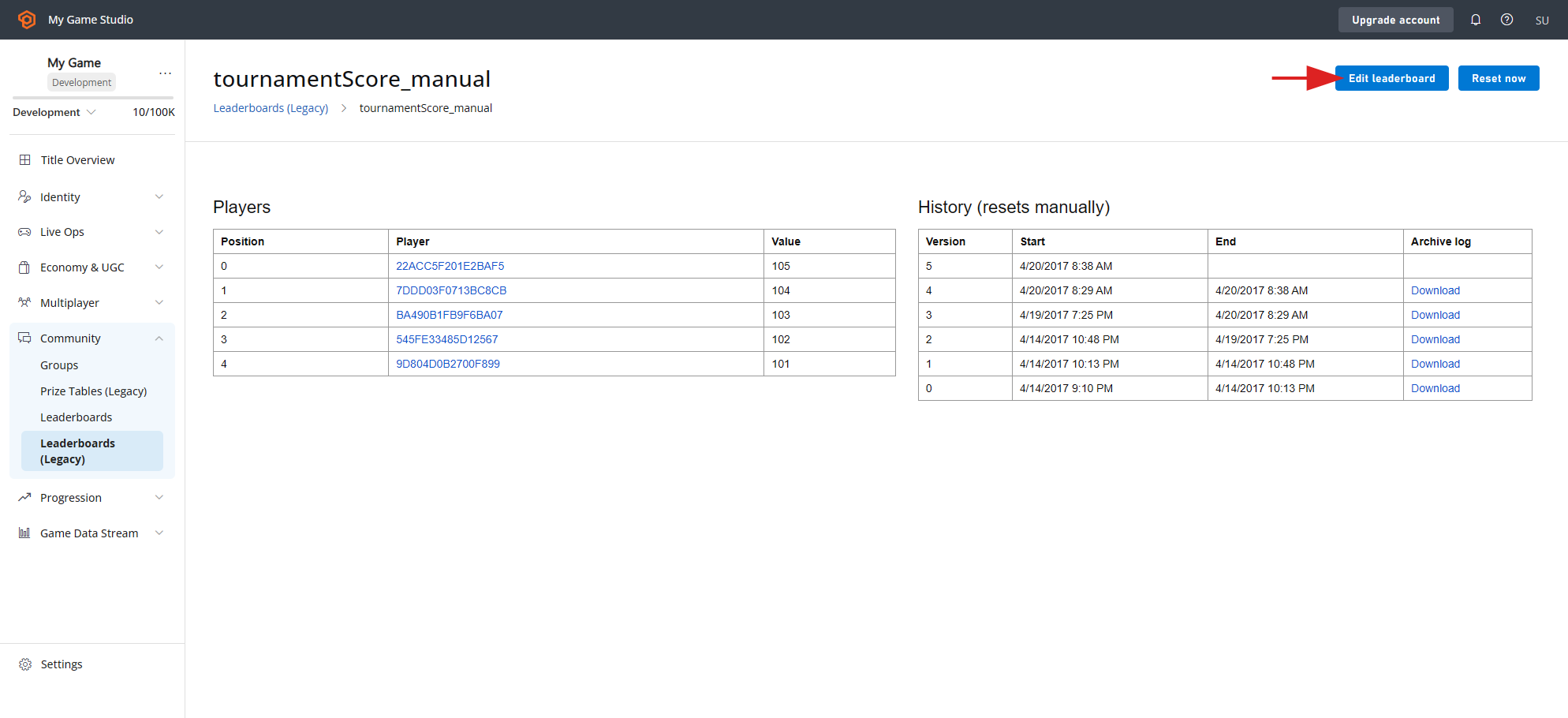 * 选择屏幕顶部的 **RESET NOW** 按钮。
* 当提示 **Reset this Leaderboard now?** 时,选择 **RESET** 按钮以确认重置。
* 这将清空 **Players** 列表。
* 选择屏幕顶部的 **RESET NOW** 按钮。
* 当提示 **Reset this Leaderboard now?** 时,选择 **RESET** 按钮以确认重置。
* 这将清空 **Players** 列表。
 ## 步骤 6 - 测试奖品表是否有效
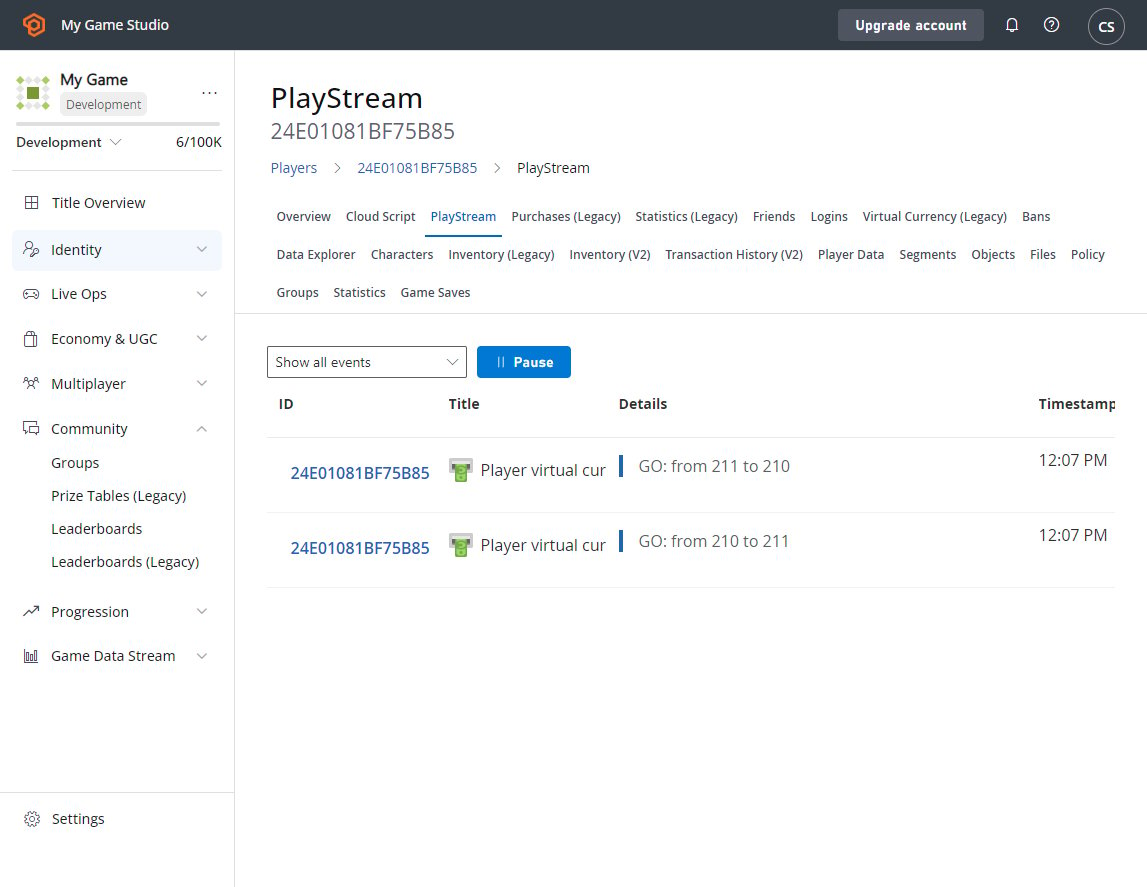
要查看奖品表是否有效,可以检查排行榜中的玩家,看看他们是否被授予了正确数量的货币。这可以在玩家的 PlayStream 调试器中快速查看。
要在 PlayStream 调试器中查看此内容:
* 从左侧菜单中选择 **Players**。
* **PlayStream** 选项卡将显示 **Player** 在 **Leaderboard** 上的排名事件,后跟 **Virtual Currency** 更新。
## 步骤 6 - 测试奖品表是否有效
要查看奖品表是否有效,可以检查排行榜中的玩家,看看他们是否被授予了正确数量的货币。这可以在玩家的 PlayStream 调试器中快速查看。
要在 PlayStream 调试器中查看此内容:
* 从左侧菜单中选择 **Players**。
* **PlayStream** 选项卡将显示 **Player** 在 **Leaderboard** 上的排名事件,后跟 **Virtual Currency** 更新。
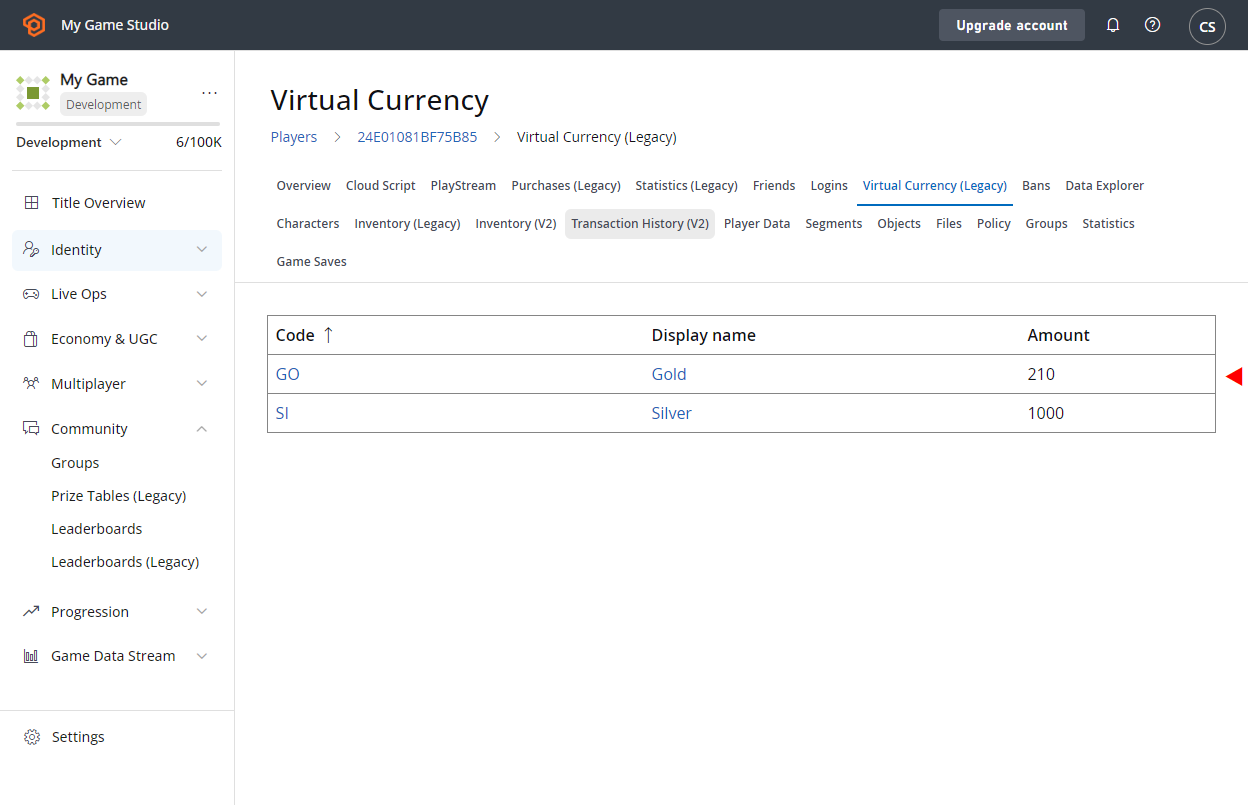
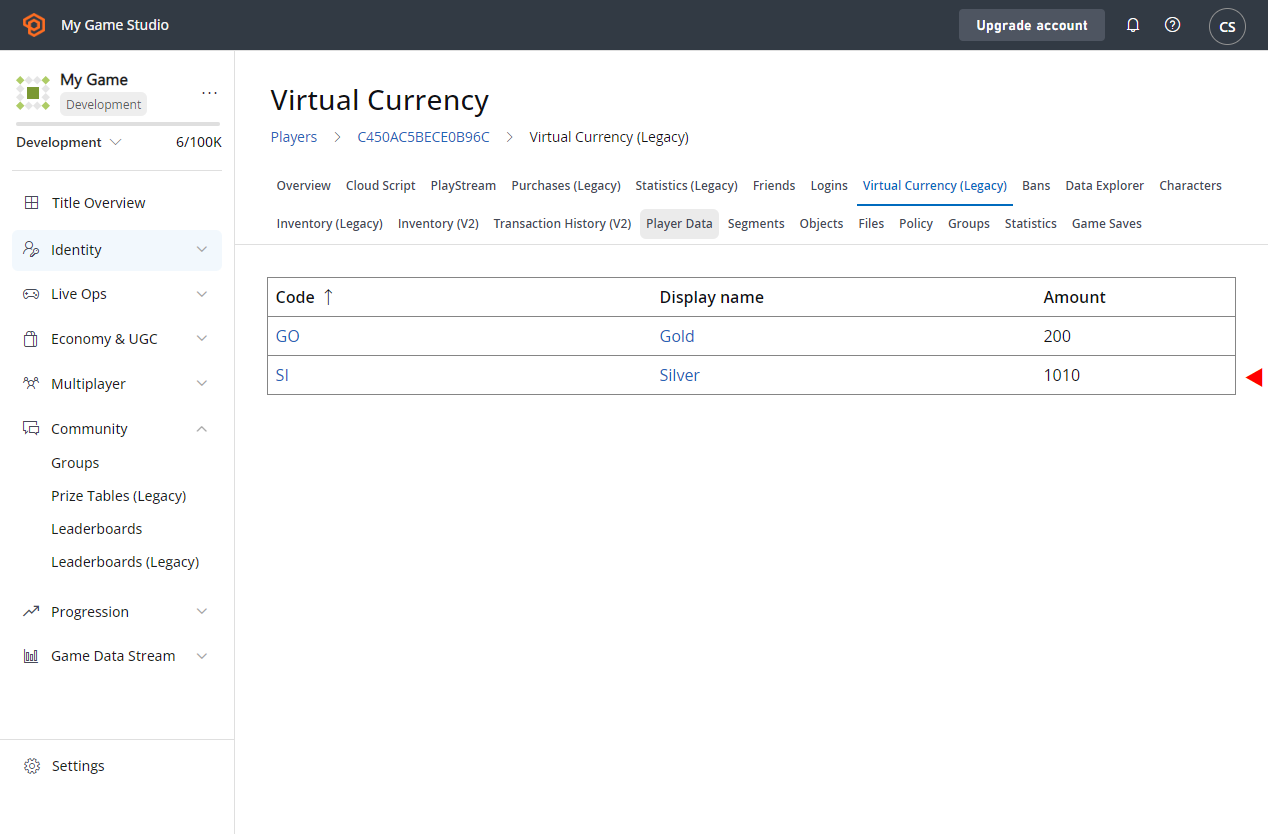
 现在,让我们手动检查玩家是否收到了正确的货币:
* 从左侧菜单中选择 **Players**。
* 在 **Players** 选项卡上,转到屏幕的 **Virtual Currency** 区域。
* 确认货币是否已正确授予。
* 这应该比之前记录的数量*多一个*。
* 注意,处于排行榜位置 **0** 或 **1** 的 **Players** 获得了 **10 gold**,*没有授予 silver*。
* 同时,处于位置 **2**、**3** 和 **4** 的 **Players** 被授予了 **10 silver**,*没有 gold*。
* 这与为奖品表设置的操作相匹配。
现在,让我们手动检查玩家是否收到了正确的货币:
* 从左侧菜单中选择 **Players**。
* 在 **Players** 选项卡上,转到屏幕的 **Virtual Currency** 区域。
* 确认货币是否已正确授予。
* 这应该比之前记录的数量*多一个*。
* 注意,处于排行榜位置 **0** 或 **1** 的 **Players** 获得了 **10 gold**,*没有授予 silver*。
* 同时,处于位置 **2**、**3** 和 **4** 的 **Players** 被授予了 **10 silver**,*没有 gold*。
* 这与为奖品表设置的操作相匹配。
 检查是否正确授予了 **Virtual Currency** 的另一种方法是:
* 进入 **Players**。
* 查看 **Event History**。
* 这将显示一个 **player\_virtual\_currency\_balance\_changed** 事件,其中包含所授予 **Virtual Currency** 更改金额的具体详细信息。
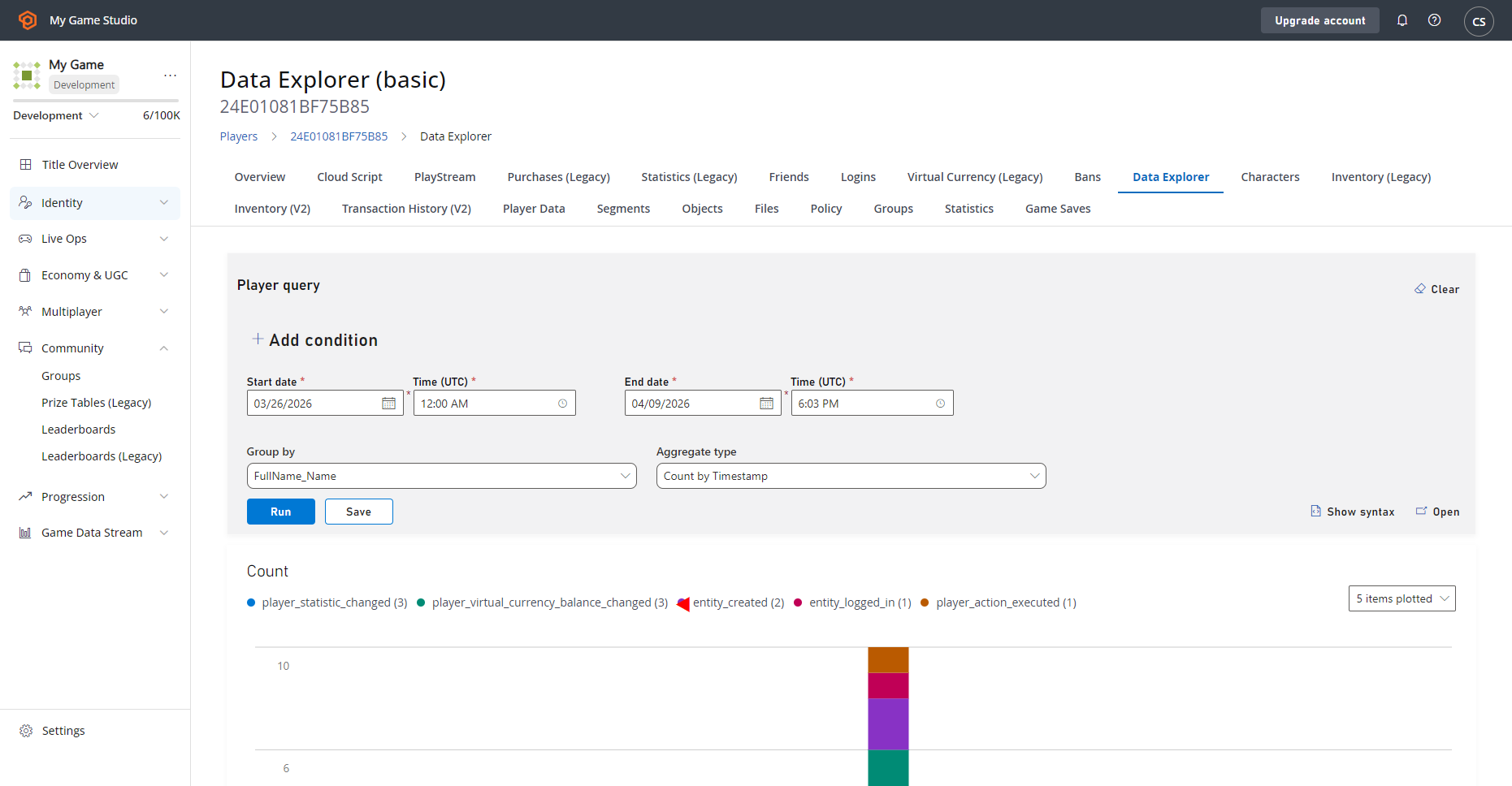
检查是否正确授予了 **Virtual Currency** 的另一种方法是:
* 进入 **Players**。
* 查看 **Event History**。
* 这将显示一个 **player\_virtual\_currency\_balance\_changed** 事件,其中包含所授予 **Virtual Currency** 更改金额的具体详细信息。
 ## Related topics
- [Economy v2 中的掉落表和随机战利品](/zh-CN/services/playfab/economy-monetization/economy-v2/tutorials/drop-tables-and-randomized-loot.md)
- [奖励式广告入门](/zh-CN/services/playfab/economy-monetization/rewarded-ads/quickstart.md)
- [秘诀](/zh-CN/services/playfab/resources/playfab-recipes.md)
- [锦标赛与排行榜](/zh-CN/services/playfab/community/leaderboards/tournaments-leaderboards/index.md)
- [PAGE 108 · 无障碍的娱乐设施与互动活动](/zh-CN/build/game-principles/accessibility/page/page-108-attractions-activations.md)
## Related topics
- [Economy v2 中的掉落表和随机战利品](/zh-CN/services/playfab/economy-monetization/economy-v2/tutorials/drop-tables-and-randomized-loot.md)
- [奖励式广告入门](/zh-CN/services/playfab/economy-monetization/rewarded-ads/quickstart.md)
- [秘诀](/zh-CN/services/playfab/resources/playfab-recipes.md)
- [锦标赛与排行榜](/zh-CN/services/playfab/community/leaderboards/tournaments-leaderboards/index.md)
- [PAGE 108 · 无障碍的娱乐设施与互动活动](/zh-CN/build/game-principles/accessibility/page/page-108-attractions-activations.md)