> ## Documentation Index
> Fetch the complete documentation index at: https://devdocs.xbox.com/llms.txt
> Use this file to discover all available pages before exploring further.
# 使用玩家统计信息
> 了解如何以键值对的形式创建、更新和查询 PlayFab 玩家统计信息,以及如何在 Game Manager 中配置客户端和服务器权限。
本教程介绍如何创建和使用玩家统计信息。玩家统计信息以键值对(KVP)形式存储,其中键是字符串,值是 32 位整数(为了与不支持 64 位的语言兼容)。
排行榜也使用玩家统计信息,但本指南仅涵盖玩家统计信息。如果你希望阅读玩家统计信息和排行榜如何*一起*工作,请阅读我们的教程[使用可重置的统计信息和排行榜](/services/playfab/community/leaderboards/tournaments-leaderboards/using-resettable-statistics-and-leaderboards)。
在某些文档和 API 调用中,你可能会看到术语 **UserStatistics**。就本次讨论而言,术语 *user* 和 *player* 是相同并可互换的。在 **Game Manager** 页面中,**Players** 选项卡提供对标题的 **Users/Players** 及其统计信息的访问。玩家统计信息具体是指绑定到玩家的信息,而不是有关玩家的分析信息。
## 客户端 API
客户端有权限读取玩家统计信息,但为了防止作弊,客户端默认无法更新统计信息。
要启用此功能:
* [登录到 PlayFab](https://developer.playfab.com/en-us/my-games)
* 选择你的 **Title**。
* 从左侧菜单中选择 **Settings**。
* 选择 **API Features** 选项卡。
* 找到并激活 **Allow client to post player statistics**。
这样做会禁用你标题的一层安全,允许玩家将任意分数发布到他们所有的统计信息。如果你的游戏具有*任何*竞技性方面,我们建议你*绝不*从客户端发布统计信息。
## 统计信息是公共信息
不存在私有或仅服务器的统计信息。玩家始终可以通过 [GetPlayerStatistics](xref:titleid.playfabapi.com.client.playerdatamanagement.getplayerstatistics) 读取他们自己的所有统计信息,并可以通过排行榜 API 调用读取所有其他玩家的统计信息。即使你*不*在游戏中显示某个统计信息或不使用排行榜,情况也是如此。
唯一的例外是你通过我们的 [API 访问策略](/services/playfab/api-references/api-access-policy)禁用客户端功能。有关如何为标题使用策略设置的更多信息,请参阅该链接,因为这是一个高级主题,本教程不涵盖。
## 设置统计信息
以下 Unity/C# 代码为玩家创建(如果已存在则更新)*strength statistic* 值。
```csharp theme={null}
PlayFabClientAPI.UpdatePlayerStatistics( new UpdatePlayerStatisticsRequest {
// request.Statistics is a list, so multiple StatisticUpdate objects can be defined if required.
Statistics = new List {
new StatisticUpdate { StatisticName = "strength", Value = 18 },
}
},
result => { Debug.Log("User statistics updated"); },
error => { Debug.LogError(error.GenerateErrorReport()); });
```
## 获取统计信息
以下 Unity/C# 代码检索玩家所有当前的统计信息值。
```csharp theme={null}
void GetStatistics()
{
PlayFabClientAPI.GetPlayerStatistics(
new GetPlayerStatisticsRequest(),
OnGetStatistics,
error => Debug.LogError(error.GenerateErrorReport())
);
}
void OnGetStatistics(GetPlayerStatisticsResult result)
{
Debug.Log("Received the following Statistics:");
foreach (var eachStat in result.Statistics)
Debug.Log("Statistic (" + eachStat.StatisticName + "): " + eachStat.Value);
}
```
## 聚合方法
PlayFab 支持一些统计信息聚合的便利选项。四种选项包括:
* **Last**
* **Min**
* **Max**
* **Sum**
你可以通过 [CreatePlayerStatisticDefinition](xref:titleid.playfabapi.com.admin.playerdatamanagement.createplayerstatisticdefinition) API 调用创建统计信息定义,尽管这不是必需的。对标题的任何更新玩家统计信息的调用将*自动*创建默认统计信息定义,使用 Last 聚合方法。
要更改统计信息聚合方法,你可以使用 Game Manager 或 [UpdatePlayerStatisticDefinition](xref:titleid.playfabapi.com.admin.playerdatamanagement.updateplayerstatisticdefinition) API 调用。
在 **Game Manager** 中编辑统计信息定义:
* 登录到 [PlayFab](https://developer.playfab.com/en-us/my-games)
* 选择你的 **Title**。
* 从左侧菜单中选择 **Leaderboards**(**Statistics** 和 **Leaderboards** 密切相关)。
* 选择要修改的现有统计信息,或者 -
* 选择 **New Leaderboard** 按钮。
* 对于现有的统计信息,你将有另一个页面,其中包含 **Edit Leaderboard** 按钮。
* 此时你应该看到下面所示的页面。
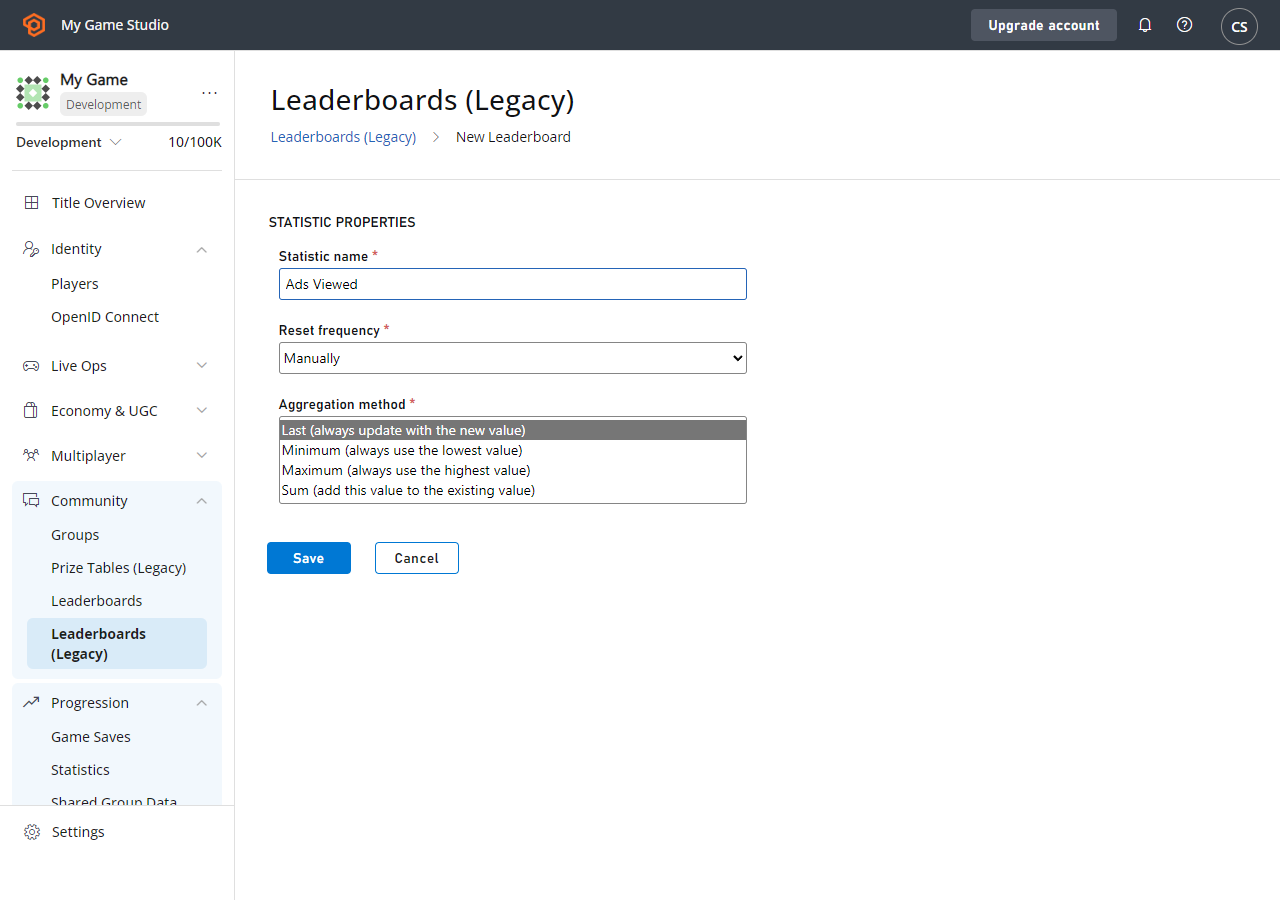 如何使用统计信息聚合的一些示例:
* **Max** 和 **Min** 可用于保存**最佳/最差**分数,如爆头数或准确性:
* 简言之,它们应用规则:**如果这高于(或低于)现有分数,则更新分数**。
* 在会话结束时发布统计信息,**Min/Max 聚合**会决定是否更新。
* 这些对于[可重置排行榜](/services/playfab/community/leaderboards/tournaments-leaderboards/using-resettable-statistics-and-leaderboards)以及授予成就的 [PlayStream 规则](https://playfab.com/introducing-playstream/)可能非常有用。
* **Sum** 可用于保存经验值:
* 你发布此次战斗获得的经验,将其添加到玩家的现有统计信息值中。
* **Last** 允许你自己管理统计信息:
* 每次你发布统计信息时,都会使用最新的值。
## 排行榜
排行榜是为 PlayFab 中保存的所有统计信息生成的。访问特定统计信息的排行榜是可选的。
重置频率和聚合方法在你的游戏中排行榜的动态程度方面起着重要作用。**Tournaments** 功能着重于具有自动重置频率的排行榜,并在教程[使用可重置的统计信息和排行榜](/services/playfab/community/leaderboards/tournaments-leaderboards/using-resettable-statistics-and-leaderboards)中进行了描述。
我们鼓励你以与游戏相关的每种方式使用统计信息。你可以使用可重置的统计信息运行每日锦标赛,同时并行使用长期统计信息,如经验值。
## Related topics
- [基于事件的挑战的门户配置](/zh-CN/services/xbox-services/player-data/achievements/event-based/config/live-challenges-eb-portal.md)
- [根据统计信息为玩家排名](/zh-CN/services/playfab/community/leaderboards/leaderboards-linked-to-stats.md)
- [使用可重置的统计信息和排行榜](/zh-CN/services/playfab/community/leaderboards/tournaments-leaderboards/using-resettable-statistics-and-leaderboards.md)
- [丰富在线状态最佳实践](/zh-CN/services/xbox-services/community/presence/concepts/live-presence-best-practices.md)
- [锦标赛与排行榜快速入门](/zh-CN/services/playfab/community/leaderboards/tournaments-leaderboards/quickstart.md)
如何使用统计信息聚合的一些示例:
* **Max** 和 **Min** 可用于保存**最佳/最差**分数,如爆头数或准确性:
* 简言之,它们应用规则:**如果这高于(或低于)现有分数,则更新分数**。
* 在会话结束时发布统计信息,**Min/Max 聚合**会决定是否更新。
* 这些对于[可重置排行榜](/services/playfab/community/leaderboards/tournaments-leaderboards/using-resettable-statistics-and-leaderboards)以及授予成就的 [PlayStream 规则](https://playfab.com/introducing-playstream/)可能非常有用。
* **Sum** 可用于保存经验值:
* 你发布此次战斗获得的经验,将其添加到玩家的现有统计信息值中。
* **Last** 允许你自己管理统计信息:
* 每次你发布统计信息时,都会使用最新的值。
## 排行榜
排行榜是为 PlayFab 中保存的所有统计信息生成的。访问特定统计信息的排行榜是可选的。
重置频率和聚合方法在你的游戏中排行榜的动态程度方面起着重要作用。**Tournaments** 功能着重于具有自动重置频率的排行榜,并在教程[使用可重置的统计信息和排行榜](/services/playfab/community/leaderboards/tournaments-leaderboards/using-resettable-statistics-and-leaderboards)中进行了描述。
我们鼓励你以与游戏相关的每种方式使用统计信息。你可以使用可重置的统计信息运行每日锦标赛,同时并行使用长期统计信息,如经验值。
## Related topics
- [基于事件的挑战的门户配置](/zh-CN/services/xbox-services/player-data/achievements/event-based/config/live-challenges-eb-portal.md)
- [根据统计信息为玩家排名](/zh-CN/services/playfab/community/leaderboards/leaderboards-linked-to-stats.md)
- [使用可重置的统计信息和排行榜](/zh-CN/services/playfab/community/leaderboards/tournaments-leaderboards/using-resettable-statistics-and-leaderboards.md)
- [丰富在线状态最佳实践](/zh-CN/services/xbox-services/community/presence/concepts/live-presence-best-practices.md)
- [锦标赛与排行榜快速入门](/zh-CN/services/playfab/community/leaderboards/tournaments-leaderboards/quickstart.md)