> ## Documentation Index
> Fetch the complete documentation index at: https://devdocs.xbox.com/llms.txt
> Use this file to discover all available pages before exploring further.
# 锦标赛与排行榜快速入门
> 旧版 PlayFab 锦标赛快速入门:在 Game Manager 中创建 HighScore 统计信息和排行榜,然后使用 C# 从客户端提交玩家分数。
# 锦标赛和排行榜快速入门
本快速入门介绍如何拥有一个可跟踪玩家最高分的统计信息,以及如何获取最高分的排行榜。它可用于全局排行榜,或与[可重置统计信息](/services/playfab/community/leaderboards/tournaments-leaderboards/using-resettable-statistics-and-leaderboards)结合,用于针对特定事件或锦标赛进行重置。
## 先决条件
你的玩家已登录到 PlayFab。
## 步骤 1 - 创建统计信息和关联的排行榜
在 Game Manager 中:
* 转到左侧菜单中的 **Leaderboards**。
* 选择 **NEW LEADERBOARD**。
* 在 **Statistic name** 字段中添加名为 **HighScore** 的 **Leaderboard**。
* 使用提供的下拉菜单,将 **Reset frequency** 字段设置为 **Manually**。
* 转到 **Aggregation method** 字段,然后从提供的下拉菜单中选择 **Maximum**(始终使用最高值)。
## 步骤 2 - 使用玩家的最高分更新统计信息
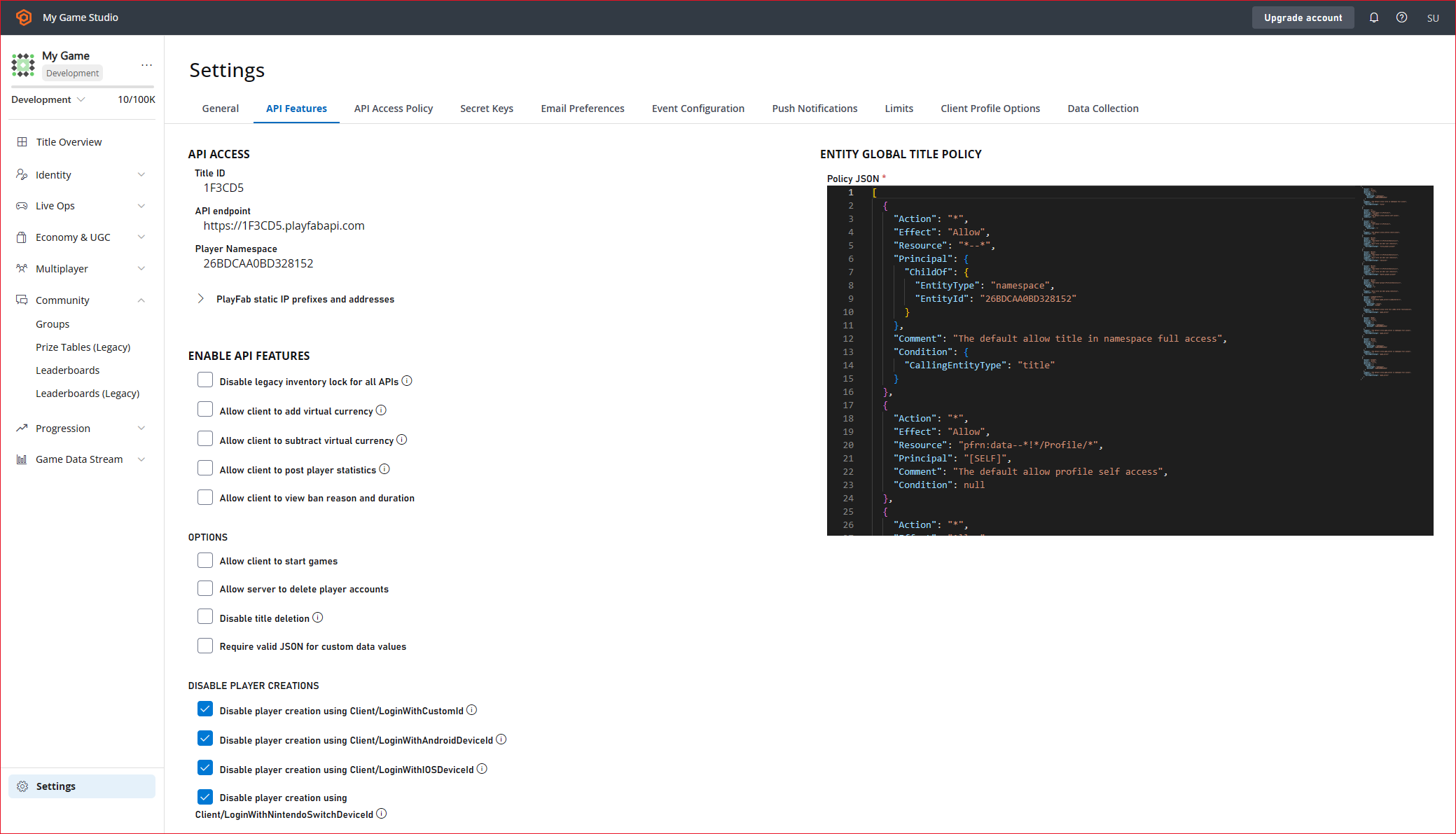
在我们可以从客户端使用 [UpdatePlayerStatistics](xref:titleid.playfabapi.com.client.playerdatamanagement.updateplayerstatistics) 之前,必须在 **API Features** 中启用它。
1. 从你的标题的 Settings 菜单中选择 **Title settings**。
2. 选择 **API Features** 选项卡。
3. 选中 **Allow client to post player statistics** 的复选框。
注意:一般来说,此选项不应在正式游戏中使用,因为它使客户端有权提交值。这仅适用于不担心玩家可能会作弊统计信息的情况。如果统计信息需要保持安全,则应仅通过服务器权威操作(如 Cloud Script 或自定义游戏服务器)进行更新。
4. 选择屏幕底部的 **SAVE**。
 ### C# 代码示例 - SubmitScore
在此代码示例中,我们有一个将在游戏结束时调用的 `SubmitScore` 函数。
```csharp theme={null}
public void SubmitScore(int playerScore) {
PlayFabClientAPI.UpdatePlayerStatistics(new UpdatePlayerStatisticsRequest {
Statistics = new List {
new StatisticUpdate {
StatisticName = "HighScore",
Value = playerScore
}
}
}, result=> OnStatisticsUpdated(result), FailureCallback);
}
private void OnStatisticsUpdated(UpdatePlayerStatisticsResult updateResult) {
Debug.Log("Successfully submitted high score");
}
private void FailureCallback(PlayFabError error){
Debug.LogWarning("Something went wrong with your API call. Here's some debug information:");
Debug.LogError(error.GenerateErrorReport());
}
```
### 步骤 3 - 请求最高分排行榜
为了获取所有玩过游戏的玩家的最高分排行榜,你将调用 [GetLeaderboard](xref:titleid.playfabapi.com.client.playerdatamanagement.getleaderboard)。
### C# 代码示例 - RequestLeaderboard
在此代码示例中,我们有一个 `RequestLeaderboard` 函数,它将被调用以获取排行榜,并将结果传递给 `DisplayLeaderboard` 函数,该函数将填充你游戏中显示最高分的体验。
```csharp theme={null}
//Get the players with the top 10 high scores in the game
public void RequestLeaderboard() {
PlayFabClientAPI.GetLeaderboard(new GetLeaderboardRequest {
StatisticName = "HighScore",
StartPosition = 0,
MaxResultsCount = 10
}, result=> DisplayLeaderboard(result), FailureCallback);
}
private void FailureCallback(PlayFabError error){
Debug.LogWarning("Something went wrong with your API call. Here's some debug information:");
Debug.LogError(error.GenerateErrorReport());
}
```
## Related topics
- [锦标赛与排行榜](/zh-CN/services/playfab/community/leaderboards/tournaments-leaderboards/index.md)
- [排行榜快速入门](/zh-CN/services/playfab/community/leaderboards/quickstart-leaderboards.md)
- [推送通知快速入门](/zh-CN/services/playfab/live-service-management/game-configuration/title-communications/push-notifications/quickstart.md)
- [访问已存档的锦标赛结果](/zh-CN/services/playfab/community/leaderboards/tournaments-leaderboards/accessing-archived-tournament-results.md)
- [PlayFab 排行榜概述](/zh-CN/services/playfab/community/leaderboards/index.md)
### C# 代码示例 - SubmitScore
在此代码示例中,我们有一个将在游戏结束时调用的 `SubmitScore` 函数。
```csharp theme={null}
public void SubmitScore(int playerScore) {
PlayFabClientAPI.UpdatePlayerStatistics(new UpdatePlayerStatisticsRequest {
Statistics = new List {
new StatisticUpdate {
StatisticName = "HighScore",
Value = playerScore
}
}
}, result=> OnStatisticsUpdated(result), FailureCallback);
}
private void OnStatisticsUpdated(UpdatePlayerStatisticsResult updateResult) {
Debug.Log("Successfully submitted high score");
}
private void FailureCallback(PlayFabError error){
Debug.LogWarning("Something went wrong with your API call. Here's some debug information:");
Debug.LogError(error.GenerateErrorReport());
}
```
### 步骤 3 - 请求最高分排行榜
为了获取所有玩过游戏的玩家的最高分排行榜,你将调用 [GetLeaderboard](xref:titleid.playfabapi.com.client.playerdatamanagement.getleaderboard)。
### C# 代码示例 - RequestLeaderboard
在此代码示例中,我们有一个 `RequestLeaderboard` 函数,它将被调用以获取排行榜,并将结果传递给 `DisplayLeaderboard` 函数,该函数将填充你游戏中显示最高分的体验。
```csharp theme={null}
//Get the players with the top 10 high scores in the game
public void RequestLeaderboard() {
PlayFabClientAPI.GetLeaderboard(new GetLeaderboardRequest {
StatisticName = "HighScore",
StartPosition = 0,
MaxResultsCount = 10
}, result=> DisplayLeaderboard(result), FailureCallback);
}
private void FailureCallback(PlayFabError error){
Debug.LogWarning("Something went wrong with your API call. Here's some debug information:");
Debug.LogError(error.GenerateErrorReport());
}
```
## Related topics
- [锦标赛与排行榜](/zh-CN/services/playfab/community/leaderboards/tournaments-leaderboards/index.md)
- [排行榜快速入门](/zh-CN/services/playfab/community/leaderboards/quickstart-leaderboards.md)
- [推送通知快速入门](/zh-CN/services/playfab/live-service-management/game-configuration/title-communications/push-notifications/quickstart.md)
- [访问已存档的锦标赛结果](/zh-CN/services/playfab/community/leaderboards/tournaments-leaderboards/accessing-archived-tournament-results.md)
- [PlayFab 排行榜概述](/zh-CN/services/playfab/community/leaderboards/index.md)