> ## Documentation Index
> Fetch the complete documentation index at: https://devdocs.xbox.com/llms.txt
> Use this file to discover all available pages before exploring further.
# 排行榜快速入门
> PlayFab 排行榜快速入门:在 Game Manager 中创建首个排行榜,并使用你的 TitleId 和开发者密钥配置 C# SDK。
# 排行榜快速入门
在本指南中,我们将了解如何为排行榜服务设置开发环境。我们还将学习如何从我们的网站 [Game Manager](https://developer.playfab.com) 快速创建一个排行榜。
## 先决条件
我们需要一个 PlayFab 帐户才能使用 PlayFab 排行榜服务。有关创建帐户的说明,请参见[身份验证](/services/playfab/identity/player-identity/authentication)
## 创建排行榜
在左侧菜单中选择 Progression。
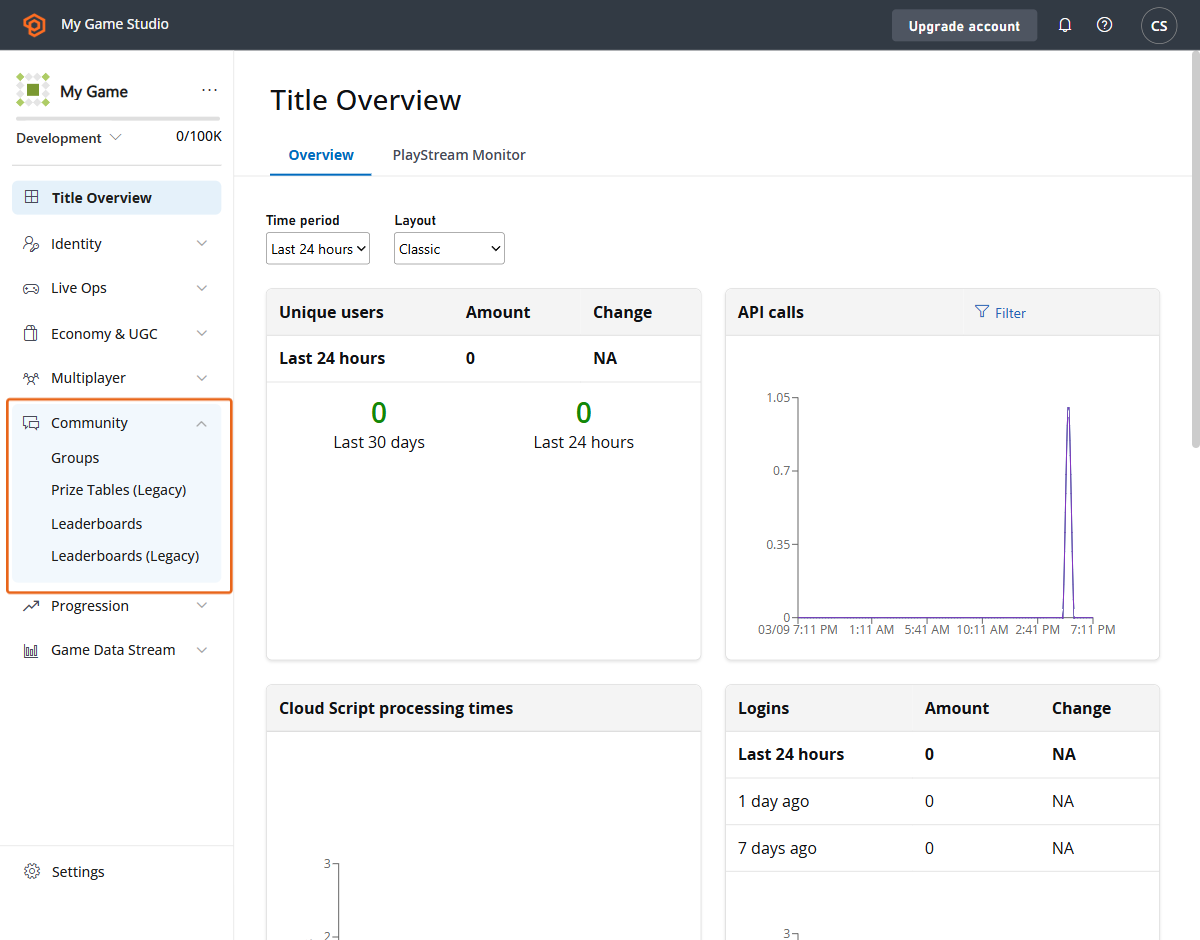 我们现在在上部菜单中选择 Leaderboards 选项卡。
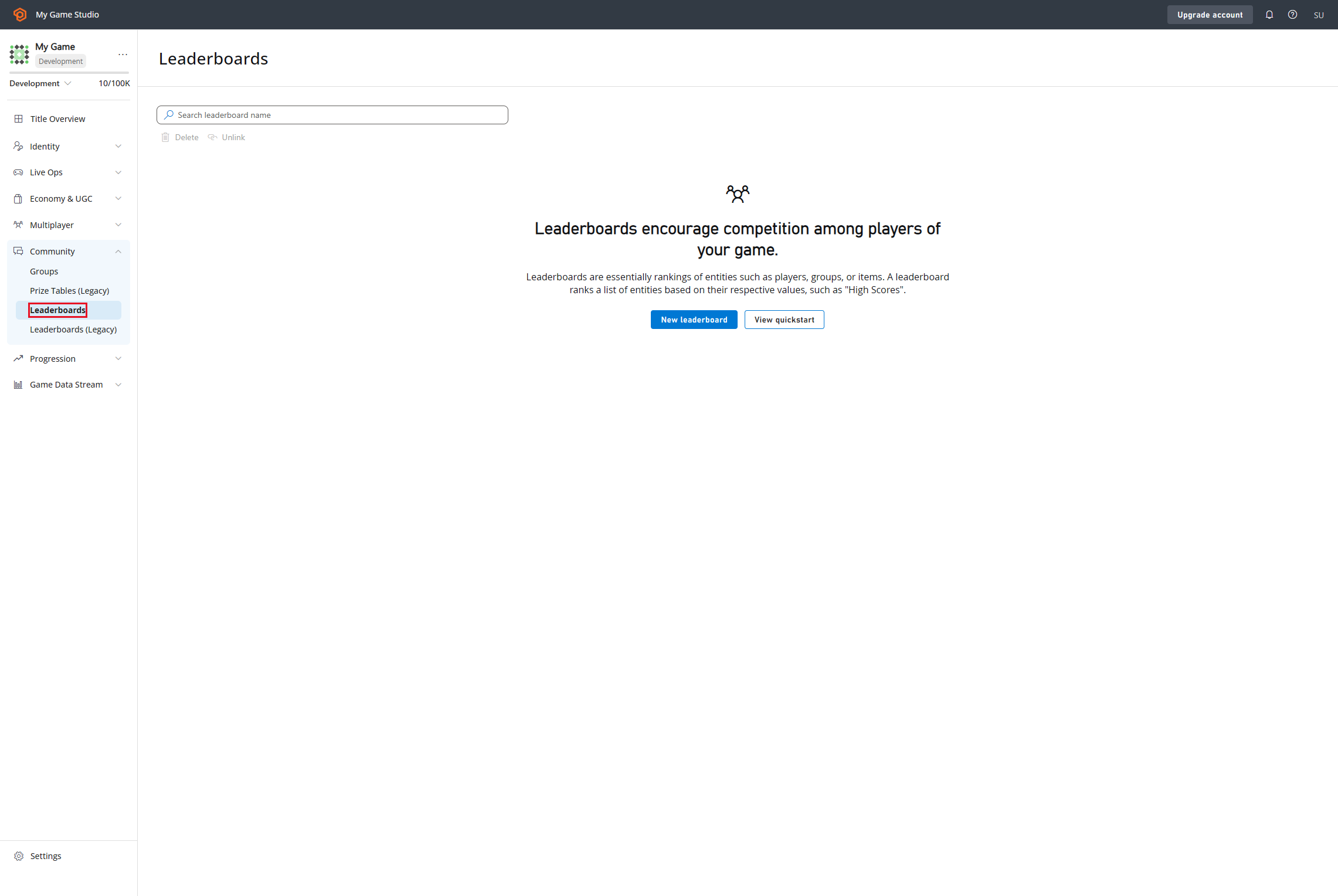 然后我们点击“New Leaderboard”按钮并创建我们的排行榜定义。
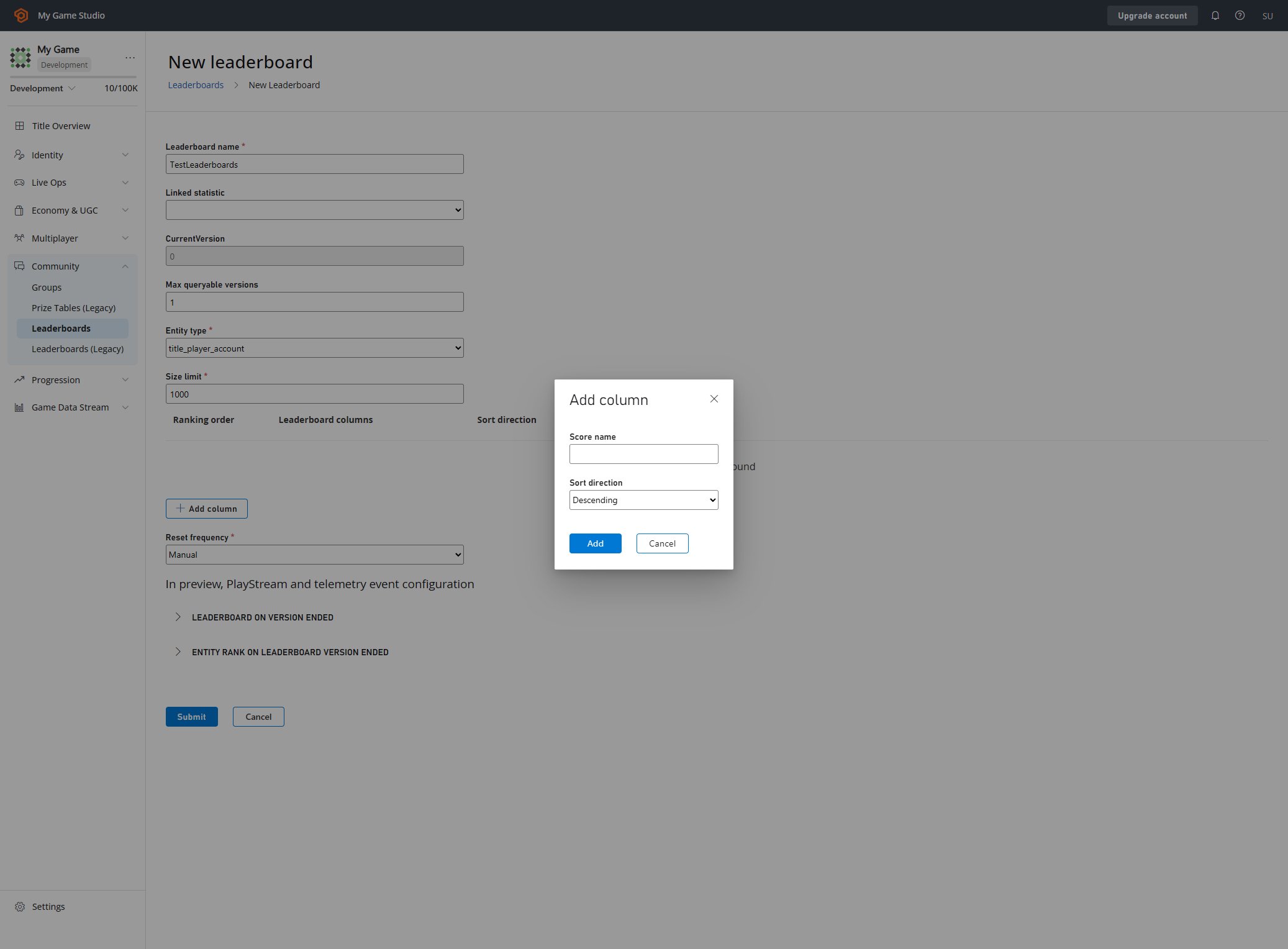 在这里我们可以配置排行榜的每个方面。在此处了解可用参数以及如何创建排行榜的更多信息:
* [创建基本排行榜](/services/playfab/community/leaderboards/create-basic-leaderboard)。
* [API 参考](/services/playfab/community/leaderboards/api-reference)
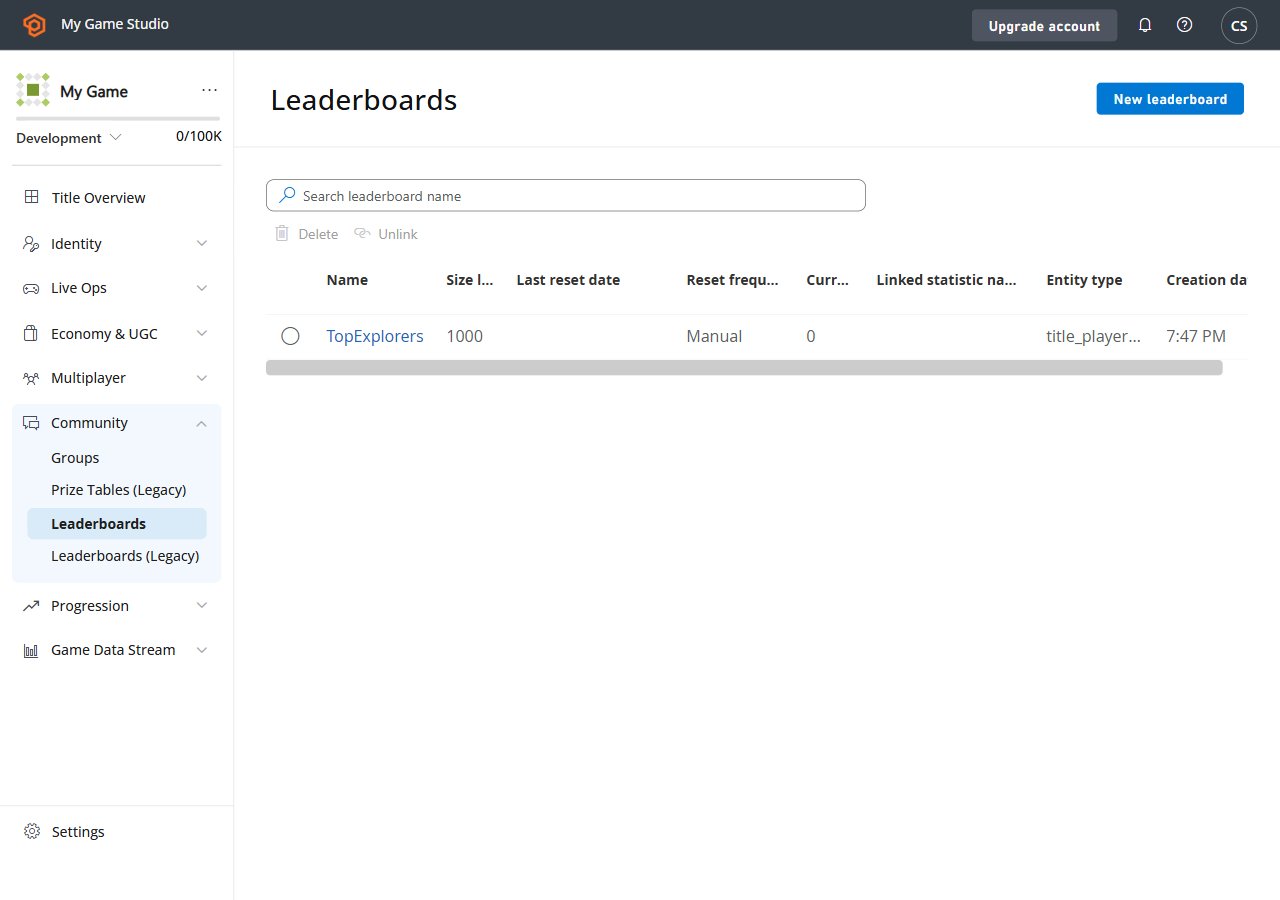
最终结果应该如下所示。
在这里我们可以配置排行榜的每个方面。在此处了解可用参数以及如何创建排行榜的更多信息:
* [创建基本排行榜](/services/playfab/community/leaderboards/create-basic-leaderboard)。
* [API 参考](/services/playfab/community/leaderboards/api-reference)
最终结果应该如下所示。
 ## 设置环境
在这里我们将学习如何设置开发者环境以使用 C# SDK,但此处所介绍的概念也可以与其他 SDK 或普通 HTTP 请求一起使用。
## 设置 TitleId 和 DeveloperSecretKey
作为标题实体(Title Entity)进行身份验证时,需要 DeveloperSecretKey。
```C# theme={null}
PlayFabSettings.staticSettings.TitleId = ""; // Change this value to your own titleId from PlayFab Game Manager
PlayFabSettings.staticSettings.DeveloperSecretKey = ""; // Change this to your title's secret key from Game Manager
```
## 创建标题并获取密钥
* 登录到 [https://developer.playfab.com/](https://developer.playfab.com/)
* 创建一个标题
* 在设置下的 API Features 部分找到 Title ID。
* 生成密钥:
* 点击标题视图左上方标题名称旁边的齿轮图标
* Title Settings
* Secret Keys
* New secret key
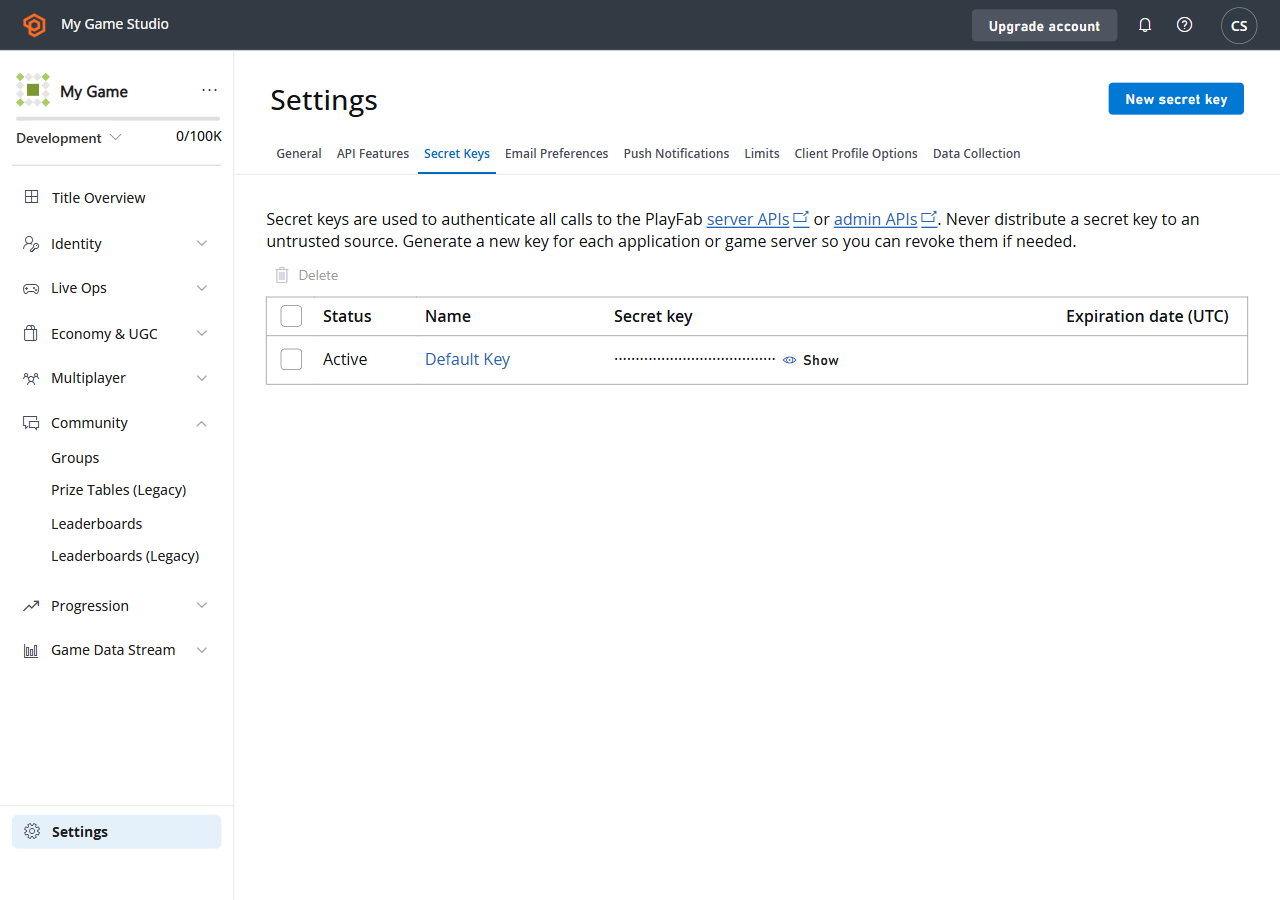
以下是在 Game Manager 中找到 Secret Key 部分时的 UI 外观。
## 设置环境
在这里我们将学习如何设置开发者环境以使用 C# SDK,但此处所介绍的概念也可以与其他 SDK 或普通 HTTP 请求一起使用。
## 设置 TitleId 和 DeveloperSecretKey
作为标题实体(Title Entity)进行身份验证时,需要 DeveloperSecretKey。
```C# theme={null}
PlayFabSettings.staticSettings.TitleId = ""; // Change this value to your own titleId from PlayFab Game Manager
PlayFabSettings.staticSettings.DeveloperSecretKey = ""; // Change this to your title's secret key from Game Manager
```
## 创建标题并获取密钥
* 登录到 [https://developer.playfab.com/](https://developer.playfab.com/)
* 创建一个标题
* 在设置下的 API Features 部分找到 Title ID。
* 生成密钥:
* 点击标题视图左上方标题名称旁边的齿轮图标
* Title Settings
* Secret Keys
* New secret key
以下是在 Game Manager 中找到 Secret Key 部分时的 UI 外观。
 ## 以标题身份登录
对于写入操作,我们建议从游戏服务器使用 TitleEntity,此方法将返回将在我们发出的所有请求中使用的 `AuthenticationContext`。
```C# theme={null}
public static async Task LoginAsTitleEntity()
{
GetEntityTokenRequest request = new GetEntityTokenRequest()
{
Entity = new PlayFab.AuthenticationModels.EntityKey()
{
Id = PlayFabSettings.staticSettings.TitleId,
Type = "title",
},
};
PlayFabResult entityTokenResult = await PlayFabAuthenticationAPI.GetEntityTokenAsync(request);
PlayFabAuthenticationContext authContext = new PlayFabAuthenticationContext
{
EntityToken = entityTokenResult.Result.EntityToken
};
return authContext;
}
```
## 以玩家身份登录(创建玩家)
此方法基于一个标识符创建玩家,该标识符返回类型为 `title_player_account` 的实体。更多信息请见:
[实体快速入门](/services/playfab/live-service-management/game-configuration/entities/quickstart)
```C# theme={null}
private static async Task LoginAsPlayer(string customId = "GettingStartedGuide")
{
LoginWithCustomIDRequest request = new LoginWithCustomIDRequest { CustomId = customId, CreateAccount = true };
PlayFabResult loginResult = await PlayFabClientAPI.LoginWithCustomIDAsync(request);
return loginResult.Result.AuthenticationContext;
}
```
## 为实体设置 display name 属性
为了让 `DisplayName` 属性作为 "Get Leaderboards APIs" 响应的一部分可用,我们需要对创建的每个实体执行以下代码,以便将实体映射到游戏的自定义显示名称。
```C# theme={null}
private static async Task UpdateEntityDisplayName(PlayFabAuthenticationContext context, string customId)
{
SetDisplayNameRequest request = new SetDisplayNameRequest()
{
AuthenticationContext = context,
DisplayName = customId,
Entity = new PlayFab.ProfilesModels.EntityKey()
{
Id = context.EntityId,
Type = context.EntityType,
},
};
PlayFabResult updateNameResult = await PlayFabProfilesAPI.SetDisplayNameAsync(request);
}
```
## 另请参阅
* [创建基本排行榜](/services/playfab/community/leaderboards/create-basic-leaderboard)。
* [排行榜的更多用法](/services/playfab/community/leaderboards/doing-more-with-leaderboards)。
* [限制 ](/services/playfab/community/leaderboards/limits-leaderboards)。
* [配额 ](/services/playfab/community/leaderboards/quota-leaderboards)。
* [季节性排行榜](/services/playfab/community/leaderboards/seasonal-leaderboards)。
* [组排行榜](/services/playfab/community/leaderboards/group-leaderboards)。
* [手动分级](/services/playfab/community/leaderboards/manual-tiers)。
* [按统计信息对玩家排名](/services/playfab/community/leaderboards/leaderboards-linked-to-stats)。
* [向排行榜添加上下文数据](/services/playfab/community/leaderboards/metadata-leaderboards)。
* [API 参考](/services/playfab/community/leaderboards/api-reference)。
* [排行榜计量表](/services/playfab/pricing/meters/leaderboard-meters)。
* [排行榜与 CloudScript](/services/playfab/community/leaderboards/leaderboards-cloudscript)。
* [排行榜与 PlayStream](/services/playfab/community/leaderboards/leaderboards-with-playstream-and-telemetry)
## 以标题身份登录
对于写入操作,我们建议从游戏服务器使用 TitleEntity,此方法将返回将在我们发出的所有请求中使用的 `AuthenticationContext`。
```C# theme={null}
public static async Task LoginAsTitleEntity()
{
GetEntityTokenRequest request = new GetEntityTokenRequest()
{
Entity = new PlayFab.AuthenticationModels.EntityKey()
{
Id = PlayFabSettings.staticSettings.TitleId,
Type = "title",
},
};
PlayFabResult entityTokenResult = await PlayFabAuthenticationAPI.GetEntityTokenAsync(request);
PlayFabAuthenticationContext authContext = new PlayFabAuthenticationContext
{
EntityToken = entityTokenResult.Result.EntityToken
};
return authContext;
}
```
## 以玩家身份登录(创建玩家)
此方法基于一个标识符创建玩家,该标识符返回类型为 `title_player_account` 的实体。更多信息请见:
[实体快速入门](/services/playfab/live-service-management/game-configuration/entities/quickstart)
```C# theme={null}
private static async Task LoginAsPlayer(string customId = "GettingStartedGuide")
{
LoginWithCustomIDRequest request = new LoginWithCustomIDRequest { CustomId = customId, CreateAccount = true };
PlayFabResult loginResult = await PlayFabClientAPI.LoginWithCustomIDAsync(request);
return loginResult.Result.AuthenticationContext;
}
```
## 为实体设置 display name 属性
为了让 `DisplayName` 属性作为 "Get Leaderboards APIs" 响应的一部分可用,我们需要对创建的每个实体执行以下代码,以便将实体映射到游戏的自定义显示名称。
```C# theme={null}
private static async Task UpdateEntityDisplayName(PlayFabAuthenticationContext context, string customId)
{
SetDisplayNameRequest request = new SetDisplayNameRequest()
{
AuthenticationContext = context,
DisplayName = customId,
Entity = new PlayFab.ProfilesModels.EntityKey()
{
Id = context.EntityId,
Type = context.EntityType,
},
};
PlayFabResult updateNameResult = await PlayFabProfilesAPI.SetDisplayNameAsync(request);
}
```
## 另请参阅
* [创建基本排行榜](/services/playfab/community/leaderboards/create-basic-leaderboard)。
* [排行榜的更多用法](/services/playfab/community/leaderboards/doing-more-with-leaderboards)。
* [限制 ](/services/playfab/community/leaderboards/limits-leaderboards)。
* [配额 ](/services/playfab/community/leaderboards/quota-leaderboards)。
* [季节性排行榜](/services/playfab/community/leaderboards/seasonal-leaderboards)。
* [组排行榜](/services/playfab/community/leaderboards/group-leaderboards)。
* [手动分级](/services/playfab/community/leaderboards/manual-tiers)。
* [按统计信息对玩家排名](/services/playfab/community/leaderboards/leaderboards-linked-to-stats)。
* [向排行榜添加上下文数据](/services/playfab/community/leaderboards/metadata-leaderboards)。
* [API 参考](/services/playfab/community/leaderboards/api-reference)。
* [排行榜计量表](/services/playfab/pricing/meters/leaderboard-meters)。
* [排行榜与 CloudScript](/services/playfab/community/leaderboards/leaderboards-cloudscript)。
* [排行榜与 PlayStream](/services/playfab/community/leaderboards/leaderboards-with-playstream-and-telemetry)